链载Ai
标题: SubAgent 与 Skills:AI Agent 的两种扩展方式 [打印本页]
作者: 链载Ai 时间: 3 天前
标题: SubAgent 与 Skills:AI Agent 的两种扩展方式
ingFang SC", "Hiragino Sans GB", "Microsoft YaHei UI", "Microsoft YaHei", Arial, sans-serif;font-size: 16px;font-style: normal;font-variant-ligatures: normal;font-variant-caps: normal;font-weight: 400;letter-spacing: normal;orphans: 2;text-align: left;text-indent: 0px;text-transform: none;widows: 2;word-spacing: 0px;-webkit-text-stroke-width: 0px;white-space: normal;background-color: rgb(255, 255, 255);text-decoration-thickness: initial;text-decoration-style: initial;text-decoration-color: initial;">
ingFang SC", "Hiragino Sans GB", "Microsoft YaHei UI", "Microsoft YaHei", Arial, sans-serif;font-size: 16px;font-style: normal;font-variant-ligatures: normal;font-variant-caps: normal;font-weight: 400;orphans: 2;text-align: left;text-indent: 0px;text-transform: none;widows: 2;word-spacing: 0px;-webkit-text-stroke-width: 0px;white-space: normal;background-color: rgb(255, 255, 255);text-decoration-thickness: initial;text-decoration-style: initial;text-decoration-color: initial;">一句话解释 SubAgent 和 Skills 的区别:AI Agent 就像操作系统,Skills 就像应用程序,SubAgent 也是操作系统,不过预装了应用,并且像虚拟机一样运行,独立上下文。
ingFang SC", "Hiragino Sans GB", "Microsoft YaHei UI", "Microsoft YaHei", Arial, sans-serif;font-style: normal;font-variant-ligatures: normal;font-variant-caps: normal;letter-spacing: normal;orphans: 2;text-indent: 0px;text-transform: none;widows: 2;word-spacing: 0px;-webkit-text-stroke-width: 0px;white-space: normal;text-decoration-thickness: initial;text-decoration-style: initial;text-decoration-color: initial;">Skills:教 Agent 新技能ingFang SC", "Hiragino Sans GB", "Microsoft YaHei UI", "Microsoft YaHei", Arial, sans-serif;font-size: 16px;font-style: normal;font-variant-ligatures: normal;font-variant-caps: normal;font-weight: 400;orphans: 2;text-align: left;text-indent: 0px;text-transform: none;widows: 2;word-spacing: 0px;-webkit-text-stroke-width: 0px;white-space: normal;background-color: rgb(255, 255, 255);text-decoration-thickness: initial;text-decoration-style: initial;text-decoration-color: initial;">Skills 是一份“操作手册”。ingFang SC", "Hiragino Sans GB", "Microsoft YaHei UI", "Microsoft YaHei", Arial, sans-serif;font-size: 16px;font-style: normal;font-variant-ligatures: normal;font-variant-caps: normal;font-weight: 400;orphans: 2;text-align: left;text-indent: 0px;text-transform: none;widows: 2;word-spacing: 0px;-webkit-text-stroke-width: 0px;white-space: normal;background-color: rgb(255, 255, 255);text-decoration-thickness: initial;text-decoration-style: initial;text-decoration-color: initial;">你招了个聪明的助理,但他对你的业务一无所知。每次布置任务,你都得从头解释流程、注意事项、工具用法。Skills 就是把这些知识写成文档,Agent 需要时自己去翻阅,不用你反复交代。ingFang SC", "Hiragino Sans GB", "Microsoft YaHei UI", "Microsoft YaHei", Arial, sans-serif;font-size: 16px;font-style: normal;font-variant-ligatures: normal;font-variant-caps: normal;font-weight: 400;orphans: 2;text-align: left;text-indent: 0px;text-transform: none;widows: 2;word-spacing: 0px;-webkit-text-stroke-width: 0px;white-space: normal;background-color: rgb(255, 255, 255);text-decoration-thickness: initial;text-decoration-style: initial;text-decoration-color: initial;">比如我写了一个“给文章配图”的 Skill,它告诉 Agent:ingFang SC", "Hiragino Sans GB", "Microsoft YaHei UI", "Microsoft YaHei", Arial, sans-serif;font-size: 16px;font-style: normal;font-variant-ligatures: normal;font-variant-caps: normal;font-weight: 400;letter-spacing: normal;orphans: 2;text-align: left;text-indent: 0px;text-transform: none;widows: 2;word-spacing: 0px;-webkit-text-stroke-width: 0px;white-space: normal;background-color: rgb(255, 255, 255);text-decoration-thickness: initial;text-decoration-style: initial;text-decoration-color: initial;" class="list-paddingleft-1">ingFang SC", "Hiragino Sans GB", "Microsoft YaHei UI", "Microsoft YaHei", Arial, sans-serif;font-size: 16px;font-style: normal;font-variant-ligatures: normal;font-variant-caps: normal;font-weight: 400;orphans: 2;text-align: left;text-indent: 0px;text-transform: none;widows: 2;word-spacing: 0px;-webkit-text-stroke-width: 0px;white-space: normal;background-color: rgb(255, 255, 255);text-decoration-thickness: initial;text-decoration-style: initial;text-decoration-color: initial;">Agent 启动时只记住“有这么个配图技能”,大概 100 个 token,真正要用时才去读详细内容。这叫**“渐进式加载”**,好处是装一堆 Skill 也不会撑爆上下文。ingFang SC", "Hiragino Sans GB", "Microsoft YaHei UI", "Microsoft YaHei", Arial, sans-serif;font-size: 16px;font-style: normal;font-variant-ligatures: normal;font-variant-caps: normal;font-weight: 400;letter-spacing: normal;orphans: 2;text-align: left;text-indent: 0px;text-transform: none;widows: 2;word-spacing: 0px;-webkit-text-stroke-width: 0px;white-space: normal;background-color: rgb(255, 255, 255);text-decoration-thickness: initial;text-decoration-style: initial;text-decoration-color: initial;">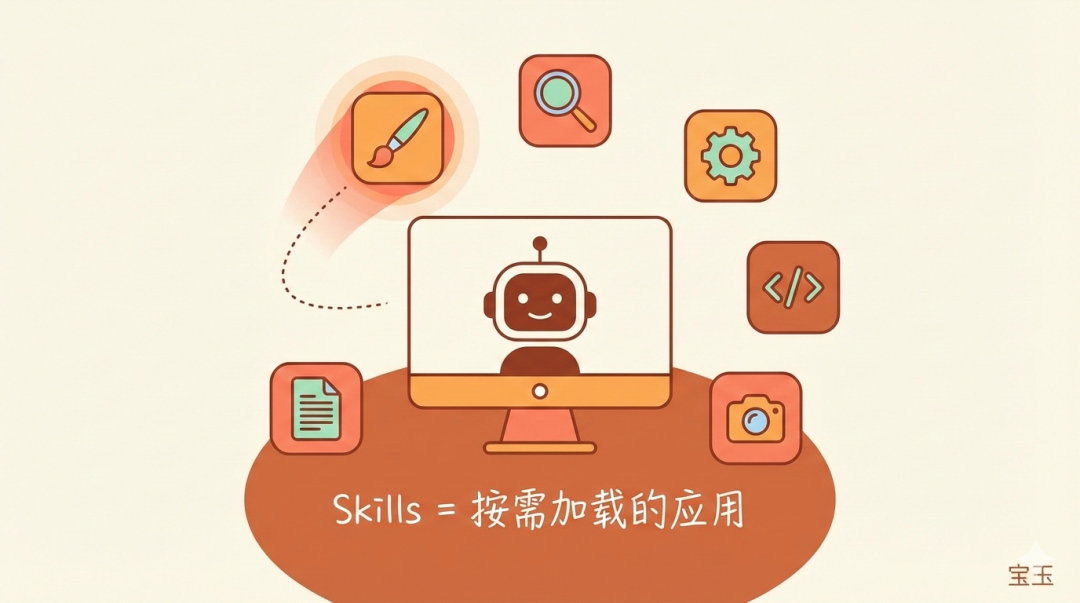
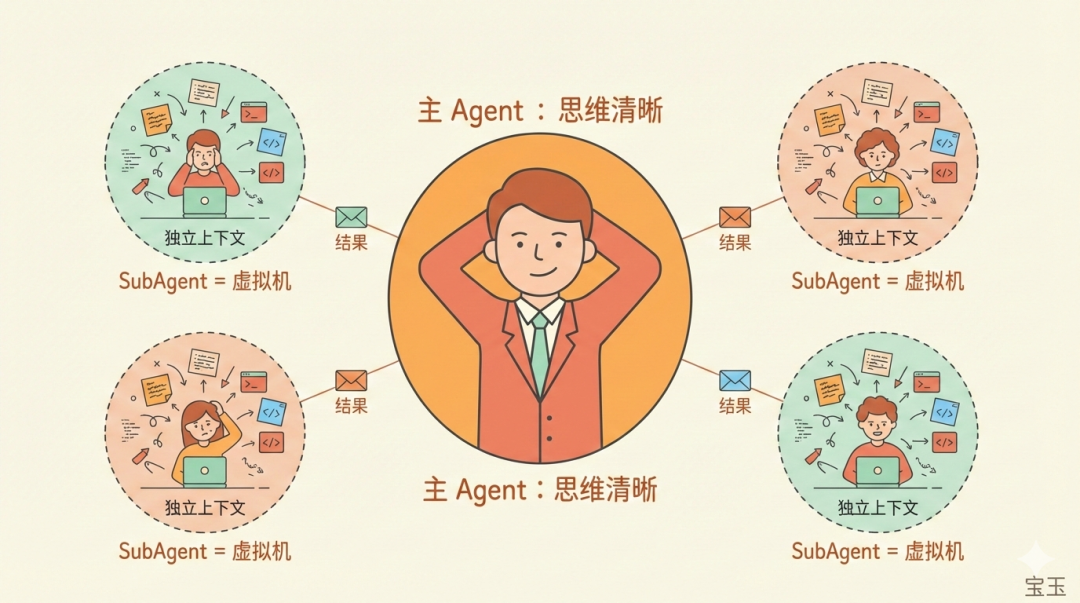
ingFang SC", "Hiragino Sans GB", "Microsoft YaHei UI", "Microsoft YaHei", Arial, sans-serif;font-style: normal;font-variant-ligatures: normal;font-variant-caps: normal;letter-spacing: normal;orphans: 2;text-indent: 0px;text-transform: none;widows: 2;word-spacing: 0px;-webkit-text-stroke-width: 0px;white-space: normal;text-decoration-thickness: initial;text-decoration-style: initial;text-decoration-color: initial;">SubAgent:开个虚拟机干活SubAgent 是独立运行的“专家助手”。
它有自己的上下文窗口,相当于自己的“工作记忆”。干完活只把结果交回来,中间过程不会污染主 Agent 的思维空间。
你是项目经理,手下有三个专家。你不需要盯着他们每一步操作,只需要告诉他们任务目标,等他们交报告就行。
一个真实案例:给文章配图
假设我写完一篇文章,想配三套不同风格的插图方案,让用户自己选。
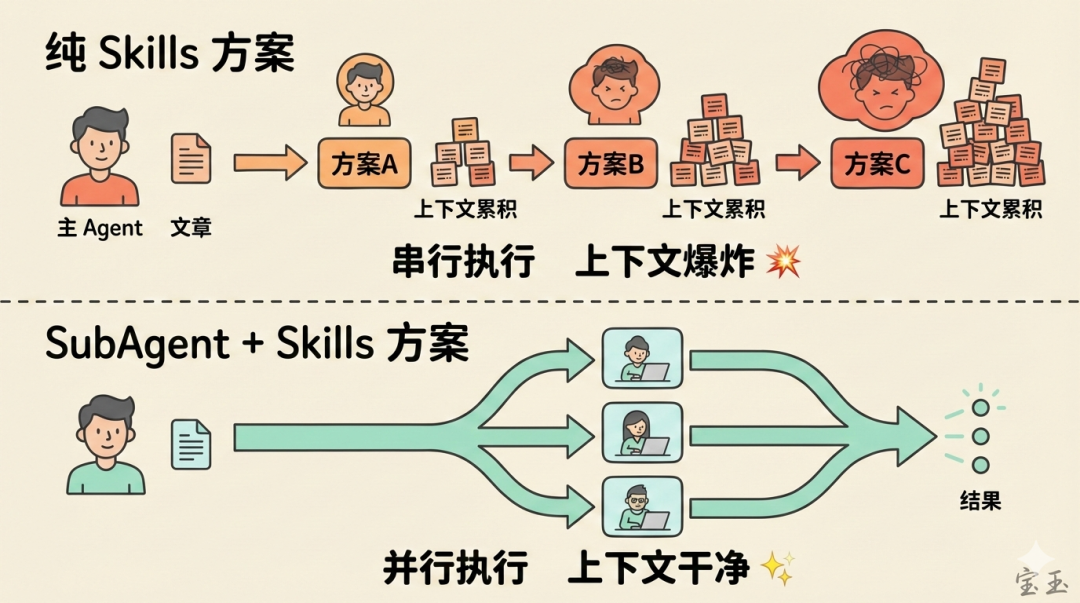
如果只用 Skills:
主 Agent 分析文章 → 设计三种方案 → 调用画图 Skill 画第一套 → 画完再画第二套 → 再画第三套
问题来了:
- 1.上下文爆炸:三套图的生成过程全堆在主 Agent 的“脑子”里,几十张图的提示词、中间结果、错误重试……全占着位置
如果用 SubAgent + Skills:
主 Agent 分析文章 → 设计三种方案 → 同时启动三个 SubAgent
每个 SubAgent:
- • 独立去读文章、生成提示词、调用画图工具、插入图片
主 Agent 这边呢?上下文干干净净,只有三个结果链接。用户想看哪套,再去读取对应的 URL。
什么时候用哪个?
用 Skills:
用 SubAgent:
一句话总结
Skills 是应用程序,装在主系统里按需调用;SubAgent 是虚拟机,独立运行完再把结果交回来。任务简单用应用,任务复杂开虚拟机。
| 欢迎光临 链载Ai (https://www.lianzai.com/) |
Powered by Discuz! X3.5 |