ingFang SC", "Hiragino Sans GB", "Microsoft YaHei UI", "Microsoft YaHei", Arial, sans-serif;display: table;padding: 0px 1em;color: rgb(63, 63, 63);">MCP Server开发实践ingFang SC", "Hiragino Sans GB", "Microsoft YaHei UI", "Microsoft YaHei", Arial, sans-serif;font-size: 16px;letter-spacing: 0.1em;color: rgb(63, 63, 63);">上一篇文章我们介绍了MCP的基本原理MCP:大模型的"万能接口"革命,但是对于开发者来说更关心如何实现我们的自己的MCP Server,接下来我们将使用MCP提供的java sdk和spring-ai来实现一个MCP Server。ingFang SC", "Hiragino Sans GB", "Microsoft YaHei UI", "Microsoft YaHei", Arial, sans-serif;display: table;padding: 0px 0.2em;color: rgb(255, 255, 255);background: rgb(15, 76, 129);">构建Spring Boot服务ingFang SC", "Hiragino Sans GB", "Microsoft YaHei UI", "Microsoft YaHei", Arial, sans-serif;font-size: 16px;letter-spacing: 0.1em;color: rgb(63, 63, 63);">技术选型:ingFang SC", "Hiragino Sans GB", "Microsoft YaHei UI", "Microsoft YaHei", Arial, sans-serif;font-size: 16px;color: rgb(63, 63, 63);" class="list-paddingleft-1">ingFang SC", "Hiragino Sans GB", "Microsoft YaHei UI", "Microsoft YaHei", Arial, sans-serif;font-size: 16px;text-indent: -1em;display: block;margin: 0.2em 8px;color: rgb(63, 63, 63);">• Spring Boot 3.4.2,因为Spring AI支持的Spring Boot版本为3.4.xingFang SC", "Hiragino Sans GB", "Microsoft YaHei UI", "Microsoft YaHei", Arial, sans-serif;font-size: 16px;font-style: normal;padding: 1em;border-radius: 6px;color: rgba(0, 0, 0, 0.5);background: rgb(247, 247, 247);">ingFang SC", "Hiragino Sans GB", "Microsoft YaHei UI", "Microsoft YaHei", Arial, sans-serif;font-size: 1em;display: block;letter-spacing: 0.1em;color: rgb(63, 63, 63);">Spring AI supports Spring Boot 3.4.x. When Spring Boot 3.5.x is released, we will support that as well.ingFang SC", "Hiragino Sans GB", "Microsoft YaHei UI", "Microsoft YaHei", Arial, sans-serif;font-size: 16px;color: rgb(63, 63, 63);" class="list-paddingleft-1">ingFang SC", "Hiragino Sans GB", "Microsoft YaHei UI", "Microsoft YaHei", Arial, sans-serif;font-size: 16px;text-indent: -1em;display: block;margin: 0.2em 8px;color: rgb(63, 63, 63);">• JDK 17,Spring Boot3需要使用JDK 17• spring-ai-mcp-server-webmvc-spring-boot-starter 1.0.0-M6,Spring AI支持三种方式提供服务,这里采用webmvc- • Standard Input/Output (STDIO) - spring-ai-starter-mcp-server
- • Spring MVC (Server-Sent Events) - spring-ai-starter-mcp-server-webmvc
- • Spring WebFlux (Reactive SSE) - spring-ai-starter-mcp-server-webflux
• httpclient5,将现有服务的HTTP接口暴露为MCP Serverpom.xml文件示例:
 <dependencyManagement>
   <dependencies>
     <dependency>
       <groupId>org.springframework.boot</groupId>
       <artifactId>spring-boot-dependencies</artifactId>
       <version>3.4.2</version>
       <type>pom</type>
       <scope>import</scope>
     </dependency>
   </dependencies>
 </dependencyManagement>

 <dependencies>
   <!-- MCP -->
   <dependency>
     <groupId>org.springframework.ai</groupId>
     <artifactId>spring-ai-mcp-server-webmvc-spring-boot-starter</artifactId>
     <version>1.0.0-M6</version>
   </dependency>

   <!-- Lombok -->
   <dependency>
     <groupId>org.projectlombok</groupId>
     <artifactId>lombok</artifactId>
     <optional>true</optional>
   </dependency>

   <!-- Apache HttpClient -->
   <dependency>
     <groupId>org.apache.httpcomponents.client5</groupId>
     <artifactId>httpclient5</artifactId>
   </dependency>
   <dependency>
     <groupId>org.apache.httpcomponents.core5</groupId>
     <artifactId>httpcore5</artifactId>
   </dependency>
   <dependency>
     <groupId>org.apache.httpcomponents.core5</groupId>
     <artifactId>httpcore5-h2</artifactId>
   </dependency>

   <!-- Spring Boot Starter -->
   <dependency>
     <groupId>org.springframework.boot</groupId>
     <artifactId>spring-boot-starter</artifactId>
   </dependency>

   <dependency>
     <groupId>org.springframework.boot</groupId>
     <artifactId>spring-boot-starter-web</artifactId>
   </dependency>
 </dependencies>
MCP配置spring:
application:
name:mcp-name
ai:
mcp:
server:
name:mcp-name
version:1.0.0
type:SYNC
sse-endpoint:/sse
- • Server实现,这里直接通过转发的方式将现有的HTTP接口暴露为MCP Server
/**
*@date2025/03/27 14:52
**/
@Service
publicclassSmdMcpService{

 @Autowired
 privateRestTemplate restTemplate;

 @Value("${smd.service.url}")
 privateString smdServiceUrl;

 @Tool(name = "getSmdInfo", description = "获取表结构信息")
 publicStringgetSmdInfo(@ToolParam(description = "业务系统")String businessSystem,
              @ToolParam(description = "表名")Set<String> tableNames){
    Map<String, Object> params =newHashMap<>();
    params.put("businessSystem", businessSystem);
    params.put("tableNames", tableNames);

    ResponseEntity<String> response = restTemplate.postForEntity(
        smdServiceUrl +"/mcp/api/getSmdInfo",
        params,
        String.class);
   returnresponse.getBody();
  }

 @Tool(name = "getCRUDCode", description = "根据表名生成增删改查代码")
 publicList<Map<String, Object>>getCRUDByTable(@ToolParam(description = "业务系统")String businessSystem,
                 @ToolParam(description = "表名")Set<String> tableNames,
                 @ToolParam(description = "模块名,非必填")String moduleName
                ){
    Map<String, Object> params =newHashMap<>();
    params.put("businessSystem", businessSystem);
    params.put("tableNames", tableNames);
    params.put("moduleName", moduleName);
    params.put("author","smd-mcp");

    HttpEntity<Map<String, Object>> httpEntity = newHttpEntity<>(params);
    ResponseEntity<List<Map<String, Object>>> response = restTemplate.exchange(
        smdServiceUrl +"/mcp/api/crud",
        HttpMethod.POST,
        httpEntity,
       newParameterizedTypeReference<List<Map<String, Object>>>() {});
   returnresponse.getBody();
  }
}
/**
* MCP配置类
*
*@authorAI Assistant
*@date2024/03/21
*/
@Configuration
@Slf4j
publicclassMcpConfig{

 @Bean
 publicToolCallbackProvidersmdToolCallbackProvider(SmdMcpService smdMcpService, RulesMcpService rulesMcpService){
   returnMethodToolCallbackProvider.builder()
        .toolObjects(smdMcpService, rulesMcpService)
        .build();
  };
}
测试MCP使用支持MCP的客户端进行测试,客户端支持情况可查看:https://modelcontextprotocol.io/clients 这里使用Cursor进行测试: 配置mcp.json {
"mcpServers":{
"mcp-name":{
"url":"http://localhost:8089/sse",
"env":{
"API_KEY":"value"
}
}
}
}
配置后即可看到MCP Server提供的Tools,如下图所示:
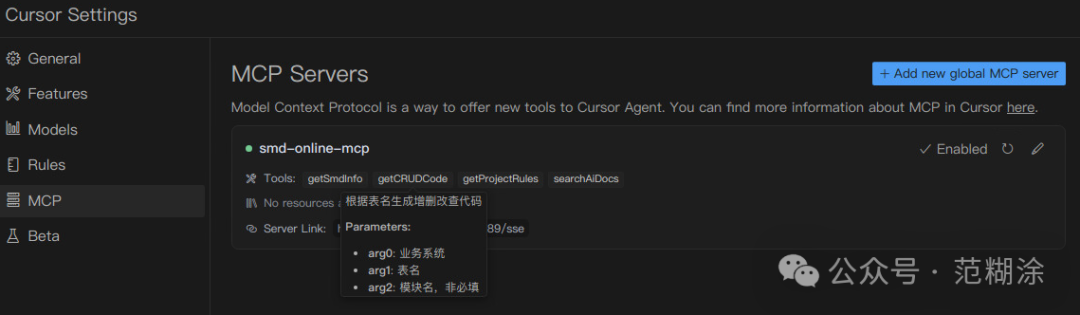 MCP思考MCP 还处于发展初期,现阶段更重要的是生态构建,基于统一标准下构筑的生态也会正向的促进整个领域的发展。 对于普通开发者我们可以直接使用已有的MCP工具平台:https://mcp.so/ 对于企业,我们可以通过代理的方式将已有HTTP接口暴露为MCP Server: - • 零侵入改造:无需修改原有HTTP服务代码即可获得MCP能力
- • 跨模型兼容:让原本不支持MCP的传统服务获得与大模型生态无缝对接的能力
- • 低成本投入:已有业务接入MCP生态的改造周期大幅缩短
后续考虑将其做成MCP代理服务,通过简单配置即可将已有业务转换为MCP Server,为AI智能体打开新世界的大门。 |










