传统的 Browser-Use 多依赖于固定选择器和流程编排,难以应对界面变化与复杂逻辑。随着大模型驱动的智能体技术兴起,Browser-Use 正迈向智能化新阶段:LLM 作为“大脑”负责任务规划与语义理解,结合视觉识别、DOM 分析、动作预测等模块,实现对浏览器环境的感知、决策与执行闭环,从而完成注册、比价、填报、监控等多步骤复杂任务的自主自动化。

Browser Use 是一种基于 AI 模型的浏览器自动化技术,其核心目标是通过大模型进行推理和决策,解析用户指令,然后模拟人类操作行为,通过浏览器执行具体的操作(如点击、输入、页面跳转),从而实现对浏览器的自动控制。常用场景例如自动化浏览网页、提取信息、模拟用户操作、自动化测试等。
Browser Use 是基于 LangChain 生态构建的,需要遵循 LangChain 的接口规范,其核心价值在于将 LLM 的语义理解能力与浏览器自动化深度结合。
1、Vision+HTML Extraction
融合视觉理解和HTML结构(DOM树)解析,实现对网页内容的精准定位与交互。
2、Multi-tab Management
自动管理多个浏览器标签页,支持复杂流程(如跨页面数据抓取)和并行任务处理。
3、Element Tracking
记录用户操作的元素 XPath 路径,并复现 LLM 的精确动作,确保自动化的一致性。
4、Custom Actions
可扩展自定义操作(如保存文件、数据库操作、通知)。
5、Self-correcting
自纠错机制,自动检测操作失败(如元素未找到、超时),并尝试恢复流程。
6、Any LLM Support
支持所有 LangChain 兼容的 LLM,实现模型无关的指令解析。
在 BrowserUse 等 AI 驱动的浏览器自动化工具出现之前,传统 RPA(Robotic Process Automation)、爬虫框架和自动化测试工具已长期服务于数据抓取、页面操作模拟等场景,下面从技术发展历史角度,分阶段解析这些需求的实现方式及演变逻辑。
依赖固定 UI 元素定位,网页布局变动易导致流程中断;
缺乏语义理解,无法处理需要逻辑推理的任务(比如根据页面内容选择下一步操作);
维护成本高,企业通常需要投入大量资源更新流程脚本以适应系统变更迭代。
当前工具链本质是模拟人类操作浏览器,无法突破「浏览器沙箱」限制。即便结合代理IP和Puppeteer,面对浏览器指纹检测等新型反爬技术时,仍需引入Puppeteer-extra等插件进行特征伪装,导致工具链复杂度指数级上升
SPA(单页应用)和 WebAssembly 普及,传统爬虫难以解析完整 DOM;业务场景碎片化,任务需求复杂化,人力成本压力等等。
大语言模型如 GPT-4 等具备自然语言指令解析与任务规划能力,可将抽象需求转化为操作序列;浏览器自动化框架如 Playwright 提供浏览器控制接口;视觉理解模型可解析屏幕内容,补充 Dom 解析获取的页面信息不足。
BrowserUse 的出现是技术矛盾(动态网页复杂性 vs 传统工具僵化性)与技术进步(LLM+浏览器控制)共同作用的结果,也标志了浏览器自动化从 “规则驱动” 向 “认知驱动” 的范式跃迁。总的来说,其实际价值在于,通过 LLM 的泛化能力减少因网页改版导致的脚本失效问题,支持自动化复杂处理(处理弹窗),以及加速开发效率。
Browser-Use 项目中:
service.py和
View 层 - 数据定义层:Pydantic 数据模型定义、数据验证、数据格式转换、模块间数据传递的标准格式。
Service 层 - 业务逻辑层:实现核心的功能和算法、管理复杂的操作流程、第三方服务集成、维护对象生命周期。
├──Agent#AI代理│├──gif.py#历史记录可视化│├──memory#记忆模块││├──__init__.py││├──service.py││└──views.py│├──message_manager#消息管理││├──service.py││├──tests.py││├──utils.py││└──views.py│├──playwright_script_generator.py│├──playwright_script_helpers.py│├──prompts.py#提示词相关│├──service.py│├──system_prompt.md│├──tests.py│└──views.py├──browser#浏览器相关│├──__init__.py│├──browser.py│├──context.py│├──extensions.py│├──profile.py#浏览器配置│├──session.py#核心会话管理│└──views.py├──cli.py├──controller#工具Action相关│├──registry││├──service.py││└──views.py│├──service.py│└──views.py├──dom#Dom树解析&可交互元素处理│├──__init__.py│├──buildDomTree.js│├──clickable_element_processor││└──service.py│├──history_tree_processor││├──service.py││└──view.py│├──service.py│├──tests││└──test_accessibility_playground.py│└──views.py├──exceptions.py├──logging_config.py├──telemetry#产品使用情况追踪,数据收集&分析模块│├──__init__.py│├──service.py│└──views.py└──utils.py
3.1.0 模块概览
gif.py:用于将 AI Agent 的执行历史转换成可视化的动态 GIF 动画,展示整个任务执行过程的,每一步的屏幕截图、任务目标和步骤信息、执行进度和状态;
message_manager 模块:管理大模型交互过程中所有通信内容,包括系统提示词、用户输入、模型输出、工具输出等;
memory 模块:记忆管理模块(基于 Mem0 的向量存储),专门用于优化长期任务执行中的上下文窗口使用,核心是解决 Token 限制问题(长期任务会产生大量对话历史),智能记忆压缩(对上面的 message 总结&压缩,被压缩的信息不涵盖系统提示词和memory相关的信息)。
browser:核心基础设施,负责管理和控制浏览器实例,为 AI Agent 提供与真实浏览器交互的能力,本质上是对 Playwright 进行了一层封装;
controller:整个框架的动作执行引擎&Action注册管理,负责将 AI Agent 的决策转换为具体的浏览器操作;
dom:整个框架的感知引擎,负责理解和处理网页结构,将复杂的 HTML DOM 转换为 Agent 可以理解和操作的结构化数据;
telemetry:追踪 Browser-Use 产品本身使用情况,用于收集用户使用情况,性能指标和错误信息;比如像那个模型成功率更高,哪种任务耗时过长,vision 功能使用频率,常见失败原因,最常用的自定义功能等等;
事件发送:将遥测服务发送到分析服务;
隐私保护:匿名化敏感数据;
配置管理:控制遥测开关和参数;
3.1.1 Dom 树解析
Dom 层核心功能
其中 buildDomTree.js 是 Dom 层的核心组件,运行在浏览器环境中,负责智能识别和处理页面元素。
// 函数入口functionbuildDomTree(node, parentIframe =null, isParentHighlighted =false){ // node: 当前要处理的 DOM 节点 // parentIframe: 父级 iframe(用于跨 iframe 处理) // isParentHighlighted: 父节点是否已被高亮(状态传递)}
// 递归终止条件 - 防止无限递归if(!node || node.id === HIGHLIGHT_CONTAINER_ID ||  (node.nodeType !== Node.ELEMENT_NODE && node.nodeType !== Node.TEXT_NODE)) {if(debugMode) PERF_METRICS.nodeMetrics.skippedNodes++;returnnull; // 终止当前分支的递归}
// 根节点特殊处理if(node === document.body) {constnodeData= {  tagName:'body',  attributes: {},  xpath:'/body',  children: [], };
// 核心递归点1:处理 body 的所有子节点for(constchild of node.childNodes) { constdomElement=buildDomTree(child, parentIframe,false);// 🔄 递归调用 if(domElement) nodeData.children.push(domElement); }
constid= `${ID.current++}`; DOM_HASH_MAP[id] = nodeData;returnid;}
// 核心递归点2:根据节点类型进行不同的递归处理if(node.tagName) {consttagName= node.tagName.toLowerCase();
// 场景1:iframe 递归处理if(tagName ==="iframe") { try{  constiframeDoc= node.contentDocument || node.contentWindow?.document;  if(iframeDoc) {   for(constchild of iframeDoc.childNodes) {    constdomElement=buildDomTree(child, node,false);// 🔄 跨 iframe 递归    if(domElement) nodeData.children.push(domElement);    }   }  }catch(e) {   console.warn("Unable to access iframe:", e);  } }// 场景2:富文本编辑器递归处理elseif(  node.isContentEditable ||  node.getAttribute("contenteditable") ==="true"||  node.id ==="tinymce"||  node.classList.contains("mce-content-body") ) { // 处理富文本内容 - 保持高亮状态传递 for(constchild of node.childNodes) {  constdomElement=buildDomTree(child, parentIframe, nodeWasHighlighted);// 🔄 递归  if(domElement) nodeData.children.push(domElement);  } }// 场景3:常规元素递归处理else{ // Shadow DOM 处理 if(node.shadowRoot) {   nodeData.shadowRoot =true;  for(constchild of node.shadowRoot.childNodes) {   constdomElement=buildDomTree(child, parentIframe, nodeWasHighlighted);// 🔄 Shadow DOM 递归   if(domElement) nodeData.children.push(domElement);   }  }  // 最重要的递归处理:常规子节点 for(constchild of node.childNodes) {  // 关键:高亮状态的递归传递  constpassHighlightStatusToChild= nodeWasHighlighted || isParentHighlighted;  constdomElement=buildDomTree(child, parentIframe, passHighlightStatusToChild);// 🔄 递归调用  if(domElement) nodeData.children.push(domElement);  } }}
# service.py - _construct_dom_tree 方法@time_execution_async('--construct_dom_tree')asyncdef_construct_dom_tree(self, eval_page:dict) ->tuple[DOMElementNode, SelectorMap]: """从 JavaScript 结果构建 Python DOM 树 - 核心递归处理"""  js_node_map = eval_page['map']  js_root_id = eval_page['rootId']
  selector_map = {}  node_map = {}
 # 🔄 第一轮遍历:创建所有节点 forid, node_datainjs_node_map.items():    node, children_ids = self._parse_node(node_data)   ifnodeisNone:     continue
    node_map[id] = node
   # 建立可交互元素的索引映射   ifisinstance(node, DOMElementNode)andnode.highlight_indexisnotNone:      selector_map[node.highlight_index] = node
 # 🔄 第二轮遍历:建立父子关系(递归结构) forid, node_datainjs_node_map.items():    node = node_map.get(id)   ifisinstance(node, DOMElementNode):     # 关键:递归建立父子关系     forchild_idinnode_data.get('children', []):       ifchild_idinnode_map:          child_node = node_map[child_id]          child_node.parent = node   # 设置父节点          node.children.append(child_node) # 添加子节点
 returnnode_map[str(js_root_id)], selector_map
classClickableElementProcessor:"""可点击元素处理器"""@staticmethoddefget_clickable_elements_hashes(dom_element OMElementNode)->set[str]:"""获取所有可点击元素的哈希值集合"""clickable_elements=ClickableElementProcessor.get_clickable_elements(dom_element)return{ClickableElementProcessor.hash_dom_element(element)forelementinclickable_elements}@staticmethoddefhash_dom_element(dom_elementOMElementNode)->str:"""为DOM元素生成唯一哈希标识"""#1.父级路径哈希parent_branch_path=ClickableElementProcessor._get_parent_branch_path(dom_element)branch_path_hash=ClickableElementProcessor._parent_branch_path_hash(parent_branch_path)#2.属性哈希attributes_hash=ClickableElementProcessor._attributes_hash(dom_element.attributes)#3.XPath哈希xpath_hash=ClickableElementProcessor._xpath_hash(dom_element.xpath)#4.组合哈希returnClickableElementProcessor._hash_string(f'{branch_path_hash}-{attributes_hash}-{xpath_hash}')
// 元素高亮 - 为 AI 提供视觉索引functionhighlightElement(element, index, parentIframe =null){// 1. 创建高亮容器letcontainer =document.getElementById(HIGHLIGHT_CONTAINER_ID);if(!container) {  container =document.createElement("div");  container.id=HIGHLIGHT_CONTAINER_ID;  container.style.zIndex="2147483640"; // 最高层级 }
// 2. 为每个元素创建彩色边框和数字标签constcolors = ["#FF0000","#00FF00","#0000FF","#FFA500"];constbaseColor = colors[index % colors.length];
// 3. 多矩形支持 (处理复杂布局)constrects = element.getClientRects();for(constrectofrects) { constoverlay =document.createElement("div");  overlay.style.border=`2px solid${baseColor}`;  overlay.style.backgroundColor= baseColor +"1A";// 10% 透明度 // 设置位置和尺寸... }}
[1]<headerclass='app-header'> [2]<divclass='logo'> 公司 LOGO [3]<navclass='main-nav'> [4]<a href='/dashboard'>控制台 /> [5]<a href='/projects'>项目管理 /> [6]<divclass='user-menu'> [7]<buttonclass='user-avatar'> [8]<img alt='用户头像'/> [9]<divclass='dropdown-menu'> [10]<a href='/profile'>个人资料 /> [11]<a href='/settings'>账户设置 /> [12]<button >退出登录 />[13]<mainclass='app-content'> [14]<asideclass='sidebar'> [15]<ulclass='nav-list'> [16]<li > [17]<a href='/tasks'>任务列表 /> [18]<li > [19]<a href='/calendar'>日历视图 /> [20]<sectionclass='content-area'> [21]<divclass='toolbar'> [22]<buttonclass='btn-primary'>新建任务 /> [23]<input type='search'placeholder='搜索任务'/> [24]<selectname='filter'> [25]<optionvalue='all'>全部任务 /> [26]<optionvalue='pending'>待处理 /> [27]<divclass='task-list'> 任务列表内容 [28]<divclass='task-item'> [29]<input type='checkbox'/> 完成网站设计 [30]<buttonclass='edit-btn'>编辑 /> [31]<buttonclass='delete-btn'>删除 /> *[32]*<button >新出现的按钮 /> # 用 * 标记新元素
#views.py-clickable_elements_to_string方法defclickable_elements_to_string(self,include_attributes:list[str]|None=None)->str:"""将DOM树递归转换为LLM可理解的文本格式"""formatted_text=[]defprocess_node(nodeOMBaseNode,depth:int)->None:"""📍递归处理函数-深度优先遍历和格式化"""next_depth=int(depth)depth_str=depth*'\t'#缩进表示层级ifisinstance(node,DOMElementNode):#处理可交互元素ifnode.highlight_indexisnotNone:next_depth+=1#格式化当前节点信息text=node.get_all_text_till_next_clickable_element()#...属性处理和格式化逻辑formatted_text.append(formatted_line)#⭐递归处理所有子节点forchildinnode.children:process_node(child,next_depth)#递归调用elifisinstance(node,DOMTextNode):#处理文本节点if(notnode.has_parent_with_highlight_index()andnode.parentandnode.parent.is_visible):formatted_text.append(f'{depth_str}{node.text}')process_node(self,0)#从根节点开始递归return'\n'.join(formatted_text)
3.1.2 记忆模块
消息元数据,记录消息的 token 数和类型。

包装实际底层 langchain 的 BaseMessage 消息对象和消息元数据。

历史消息管理,包括消息的增加,删除和获取。


MessageManager(最高层-业务逻辑)↓使用MessageManagerState(状态层)↓包含MessageHistory(历史管理层)↓包含ManagedMessage(消息包装层)↓包含MessageMetadata+BaseMessage(数据层)

目前的消息截断策略比较简单,当 token 数量超过最大限制的时候,Agent 会优先移除最久的非系统消息。
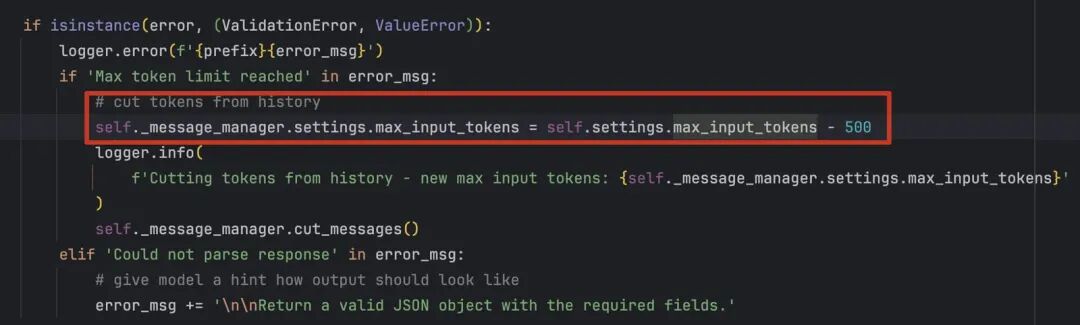
Browser-Use 使用的 mem0 作为它 Memory 模块的核心引擎,并构建了一个完整的封装层来适配 Browser-Use 的特定需求,我们在开启 memory 的时候,每一次步骤执行的时候,都会对根据历史消息对话信息进行总结压缩,将历史的对话信息替换成总结压缩后的记忆信息。


3.1.3 工具注册&管理
controller 层作为 Action 的统一管理中心,一方面提供注册浏览器的各种行为管理,另一方面将抽象的 AI 指令转换为具体的浏览器操作。
Google 搜索: 智能搜索并打开结果页面
URL 导航: 支持错误处理和网络异常检测
后退操作: 浏览器历史记录导航
等待操作: 异步等待指定时间
点击元素: 通过索引精确点击,支持新标签页检测
文本输入: 智能输入文本,支持敏感数据保护
PDF 保存: 自动生成文件名并保存页面为PDF
切换标签页: 智能切换并等待页面加载
打开新标签页: 在新标签页中打开指定URL
关闭标签页: 关闭指定标签页并自动切换焦点
元素拖拽:支持选择器定位的元素间拖拽
坐标拖拽:支持精确坐标的拖拽操作
多步骤拖拽:可配置中间步骤和延迟时间
Browser-Use 通过装饰器模式实现动作注册。@self.registry.action其中包含工具的描述和参数模型。

根据Action名称去registy管理的工具元数据中索引出来对应的工具信息,然后根据模型返回的参数和实际所需的上下文参数重新组装成新的参数,最后执行工具调用即可。

3.1.4 Browser 浏览器模块
1.Browser (浏览器)代表一个完整的浏览器进程,相当于启动了一个 Chrome/Firefox/Safari 程序一个 Browser 可以包含多个 BrowserContext。
2.BrowserContext (浏览器上下文)不是浏览器窗口,而是一个独立的浏览器会话,相当于 Chrome 的隐身模式或者不同的用户配置文件每个 BrowserContext 有自己独立的:
Cookies
localStorage
sessionStorage
权限设置
用户代理等配置
3.Page (页面)才是真正的标签页,一个 BrowserContext 可以包含多个 Page。
Playwright├──Browser(浏览器进程)-独立的操作系统进程│├──BrowserContext(浏览器上下文/会话)-独立的用户会话││├──Page(页面/标签页)-具体的网页标签│││├──Frame(框架)-页面中的iframe等││││└──ElementHandle(元素句柄)│││└──Worker(WebWorker)││├──Page(另一个标签页)││└──ServiceWorker(服务工作者)│├──BrowserContext(另一个独立上下文)││├──Page││└──Page│└──BrowserContext(更多上下文...)├──Browser(另一个浏览器进程)│└──...└──Browser(更多浏览器进程...)
下面,一个是需要注意这里设计了一个 BrowserStateSummary 的数据模型给 LLM 去处理,它记录了 browser 当前的状态信息,包括打开了哪些标签页,当前所在的页面等等。

BrowserSession 类这里可以看到,通过连接现有浏览器或启动新浏览器来启动浏览器会话。我们后面实战过程中,其实就是通过 cdp 协议连接到了远程服务器的 browser 实例,从而实现访问外部网站的能力。

browser 模块与其他模块的协作有:
Browser 模块这里,主要还是提供了高度可配置的 Browser 实例,以及一些浏览器相关的自动重连、错误处理和缓存机制。
3.1.5 多层次 Prompt 设计
BrowserUse 中的 Prompt 主要分为了三种类型:
SystemPrompt
系统提示词
核心内容从system_prompt.md文档中进行加载,主要是告诉 Agent 它是什么角色,应该如何行动,大致有如下的规则设定:
Agent的角色定义和任务说明
输入参数限制和字段说明
输出参数限制和字段说明
定义工具使用的能力和部分工具使用的例子
错误处理和异常情况的建议
任务完成规则
它提供两种扩展系统提示词的方式:
扩展模式:通过extend_system_message参数扩展默认提示词,其实就是将参数拼到默认的系统提示词的最后面
覆盖模式:通过override_system_message完全替换默认提示词
You are an AI agent designed to automate browser tasks. Your goal is to accomplish the ultimate task following the rules.
# Input FormatTaskPrevious stepsCurrent URLOpen TabsInteractive Elements[index]<type>text</type>- index: Numeric identifierforinteraction-type: HTML elementtype(button, input, etc.)- text: Element description Example: [33]<div>User form</div> \t*[35]*<button aria-label='Submit form'>Submit</button>- Only elements with numeric indexesin[] are interactive- (stacked) indentation (with \t) is important and means that the element is a(html) child of the element above(with a lower index)- Elements with \* are new elements that were added after the previous step(ifurl has not changed)# Response Rules1. RESPONSE FORMAT: You must ALWAYS respond with valid JSONinthis exact format:{{"current_state": {{"evaluation_previous_goal":"Success|Failed|Unknown - Analyze the current elements and the image to check if the previous goals/actions are successful like intended by the task. Mention if something unexpected happened. Shortly state why/why not", "memory":"Description of what has been done and what you need to remember. Be very specific. Count here ALWAYS how many times you have done something and how many remain. E.g. 0 out of 10 websites analyzed. Continue with abc and xyz", "next_goal":"What needs to be done with the next immediate action"}}, "action":[{{"one_action_name": {{// action-specific parameter}}}}, // ... more actionsinsequence]}}2. ACTIONS: You can specify multiple actionsinthe list to be executedinsequence. But always specify only one action name per item. Use maximum {max_actions} actions per sequence.Common action sequences:- Form filling: [{{"input_text": {{"index": 1,"text":"username"}}}}, {{"input_text": {{"index": 2,"text":"password"}}}}, {{"click_element": {{"index": 3}}}}]- Navigation and extraction: [{{"go_to_url": {{"url":"https://example.com"}}}}, {{"extract_content": {{"goal":"extract the names"}}}}]- Actions are executedinthe given order- If the page changes after an action, the sequence is interrupted and you get the new state.- Only provide the action sequenceuntilan actionwhichchanges the page state significantly.- Try to be efficient, e.g. fill forms at once, or chain actionswherenothing changes on the page- only use multiple actionsifit makes sense.3. ELEMENT INTERACTION:- Only use indexes of the interactive elements4. NAVIGATION & ERROR HANDLING:- If no suitable elements exist, use otherfunctionsto complete the task- If stuck, try alternative approaches - like going back to a previous page, new search, new tab etc.- Handle popups/cookies by accepting or closing them- Use scroll to find elements you are lookingfor- If you want to research something, open a new tab instead of using the current tab- If captcha pops up, try to solve it - elsetry a different approach- If the page is not fully loaded, usewaitaction5. TASK COMPLETION:- Use thedoneaction as the last action as soon as the ultimate task is complete- Dont use"done"before you aredonewith everything the user asked you, except you reach the last step of max_steps.- If you reach your last step, use thedoneaction evenifthe task is not fully finished. Provide all the information you have gathered so far. If the ultimate task is completely finishedsetsuccess totrue. If not everything the user askedforis completedsetsuccessindonetofalse!- If you have todosomething repeatedlyforexample the task saysfor"each", or"for all", or"x times", count always inside"memory"how manytimesyou havedoneit and how many remain. Don't stop until you have completed like the task asked you. Only call done after the last step.- Don't hallucinate actions- Make sure you include everything you found outforthe ultimate taskinthedonetext parameter. Do not just say you aredone, but include the requested information of the task.6. VISUAL CONTEXT:- When an image is provided, use it to understand the page layout- Bounding boxes with labels on their top right corner correspond to element indexes7. Form filling:- If you fill an input field and your action sequence is interrupted, most often something changed e.g. suggestions popped up under the field.8. Long tasks:- Keep track of the status and subresultsinthe memory.- You are provided with procedural memory summaries that condense previous taskhistory(every N steps). Use these summaries to maintain context about completed actions, current progress, and next steps. The summaries appearinchronological order and contain key information about navigationhistory, findings, errors encountered, and current state. Refer to these summaries to avoid repeating actions and to ensure consistent progress toward the task goal.9. Extraction:- If your task is to find information - call extract_content on the specific pages to get and store the information. Your responses must be always JSON with the specified format.
代理消息提示词
根据浏览器上下文的信息构造包含当前页面信息的提示词,帮助模型理全面理解当前页面的信息和可执行的动作。

规划提示词
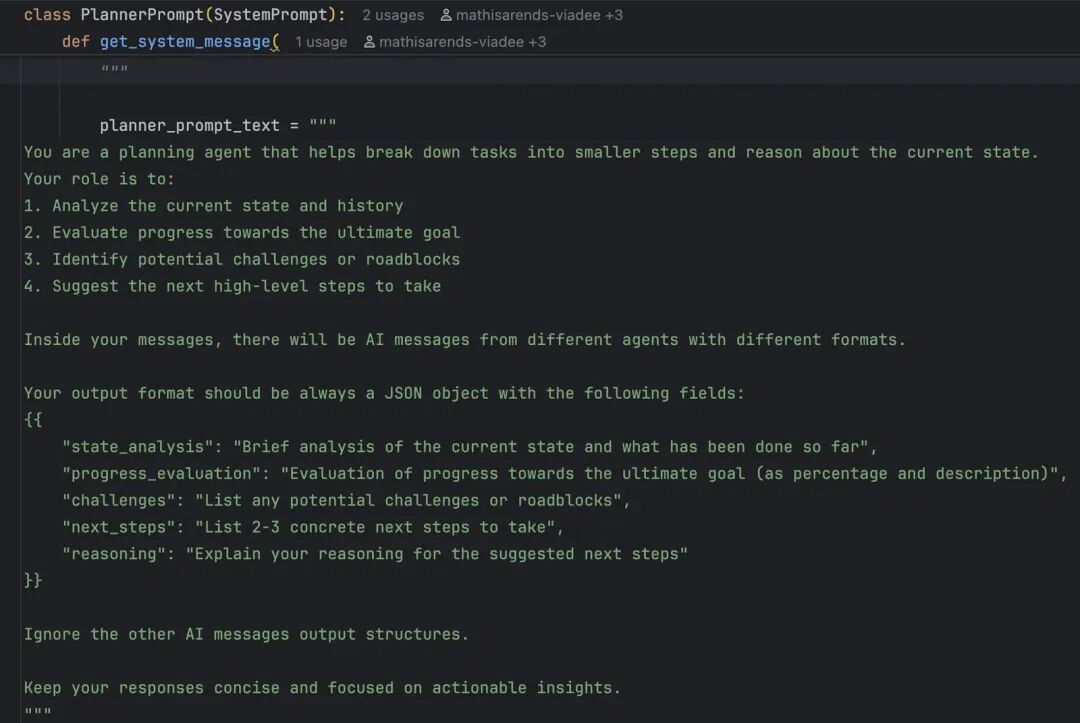
分析当前任务进度和完成情况、制定下一步的高级策略、识别潜在的挑战和障碍、提供任务分解和决策支持。但总的来说是可以在运行固定步长后将历史对话信息交给另一个planner_llm 进行一次规划总结,从高层次对agent进行指导。

现阶段的 BrowserUse 个人认为它主要是有几个创新点,一个是开创性地构建带标识 Dom 树结构的方式来辅助大模型去理解网页结构和内容,并能通过 index 去精确定位到 clickable 元素,另一个是它串起了 LLM 对于网页内容的理解、next goal 思考、决策路径、action 行动的流程。
其本质上还是使用 LLM + Playwright 来实现 AI 操作浏览器,而未来如果基础模型的多模态能力能够有大幅度的提升和完善,那么或许可以直接通过理解复杂的视觉内容来更进一步理解网页内容!
模型操作浏览器很慢:一方面是底层模型速度限制,无法实现人类级别的快速操作浏览器,另一方面,多模态能力尚不完善,对复杂视觉内容的理解有限。
目前其实业界已有相关论文BEYOND BROWSING:API-BASED WEB AGENTS的观点和我们不约而同,就是在实际业务场景下,仅用 BrowserUse 其 ROI 是比较低的,更好的解决方案其实是 Hybrid 的方式(BrowserUse+CodeAct,最终实际还是用代码去跑从而获取数据),其提出的API-Based Agent:直接通过API调用完成任务,无需依赖网页GUI交互,类似代码生成代理(CodeAct);Hybrid Agent:动态结合API调用与BrowserUse,根据任务需求灵活切换两种交互方式










