ingFang SC", system-ui, -apple-system, BlinkMacSystemFont, "Helvetica Neue", "Hiragino Sans GB", "Microsoft YaHei UI", "Microsoft YaHei", Arial, sans-serif;font-size: 17px;font-style: normal;font-variant-ligatures: normal;font-variant-caps: normal;font-weight: 400;letter-spacing: 0.544px;orphans: 2;text-indent: 0px;text-transform: none;widows: 2;word-spacing: 0px;-webkit-text-stroke-width: 0px;white-space: normal;text-decoration-thickness: initial;text-decoration-style: initial;text-decoration-color: initial;background-color: rgb(255, 255, 255);text-align: left;visibility: visible;box-sizing: border-box !important;overflow-wrap: break-word !important;">借助全新 AI 智能体, ONLYOFFICE 为快速发展的数字世界提供了前沿工具。作为开源项目,我们始终鼓励用户通过创新拓展能力边界。现在,您不仅可通过自定义 AI 函数提升文档处理效率,更能参与 ONLYOFFICE AI 智能体功能开发大赛,将创意直接转化为生产力!本文提供详细实施指南(文末附大赛信息),助您快速掌握函数开发全流程。什么是 AI 函数?AI 函数有什么用途?AI 函数是AI 智能体功能的核心构建模块。它们本质上是对 AI 助手发出的指令,可以告诉 AI 助手: 要向 AI 模型发送什么请求; 要对您的文档执行哪些操作。
借助 AI 函数,您可以扩展并控制 AI 与文档内容的交互方式。 如何使用 AI 函数在AI 插件中选择并添加模型。
示例:commentText函数commentText函数可让您直接在文档中添加由 AI 生成的批注。工作流程如下: 选中要添加批注的单词; 打开AI智能体对话框(CTRL + B); 输入指令,例如:“解释这段文字”; 按下Enter。
AI 智能体将运行commentText函数,并在文档中插入相关批注: 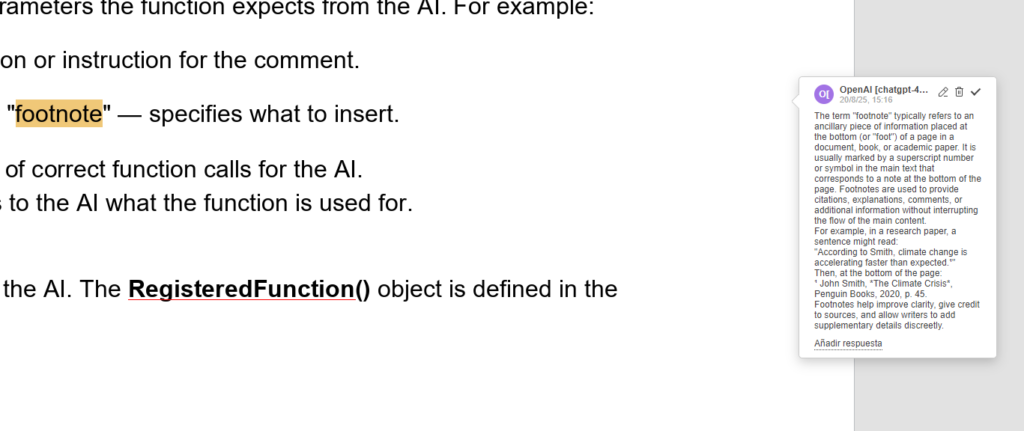
为什么要为 AI 智能体添加自定义函数?添加自定义 AI 函数可以扩展 AI 智能体能力,使其能精确满足个人需求。无论是处理文档、电子表格还是演示文稿,智能体的灵活性加上现代 AI 模型的强大功能,都能帮您把创意转化为现实,并整合进工作流中。 添加自定义 AI 函数的通用逻辑智能体的所有 AI 函数都组织在helpers目录中,其结构如下: 创建新的自定义函数时,将其添加到其所属编辑器的适当文件中。 helpers目录:https://github.com/ONLYOFFICE-PLUGINS/onlyoffice.github.io/tree/8a8b3e3237745bde2f99db5b8cee0abf2c637317/sdkjs-plugins/content/ai/scripts/helpers 添加自定义函数的过程包括两大阶段: 下面将详细介绍这两个阶段。 函数注册要添加新函数,我们需执行RegisteredFunction对象。它允许我们为函数添加元数据和逻辑。以下示例展示了如何为文档编辑器添加commentText函数: letfunc=newRegisteredFunction();func.name="commentText";func.params=["type(string):whethertoaddasa'comment'orasa'footnote'defaultis'comment')"];func.examples=["Ifyouneedtoexplainselectedtextasacomment,respondwith:\n"+"[functionCalling(commentText)]:{\"prompt\":\"Explainthistext\",\"type\":\"comment\"}","Ifyouneedtoaddafootnotetoselectedtext,respondwith:\n"+"[functionCalling(commentText)]:{\"prompt\":\"Addafootnotetothistext\",\"type\":\"footnote\"}","Ifyouneedtocommentselectedtext,respondwith:\n"+"[functionCalling(commentText)]:{\"prompt\":\"Commentthistext\"}","Ifyouneedtoexplainselectedtextasafootnote,respondwith:\n"+"[functionCalling(commentText)]:{\"prompt\":\"Explainthistext\",\"type\":\"footnote\"}"]其中: –prompt (string):批注的描述或指令,为字符串格式。 – type (string):您需要指定插入“批注” 还是 “脚注”类型,为字符串格式。 AI 使用这些参数。RegisteredFunction()对象被定义在helperFunc.js文件中:https://github.com/ONLYOFFICE-PLUGINS/onlyoffice.github.io/blob/8a8b3e3237745bde2f99db5b8cee0abf2c637317/sdkjs-plugins/content/ai/scripts/helperFuncs.js 函数执行逻辑注册函数后,我们要编写当 AI 被调用时该函数真正执行的逻辑。 func.call=asyncfunction(params){lettype=params.type;letisFootnote="footnote"===type;//Executesablockofcodeinsidetheeditor'scontextusingtheoffice=jsAPI.lettext=awaitAsc.Editor.callCommand(function(){letdoc=Api.GetDocument();//Getsthecurrentselectedtextrange.letrange=doc.GetRangeBySelect();lettext=range?range.GetText():"";if(!text){text=doc.GetCurrentWord();//Selectsthecurrentwordsocommentscanbeappliedtoit.doc.SelectCurrentWord();}returntext;});letargPromt=params.prompt+":\n"+text; engine.js:https://github.com/ONLYOFFICE-PLUGINS/onlyoffice.github.io/blob/8a8b3e3237745bde2f99db5b8cee0abf2c637317/sdkjs-plugins/content/ai/scripts/engine/engine.js#L554 //InitializesarequestengineforcommunicatingwiththeAImodel(e.g.Chat,Translation).letrequestEngine=AI.Request.create(AI.ActionType.Chat);if(!requestEngine)return; //SendsaprompttotheAImodelandprocessestheresponseviacallback.Canstreamorwait.letresult=awaitrequestEngine.chatRequest(argPromt,false,asyncfunction(data){if(!data)return;AddFootnote执行: if(isFootnote){letaddFootnote=true;//SendsaprompttotheAImodelandprocessestheresponseviacallback.Canstreamorwait.letresult=awaitrequestEngine.chatRequest(argPromt,false,asyncfunction(data){if(!data)return;//Markstheendofalogicalgrouporblockactionintheeditor.awaitcheckEndAction();Asc.scope.data=data;Asc.scope.model=requestEngine.modelUI.name;if(addFootnote){//Executesablockofcodeinsidetheeditor'scontextusingthedocumentmodelAPI.awaitAsc.Editor.callCommand(function(){//Returnsthemaindocumentobject,whichgivesaccesstoallediting,structure,andselectionAPIs.Api.GetDocument().AddFootnote();});addFootnote=false;}//InsertstheAI-generatedresultintothedocumentatthecurrentselectionorcursor.awaitAsc.Library.PasteText(data);});AddComment执行: letcommentId=null;//SendsaprompttotheAImodelandprocessestheresponseviacallback.Canstreamorwait.letresult=awaitrequestEngine.chatRequest(argPromt,false,asyncfunction(data){if(!data)return;//Markstheendofalogicalgrouporblockactionintheeditor.awaitcheckEndAction();Asc.scope.data=data;Asc.scope.model=requestEngine.modelUI.name;Asc.scope.commentId=commentId;//Executesablockofcodeinsidetheeditor'scontextusingthedocumentmodelAPI.commentId=awaitAsc.Editor.callCommand(function(){//Returnsthemaindocumentobject,whichgivesaccesstoallediting,structure,andselectionAPIs.letdoc=Api.GetDocument();letcommentId=Asc.scope.commentId;if(!commentId){//Getsthecurrentselectedtextrange,whichcanbemodifiedorannotated.letrange=doc.GetRangeBySelect();if(!range)returnnull;letcomment=range.AddComment(Asc.scope.data,Asc.scope.model,"uid"+Asc.scope.model);if(!comment)returnnull;doc.ShowComment([comment.GetId()]);returncomment.GetId();}letcomment=doc.GetCommentById(commentId);if(!comment)returncommentId;comment.SetText(comment.GetText()+scope.data);returncommentId;});});}注意! 为确保整个修改块在请求完成后可以被撤销,我们在commentText函数中统一使用了StartAction与EndAction方法。 StartAction:https://api.onlyoffice.com/zh-CN/docs/plugin-and-macros/interacting-with-editors/text-document-api/Methods/StartAction/ EndAction:https://api.onlyoffice.com/zh-CN/docs/plugin-and-macros/interacting-with-editors/text-document-api/Methods/EndAction/ 带完整注释的commentText函数实现: (function(){//DefinesthecommentTextfunction—letsAIinsertacommentorfootnoteforselectedtextusingAIresponse.WORD_FUNCTIONS.commentText=function(){//CreatesanewfunctionobjectthatwillberegisteredandexposedtotheAI.letfunc=newRegisteredFunction();func.name="commentText";//Liststheparametersexpectedbythefunction.ThesearepassedasaJSONobjectbytheAIAgent.func.params=["type(string):whethertoaddasa'comment'orasa'footnote'(defaultis'comment')"];//GivesexampleJSONinputstoteachtheAIhowtocorrectlyinvokethisfunction.func.examples=["Ifyouneedtoexplainselectedtextasacomment,respondwith:\n"+"[functionCalling(commentText)]:{\"prompt\":\"Explainthistext\",\"type\":\"comment\"}","Ifyouneedtoaddafootnotetoselectedtext,respondwith:\n"+"[functionCalling(commentText)]:{\"prompt\":\"Addafootnotetothistext\",\"type\":\"footnote\"}","Ifyouneedtocommentselectedtext,respondwith:\n"+"[functionCalling(commentText)]:{\"prompt\":\"Commentthistext\"}","Ifyouneedtoexplainselectedtextasafootnote,respondwith:\n"+"[functionCalling(commentText)]:{\"prompt\":\"Explainthistext\",\"type\":\"footnote\"}"];//TheactuallogicthatgetsexecutedwhentheAIcallsthisfunction.func.call=asyncfunction(params){lettype=params.type;letisFootnote="footnote"===type;//Executesablockofcodeinsidetheeditor'scontextusingtheoffice-jsAPI.lettext=awaitAsc.Editor.callCommand(function(){letdoc=Api.GetDocument();//Getsthecurrentselectedtextrange.letrange=doc.GetRangeBySelect();lettext=range?range.GetText():"";if(!text){text=doc.GetCurrentWord();//Selectsthecurrentwordsocommentscanbeappliedtoit.doc.SelectCurrentWord();}returntext;});letargPromt=params.prompt+":\n"+text;//InitializesarequestengineforcommunicatingwiththeAImodel(e.g.Chat,Translation).letrequestEngine=AI.Request.create(AI.ActionType.Chat);if(!requestEngine)return;letisSendedEndLongAction=false;//Markstheendofalogicalgrouporblockactionintheeditor.asyncfunctioncheckEndAction(){if(!isSendedEndLongAction){//Markstheendofalogicalgrouporblockactionintheeditor.awaitAsc.Editor.callMethod("EndAction",["Block","AI("+requestEngine.modelUI.name+")"]);isSendedEndLongAction=true}}//Startsablockactionintheeditor,usedforundo/redoawaitAsc.Editor.callMethod("StartAction",["Block","AI("+requestEngine.modelUI.name+")"]);//Startsablockactionintheeditor,usedforundo/redoawaitAsc.Editor.callMethod("StartAction",["GroupActions"]);if(isFootnote){letaddFootnote=true;//SendsaprompttotheAImodelandprocessestheresponseviacallbackletresult=awaitrequestEngine.chatRequest(argPromt,false,asyncfunction(data){if(!data)return;//Markstheendofablockactionintheeditor.awaitcheckEndAction();Asc.scope.data=data;Asc.scope.model=requestEngine.modelUI.name;if(addFootnote){//Executesablockofcodeinsidetheeditor'scontextusingtheoffice-jsAPI.awaitAsc.Editor.callCommand(function(){Api.GetDocument().AddFootnote();});addFootnote=false;}//InsertstheAI-generatedresultintothedocumentatthecurrentselectionorcursor.awaitAsc.Library.PasteText(data);});}else{letcommentId=null;//SendsaprompttotheAImodelandprocessestheresponseviacallback.letresult=awaitrequestEngine.chatRequest(argPromt,false,asyncfunction(data){if(!data)return;//Markstheendofablockactionintheeditor.awaitcheckEndAction();Asc.scope.data=data;Asc.scope.model=requestEngine.modelUI.name;Asc.scope.commentId=commentId;//Executesablockofcodeinsidetheeditor'scontextusingtheoffice-jsAPI.commentId=awaitAsc.Editor.callCommand(function(){letdoc=Api.GetDocument();letcommentId=Asc.scope.commentId;if(!commentId){//Getsthecurrentselectedtextrange.letrange=doc.GetRangeBySelect();if(!range)returnnull;letcomment=range.AddComment(Asc.scope.data,Asc.scope.model,"uid"+Asc.scope.model);if(!comment)returnnull;doc.ShowComment([comment.GetId()]);returncomment.GetId();}letcomment=doc.GetCommentById(commentId);if(!comment)returncommentId;comment.SetText(comment.GetText()+scope.data);returncommentId;});});}//Markstheendofablockactionintheeditor.awaitcheckEndAction();//Markstheendofablockactionintheeditor.awaitAsc.Editor.callMethod("EndAction",["GroupActions"]);};returnfunc;}我们始终致力于紧跟现代技术,确保智能 AI 智能体持续演进,以满足当今数字世界需求。通过创建自定义函数,您可以扩展 AI 能力,直至能完全满足个人需求。我们期待您的创意与想法。 | 









