随着多智能体系统(Multi-Agent Systems)和大语言模型(LLMs)技术的飞速发展,AI Agent 的工作能力越来越强。然而,在落地到真实应用中时,我们却发现一项关键能力仍旧缺失——如何让智能体与用户进行顺畅、高效的交互? CopilotKit 团队提出的AG-UI 协议(Agent-User Interaction Protocol),正是为此而生。
一、为什么需要 AG-UI?
当前市面上的 AI 系统,大多聚焦在后端的 Agent 执行、工具调用、模型编排等逻辑层面。然而当这些智能体要接入前端界面、嵌入产品时,开发者却面临种种困境:
- 每个 Agent 框架(如 LangGraph、CrewAI、Mastra 等)都有自己的事件机制和 API;
- 用户难以对 Agent 执行过程进行实时干预或控制;
这些问题直接影响 Agent 系统的可用性与用户体验。
二、AG-UI 是什么?
AG-UI 是一个开源、轻量的协议,旨在规范 AI Agent 与前端用户界面之间的通信流程。
协议亮点:
- 基于标准 HTTP 通信(支持 SSE / WebSocket / 二进制);
- 所有数据通过JSON 编码的事件(Event)进行传输;
- 提供 TypeScript 与 Python SDK,可快速集成;
- 可兼容主流 Agent 框架(LangGraph、CrewAI、Mastra、AG2 等);
架构

三、AG-UI 核心能力
| |
|---|
| 所有交互统一采用结构化的 JSON 事件格式,降低前后端适配成本 |
| 支持 token-by-token 的流式推送,提供极致响应式的用户体验 |
| Agent 执行过程中的 Tool 调用全过程均可被标准事件表示并渲染 |
| 提供完整快照STATE_SNAPSHOT与增量更新STATE_DELTA,高效同步状态 |
| 支持线程管理、任务取消、重启等机制,提升系统的可控性与稳定性 |
| 协议内建权限管理、身份认证等机制,适配企业级安全需求 |
这些能力构成了 AG-UI 成为生产级 Agent 应用的关键基础。
四、事件机制
AG-UI 协议中一切交互都围绕“事件”进行组织。核心事件类别包括:
- 生命周期事件(如
RUN_STARTED,RUN_FINISHED),监控Agent运行进度。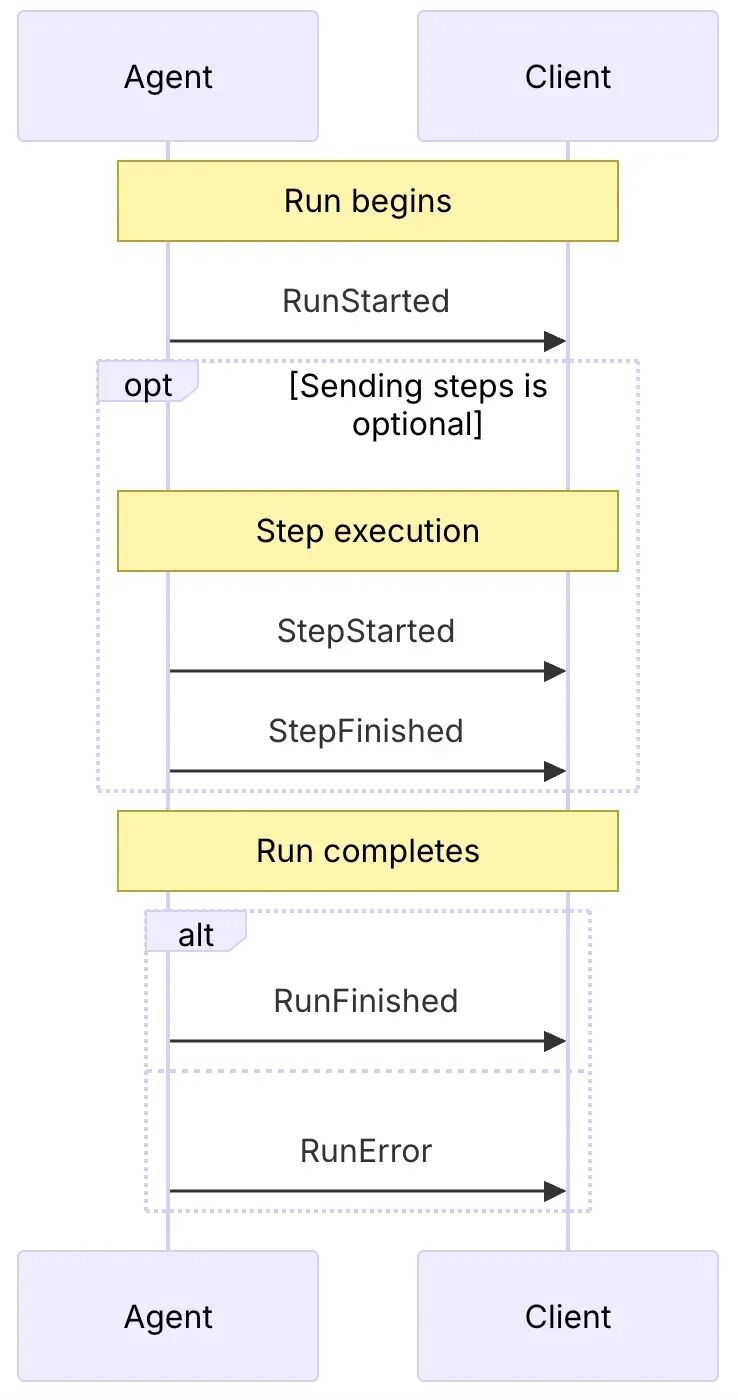
- 文本消息事件(如
TEXT_MESSAGE_START,TEXT_MESSAGE_CONTENT,TEXT_MESSAGE_END),处理文本流式内容的事件。
- 工具调用事件(如
TOOL_CALL_START,TOOL_CALL_ARGS,TOOL_CALL_END),管理 Agent 对工具的执行。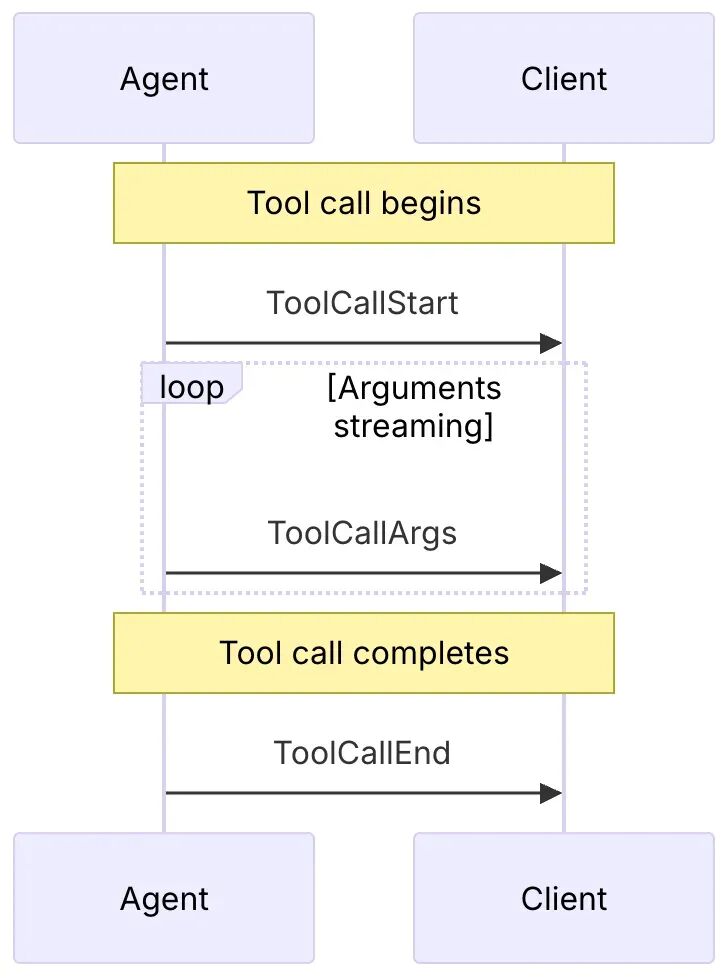
- 状态管理事件(如
STATE_SNAPSHOT,STATE_DELTA),同步 Agent 和 UI 之间的状态。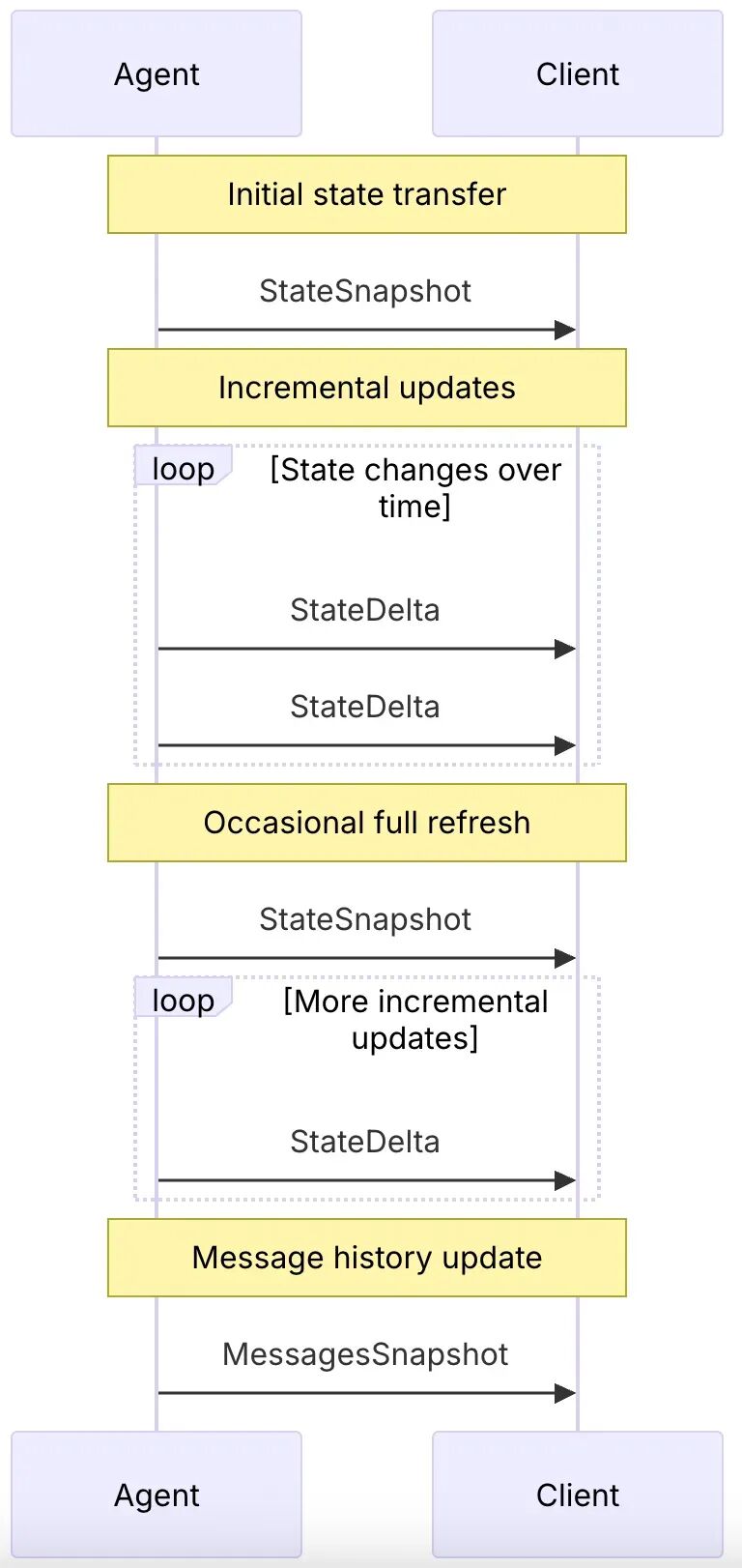
这一机制不仅提供了强大可扩展性,还简化了前端的 UI 渲染逻辑。
五、与其他协议的关系
AG-UI 与 A2A(Agent-to-Agent)和 MCP(Model Context Protocol)形成互补:

- A2A:主要促进智能体(agent-to-agent)之间的通信和协作;
- MCP:主要解决跨不同模型之间工具调用的标准化和上下文处理问题;
- AG-UI:主要处理由用户(人)参与的交互以及流式更新用户界面;
六、工作流程
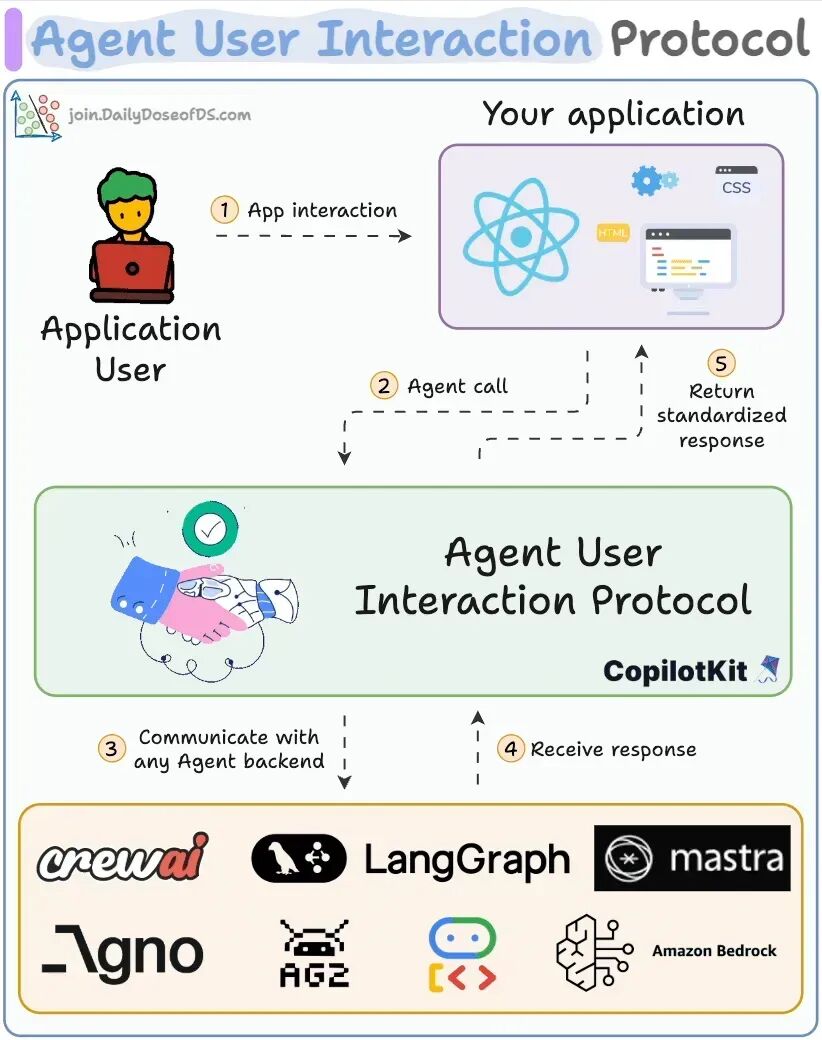
AG-UI 的工作流程基于事件驱动架构,主要包括以下几个步骤:
- 前端应用将用户输入封装为
RunAgentInput类型的 JSON 请求,发送到后端的/awp端点。 - 后端接收到请求后,解析
RunAgentInput,提取thread_id、run_id和用户消息等信息。 - 后端启动 AI 代理的处理流程,并准备通过事件流向前端发送处理状态和结果。
- 后端通过 Server-Sent Events(SSE)或 WebSocket 等协议,向前端持续发送事件。
(1)RunStartedEvent:表示代理开始处理请求。
(2)TextMessageContentEvent:代理生成的文本内容。
(3)RunFinishedEvent:代理完成处理。
- 前端接收到事件后,根据事件类型和内容,实时更新用户界面,展示代理的处理过程和结果。
例子
创建一个基础服务
mkdir awp-endpoint &&cdawp-endpoint
npm init -y
npm install typescript ts-node @types/node @types/express --save-dev
npx tsc --init

npm install express openai @ag-ui/core @ag-ui/encoder uuid
npm install @types/uuid --save-dev
importexpressfrom"express"
import{ Request, Response }from"express"

constapp = express()

app.use(express.json())

app.post("/awp",(req: Request, res: Response) =>{
 res.json({ message:"Hello World"})
})

app.listen(8000,()=>{
console.log("Server running on http://localhost:8000")
})
解析 AG-UI 输入并添加事件流(SSE)
importexpress, { Request, Response }from"express"
import{ RunAgentInputSchema, RunAgentInput, EventType }from"@ag-ui/core"
import{ EventEncoder }from"@ag-ui/encoder"

constapp = express()

app.use(express.json())

app.post("/awp",async(req: Request, res: Response) => {
try{
 // 解析并验证请求体
 constinput: RunAgentInput = RunAgentInputSchema.parse(req.body)

 // 设置 SSE headers
  res.setHeader("Content-Type","text/event-stream")
  res.setHeader("Cache-Control","no-cache")
  res.setHeader("Connection","keep-alive")

 // 创建事件 encoder
 constencoder =newEventEncoder()

 // 发送 started 事件
 construnStarted = {
  type: EventType.RUN_STARTED,
   threadId: input.threadId,
   runId: input.runId,
  }
  res.write(encoder.encode(runStarted))

 // 发送 finished 事件
 construnFinished = {
  type: EventType.RUN_FINISHED,
   threadId: input.threadId,
   runId: input.runId,
  }
  res.write(encoder.encode(runFinished))

 // 结束响应
  res.end()
 }catch(error) {
  res.status(422).json({ error: (errorasError).message })
 }
})

app.listen(8000,()=>{
console.log("Server running on http://localhost:8000")
})
集成 OpenAI
importexpress, { Request, Response }from"express"
import{
 RunAgentInputSchema,
 RunAgentInput,
 EventType,
 Message,
}from"@ag-ui/core"
import{ EventEncoder }from"@ag-ui/encoder"
import{ OpenAI }from"openai"
import{ v4asuuidv4 }from"uuid"

constapp = express()

app.use(express.json())

app.post("/awp",async(req: Request, res: Response) => {
try{
 // 解析并验证请求体
 constinput: RunAgentInput = RunAgentInputSchema.parse(req.body)

 // 设置 SSE headers
  res.setHeader("Content-Type","text/event-stream")
  res.setHeader("Cache-Control","no-cache")
  res.setHeader("Connection","keep-alive")

 // 创建事件 encoder
 constencoder =newEventEncoder()

 // 发送 started 事件
 construnStarted = {
  type: EventType.RUN_STARTED,
   threadId: input.threadId,
   runId: input.runId,
  }
  res.write(encoder.encode(runStarted))


 // 初始化 OpenAI 客户端
 constclient =newOpenAI()

 // 将 AG-UI 消息转换为 OpenAI 消息格式
 constopenaiMessages = input.messages
   .filter((msg: Message) =>
    ["user","system","assistant"].includes(msg.role)
   )
   .map((msg: Message) =>({
    role: msg.roleas"user"|"system"|"assistant",
    content: msg.content ||"",
   }))

 // 生成消息 ID
 constmessageId = uuidv4()

 // 发送 ‘文本消息开始’ 事件
 consttextMessageStart = {
  type: EventType.TEXT_MESSAGE_START,
   messageId,
   role:"assistant",
  }
  res.write(encoder.encode(textMessageStart))

 // 创建流式传输完成请求
 conststream =awaitclient.chat.completions.create({
   model:"gpt-3.5-turbo",
   messages: openaiMessages,
   stream:true,
  })

 // 处理流并发送 ‘文本消息内容’ 事件
 forawait(constchunk of stream) {
  if(chunk.choices[0]?.delta?.content) {
   constcontent = chunk.choices[0].delta.content
   consttextMessageContent = {
    type: EventType.TEXT_MESSAGE_CONTENT,
     messageId,
     delta: content,
    }
    res.write(encoder.encode(textMessageContent))
   }
  }

 // 发送 ‘文本消息结束’ 事件
 consttextMessageEnd = {
  type: EventType.TEXT_MESSAGE_END,
   messageId,
  }
  res.write(encoder.encode(textMessageEnd))


 // 发送 finished 事件
 construnFinished = {
  type: EventType.RUN_FINISHED,
   threadId: input.threadId,
   runId: input.runId,
  }
  res.write(encoder.encode(runFinished))

 // 结束响应
  res.end()
 }catch(error) {
  res.status(422).json({ error: (errorasError).message })
 }
})

app.listen(8000,()=>{
console.log("Server running on http://localhost:8000")
})
现在,已构建了兼容 AG-UI 的 Agent,可以将其连接到支持 AG-UI 协议的任何前端。 例如,CopilotKit 提供了一套丰富的 UI 组件,旨在与 AG-UI 代理无缝协作。
七、项目接入与生态支持
目前 AG-UI 已经原生支持多个框架与平台:
前端开发者可通过 CopilotKit 提供的 React Hooks 快速集成 UI 能力,后端则通过 Python/TS SDK 发送标准事件流,真正实现一次接入,多框架兼容。
八、AG-UI 的意义
AG-UI 的出现,标志着智能体系统迈入“用户协作”的新阶段:
- 它让 Agent 能像人类协作者一样,参与到用户界面中;
- 它让 AI 输出不再是黑盒,而是可观察、可控制、可中断;
- 它推动了 AI 系统从“自动化”向“交互化”演进。
在产品实际部署中,AG-UI 能有效降低开发门槛、提升交互体验、增强稳定性与可维护性。
九、结语
随着智能体生态的逐渐成熟,前后端协同将成为决定 AI 应用成败的关键因素。而 AG-UI 协议正是其中最重要的一环。它不仅解决了技术层面的接口统一问题,更为未来智能体与人协作的产品形态奠定了坚实基础。
正如 CopilotKit 团队所说: “就像 REST 之于 API,AG-UI 是 Agent 之于用户界面的流式交互协议。”










