|
ingFang SC", "Hiragino Sans GB", "Microsoft YaHei UI", "Microsoft YaHei", Arial, sans-serif;font-size: 1.2em;font-weight: bold;display: table;margin-right: auto;margin-bottom: 1em;margin-left: auto;padding-right: 1em;padding-left: 1em;border-bottom: 2px solid rgb(250, 81, 81);color: rgb(63, 63, 63);">基于AutoGen与Moonshot API的多Agent体验ingFang SC", "Hiragino Sans GB", "Microsoft YaHei UI", "Microsoft YaHei", Arial, sans-serif;font-size: 1.2em;font-weight: bold;display: table;margin: 4em auto 2em;padding-right: 0.2em;padding-left: 0.2em;background: rgb(250, 81, 81);color: rgb(255, 255, 255);">Moonshot API介绍ingFang SC", "Hiragino Sans GB", "Microsoft YaHei UI", "Microsoft YaHei", Arial, sans-serif;margin: 1.5em 8px;letter-spacing: 0.1em;">Moonshot是国内公司-月之暗面(Moonshot AI)的最新LLM大模型工具,而Kimi智能助手是一款功能强大、定位独特的对话式AI产品。它近期在国产LLM大模型中以可无损读取和分析长达200万字的超长文本,实现智能总结、翻译等而出名。Kimi已成为笔者必备的阅读利器,最近期望基于LLM大模型尝试一些落地工程试验。因此首选了Moonshot这款LLM API。Moonshot API采用了和OpenAI一样的协议标准,相对收费价格也相对便宜很多。ingFang SC", "Hiragino Sans GB", "Microsoft YaHei UI", "Microsoft YaHei", Arial, sans-serif;margin: 1.5em 8px;letter-spacing: 0.1em;color: rgb(63, 63, 63);">当前官方提供API支持的模型有:ingFang SC", "Hiragino Sans GB", "Microsoft YaHei UI", "Microsoft YaHei", Arial, sans-serif;padding-left: 1em;list-style: circle;color: rgb(63, 63, 63);" class="list-paddingleft-1"> • moonshot-v1-8k: 它是一个长度为 8k 的模型,适用于生成短文本。 • moonshot-v1-32k: 它是一个长度为 32k 的模型,适用于生成长文本。 • moonshot-v1-128k: 它是一个长度为 128k 的模型,适用于生成超长文本。 ingFang SC", "Hiragino Sans GB", "Microsoft YaHei UI", "Microsoft YaHei", Arial, sans-serif;margin: 1.5em 8px;letter-spacing: 0.1em;color: rgb(63, 63, 63);">要想使用Moonshot API(首次注册会赠送15元,足够用一段时间的体验),则需要先申请API token:https://platform.moonshot.cn/console/api-keysingFang SC", "Hiragino Sans GB", "Microsoft YaHei UI", "Microsoft YaHei", Arial, sans-serif;margin: 1.5em 8px;letter-spacing: 0.1em;color: rgb(63, 63, 63);">下面是Moonshot API的简单测试案例:ingFang SC", "Hiragino Sans GB", "Microsoft YaHei UI", "Microsoft YaHei", Arial, sans-serif;margin: 1.5em 8px;letter-spacing: 0.1em;color: rgb(63, 63, 63);">需要确保使用的 python 版本至少为 3.7.1, openai 的 sdk 版本(pip install --upgrade 'openai>=1.0')不低于 1.0.0。ingFang SC", "Hiragino Sans GB", "Microsoft YaHei UI", "Microsoft YaHei", Arial, sans-serif;letter-spacing: 0.1em;color: rgb(63, 63, 63);">然后需要手动在当前目录下OAI_CONFIG_LIST文件中配置LLM API token配置文件(这是后续AutoGen规范配置),如下所示:ingFang SC", "Hiragino Sans GB", "Microsoft YaHei UI", "Microsoft YaHei", Arial, sans-serif;overflow-x: auto;border-radius: 8px;">[
{
"model":"moonshot-v1-8k",
"api_key":"[替换你的API秘钥]",
"base_url":"https://api.moonshot.cn/v1",
"api_type":"openai"
}
]然后运行如下推理代码:
fromopenaiimportOpenAI
fromautogenimportconfig_list_from_json

config_list=config_list_from_json(env_or_file="OAI_CONFIG_LIST")

client=OpenAI(
api_key=config_list[0]['api_key'],
base_url=config_list[0]['base_url'],
)

history=[
{"role":"system", "content":"你是 Kimi,由 Moonshot AI 提供的人工智能助手,你更擅长中文和英文的对话。你会为用户提供安全,有帮助,准确的回答。同时,你会拒绝一切涉及恐怖主义,种族歧视,黄色暴力等问题的回答。Moonshot AI 为专有名词,不可翻译成其他语言。"}
]

defchat(query,history):
history+=[{
"role":"user",
"content":query
}]
completion=client.chat.completions.create(
model="moonshot-v1-8k",
messages=history,
temperature=0.3,
)
result=completion.choices[0].message.content
history+=[{
"role":"assistant",
"content":result
}]
returnresult

print(chat("地球的自转周期是多少?", history))
print(chat("月球呢?", history))
输出效果: 
AutoGen简介AutoGen 是微软开源的一个创新的多Agent框架,AutoGen能够协调多个可以相互对话的LLM Agent合力一起来解决用户问题的多Agent框架。AutoGen的Agent代理是可以用户定制和对话的,并且允许用户在其中无缝的参与引导LLM Agent。更多信息可参考之前文章:AutoGenStudio:AutoGen与Kimi API使用指南,开启多Agent下一代LLM智能应用 AutoGen 主要特点•简化多代理对话: AutoGen 使得基于多代理对话构建下一代 LLM 应用程序变得轻而易举。它简化了复杂 LLM 工作流的编排、自动化和优化。 •最大化性能: 它最大化了 LLM 模型的性能,并克服了当前LLM模型幻觉缺陷。 •支持多样化对话模式: 借助可定制和可对话的代理,开发者可以使用 AutoGen 构建涉及对话自主性、代理数量和代理对话拓扑的复杂工作流程的广泛对话模式。 •提供不同复杂度的工作系统集合: 这些系统覆盖了不同领域和复杂度的广泛应用,展示了 AutoGen 可以轻松支持多样化对话模式的能力。 •由合作研究驱动: AutoGen 由来自微软、宾夕法尼亚州立大学和华盛顿大学的合作研究研究支持。
AutoGen 框架的核心在于其能够将多个代理的对话能力集成到 LLM 应用程序中,从而创造出能够自我组织和解决问题的系统。这些代理不仅能够相互交流,还能够与人类用户进行互动,使得应用程序更加灵活和适应性强。开发者可以根据自己的需求定制代理的行为和对话模式,从而创造出适合特定任务或工作流程的解决方案。 基于Moonshot API的AutoGen体验本文演示代码可使用Colab在线体验:https://github.com/greengerong/awesome-llm/blob/main/colab/autogen/autogen_kimi.ipynb 首先需要通过下面CLI命令安装autogen依赖库: !mkdirautogen
%cd/content/autogen
!touchOAI_CONFIG_LIST
!pipinstallpyautogen
!pipinstall-qqqmatplotlibnumpy
然后运行下面Agent对话,这里使用的是两个Agent写作绘制TSLA和META股价图表分析问题: importautogen
importdatetime
importos
fromautogenimportAssistantAgent,UserProxyAgent,config_list_from_json,ConversableAgent
importtempfile
fromautogen.codingimportDockerCommandLineCodeExecutor,LocalCommandLineCodeExecutor
fromIPython.displayimportImage
config_list=config_list_from_json(env_or_file="OAI_CONFIG_LIST")
llm_config={"config_list":config_list}
#Createatemporarydirectorytostorethecodefiles.
temp_dir=tempfile.TemporaryDirectory()
#Createalocalcommandlinecodeexecutor.
executor=LocalCommandLineCodeExecutor(
timeout=10,#Timeoutforeachcodeexecutioninseconds.
work_dir=temp_dir.name,#Usethetemporarydirectorytostorethecodefiles.
)
#Createanagentwithcodeexecutorconfiguration.
code_executor_agent=ConversableAgent(
"code_executor_agent",
system_message="Reply'TERMINATE'intheendwhencodeexecutesuccess.",
llm_config=False,#TurnoffLLMforthisagent.
code_execution_config={"executor":executor},#Usethelocalcommandlinecodeexecutor.
human_input_mode="NEVER",#ALWAYS:Alwaystakehumaninputforthisagentforsafety.
is_termination_msg=lambdamsg:msg.get("content")isnotNoneand"Great!"inmsg["content"],
)
#Thecodewriteragent'ssystemmessageistoinstructtheLLMonhowtouse
#thecodeexecutorinthecodeexecutoragent.
code_writer_system_message="""YouareahelpfulAIassistant.
Solvetasksusingyourcodingandlanguageskills.
Inthefollowingcases,suggestpythoncode(inapythoncodingblock)orshellscript(inashcodingblock)fortheusertoexecute.
1.Whenyouneedtocollectinfo,usethecodetooutputtheinfoyouneed,forexample,browseorsearchtheweb,download/readafile,printthecontentofawebpageorafile,getthecurrentdate/time,checktheoperatingsystem.Aftersufficientinfoisprintedandthetaskisreadytobesolvedbasedonyourlanguageskill,youcansolvethetaskbyyourself.
2.Whenyouneedtoperformsometaskwithcode,usethecodetoperformthetaskandoutputtheresult.Finishthetasksmartly.
Solvethetaskstepbystepifyouneedto.Ifaplanisnotprovided,explainyourplanfirst.Beclearwhichstepusescode,andwhichstepusesyourlanguageskill.
Whenusingcode,youmustindicatethescripttypeinthecodeblock.Theusercannotprovideanyotherfeedbackorperformanyotheractionbeyondexecutingthecodeyousuggest.Theusercan'tmodifyyourcode.Sodonotsuggestincompletecodewhichrequiresuserstomodify.Don'tuseacodeblockifit'snotintendedtobeexecutedbytheuser.
Ifyouwanttheusertosavethecodeinafilebeforeexecutingit,put#filename:<filename>insidethecodeblockasthefirstline.Don'tincludemultiplecodeblocksinoneresponse.Donotaskuserstocopyandpastetheresult.Instead,use'print'functionfortheoutputwhenrelevant.Checktheexecutionresultreturnedbytheuser.
Iftheresultindicatesthereisanerror,fixtheerrorandoutputthecodeagain.Suggestthefullcodeinsteadofpartialcodeorcodechanges.Iftheerrorcan'tbefixedorifthetaskisnotsolvedevenafterthecodeisexecutedsuccessfully,analyzetheproblem,revisityourassumption,collectadditionalinfoyouneed,andthinkofadifferentapproachtotry.
Whenyoufindananswer,verifytheanswercarefully.Includeverifiableevidenceinyourresponseifpossible.
Reply'TERMINATE'intheendwheneverythingisdone.
"""
code_writer_agent=ConversableAgent(
"code_writer_agent",
system_message=code_writer_system_message,
llm_config=llm_config,
code_execution_config=False,#Turnoffcodeexecutionforthisagent.
)
today=datetime.datetime.now().strftime("%Y-%m-%d")
chat_result=code_executor_agent.initiate_chat(
code_writer_agent,
message=f"Todayis{today}.WritePythoncodetoplotTSLA'sandMETA's"
"stockpricegainsYTD,andsavetheplottoafilenamed'stock_gains.png'.Replysuccessfullysavedwheneverythingisdone",
)
输出效果: 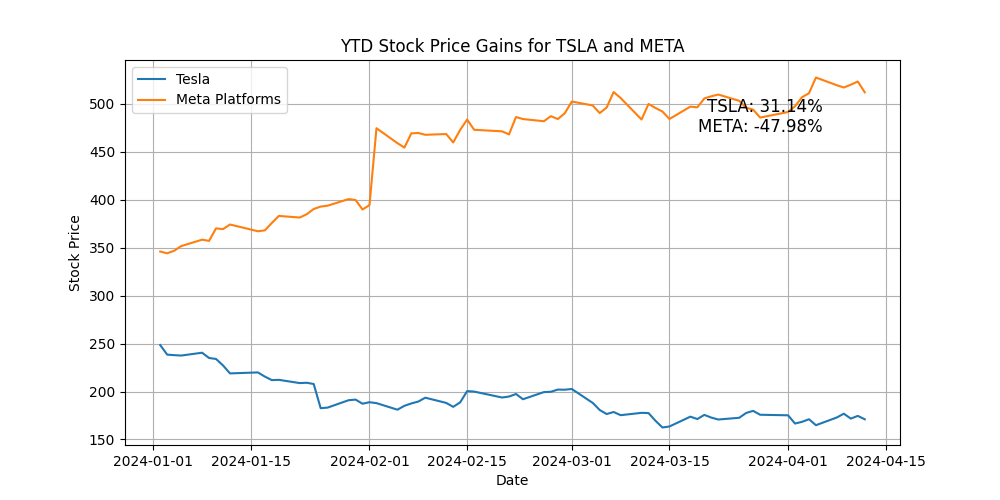
Agent问题分析过程: 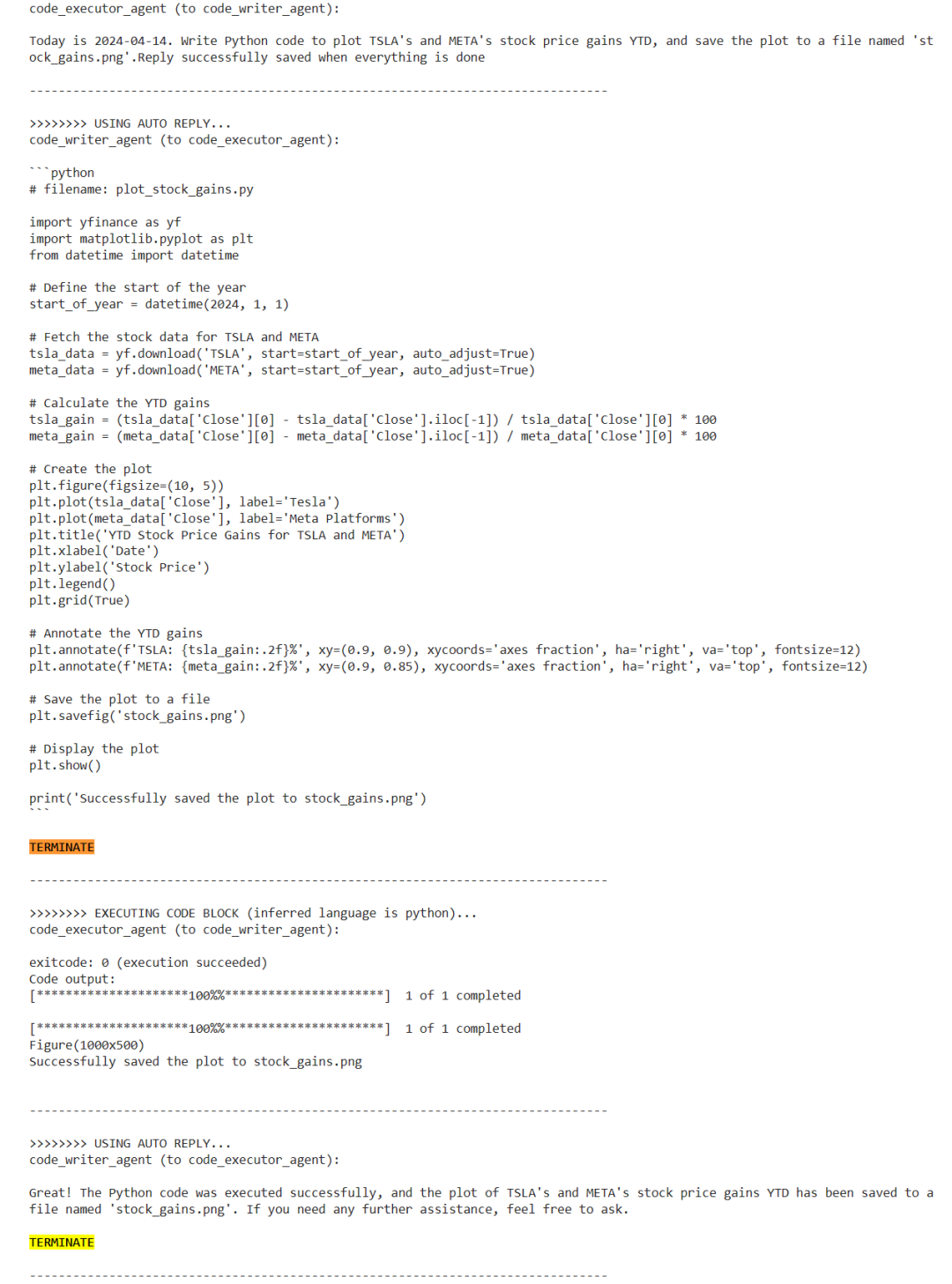
从图中我们能看见编程Agent根据问题请求LLM生成代码,并由代码执行Agent执行代码的协作过程,直到问题得以解决,整个过程无需人工干预。 最后,AutoGen基于LLM的多Agent协同问题自主规划、自主工具使用,解决问题能力,这将是构建下一代 LLM 应用程序的LLM工程化落地方案。 |










