|
ingFang SC", "Hiragino Sans GB", "Microsoft YaHei UI", "Microsoft YaHei", Arial, sans-serif;font-size: 1.2em;font-weight: bold;display: table;margin-right: auto;margin-bottom: 1em;margin-left: auto;padding-right: 1em;padding-left: 1em;border-bottom: 2px solid rgb(250, 81, 81);color: rgb(63, 63, 63);">一、LlamaFactory介绍  ingFang SC", "Hiragino Sans GB", "Microsoft YaHei UI", "Microsoft YaHei", Arial, sans-serif;font-size: 14px;letter-spacing: normal;text-align: left;line-height: 1.75;border-radius: 4px;display: block;margin: 0.1em auto 0.5em;height: auto !important;" title="null"/> ingFang SC", "Hiragino Sans GB", "Microsoft YaHei UI", "Microsoft YaHei", Arial, sans-serif;font-size: 14px;letter-spacing: normal;text-align: left;line-height: 1.75;border-radius: 4px;display: block;margin: 0.1em auto 0.5em;height: auto !important;" title="null"/>
ingFang SC", "Hiragino Sans GB", "Microsoft YaHei UI", "Microsoft YaHei", Arial, sans-serif;margin: 1.5em 8px;letter-spacing: 0.1em;color: rgb(63, 63, 63);">LlamaFactory 是一个封装比较完善的LLM微调工具,它能够帮助用户快速地训练和微调大多数LLM模型。ingFang SC", "Hiragino Sans GB", "Microsoft YaHei UI", "Microsoft YaHei", Arial, sans-serif;margin: 1.5em 8px;letter-spacing: 0.1em;color: rgb(63, 63, 63);">https://github.com/hiyouga/LLaMA-FactoryingFang SC", "Hiragino Sans GB", "Microsoft YaHei UI", "Microsoft YaHei", Arial, sans-serif;font-size: 1.1em;font-weight: bold;margin-top: 2em;margin-right: 8px;margin-bottom: 0.75em;padding-left: 8px;border-left: 3px solid rgb(250, 81, 81);color: rgb(63, 63, 63);">1.1 简介ingFang SC", "Hiragino Sans GB", "Microsoft YaHei UI", "Microsoft YaHei", Arial, sans-serif;margin: 1.5em 8px;color: rgb(63, 63, 63);"> ingFang SC", "Hiragino Sans GB", "Microsoft YaHei UI", "Microsoft YaHei", Arial, sans-serif;border-radius: 4px;display: block;margin: 0.1em auto 0.5em;height: auto !important;" title="null"/>ingFang SC", "Hiragino Sans GB", "Microsoft YaHei UI", "Microsoft YaHei", Arial, sans-serif;margin: 1.5em 8px;letter-spacing: 0.1em;color: rgb(63, 63, 63);">LlamaFactory主要通过Trainer类来实现训练流程,通过设置数据集、模型选型、训练类型、微调超参、模型保存,以及训练状态监控等信息,来开启训练。ingFang SC", "Hiragino Sans GB", "Microsoft YaHei UI", "Microsoft YaHei", Arial, sans-serif;margin: 1.5em 8px;color: rgb(63, 63, 63);"> ingFang SC", "Hiragino Sans GB", "Microsoft YaHei UI", "Microsoft YaHei", Arial, sans-serif;border-radius: 4px;display: block;margin: 0.1em auto 0.5em;height: auto !important;" title="null"/>ingFang SC", "Hiragino Sans GB", "Microsoft YaHei UI", "Microsoft YaHei", Arial, sans-serif;margin: 1.5em 8px;letter-spacing: 0.1em;color: rgb(63, 63, 63);">LlamaFactory主要通过Trainer类来实现训练流程,通过设置数据集、模型选型、训练类型、微调超参、模型保存,以及训练状态监控等信息,来开启训练。ingFang SC", "Hiragino Sans GB", "Microsoft YaHei UI", "Microsoft YaHei", Arial, sans-serif;margin: 1.5em 8px;color: rgb(63, 63, 63);"> ingFang SC", "Hiragino Sans GB", "Microsoft YaHei UI", "Microsoft YaHei", Arial, sans-serif;border-radius: 4px;display: block;margin: 0.1em auto 0.5em;height: auto !important;" title="null"/> ingFang SC", "Hiragino Sans GB", "Microsoft YaHei UI", "Microsoft YaHei", Arial, sans-serif;border-radius: 4px;display: block;margin: 0.1em auto 0.5em;height: auto !important;" title="null"/>支持的训练方法(这里的Pre-Training指的是增量预训练) 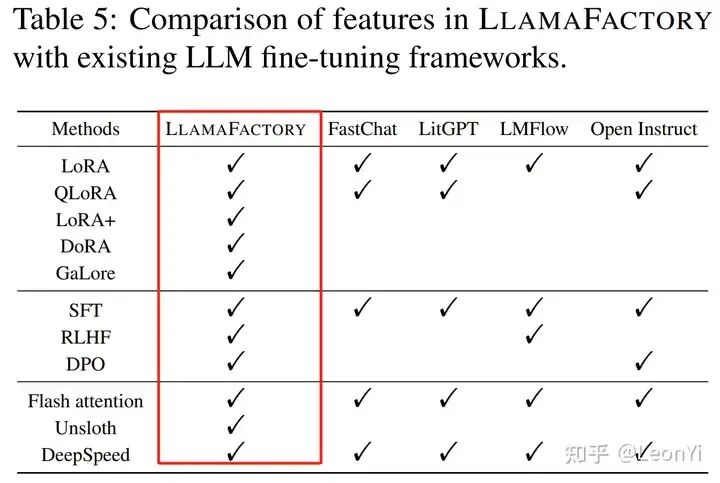 LlamaFactory基于PEFT和TRL进行二次封装,从而可以快速开始SFT和RLHF微调。同时,引入GaLore和Unsloth等方案,能降低训练显存占用。 1.2 特性•各种模型: LLaMA, LLaVA, Mistral, Mixtral-MoE, Qwen, Yi, Gemma, Baichuan, ChatGLM, Phi, etc. •集成训练方法: (Continuous) pre-training, (multimodal) supervised fine-tuning, reward modeling, PPO, DPO and ORPO. •Scalable resources: 32-bit full-tuning, 16-bit freeze-tuning, 16-bit LoRA and 2/4/8-bit QLoRA via AQLM/AWQ/GPTQ/LLM.int8. •Advanced algorithms: GaLore, BAdam, DoRA, LongLoRA, LLaMA Pro, Mixture-of-Depths, LoRA+, LoftQ and Agent tuning. •实用tricks: FlashAttention-2, Unsloth, RoPE scaling, NEFTune and rsLoRA. •实验监控 lamaBoard, TensorBoard, Wandb, MLflow, etc. lamaBoard, TensorBoard, Wandb, MLflow, etc. •推理集成: OpenAI-style API, Gradio UI and CLI with vLLM worker.
LlamaFactory支持单机单卡,同时整合了accelerate和deepseed的单机多卡、多机多卡分布式训练。 支持的模型| 模型名 | 模型大小 | Template | | Baichuan2[1] | 7B/13B | baichuan2 | | BLOOM[2] | 560M/1.1B/1.7B/3B/7.1B/176B | - | | BLOOMZ[3] | 560M/1.1B/1.7B/3B/7.1B/176B | - | | ChatGLM3[4] | 6B | chatglm3 | | Command-R[5] | 35B/104B | cohere | | DeepSeek (MoE)[6] | 7B/16B/67B/236B | deepseek | | Falcon[7] | 7B/11B/40B/180B | falcon | | Gemma/CodeGemma[8] | 2B/7B | gemma | | GLM4[9] | 9B | glm4 | | InternLM2[10] | 7B/20B | intern2 | | LLaMA[11] | 7B/13B/33B/65B | - | | LLaMA-2[12] | 7B/13B/70B | llama2 | | LLaMA-3[13] | 8B/70B | llama3 | | LLaVA-1.5[14] | 7B/13B | vicuna | | Mistral/Mixtral[15] | 7B/8x7B/8x22B | mistral | | OLMo[16] | 1B/7B | - | | PaliGemma[17] | 3B | gemma | | Phi-1.5/2[18] | 1.3B/2.7B | - | | Phi-3[19] | 4B/7B/14B | phi | | Qwen[20] | 1.8B/7B/14B/72B | qwen | | Qwen1.5 (Code/MoE)[21] | 0.5B/1.8B/4B/7B/14B/32B/72B/110B | qwen | | Qwen2 (MoE)[22] | 0.5B/1.5B/7B/57B/72B | qwen | | StarCoder2[23] | 3B/7B/15B | - | | XVERSE[24] | 7B/13B/65B | xverse | | Yi (1/1.5)[25] | 6B/9B/34B | yi | | Yi-VL[26] | 6B/34B | yi_vl | | Yuan[27] | 2B/51B/102B | yuan |
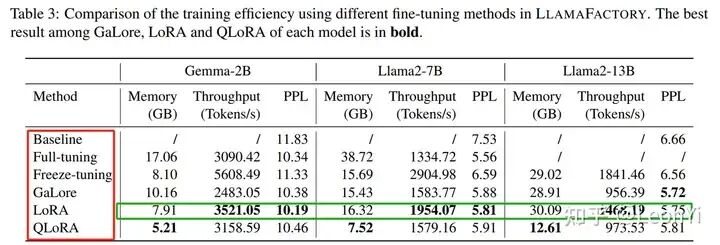 基于LlamaFactory框架进行的各种训练效率比较 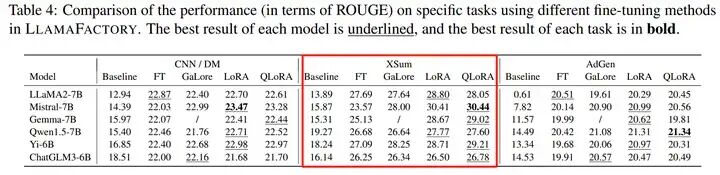 适合进行各种LLM在不同训练方法下,效果评估对比 1.3 数据集信息LlamaFactory配置的数据集格式。 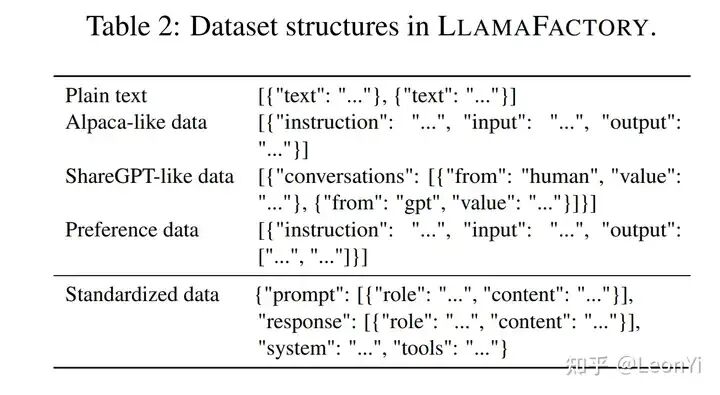 预训练数据集•Wiki Demo (en)[28] •RefinedWeb (en)[29] •RedPajama V2 (en)[30] •Wikipedia (en)[31] •Wikipedia (zh)[32] •Pile (en)[33] •SkyPile (zh)[34] •FineWeb (en)[35] •FineWeb-Edu (en)[36] •The Stack (en)[37] •StarCoder (en)[38]
指令微调数据集•Identity (en&zh)[39] •Stanford Alpaca (en)[40] •Stanford Alpaca (zh)[41] •Alpaca GPT4 (en&zh)[42] •Glaive Function Calling V2 (en&zh)[43] •LIMA (en)[44] •Guanaco Dataset (multilingual)[45] •BELLE 2M (zh)[46] •BELLE 1M (zh)[47] •BELLE 0.5M (zh)[48] •BELLE Dialogue 0.4M (zh)[49] •BELLE School Math 0.25M (zh)[50] •BELLE Multiturn Chat 0.8M (zh)[51] •UltraChat (en)[52] •OpenPlatypus (en)[53] •CodeAlpaca 20k (en)[54] •Alpaca CoT (multilingual)[55] •OpenOrca (en)[56] •SlimOrca (en)[57] •MathInstruct (en)[58] •Firefly 1.1M (zh)[59] •Wiki QA (en)[60] •Web QA (zh)[61] •WebNovel (zh)[62] •Nectar (en)[63] •deepctrl (en&zh)[64] •Advertise Generating (zh)[65] •ShareGPT Hyperfiltered (en)[66] •ShareGPT4 (en&zh)[67] •UltraChat 200k (en)[68] •AgentInstruct (en)[69] •LMSYS Chat 1M (en)[70] •Evol Instruct V2 (en)[71] •Cosmopedia (en)[72] •STEM (zh)[73] •Ruozhiba (zh)[74] •LLaVA mixed (en&zh)[75] •Open Assistant (de)[76] •Dolly 15k (de)[77] •Alpaca GPT4 (de)[78] •OpenSchnabeltier (de)[79] •Evol Instruct (de)[80] •Dolphin (de)[81] •Booksum (de)[82] •Airoboros (de)[83] •Ultrachat (de)[84]
偏好数据集•DPO mixed (en&zh)[85] •UltraFeedback (en)[86] •Orca DPO Pairs (en)[87] •HH-RLHF (en)[88] •Nectar (en)[89] •Orca DPO (de)[90] •KTO mixed (en)[91]
部分数据集的使用需要确认,推荐使用下述命令登录 Hugging Face 账户。 pipinstall--upgradehuggingface_hub
huggingface-clilogin
1.4 软硬件依赖| 必需项 | 至少 | 推荐 | | python | 3.8 | 3.11 | | torch | 1.13.1 | 2.3.0 | | transformers | 4.41.2 | 4.41.2 | | datasets | 2.16.0 | 2.19.2 | | accelerate | 0.30.1 | 0.30.1 | | peft | 0.11.1 | 0.11.1 | | trl | 0.8.6 | 0.9.4 |
| 可选项 | 至少 | 推荐 | | CUDA | 11.6 | 12.2 | | deepspeed | 0.10.0 | 0.14.0 | | bitsandbytes | 0.39.0 | 0.43.1 | | vllm | 0.4.3 | 0.4.3 | | flash-attn | 2.3.0 | 2.5.9 |
1.5 硬件依赖*估算值 | 方法 | 精度 | 7B | 13B | 30B | 70B | 110B | 8x7B | 8x22B | | Full | AMP | 120GB | 240GB | 600GB | 1200GB | 2000GB | 900GB | 2400GB | | Full | 16 | 60GB | 120GB | 300GB | 600GB | 900GB | 400GB | 1200GB | | Freeze | 16 | 20GB | 40GB | 80GB | 200GB | 360GB | 160GB | 400GB | | LoRA/GaLore/BAdam | 16 | 16GB | 32GB | 64GB | 160GB | 240GB | 120GB | 320GB | | QLoRA | 8 | 10GB | 20GB | 40GB | 80GB | 140GB | 60GB | 160GB | | QLoRA | 4 | 6GB | 12GB | 24GB | 48GB | 72GB | 30GB | 96GB | | QLoRA | 2 | 4GB | 8GB | 16GB | 24GB | 48GB | 18GB | 48GB |
估计的不一定准,取决于输入输出长度、batch_size。建议使用accelerate估计。 二、使用LlamaFactory2.1 项目结构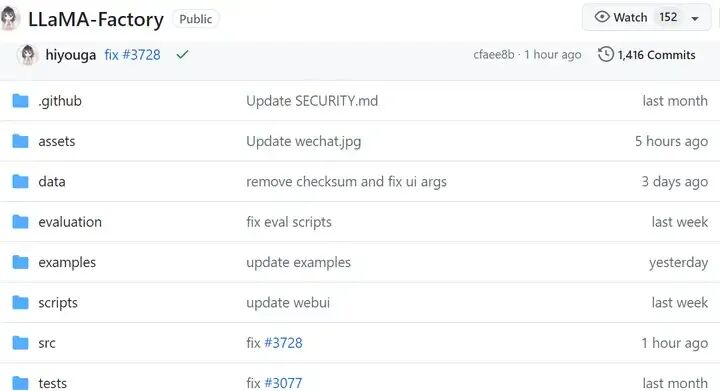 可以在 src/llmtuner/data/template.py 中添加自己的对话模板。 为了确保和LLM SFT时一致,确保对话模板格式很关键。 2.2 数据准备关于数据集文件的格式,请参考data/README_zh.md[92]的内容。你可以使用 HuggingFace / ModelScope 上的数据集或加载本地数据集。 使用自定义数据集时,请更新data/dataset_info.json[93]文件,进行数据集名称、数据集字段以及数据集路径的配置。 dataset_info.json的一些默认配置数据集信息 {
"alpaca_gpt4_zh":{
"file_name":"alpaca_gpt4_data_zh.json"
},
"identity":{
"file_name":"identity.json"
},
"oaast_sft_zh":{
"file_name":"oaast_sft_zh.json",
"columns":{
"prompt":"instruction",
"query":"input",
"response":"output",
"history":"history"
}
},
"lima":{
"file_name":"lima.json",
"columns":{
"prompt":"instruction",
"query":"input",
"response":"output",
"history":"history"
}
},
"belle_2m":{
"hf_hub_url":"BelleGroup/train_2M_CN",
"ms_hub_url":"AI-ModelScope/train_2M_CN"
},
"firefly":{
"hf_hub_url":"YeungNLP/firefly-train-1.1M",
"columns":{
"prompt":"input",
"response":"target"
}
},
"wikiqa":{
"hf_hub_url":"wiki_qa",
"columns":{
"prompt":"question",
"response":"answer"
}
}
}
也可以在 template.py 中添加自己的对话模板。典型的几个模板 _register_template(
name="alpaca",
format_user=StringFormatter(slots=["###Instruction:\n{{content}}\n\n###Response:\n"]),
format_separator=EmptyFormatter(slots=["\n\n"]),
default_system=(
"Belowisaninstructionthatdescribesatask."
"Writearesponsethatappropriatelycompletestherequest.\n\n"
),
)
_register_template(
name="qwen",
format_user=StringFormatter(slots=["<|im_start|>user\n{{content}}<|im_end|>\n<|im_start|>assistant\n"]),
format_system=StringFormatter(slots=["<|im_start|>system\n{{content}}<|im_end|>\n"]),
format_observation=StringFormatter(slots=["<|im_start|>tool\n{{content}}<|im_end|>\n<|im_start|>assistant\n"]),
format_separator=EmptyFormatter(slots=["\n"]),
default_system="Youareahelpfulassistant.",
stop_words=["<|im_end|>"],
replace_eos=True,
)
_register_template(
name="chatml",
format_user=StringFormatter(slots=["<|im_start|>user\n{{content}}<|im_end|>\n<|im_start|>assistant\n"]),
format_system=StringFormatter(slots=["<|im_start|>system\n{{content}}<|im_end|>\n"]),
format_observation=StringFormatter(slots=["<|im_start|>tool\n{{content}}<|im_end|>\n<|im_start|>assistant\n"]),
format_separator=EmptyFormatter(slots=["\n"]),
stop_words=["<|im_end|>","<|im_start|>"],
replace_eos=True,
)
_register_template(
name="deepseek",
format_user=StringFormatter(slots=["User:{{content}}\n\nAssistant:"]),
format_system=StringFormatter(slots=[{"bos_token"},"{{content}}"]),
force_system=True,
)
_register_template(
name="default",
format_user=StringFormatter(slots=["Human:{{content}}\nAssistant:"]),
format_system=StringFormatter(slots=["{{content}}\n"]),
format_separator=EmptyFormatter(slots=["\n"]),
)
_register_template(
name="llama2",
format_user=StringFormatter(slots=[{"bos_token"},"[INST]{{content}}[/INST]"]),
format_system=StringFormatter(slots=["<<SYS>>\n{{content}}\n<</SYS>>\n\n"]),
default_system=(
"Youareahelpful,respectfulandhonestassistant."
"Alwaysanswerashelpfullyaspossible,whilebeingsafe."
"Youranswersshouldnotincludeanyharmful,unethical,"
"racist,sexist,toxic,dangerous,orillegalcontent."
"Pleaseensurethatyourresponsesaresociallyunbiasedandpositiveinnature.\n\n"
"Ifaquestiondoesnotmakeanysense,orisnotfactuallycoherent,"
"explainwhyinsteadofansweringsomethingnotcorrect."
"Ifyoudon'tknowtheanswertoaquestion,pleasedon'tsharefalseinformation."
),
)
_register_template(
name="llama2_zh",
format_user=StringFormatter(slots=[{"bos_token"},"[INST]{{content}}[/INST]"]),
format_system=StringFormatter(slots=["<<SYS>>\n{{content}}\n<</SYS>>\n\n"]),
default_system="You are a helpful assistant. 你是一个乐于助人的助手。",
)
_register_template(
name="llama3",
format_user=StringFormatter(
slots=[
(
"<|start_header_id|>user<|end_header_id|>\n\n{{content}}<|eot_id|>"
"<|start_header_id|>assistant<|end_header_id|>\n\n"
)
]
),
format_system=StringFormatter(
slots=[{"bos_token"},"<|start_header_id|>system<|end_header_id|>\n\n{{content}}<|eot_id|>"]
),
format_observation=StringFormatter(
slots=[
(
"<|start_header_id|>tool<|end_header_id|>\n\n{{content}}<|eot_id|>"
"<|start_header_id|>assistant<|end_header_id|>\n\n"
)
]
),
default_system="Youareahelpfulassistant.",
stop_words=["<|eot_id|>"],
replace_eos=True,
)
2.3 安装依赖在一个干净的虚拟环境,安装如下依赖 gitclonehttps://github.com/hiyouga/LLaMA-Factory.git
condacreate-nllama_factorypython=3.10
condaactivatellama_factory
cdLLaMA-Factory
pipinstall-e.[metrics]
可选的额外依赖项:deepspeed、metrics、unsloth、galore、badam、vllm、bitsandbytes、gptq、awq、aqlm、qwen、modelscope、quality 2.4 WEB-UI 训练LlamaFactory Colab Demo脚本: https://colab.research.google.com/drive/1eRTPn37ltBbYsISy9Aw2NuI2Aq5CQrD9?usp=sharing ui界面目前只支持单卡训练 模型选择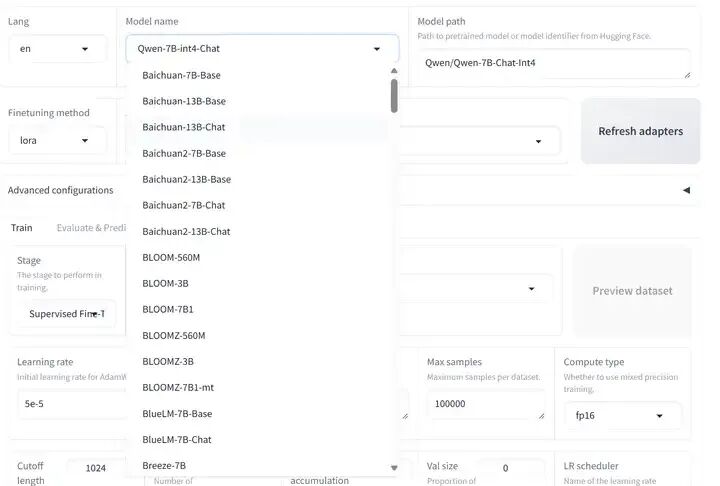 数据集选择配置 训练方式选择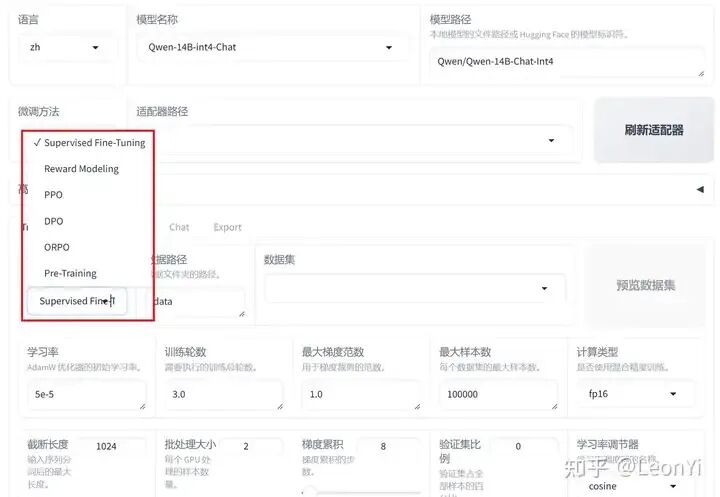 训练参数配置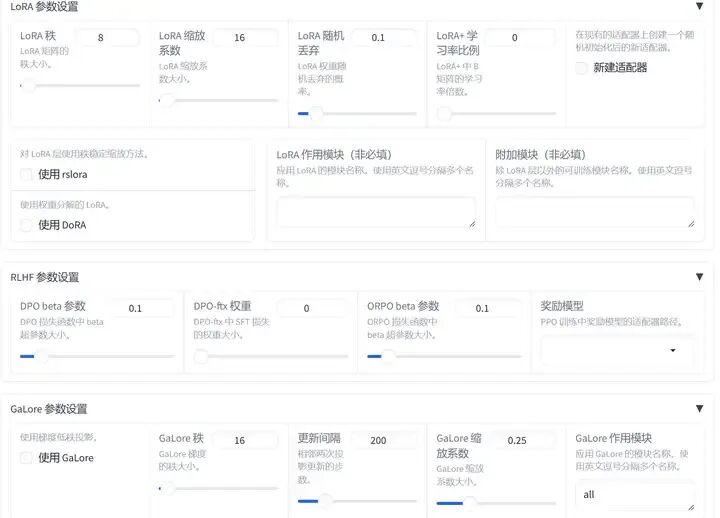 预览训练命令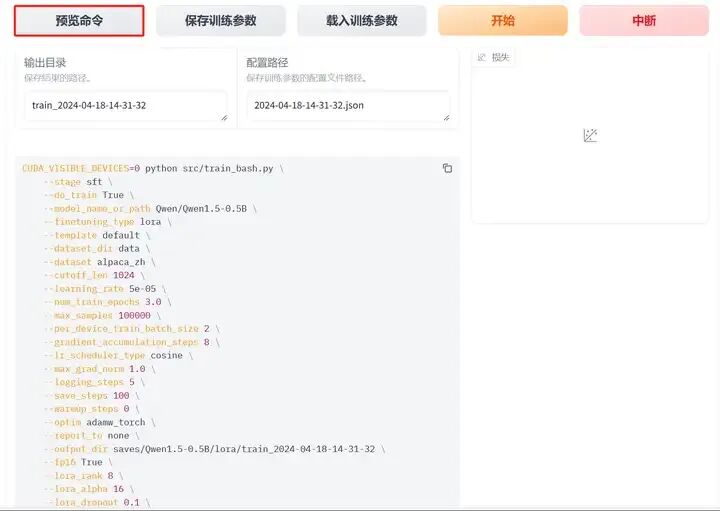 日志展示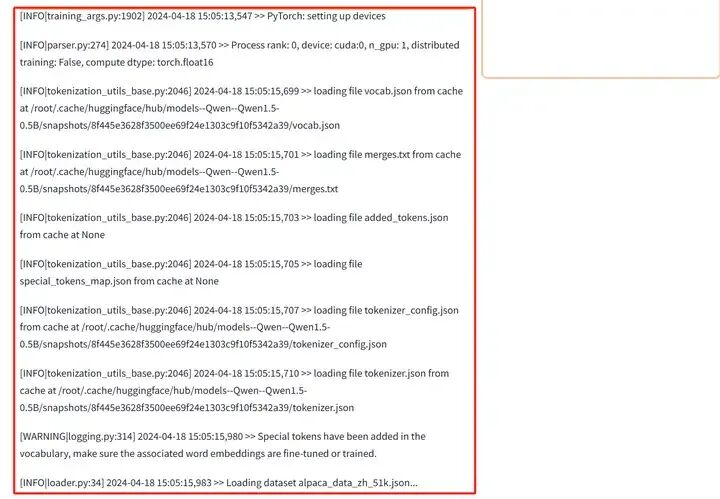 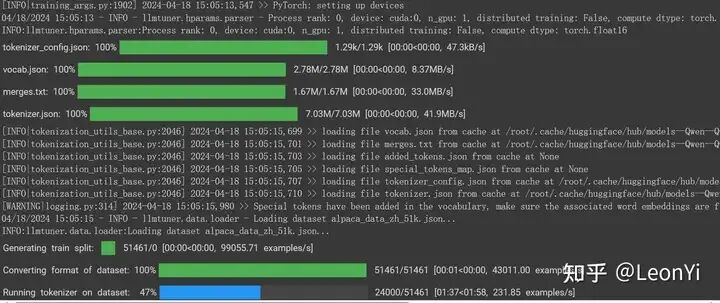 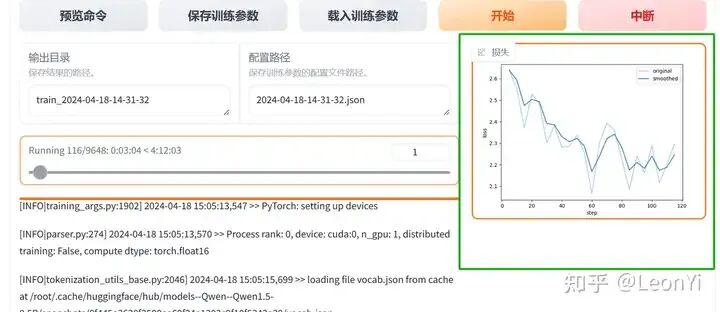 2.5 命令脚本训练目前,最新版本绝大多数examples已改成yaml配置文件,而不是shell命令用parser读取参数了. 当然,本质上就是把训练参数传到train.py中 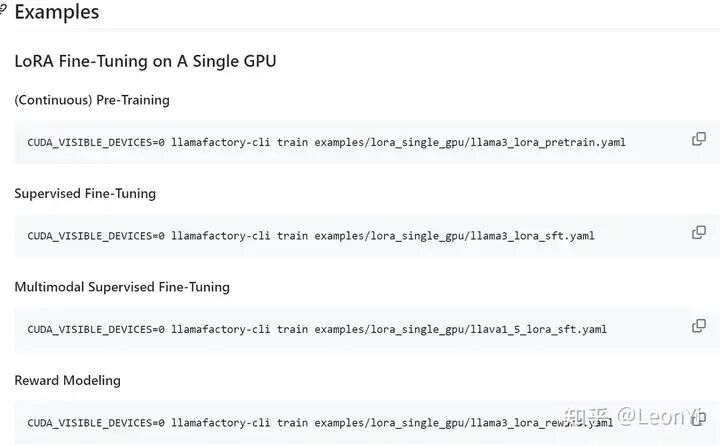 examples下的lora_single_gpu/llama3_lora_sft.yaml #model
model_name_or_path:meta-llama/Meta-Llama-3-8B-Instruct
#method
stage:sft
do_train:true
finetuning_type:lora
lora_target:q_proj,v_proj
#dataset
dataset:identity,alpaca_gpt4_en
template:llama3
cutoff_len:1024
max_samples:1000
overwrite_cache:true
preprocessing_num_workers:16
#output
output_dir:saves/llama3-8b/lora/sft
logging_steps:10
save_steps:500
plot_loss:true
overwrite_output_dir:true
#train
per_device_train_batch_size:1
gradient_accumulation_steps:8
learning_rate:0.0001
num_train_epochs:3.0
lr_scheduler_type:cosine
warmup_steps:0.1
fp16:true
#eval
val_size:0.1
per_device_eval_batch_size:1
evaluation_strategy:steps
eval_steps:500
脚本 examples/lora_multi_gpu/multi_node.sh #!/bin/bash
#alsolaunchitonslavemachineusingslave_config.yaml
CUDA_VISIBLE_DEVICES=0,1,2,3acceleratelaunch\
--config_fileexamples/accelerate/master_config.yaml\
src/train.pyexamples/lora_multi_gpu/llama3_lora_sft.yaml
之前一个训练日志: 配置了几个数据集,进行单机多卡 llama3_8b_instruct进行中文数据集sft训练 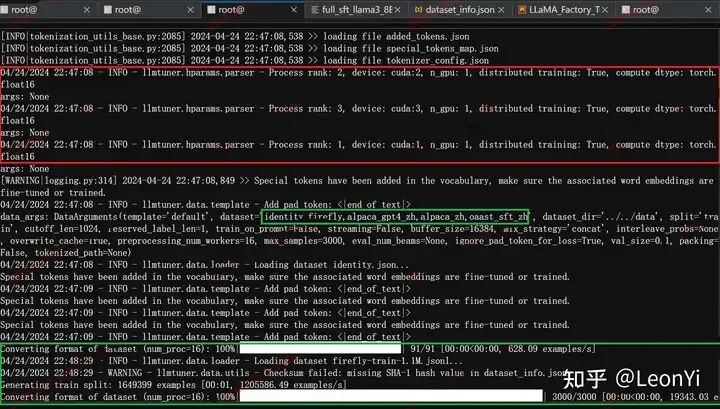 llama3_8b_instruct进行增量预训练还是中文数据SFT都不过是倒腾数据集和配置脚本的事情,当然这只是踏出训练的第一步。 毕竟搞出一个baseline和能训练好还是两码事(需要自己调参摸索,更需要学习开源的经验)。 总结LlamaFactory适合快速进行全参数、LoRA等高效微调,适合增量预训练、指令微调和强化学习微调。 它具备可视化界面,同时集成了多种比较前沿的训练Trick,用的人多。 但是呢,由于集成地太好,隐藏了很多细节,一方面不利于学习和定制化。另一方面,在使用的时候,也需要详细了解参数配置。 LlamaFactory适合快速上手,毕竟它已经集成好的框架将分散的包组合到一起,能够省时省力,但用好需花一点精力。
|










