ingFang SC", "Hiragino Sans GB", "Microsoft YaHei UI", "Microsoft YaHei", Arial, sans-serif;letter-spacing: 0.544px;text-wrap: wrap;visibility: visible;color: rgb(163, 163, 163) !important;">
经过了一年的不懈努力,今天通义千问团队对 Qwen-VL 模型进行重大更新——推出 Qwen2-VL。
Qwen2-VL 有什么新功能? · 增强的图像理解能力:Qwen2-VL显著提高了模型理解和解释视觉信息的能力,为关键性能指标设定了新的基准
·高级视频理解能力:Qwen2-VL具有卓越的在线流媒体功能,能够以很高的精度实时分析动态视频内容
·集成的可视化agent功能:Qwen2-VL 现在无缝整合了复杂的系统集成,将 Qwen2-VL 转变为能够进行复杂推理和决策的强大可视化代理
·扩展的多语言支持:Qwen2-VL 扩展了语言能力,以更好地服务于多样化的全球用户群,使 Qwen2-VL 在不同语言环境中更易于访问和有效
模型结构 

模型效果 在 7B 规模下,Qwen2-VL-7B成功保留了对图像、多图像和视频输入的支持,以更具成本效益的模型大小提供具有竞争力的性能。具体而言,Qwen2-VL-7B在文档理解任务(例如 DocVQA)和通过 MTVQA 评估的图像多语言文本理解方面表现出色,建立了非常优秀的性能。

本次Qwen2-VL推出一款更小的 2B 模型,该模型针对潜在的移动部署进行了优化。尽管参数量只有2B,但该模型在图像、视频和多语言理解方面表现出色。与其他类似规模的模型相比,它在视频相关任务、文档理解和一般场景问答方面表现尤为出色。
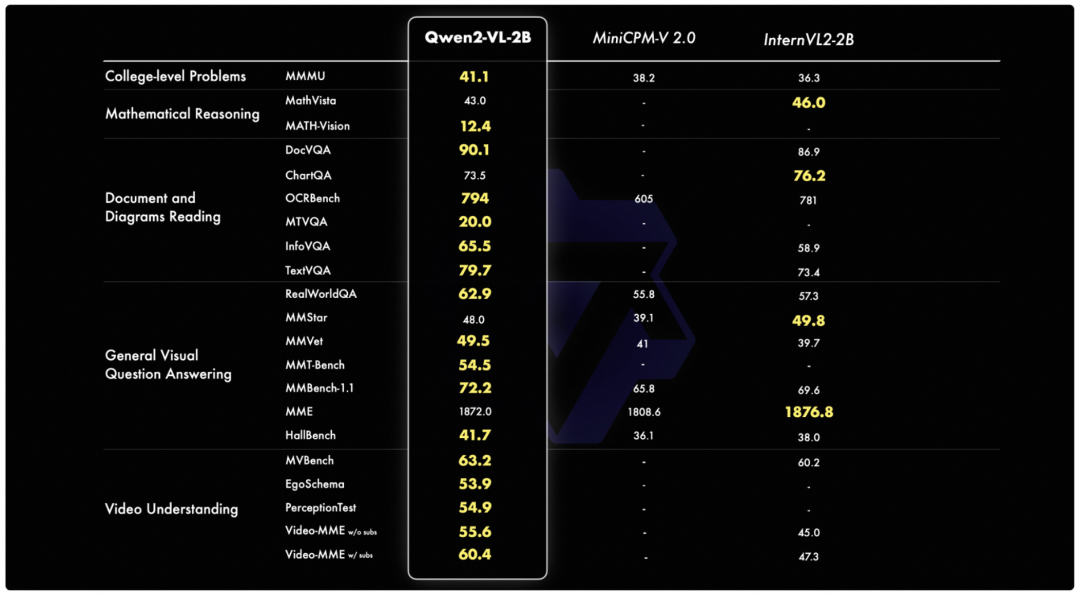
ingFang SC", "Hiragino Sans GB", "Microsoft YaHei UI", "Microsoft YaHei", Arial, sans-serif;letter-spacing: 0.544px;text-wrap: wrap;visibility: visible;color: rgb(163, 163, 163) !important;">
本次Qwen2-VL开源了两个尺寸的模型,Qwen2-VL-2B-Instruct 和 Qwen2-VL-7B-Instruct,以及其GPTQ和AWQ的量化版本。
模型链接: Qwen2-VL-2B-Instruct:https://www.modelscope.cn/models/qwen/Qwen2-VL-2B-Instruct
Qwen2-VL-7B-Instruct:https://www.modelscope.cn/models/qwen/Qwen2-VL-7B-Instruct
推荐使用ModelScope CLI下载模型 modelscopedownload--model=qwen/Qwen2-VL-7B-Instruct--local_dir./Qwen2-VL-7B-Instruct
效果体验: 1 游戏视频理解: 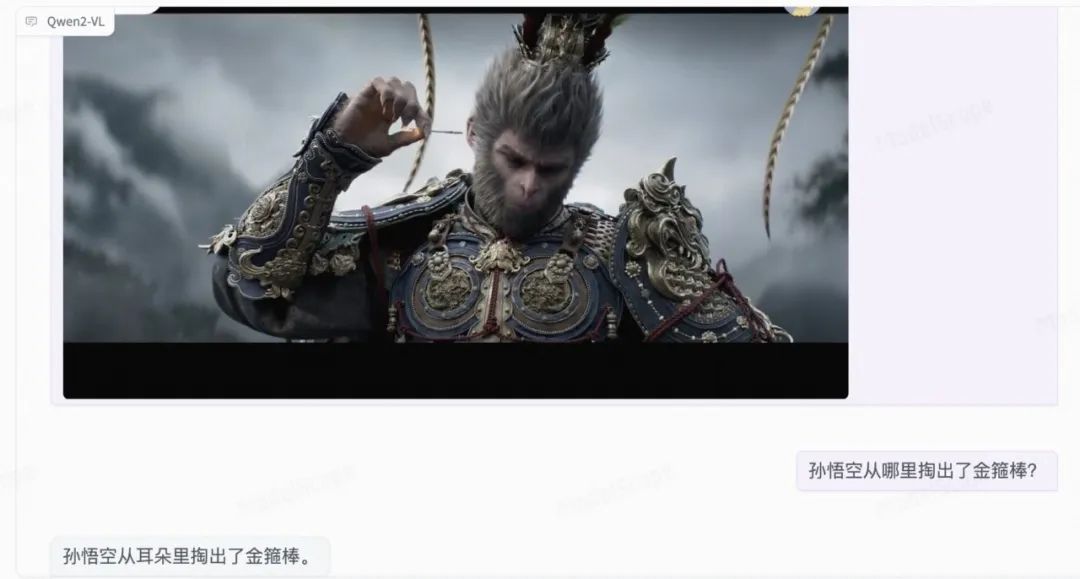
2 数学几何求解: 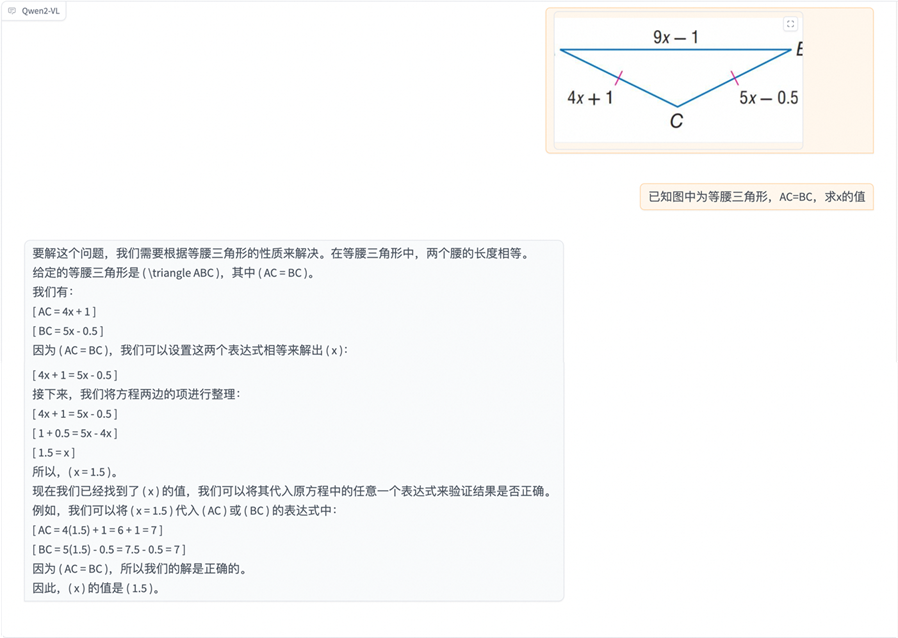
3 OCR识别 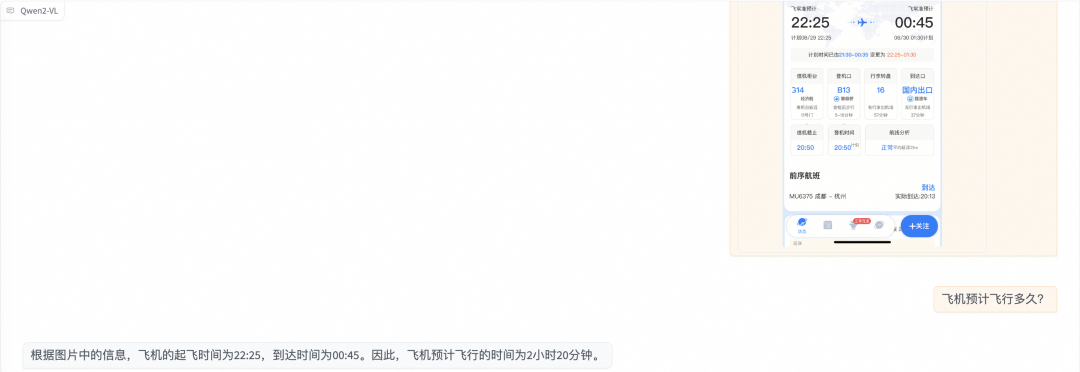
ingFang SC", "Hiragino Sans GB", "Microsoft YaHei UI", "Microsoft YaHei", Arial, sans-serif;letter-spacing: 0.544px;text-wrap: wrap;visibility: visible;color: rgb(163, 163, 163) !important;">
ingFang SC", "Hiragino Sans GB", "Microsoft YaHei UI", "Microsoft YaHei", Arial, sans-serif;letter-spacing: 0.544px;text-wrap: wrap;visibility: visible;color: rgb(163, 163, 163) !important;">
transformers推理 安装依赖: pipinstallgit+https://github.com/huggingface/transformerspipinstallqwen-vl-utils
模型推理代码-单图推理 from PIL import Imageimport torchfrom transformers import Qwen2VLForConditionalGeneration, AutoTokenizer, AutoProcessorfrom qwen_vl_utils import process_vision_infofrom modelscope import snapshot_download
model_dir = "/mnt/workspace/Qwen2-VL-2B-Instruct"
# Load the model in half-precision on the available device(s)model = Qwen2VLForConditionalGeneration.from_pretrained(model_dir, device_map="auto", torch_dtype = torch.float16)min_pixels = 256*28*28max_pixels = 1280*28*28processor = AutoProcessor.from_pretrained(model_dir, min_pixels=min_pixels, max_pixels=max_pixels)
messages = [{"role": "user", "content": [{"type": "image", "image": "https://qianwen-res.oss-cn-beijing.aliyuncs.com/Qwen-VL/assets/demo.jpeg"}, {"type": "text", "text": "Describe this image."}]}]
# Preparation for inferencetext = processor.apply_chat_template(messages, tokenize=False, add_generation_prompt=True)image_inputs, video_inputs = process_vision_info(messages)inputs = processor(text=[text], images=image_inputs, videos=video_inputs, padding=True, return_tensors="pt")inputs = inputs.to('cuda')
# Inference: Generation of the outputgenerated_ids = model.generate(**inputs, max_new_tokens=128)generated_ids_trimmed = [out_ids[len(in_ids):] for in_ids, out_ids in zip(inputs.input_ids, generated_ids)]output_text = processor.batch_decode(generated_ids_trimmed, skip_special_tokens=True, clean_up_tokenization_spaces=False)print(output_text)
模型推理代码-多图推理 # Messages containing multiple images and a text querymessages = [{"role": "user", "content": [{"type": "image", "image": "file:///path/to/image1.jpg"}, {"type": "image", "image": "file:///path/to/image2.jpg"}, {"type": "text", "text": "Identify the similarities between these images."}]}]
# Preparation for inferencetext = processor.apply_chat_template(messages, tokenize=False, add_generation_prompt=True)image_inputs, video_inputs = process_vision_info(messages)inputs = processor(text=[text], images=image_inputs, videos=video_inputs, padding=True, return_tensors="pt")inputs = inputs.to('cuda')
# Inferencegenerated_ids = model.generate(**inputs, max_new_tokens=128)generated_ids_trimmed = [out_ids[len(in_ids):] for in_ids, out_ids in zip(inputs.input_ids, generated_ids)]output_text = processor.batch_decode(generated_ids_trimmed, skip_special_tokens=True, clean_up_tokenization_spaces=False)print(output_text)
模型推理代码-视频理解 # Messages containing a video and a text querymessages = [{"role": "user", "content": [{"type": "video", "video": "file:///path/to/video1.mp4", 'max_pixels': 360*420, 'fps': 1.0}, {"type": "text", "text": "Describe this video."}]}]
# Preparation for inferencetext = processor.apply_chat_template(messages, tokenize=False, add_generation_prompt=True)image_inputs, video_inputs = process_vision_info(messages)inputs = processor(text=[text], images=image_inputs, videos=video_inputs, padding=True, return_tensors="pt")inputs = inputs.to('cuda')
# Inferencegenerated_ids = model.generate(**inputs, max_new_tokens=128)generated_ids_trimmed = [out_ids[len(in_ids):] for in_ids, out_ids in zip(inputs.input_ids, generated_ids)]output_text = processor.batch_decode(generated_ids_trimmed, skip_special_tokens=True, clean_up_tokenization_spaces=False)print(output_text)
vLLM推理 安装依赖 pipinstallgit+https://github.com/fyabc/vllm.git@add_qwen2_vl_new
启动OpenAI接口服务 python-mvllm.entrypoints.openai.api_server--served-model-nameQwen2-VL-7B-Instruct--modelmodel_path
调用服务-https curlhttp://localhost:8000/v1/chat/completions\-H"Content-Type:application/json"\-d'{"model":"Qwen2-VL-7B-Instruct","messages":[{"role":"system","content":"Youareahelpfulassistant."},{"role":"user","content":[{"type":"image_url","image_url":{"url":"https://modelscope.oss-cn-beijing.aliyuncs.com/resource/qwen.png"}},{"type":"text","text":"Whatisthetextintheillustrate?"}]}]}'
调用服务-sdk from openai import OpenAI# Set OpenAI's API key and API base to use vLLM's API server.openai_api_key = "EMPTY"openai_api_base = "http://localhost:8000/v1"
client = OpenAI(api_key=openai_api_key,base_url=openai_api_base,)
chat_response = client.chat.completions.create(model="Qwen2-7B-Instruct",messages=[{"role": "system", "content": "You are a helpful assistant."},{"role": "user", "content": [{"type": "image_url", "image_url": {"url": "https://modelscope.oss-cn-beijing.aliyuncs.com/resource/qwen.png"}},{"type": "text", "text": "What is the text in the illustrate?"},]},])print("Chat response:", chat_response)
ingFang SC", "Hiragino Sans GB", "Microsoft YaHei UI", "Microsoft YaHei", Arial, sans-serif;letter-spacing: 0.544px;text-wrap: wrap;visibility: visible;color: rgb(163, 163, 163) !important;">
我们使用swift对qwen2-vl-7b-instruct进行微调。swift是魔搭社区官方提供的大模型与多模态大模型微调推理框架。
swift开源地址: https://github.com/modelscope/swift
通常,多模态大模型微调会使用自定义数据集进行微调。在这里,我们将展示可直接运行的demo。
在开始微调之前,请确保您的环境已准备妥当。 git clone https://github.com/modelscope/swift.gitcd swiftpip install -e .[llm]
pip install pyav qwen_vl_utils
图像描述微调 我们使用 coco-en-mini 数据集进行微调,该数据集的任务是对图片内容进行描述。您可以在 modelscope 上找到该数据集:https://modelscope.cn/datasets/modelscope/coco_2014_caption/summary
#默认会将lora_target_modules设置为llm的所有linearCUDA_VISIBLE_DEVICES=0,1,2,3NPROC_PER_NODE=4swiftsft\--model_typeqwen2-vl-7b-instruct\--model_id_or_pathqwen/Qwen2-VL-7B-Instruct\--sft_typelora\--datasetcoco-en-mini#20000\--deepspeeddefault-zero2
如果要使用自定义数据集,只需按以下方式进行指定: --datasettrain.jsonl\--val_datasetval.jsonl\
自定义数据集支持json和jsonl样式,以下是自定义数据集的样例: {"query":"<image>55555","response":"66666","images":["image_path"]}{"query":"eeeee<image>eeeee<image>eeeee","response":"fffff","history":[],"images":["image_path1","image_path2"]}{"query":"EEEEE","response":"FFFFF","history":[["query1","response2"],["query2","response2"]],"images":[]}
显存占用: 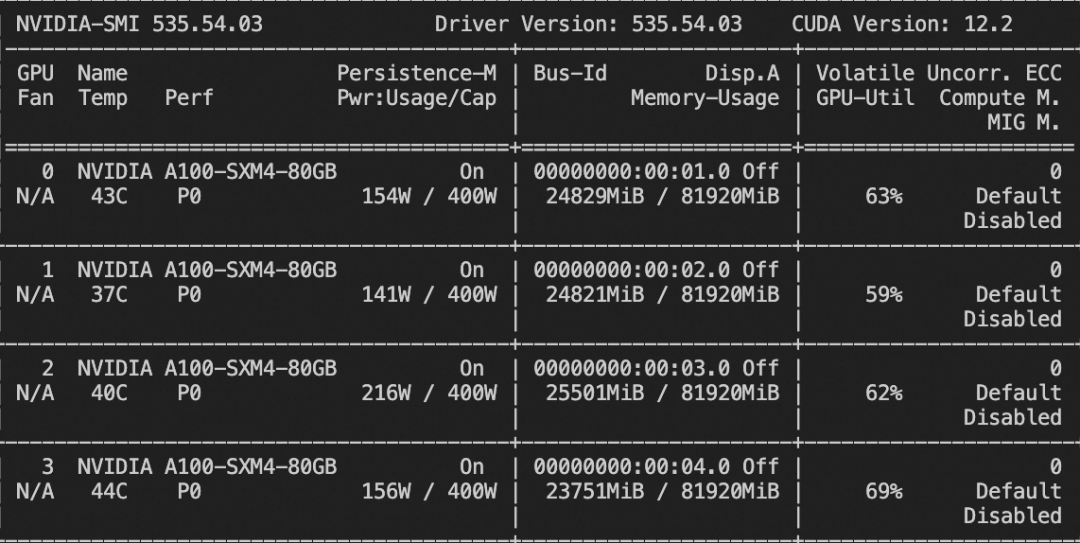
训练损失图(时间原因,只训练了200个step): 
微调后推理脚本如下: CUDA_VISIBLE_DEVICES=0swiftinfer\--ckpt_diroutput/qwen2-vl-7b-instruct/vx-xxx/checkpoint-xxx\--load_dataset_configtrue--merge_loratrue
微调后模型对验证集进行推理的示例: 
图像grounding微调
我们使用refcoco-unofficial-grounding数据集进行grounding微调,您可以在 modelscope 上找到该数据集:https://modelscope.cn/datasets/swift/refcoco
#支持使用zero3进行微调CUDA_VISIBLE_DEVICES=0,1,2,3NPROC_PER_NODE=4swiftsft\--model_typeqwen2-vl-7b-instruct\--model_id_or_pathqwen/Qwen2-VL-7B-Instruct\--sft_typelora\--datasetrefcoco-unofficial-grounding#20000\--deepspeeddefault-zero3 用户可以使用如下自定义数据集格式: #swift跨模型通用格式{"query":"Find<bbox>","response":"<ref-object>","images":["/coco2014/train2014/COCO_train2014_000000001507.jpg"],"objects":"[{\"caption\":\"guyinred\",\"bbox\":[138,136,235,359],\"bbox_type\":\"real\",\"image\":0}]"}{"query":"Find<ref-object>","response":"<bbox>","images":["/coco2014/train2014/COCO_train2014_000000001507.jpg"],"objects":"[{\"caption\":\"guyinred\",\"bbox\":[138,136,235,359],\"bbox_type\":\"real\",\"image\":0}]"}#qwen2-vl-chat特定格式,注意特殊字符的存在{"query":"Find<|object_ref_start|>theman<|object_ref_end|>","response":"<|box_start|>(123,235),(324,546)<|box_end|>","images":["/coco2014/train2014/COCO_train2014_000000001507.jpg"]}
视频微调 我们使用 video-chatgpt 数据集进行微调,该数据集的任务是对视频内容进行描述。您可以在 modelscope 上找到该数据集:https://modelscope.cn/datasets/swift/VideoChatGPT NFRAMES=24MAX_PIXELS=100352CUDA_VISIBLE_DEVICES=0,1,2,3NPROC_PER_NODE=4swiftsft\--model_typeqwen2-vl-7b-instruct\--model_id_or_pathqwen/Qwen2-VL-7B-Instruct\--sft_typelora\--datasetvideo-chatgpt\--deepspeeddefault-zero2
自定义数据集支持json和jsonl样式,以下是自定义数据集的样例: {"query":"<video>55555","response":"66666","videos":["video_path"]}{"query":"eeeee<video>eeeee<video>eeeee","response":"fffff","history":[],"videos":["video_path1","video_path2"]}{"query":"EEEEE","response":"FFFFF","history":[["query1","response2"],["query2","response2"]],"videos":[]}
显存占用: 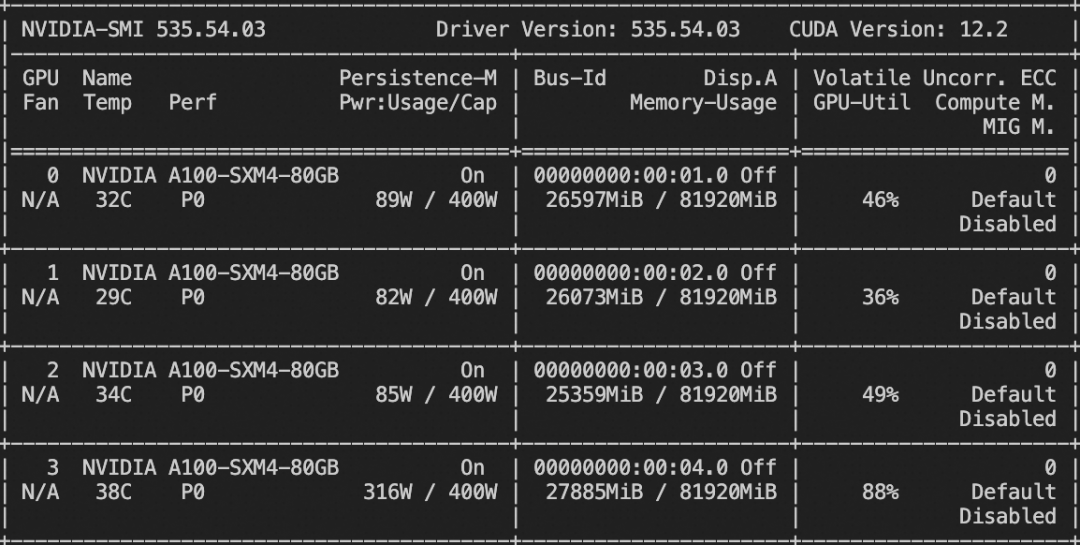
微调后推理脚本如下: NFRAMES=24MAX_PIXELS=100352CUDA_VISIBLE_DEVICES=0swiftinfer\--ckpt_diroutput/qwen2-vl-7b-instruct/vx-xxx/checkpoint-xxx\--load_dataset_configtrue--merge_loratrue
微调后模型对验证集进行推理的示例(时间原因,只训练了50个step): 
|










