传统的检索方法通常依赖于对query进行语义理解(基于向量)或关键字匹配(BM25),这两种方法都有其优点和缺点。融合检索、HyDE和RAG-Fusion可以创建一个更健壮和准确的检索系统。本文将介绍三种优化方法:Fusion retrieval:基于向量和基于bm25的检索 HyDE(假设文档嵌入):通过根据查询生成和嵌入假设文档来增强检索。 RAG-Fusion:通过结合多次搜索迭代的结果来提高检索质量。
ingFang SC", "Hiragino Sans GB", "Microsoft YaHei UI", "Microsoft YaHei", Arial, sans-serif;border-left: 4px solid rgb(248, 57, 41);visibility: visible;margin-top: 24px;margin-bottom: 24px;">ingFang SC", "Hiragino Sans GB", "Microsoft YaHei UI", "Microsoft YaHei", Arial, sans-serif;letter-spacing: 0.034em;text-align: justify;">高级 RAG 技术介绍
Fusion Retrieval 融合检索是一种强大的文档搜索方法,它结合了语义理解和关键字匹配的优势。通过利用基于向量和BM25的检索方法,它为信息检索任务提供了更全面、更灵活的解决方案。这种方法在概念相似性和关键字相关性都很重要的各个领域都有潜在的应用,例如学术研究、法律文档搜索或通用搜索引擎。 接受一个查询,并执行基于向量和基于bm25的检索。 两种方法的得分归一化到一个共同的尺度。 计算这些分数的加权组合(由alpha参数控制)。 根据综合得分对文档进行排名,并返回前k个结果。
优点:
提高检索质量:通过结合语义搜索和基于关键字的搜索,系统可以捕获概念相似度和精确的关键字匹配。
灵活性:alpha参数允许根据特定用例或查询类型调整矢量和关键字搜索之间的平衡。
健壮性:组合方法可以有效地处理更大范围的查询,减轻单个方法的弱点。
可定制性:该系统可以很容易地适应使用不同的矢量存储或基于关键字的检索方法。 实现图 下面的图表说明了流程(最后一部分给出了实现代码): 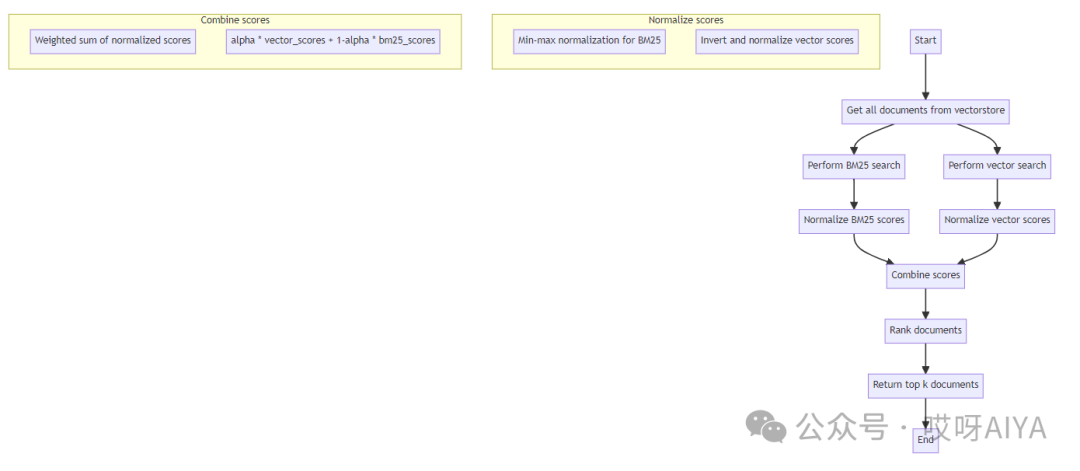
HyDEHyDE 是什么? HyDE 是一种创新方法,可增强密集检索,尤其是在零样本场景中。其工作原理如下: 查询扩展:HyDE 使用语言模型根据用户的查询生成假设答案或文档。 增强嵌入:这些假设文档被嵌入,从而创建了更丰富的语义搜索空间。 相似性搜索:嵌入用于查找数据库中最相关的实际文档。 知情生成:检索到的文档和原始查询用于生成最终响应。
实现图下面的图表说明了 HyDE 流程: 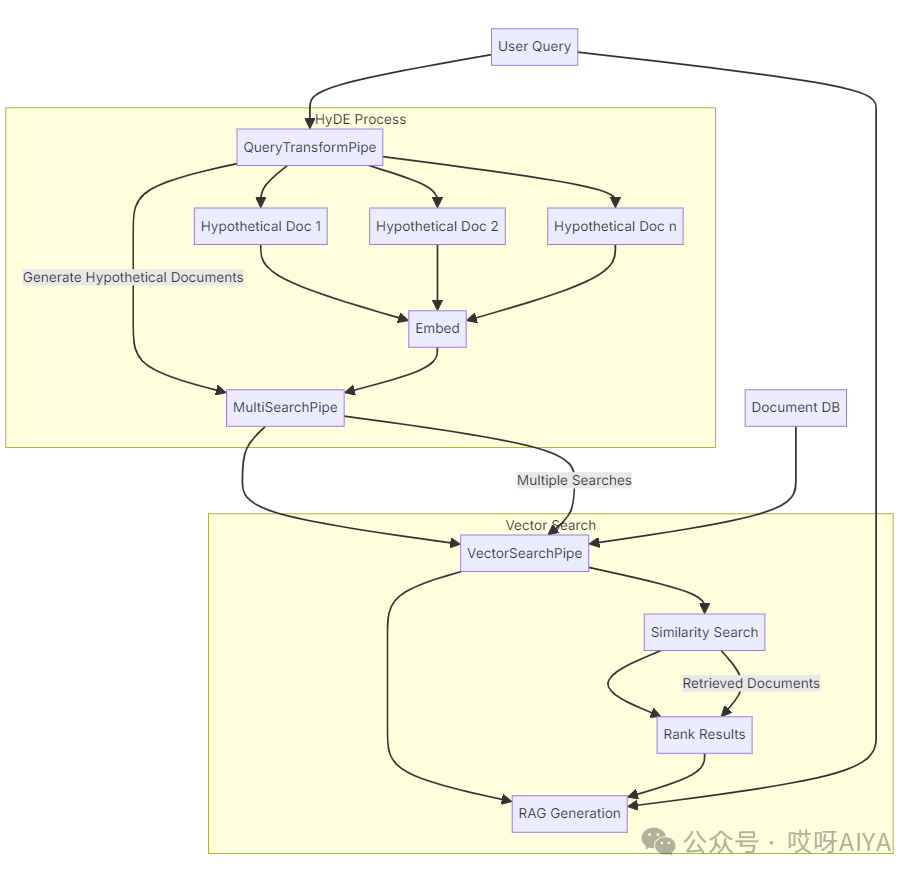
RAG-Fusion
什么是 RAG-Fusion? RAG-Fusion 是一种先进的技术,它将检索增强生成 (RAG) 与互易秩融合 (RRF) 相结合,以提高检索信息的质量和相关性。其工作原理如下:查询扩展:利用原始查询生成多个相关查询,为用户的问题提供不同的视角。 多次检索:每个生成的查询都用于从数据库中检索相关文档。 倒数秩融合:使用 RRF 算法对检索到的文档进行重新排序,该算法结合了多次检索尝试的排名。 增强 RAG:重新排序的文档以及原始和生成的查询用于生成最终响应。
与传统 RAG 相比,这种方法有助于捕捉更广泛的背景和潜在的更多相关信息。 实现图下面是说明 RAG-Fusion 工作流程的图表: 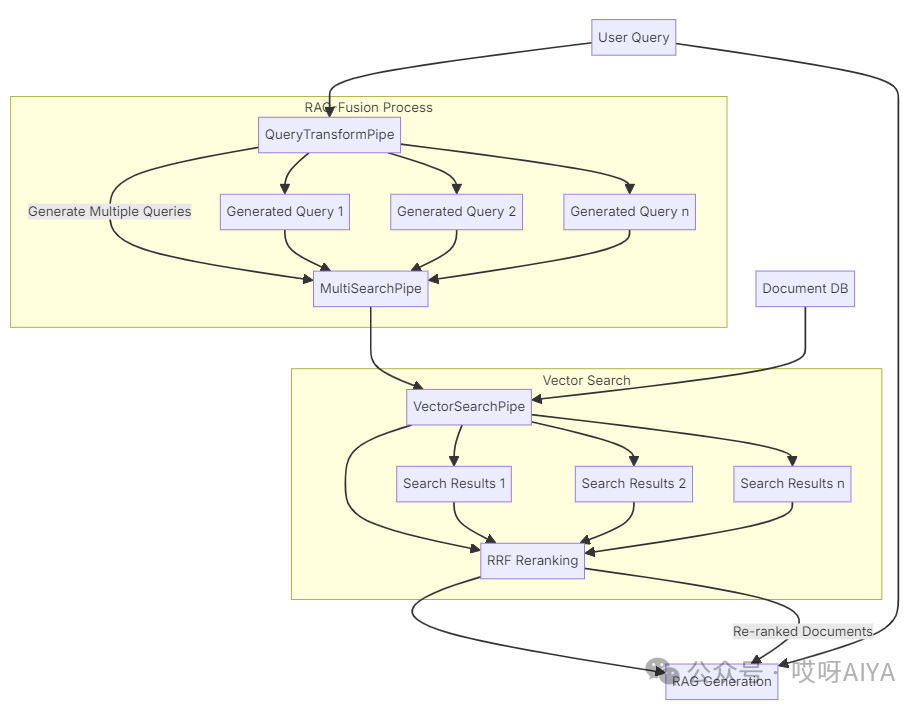
对RAG技术感兴趣,可以通过这本书全面学习。据了解这是目前第一本关于rag的书籍,很不错: ingFang SC", "Hiragino Sans GB", "Microsoft YaHei UI", "Microsoft YaHei", Arial, sans-serif;border-left: 4px solid rgb(248, 57, 41);visibility: visible;">ingFang SC", "Hiragino Sans GB", "Microsoft YaHei UI", "Microsoft YaHei", Arial, sans-serif;font-size: var(--articleFontsize);letter-spacing: 0.034em;text-align: justify;">Fusion retrieval实战import osimport sysfrom dotenv import load_dotenvfrom langchain.docstore.document import Document
from typing import Listfrom rank_bm25 import BM25Okapiimport numpy as np
bm25召回 def create_bm25_index(documents: List[Document]) -> BM25Okapi:"""Create a BM25 index from the given documents.
BM25 (Best Matching 25) is a ranking function used in information retrieval.It's based on the probabilistic retrieval framework and is an improvement over TF-IDF.
Args:documents (List[Document]): List of documents to index.
Returns:BM25Okapi: An index that can be used for BM25 scoring."""# Tokenize each document by splitting on whitespace# This is a simple approach and could be improved with more sophisticated tokenizationtokenized_docs = [doc.page_content.split() for doc in documents]return BM25Okapi(tokenized_docs)
混合召回 def fusion_retrieval(vectorstore, bm25, query: str, k: int = 5, alpha: float = 0.5) -> List[Document]:"""Perform fusion retrieval combining keyword-based (BM25) and vector-based search.
Args:vectorstore (VectorStore): The vectorstore containing the documents.bm25 (BM25Okapi): Pre-computed BM25 index.query (str): The query string.k (int): The number of documents to retrieve.alpha (float): The weight for vector search scores (1-alpha will be the weight for BM25 scores).
Returns:List[Document]: The top k documents based on the combined scores."""# Step 1: Get all documents from the vectorstoreall_docs = vectorstore.similarity_search("", k=vectorstore.index.ntotal)
# Step 2: Perform BM25 searchbm25_scores = bm25.get_scores(query.split())
# Step 3: Perform vector searchvector_results = vectorstore.similarity_search_with_score(query, k=len(all_docs))
# Step 4: Normalize scoresvector_scores = np.array([score for _, score in vector_results])vector_scores = 1 - (vector_scores - np.min(vector_scores)) / (np.max(vector_scores) - np.min(vector_scores))
bm25_scores = (bm25_scores - np.min(bm25_scores)) / (np.max(bm25_scores) - np.min(bm25_scores))
# Step 5: Combine scorescombined_scores = alpha * vector_scores + (1 - alpha) * bm25_scores
# Step 6: Rank documentssorted_indices = np.argsort(combined_scores)[::-1]
# Step 7: Return top k documentsreturn [all_docs[i] for i in sorted_indices[:k]]
| 









