|
4o-realtime相关的类主要有以下三个:
RealtimeAPI Class、RealtimeConversation Class、RealtimeClient Class,调用逻辑示意图如下: 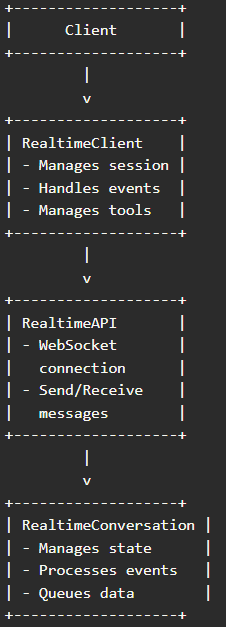
调用流程示例:示例:用户查询订单状态客户端发送音频数据:
awaitrealtime_client.append_input_audio(audio_chunk)
2.RealtimeClient处理音频数据:
awaitself.realtime.send("input_audio_buffer.append",{"audio":array_buffer_to_base64(np.array(audio_chunk))})
3.服务器处理请求并返回响应:
RealtimeAPI分发事件:
async for message in self.ws:
event = json.loads(message)
self.dispatch(f"server.{event['type']}", event)
self.dispatch("server.*", event)
5.RealtimeClient处理服务器响应:
item, delta = self.conversation.process_event(event)
if item:
self.dispatch("conversation.updated", {"item": item, "delta": delta})
6.RealtimeConversation管理对话状态:
def process_event(self, event, *args):
event_processor = self.EventProcessors.get(event['type'])
if not event_processor:
raise Exception(f"Missing conversation event processor for {event['type']}")
return event_processor(self, event, *args)
7.客户端接收并播放响应:
awaitcl.context.emitter.send_audio_chunk(cl.OutputAudioChunk(mimeType="pcm16",data=audio,track=cl.user_session.get("track_id")))使用协议说明:WebSocket协议: WebSocket是一种在单个TCP连接上进行全双工通信的协议。 在本项目中,RealtimeAPI类使用WebSocket协议与OpenAI的实时API进行通信。 WebSocket连接的建立和维护由RealtimeAPI类负责,确保低延迟和高效的数据传输。 通过WebSocket协议,RealtimeAPI类能够实时发送和接收音频数据和文本消息,确保对话的流畅性和自然性。
示例:用户通过文本查询订单状态客户端发送文本数据:
awaitrealtime_client.send_user_message_content([{"type":"text","text":"我的订单状态是什么?"}])
2.RealtimeClient处理文本数据:
await self.realtime.send("conversation.item.create", {
"item": {
"type": "message",
"role": "user",
"content": [{"type": "text", "text": "我的订单状态是什么?"}]
}
})
3.服务器处理请求并返回响应:
RealtimeAPI分发事件:
async for message in self.ws:
event = json.loads(message)
self.dispatch(f"server.{event['type']}", event)
self.dispatch("server.*", event)
5.RealtimeClient处理服务器响应:
item, delta = self.conversation.process_event(event)
if item:
self.dispatch("conversation.updated", {"item": item, "delta": delta})
6.RealtimeConversation管理对话状态:
def process_event(self, event, *args):
event_processor = self.EventProcessors.get(event['type'])
if not event_processor:
raise Exception(f"Missing conversation event processor for {event['type']}")
return event_processor(self, event, *args)
7.客户端接收并显示响应:
awaitcl.context.emitter.send_text_message(cl.OutputTextMessage(content=response_text)) 使用协议说明:WebSocket协议: WebSocket是一种在单个TCP连接上进行全双工通信的协议。 在本项目中,RealtimeAPI类使用WebSocket协议与OpenAI的实时API进行通信。 WebSocket连接的建立和维护由RealtimeAPI类负责,确保低延迟和高效的数据传输。 通过WebSocket协议,RealtimeAPI类能够实时发送和接收文本消息,确保对话的流畅性和自然性。
| 









