|
在AI技术飞速发展的今天,图片RAG(Retrieval-Augmented Generation,检索增强生成)正逐渐成为多模态应用的“杀手锏”。无论是电商平台的“以图搜商品”,还是教育领域的“文本生成插图”,图片RAG通过检索与生成的高效结合,能带来令人惊叹的效果。 你是否遇到这样一个场景: 你在电商平台上传一张衣服的图片,系统不仅能找到相似款,还能自动生成搭配建议; 你在学习一篇复杂的医学文章,AI能智能匹配相关医学图像,甚至自动生成图文结合的讲解; 设计师上传一张草图,AI能检索相关风格图像,并生成更符合设计思路的创意草图。
这些神奇的功能背后,正是图片RAG的强大之处。它通过检索+生成的方式,既能保证结果的精准性,又能提升内容的创造力,让AI的理解能力跃升至全新高度。本篇文章都将为你提供详细的实操指南、完整的代码示例,帮助你快速上手,打造一个高性能的图片RAG系统! 
一、什么是图片RAG?简单来说,图片RAG是一种将图像检索与生成模型结合的技术。它的核心思想是:先从海量数据中检索出与用户输入最相关的图像或信息,再将这些检索结果作为上下文,输入到生成模型中,输出高质量的响应。有的场景直接从海量数据中检索出与用户输入最相关的图像或信息,图片RAG相比传统的单一检索或生成技术,图片RAG的优势在于:
精准性:检索环节确保结果与用户输入高度相关。 创造性:生成模型能进一步丰富输出内容。 多模态:支持文本、图像等多种输入形式。
接下来,我们将按技术流程拆解图片RAG的每个环节,并提供详细的实现步骤和代码,确保你能直接上手实践。
二、数据预处理与特征提取:打好基础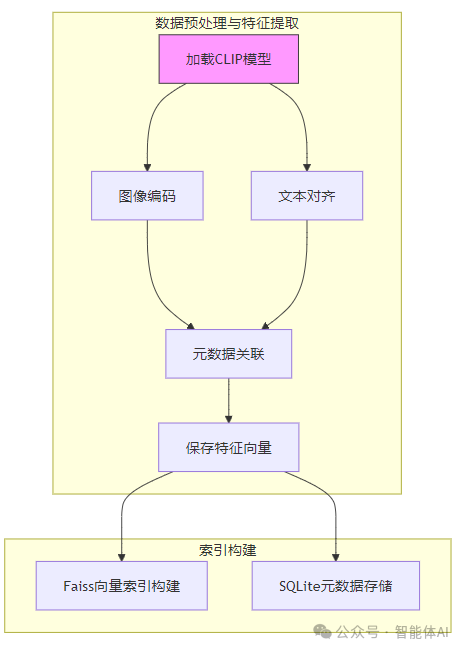
1. 图像编码:从像素到向量图片RAG的第一步是将图像转化为机器能理解的特征向量。我们推荐使用CLIP模型(ViT-B/32),这是由OpenAI开发的一个强大工具,能够将图像和文本映射到同一个向量空间,非常适合多模态任务。 工具选择:前置准备:确保你已安装必要的库: pipinstalltorchtransformerspillownumpy 代码实现:以下是一个完整的图像特征提取示例,确保你有一张名为image.jpg的图片在工作目录下: fromPILimportImagefromtransformersimportCLIPProcessor, CLIPModelimportnumpyasnp
# 加载预训练的CLIP模型和处理器model = CLIPModel.from_pretrained("openai/clip-vit-base-patch32")processor = CLIPProcessor.from_pretrained("openai/clip-vit-base-patch32")
# 打开并处理图像image = Image.open("image.jpg").convert("RGB") # 确保图像为RGB格式inputs = processor(images=image, return_tensors="pt", padding=True) # 转为PyTorch张量
# 提取图像特征image_features = model.get_image_features(**inputs).detach().numpy()
# 归一化特征向量image_features = image_features / np.linalg.norm(image_features, axis=1, keepdims=True)
# 检查结果print("图像特征维度:", image_features.shape) # 应为 (1, 512)print("图像特征示例:", image_features[0][:5]) # 查看前5个值
注意事项:try:image=Image.open("image.jpg").convert("RGB")exceptExceptionase:print(f"图像加载失败:{e}")exit(1)2. 文本对齐:图文合一如果你的应用场景需要支持文本查询(如“红色连衣裙”),需要将文本转为向量,与图像特征对齐。CLIP的强大之处在于它能同时处理图像和文本。 代码实现:# 定义文本查询text="a red dress"text_inputs= processor(text=text, return_tensors="pt", padding=True)
# 提取文本特征text_features= model.get_text_features(**text_inputs).detach().numpy()
# 归一化文本特征text_features= text_features / np.linalg.norm(text_features, axis=1, keepdims=True)
# 检查结果print("文本特征维度:", text_features.shape) # 应为 (1,512)print("文本特征示例:", text_features[0][:5]) # 查看前5个值
注意事项:3. 元数据关联:业务与技术的桥梁特征提取后,需要将特征向量与业务数据(如商品ID、价格)关联起来。我们推荐使用Pandas将数据保存为Parquet格式,既高效又节省磁盘空间。 前置准备:安装Pandas: 代码实现:importpandasaspd
# 构造元数据metadata = { "image_id": ["img_001"], "feature": [image_features.tobytes()], # 转为二进制存储 "category": ["dress"], "price": [299]}
# 创建DataFrame并保存为Parquetdf = pd.DataFrame(metadata)df.to_parquet("image_metadata.parquet", engine="pyarrow")
# 验证保存结果print("元数据已保存至 image_metadata.parquet")df_loaded = pd.read_parquet("image_metadata.parquet")print(df_loaded)
注意事项:
三、索引构建:让检索快如闪电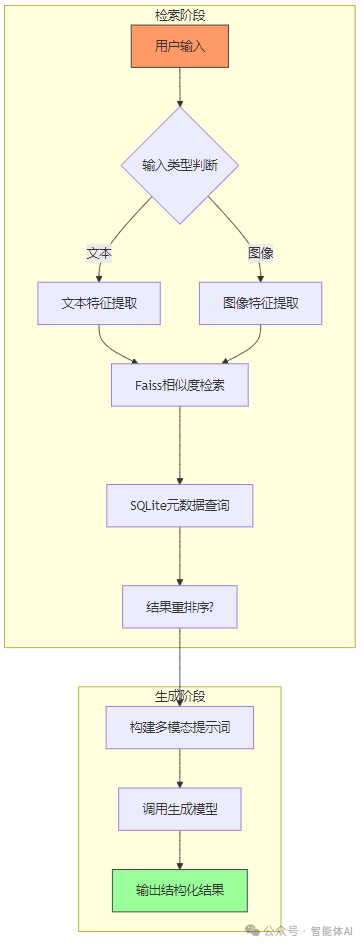
1. 向量索引:Faiss来帮忙有了特征向量,下一步是构建索引以实现快速检索。我们推荐使用Faiss,这是Facebook开源的稠密向量检索库,支持GPU加速,效率极高。 前置准备:安装Faiss(CPU版为例,GPU版需编译): 假设你已提取了多张图像的特征,保存为all_image_features.npy(形状为(n, 512),n为图像数量): #示例:生成模拟特征importnumpyasnpnp.random.seed(42)all_image_features=np.random.randn(1000,512).astype(np.float32)#1000张图像np.save("all_image_features.npy",all_image_features)基础索引:import faiss
# 定义特征维度dim =512# CLIP特征维度
# 创建内积相似度索引index= faiss.IndexFlatIP(dim)
# 加载特征并添加至索引features = np.load("all_image_features.npy")index.add(features)
# 保存索引faiss.write_index(index,"image_index.faiss")
# 验证索引print("索引中的向量总数:", index.ntotal) # 应为1000
优化索引:IVFFlat提速对于百万级数据,IndexFlatIP搜索速度较慢,推荐使用IVFFlat(倒排文件索引)通过聚类减少搜索范围。 # 定义聚类中心数nlist = 100 # 根据数据量调整,建议为sqrt(n)quantizer = faiss.IndexFlatIP(dim)
# 创建IVFFlat索引index = faiss.IndexIVFFlat(quantizer, dim, nlist, faiss.METRIC_INNER_PRODUCT)
# 训练索引index.train(features)
# 添加特征index.add(features)
# 保存索引faiss.write_index(index,"image_index_ivf.faiss")
# 设置搜索范围(可选)index.nprobe = 10 # 搜索10个聚类中心,平衡速度与精度
注意事项:2. 元数据存储:SQLite上场检索时,除了向量,还需返回业务信息。我们用SQLite存储图像ID、特征和元数据。 前置准备:SQLite无需额外安装,Python自带支持。 代码实现:importsqlite3
# 连接数据库conn = sqlite3.connect("image_rag.db")
# 创建表conn.execute('''CREATE TABLE IF NOT EXISTS images (id TEXT PRIMARY KEY, feature BLOB, category TEXT, price INT)''')
# 插入示例数据conn.execute("INSERT OR REPLACE INTO images VALUES (?, ?, ?, ?)", ("img_001", image_features.tobytes(),"dress",299))
# 提交更改conn.commit()
# 验证数据cursor = conn.cursor()cursor.execute("SELECT * FROM images WHERE id='img_001'")print("查询结果:", cursor.fetchone())conn.close()
注意事项:四、检索阶段:找到最匹配的内容1. 处理用户输入用户可能输入文本(如“蓝色衬衫”)或图像,我们需要统一转为向量。 文本查询:text="ablueshirt"text_inputs=processor(text=text,return_tensors="pt",padding=True)text_features=model.get_text_features(**text_inputs).detach().numpy()text_features=text_features/np.linalg.norm(text_features,axis=1,keepdims=True) 图像查询:query_image=Image.open("query.jpg").convert("RGB")query_inputs=processor(images=query_image,return_tensors="pt",padding=True)query_features=model.get_image_features(**query_inputs).detach().numpy()query_features=query_features/np.linalg.norm(query_features,axis=1,keepdims=True)2. 执行检索用Faiss检索Top-K结果,再从SQLite拉取元数据。 代码实现:# 加载索引index = faiss.read_index("image_index_ivf.faiss")
# 检索Top-5结果k = 5D, I = index.search(query_features, k) # D为距离,I为索引
# 连接数据库conn = sqlite3.connect("image_rag.db")cursor = conn.cursor()
# 获取元数据results = []for idx in I[0]: cursor.execute("SELECT id, category, price FROM images WHERE rowid=?", (idx + 1,)) results.append(cursor.fetchone())
conn.close()
# 输出结果print("检索结果:")for result in results: print(f"ID: {result[0]}, Category: {result[1]}, Price: {result[2]}")
注意事项:3. 重排序(可选)若对精度要求更高,可用交叉编码器对结果精排。 前置准备:pipinstallsentence-transformers 代码实现:from sentence_transformers import CrossEncoder
# 加载交叉编码器reranker = CrossEncoder("cross-encoder/ms-marco-MiniLM-L-6-v2")
# 假设检索结果有描述文本result_descriptions = ["Red silk dress","Blue cotton shirt"]query_text ="a blue shirt"pairs = [(query_text, desc) for desc in result_descriptions]
# 计算相关性得分scores = reranker.predict(pairs)
# 按得分排序sorted_indices = np.argsort(scores)[::-1]print("重排序后索引:", sorted_indices)
五、生成阶段:从检索到创意输出1. 多模态提示词将用户查询和检索结果组合成提示词,交给生成模型。 代码实现:user_query="ablueshirt"prompt=f"""UserQuery:{user_query}RetrievedImages:[img_001.jpg,img_002.jpg](Categories:dress,shirt)RetrievedText:"Thisblueshirtismadeofcotton,pricedat$49."Task:Generatearesponseexplainingwhytheseresultsarerelevant."""
2. 调用生成模型由于gpt-4非开源,我们用EleutherAI/gpt-neo-1.3B作为示例。 前置准备:代码实现:fromtransformers import pipeline
# 加载生成模型generator= pipeline("text-generation", model="EleutherAI/gpt-neo-1.3B")
# 生成响应response= generator(prompt, max_length=200, num_return_sequences=1)print("生成结果:", response[0]["generated_text"])
注意事项:3. 输出结构化想生成JSON格式?在提示词中指定即可。 代码实现:prompt+="\nFormattheresponseasJSONwithkeys:'product_id','reason'."response=generator(prompt,max_length=200)print("结构化输出:",response[0]["generated_text"])
六、效率优化:让系统更快更强1. 模型优化蒸馏模型:使用轻量版CLIP: model=CLIPModel.from_pretrained("asus-uwk/distil-clip-vit-base-patch32")量化加速:fromtorch.quantizationimportquantize_dynamicmodel=quantize_dynamic(model,{torch.nn.Linear},dtype=torch.qint8)2. 索引优化按类别分块检索: cursor.execute("SELECTcategoryFROMimagesWHEREid=?",("img_001",))category=cursor.fetchone()[0]sub_index=faiss.read_index(f"indices/{category}.faiss")D,I=sub_index.search(query_features,k=5)3. 缓存策略使用Redis缓存高频查询: 前置准备:pipinstallredis#启动Redis服务器(需本地安装Redis)redis-server 代码实现: importredisimportjson
r = redis.Redis(host="localhost", port=6379, db=0)cache_key =f"retrieval:{hash(str(query_features))}"
ifr.exists(cache_key): results = json.loads(r.get(cache_key))else: D, I = index.search(query_features, k=5) results = [{"id": i}foriinI[0]] # 简化示例 r.setex(cache_key,86400, json.dumps(results)) # 缓存24小时
print("缓存结果:", results)
七、端到端案例:电商以图搜商品1. 数据准备图像路径:/tanjp/data/products/*.jpg 元数据:product_id, image_path, category, price, description
2. 批量特征提取保存为extract_features.py: importargparseimportglobfromPILimportImageimportnumpyasnp
parser = argparse.ArgumentParser()parser.add_argument("--input_dir",default="/tanjp/data/products")parser.add_argument("--output",default="features.npy")args = parser.parse_args()
images = glob.glob(f"{args.input_dir}/*.jpg")features = []forimg_pathinimages: image =Image.open(img_path).convert("RGB") inputs =processor(images=image, return_tensors="pt") feat = model.get_image_features(**inputs).detach().numpy() features.append(feat[0])
np.save(args.output, np.array(features))
运行: pythonextract_features.py--input_dir/tanjp/data/products--outputfeatures.npy 3. 服务部署(FastAPI)前置准备:代码实现:fromfastapiimportFastAPI, File, UploadFileimportio
app = FastAPI()
@app.post("/search")asyncdefsearch(image: UploadFile = File(...)): img_bytes =awaitimage.read() query_image = Image.open(io.BytesIO(img_bytes)).convert("RGB") inputs = processor(images=query_image, return_tensors="pt") query_features = model.get_image_features(**inputs).detach().numpy() query_features = query_features / np.linalg.norm(query_features, axis=1, keepdims=True) D, I = index.search(query_features, k=5) return{"results": [int(i)foriinI[0]]}
运行: uvicornmain:app--host0.0.0.0--port8000 4. 前端调用<inputtype="file"id="imageInput"accept="image/*"><buttononclick="search()">Search</button><divid="results"></div>
<script>asyncfunctionsearch() { constfile =document.getElementById("imageInput").files[0]; constformData =newFormData(); formData.append("image", file); constresponse =awaitfetch("http://localhost:8000/search", { method:" OST", OST", body: formData }); constdata =awaitresponse.json(); document.getElementById("results").innerText=JSON.stringify(data.results);}</script>
八、常见问题解决在构建图片RAG系统时,我们可能会遇到一些性能瓶颈、数据管理、索引优化等问题。以下是几个常见问题及解决方案。 1. 内存占用过高,如何优化?问题分析: 解决方案: importlmdbimportnumpyasnp
# 创建LMDB数据库env = lmdb.open("features.lmdb", map_size=10**12) # 1TB空间
# 存储特征向量withenv.begin(write=True)astxn: txn.put("img_001".encode(), np.random.rand(512).astype(np.float32).tobytes())
2. 检索速度太慢,如何加速?问题分析: 解决方案: importfaiss
# 512维特征,100个聚类中心quantizer= faiss.IndexFlatIP(512)index= faiss.IndexIVFFlat(quantizer,512,100, faiss.METRIC_INNER_PRODUCT)index.train(np.random.rand(10000,512).astype(np.float32))index.add(np.random.rand(10000,512).astype(np.float32))
res=faiss.StandardGpuResources()index=faiss.GpuIndexFlatIP(res,512) 3. 如何保证检索结果的业务可解释性?问题分析: 解决方案: results=[rforrinretrieved_resultsifr["category"]=="clothing"]
九、应用场景:从创意到实用1. 电商:以图搜商品 + 生成个性化推荐2. 教育:智能插图生成3. 设计创意:AI辅助艺术创作十、效率提升的锦囊妙计1. 向量检索优化2. 生成模型加速fromtorch.quantizationimportquantize_dynamicimporttorch.nnasnnmodel=quantize_dynamic(model,{nn.Linear},dtype=torch.qint8)3. 业务落地优化
十一、总结通过本文,你已经掌握了图片RAG的完整技术路线,从数据预处理到检索优化,再到生成增强,我们提供了详细的实操指南,让你可以快速落地自己的 AI 应用。 无论你是想优化电商搜索,提升教育体验,还是赋能创意设计,图片RAG都能帮你大幅提升 AI 生成的智能性和实用性。 | 









