ingFang SC", Cambria, Cochin, Georgia, Times, "Times New Roman", serif;font-style: normal;font-variant-ligatures: normal;font-variant-caps: normal;font-weight: 400;orphans: 2;text-align: justify;text-indent: 0px;text-transform: none;widows: 2;-webkit-text-stroke-width: 0px;white-space: normal;background-color: rgb(255, 255, 255);text-decoration-thickness: initial;text-decoration-style: initial;text-decoration-color: initial;">大多数Claude集成都把工具当作黑盒子——调用工具,获取结果,继续执行。ingFang SC", Cambria, Cochin, Georgia, Times, "Times New Roman", serif;font-style: normal;font-variant-ligatures: normal;font-variant-caps: normal;font-weight: 400;orphans: 2;text-align: justify;text-indent: 0px;text-transform: none;widows: 2;-webkit-text-stroke-width: 0px;white-space: normal;background-color: rgb(255, 255, 255);text-decoration-thickness: initial;text-decoration-style: initial;text-decoration-color: initial;">但如果工具结果能够实时反馈到Claude的思考过程中呢?ingFang SC", Cambria, Cochin, Georgia, Times, "Times New Roman", serif;font-style: normal;font-variant-ligatures: normal;font-variant-caps: normal;font-weight: 400;orphans: 2;text-align: justify;text-indent: 0px;text-transform: none;widows: 2;-webkit-text-stroke-width: 0px;white-space: normal;background-color: rgb(255, 255, 255);text-decoration-thickness: initial;text-decoration-style: initial;text-decoration-color: initial;">这就是ThinkChain的核心创新。ingFang SC", Cambria, Cochin, Georgia, Times, "Times New Roman", serif;font-style: normal;font-variant-ligatures: normal;font-variant-caps: normal;letter-spacing: normal;orphans: 2;text-align: justify;text-indent: 0px;text-transform: none;widows: 2;word-spacing: 0px;-webkit-text-stroke-width: 0px;white-space: normal;background-color: rgb(255, 255, 255);text-decoration-thickness: initial;text-decoration-style: initial;text-decoration-color: initial;">工具结果注入机制ingFang SC", Cambria, Cochin, Georgia, Times, "Times New Roman", serif;font-style: normal;font-variant-ligatures: normal;font-variant-caps: normal;font-weight: 400;orphans: 2;text-align: justify;text-indent: 0px;text-transform: none;widows: 2;-webkit-text-stroke-width: 0px;white-space: normal;background-color: rgb(255, 255, 255);text-decoration-thickness: initial;text-decoration-style: initial;text-decoration-color: initial;">让我们用一个实际例子来说明差异。ingFang SC", Cambria, Cochin, Georgia, Times, "Times New Roman", serif;font-style: normal;font-variant-ligatures: normal;font-variant-caps: normal;font-weight: 400;orphans: 2;text-align: justify;text-indent: 0px;text-transform: none;widows: 2;-webkit-text-stroke-width: 0px;white-space: normal;background-color: rgb(255, 255, 255);text-decoration-thickness: initial;text-decoration-style: initial;text-decoration-color: initial;">当你问「旧金山的天气如何,哪里适合吃晚餐?」时:ingFang SC", Cambria, Cochin, Georgia, Times, "Times New Roman", serif;font-style: normal;font-variant-ligatures: normal;font-variant-caps: normal;font-weight: 400;orphans: 2;text-align: justify;text-indent: 0px;text-transform: none;widows: 2;-webkit-text-stroke-width: 0px;white-space: normal;background-color: rgb(255, 255, 255);text-decoration-thickness: initial;text-decoration-style: initial;text-decoration-color: initial;">传统方法:用户提问 → Claude思考 → 调用天气工具 → 获取结果
→ 调用餐厅工具 → 获取结果 → 合并结果
ThinkChain方法:
用户提问 → Claude思考 → 调用天气工具 → 思考天气情况
    → 基于天气调用餐厅工具 → 综合思考
    → 智能化响应
魔法就发生在工具执行后的思考步骤中。这是实际的技术实现:
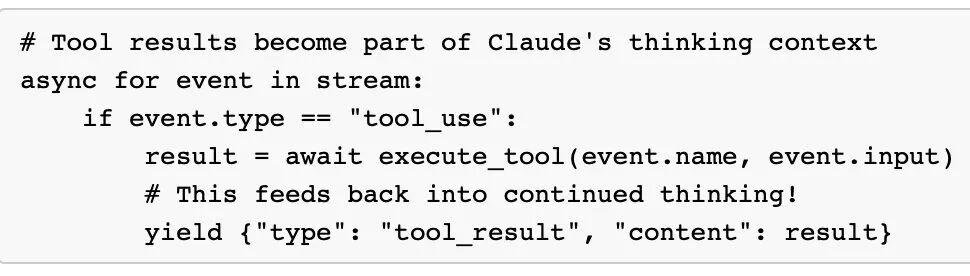
asyncdefstream_once(messages, tools):
 asyncwithclient.messages.stream(
    model="claude-sonnet-4-20250514",
    messages=messages,
    tools=tools,
    betas=["interleaved-thinking-2025-05-14","fine-grained-tool-streaming-2025-05-14"],
    thinking_budget=1024
  )asstream:

   asyncforeventinstream:
     ifevent.type =="tool_use":
       # 执行工具并将结果注入回思维流
        result =awaitexecute_tool(event.name, event.input)

       # 这个结果成为Claude剩余响应的思考上下文
       yield{"type":"tool_result","content": result}
这创建了一个反馈循环:Claude的初始思考导致工具使用,工具结果为持续思考提供信息,最终响应综合了推理和工具结果。
? 零配置快速开始
ThinkChain支持两种启动方式:
选项1:使用uv run零配置运行(推荐)
# 克隆仓库
gitclonehttps://github.com/martinbowling/ThinkChain.git
cdThinkChain

# 设置API密钥
echo"ANTHROPIC_API_KEY=your_api_key_here"> .env

# 立即运行 - uv自动处理所有依赖!
uv run thinkchain.py  # 增强UI带丰富格式
uv run thinkchain_cli.py# 最小CLI版本
uv run run.py      # 智能启动器(自动检测最佳UI)
选项2:传统安装
# 克隆并设置
gitclonehttps://github.com/martinbowling/ThinkChain.git
cdThinkChain

# 安装依赖
uv pip install -r requirements.txt
# 或: pip install -r requirements.txt

# 设置API密钥
echo"ANTHROPIC_API_KEY=your_api_key_here"> .env

# 运行应用
python run.py      # 智能启动器
python thinkchain.py  # 增强UI
python thinkchain_cli.py# CLI版本
? 技术架构剖析
工具发现系统
ThinkChain的设计理念是让开发者只需将Python文件放入文件夹即可。
无需注册,无需复杂设置。
工具发现流程如下:
本地工具(/tools/*.py)→ 验证 → 注册表
                  ↓
MCP服务器(config.json)→ 连接 → 注册表 → 统一工具列表 → Claude API
每个工具实现这个简单接口:
classBaseTool:
  @property
 defname(self)-> str:...

  @property
 defdescription(self)-> str:...

  @property
 definput_schema(self)-> Dict[str, Any]:...

 defexecute(self, **kwargs)-> str:...
实际工具实现示例
这是完整的天气工具实现,展示了所有最佳实践:
fromtools.baseimportBaseTool
importrequests

classWeatherTool(BaseTool):
  name ="weathertool"
  description ="""
  获取全球任何地点的当前天气信息。

  使用此工具当用户询问:
  - 任何城市/地点的当前天气
  - 任何地方的温度
  - "某地天气如何?"
  """

  input_schema = {
   "type":"object",
   "properties": {
     "location": {
       "type":"string",
       "description":"城市和州/国家(例如:'San Francisco, CA'或'London, UK')"
      },
     "units": {
       "type":"string",
       "enum": ["fahrenheit","celsius"],
       "default":"fahrenheit"
      }
    },
   "required": ["location"]
  }

 defexecute(self, **kwargs)-> str:
    location = kwargs.get("location")
    units = kwargs.get("units","fahrenheit")

   try:
     # 使用wttr.in API获取实时天气数据
      response = requests.get(f"https://wttr.in/{location}?format=j1")
      data = response.json()

     # 为Claude格式化输出
     returnf"?️{location}的天气:\n温度:{data['current_condition'][0]['temp_F']}°F\n..."
   exceptExceptionase:
     returnf"❌ 获取天气数据时出错:{str(e)}"
工具的美妙之处在于它们只是具有四个属性的类:名称、描述、输入模式和执行方法。
将文件放入/tools/,ThinkChain会自动发现它。
实际执行流程示例
让我展示当有人问「旧金山的天气如何,找些好餐厅」时会发生什么:
[thinking] 我需要先查看天气,然后根据天气条件找到可能合适的餐厅。

[tool_use:weathertool] ▶ {"location": "San Francisco, CA"}
[tool_result] ?️ 旧金山,CA的天气:
温度:62°F(体感温度62°F)
条件:部分多云
湿度:38%
风速:5 mph 西南风

[thinking] 天气宜人,62°F且部分多云——非常适合户外用餐或步行去餐厅。我应该寻找有户外座位或露台的地方。

[tool_use:duckduckgotool] ▶ {"query": "best restaurants San Francisco outdoor seating patio"}
[tool_result] [带户外用餐选项的餐厅结果...]

[thinking] 考虑到天气不错,我可以推荐这些适合户外的餐厅...
看到天气结果如何影响餐厅搜索了吗?
这就是工具结果注入的力量——Claude不只是顺序调用工具,它会思考结果并做出更智能的决策。
? 可用工具集
本地工具(/tools目录)
? 网络和数据工具:
- weathertool:从wttr.in API获取全球任何地点的实时天气数据
- duckduckgotool:用于网络查询和餐厅搜索的实时DuckDuckGo搜索结果
- webscrapertool:增强的网页抓取器,从任何网页提取主要内容
? 文件和开发工具:
- filecreatortool:创建具有指定内容和目录结构的新文件
- fileedittool:高级文件编辑,支持完整/部分内容替换和搜索/替换
- filecontentreadertool:同时读取并返回多个文件的内容
- createfolderstool:创建目录和嵌套文件夹结构
- diffeditortool:精确的文件文本片段替换
⚙️ 开发和包管理:
- uvpackagemanager:Python项目的完整uv包管理器接口
- lintingtool:在Python文件上运行Ruff linter以检测和修复代码问题
- toolcreator:基于自然语言描述动态创建新工具
MCP服务器支持
在mcp_config.json中配置:
{
"mcpServers": {
 "sqlite": {
  "command":"uvx",
  "args": ["mcp-server-sqlite","--db-path","./database.db"],
  "enabled":true
  },
 "puppeteer": {
  "command":"npx",
  "args": ["-y","@modelcontextprotocol/server-puppeteer"],
  "enabled":false
  }
 }
}
支持的MCP服务器:
? 交互式命令
在与Claude聊天时,你可以使用这些斜杠命令:
/refresh或/reload- 刷新工具发现(获取新工具)/config model <model_name>- 在Claude模型之间切换(sonnet/opus)/config thinking <1024-16000>- 调整思考令牌预算
✨ 关键特性
? 高级思考集成
ThinkChain的核心创新是工具执行结果如何注入回Claude的思维流。当Claude调用工具时:
? 动态工具发现
- 本地工具:自动从
/tools目录发现Python工具 - 热重载:使用
refresh命令在开发期间重新加载工具 - 统一注册表:所有工具(本地+MCP)在流式接口中工作方式相同
? 增强的CLI界面
启动时的炫酷界面:
╔═══════════════════════════════════════════════════════════════════╗
║ ████████╗██╗ ██╗██╗███╗  ██╗██╗ ██╗ ██████╗██╗ ██╗ █████╗ ██╗███╗  ██╗ ║
║ ╚══██╔══╝██║ ██║██║████╗ ██║██║ ██╔╝██╔════╝██║ ██║██╔══██╗██║████╗ ██║ ║
║   ██║  ███████║██║██╔██╗ ██║█████╔╝ ██║   ███████║███████║██║██╔██╗ ██║ ║
║   ██║  ██╔══██║██║██║╚██╗██║██╔═██╗ ██║   ██╔══██║██╔══██║██║██║╚██╗██║ ║
║   ██║  ██║ ██║██║██║ ╚████║██║ ██╗╚██████╗██║ ██║██║ ██║██║██║ ╚████║ ║
║   ╚═╝  ╚═╝ ╚═╝╚═╝╚═╝ ╚═══╝╚═╝ ╚═╝ ╚═════╝╚═╝ ╚═╝╚═╝ ╚═╝╚═╝╚═╝ ╚═══╝ ║
║     ? Claude Chat with Advanced Tool Integration & Thinking ?     ║
╚═══════════════════════════════════════════════════════════════════════════════╝

Claude Tool Discovery Chat
? 本地:11个工具 │ ? MCP:6个服务器 │ ? 思考:开启 │ ? 就绪
⚙️ 配置选项
环境设置
创建.env文件:
ANTHROPIC_API_KEY=your_api_key_here
呃,是有一点费钱……
模型配置
系统支持两个Claude模型,带可配置设置:
可用模型:
claude-sonnet-4-20250514(默认)- 快速高效claude-opus-4-20250514- 最强大,较慢
可配置设置:
- 思考预算:1024-16000令牌(默认:1024)
- Beta功能:
interleaved-thinking-2025-05-14,fine-grained-tool-streaming-2025-05-14
运行时配置:
# 在对话期间更改模型
/config model claude-opus-4-20250514

# 为复杂问题增加思考预算
/config thinking 8192
? 开发指南
创建新的本地工具
创建新工具很简单——只需遵循这些步骤:
1. 创建工具文件
在/tools/目录中创建新的Python文件(例如/tools/mytool.py):
fromtools.baseimportBaseTool

classMyTool(BaseTool):
  name ="mytool"
  description ="""
  你的工具功能的详细描述。

  使用此工具当用户询问:
  - 特定用例1
  - 特定用例2
  - "应触发此工具的关键词"
  """

  input_schema = {
   "type":"object",
   "properties": {
     "input_param": {
       "type":"string",
       "description":"此参数的描述"
      },
     "optional_param": {
       "type":"integer",
       "description":"带默认值的可选参数",
       "default":10
      }
    },
   "required": ["input_param"]
  }

 defexecute(self, **kwargs)-> str:
    input_param = kwargs.get("input_param")
    optional_param = kwargs.get("optional_param",10)

   # 你的工具逻辑在这里
    result =f"处理:{input_param},使用{optional_param}"

   returnresult
2. 关键要求
- 类名:必须匹配文件名(例如
mytool.py的MyTool) - 继承自BaseTool:从
tools.base导入 - 四个必需属性:
name、description、input_schema、execute()方法 - 返回字符串:
execute()方法必须返回字符串结果
3. 工具发现
添加MCP服务器
MCP允许与提供额外工具的外部服务器集成。编辑mcp_config.json添加你的服务器:
{
"mcpServers": {
 "my-server": {
  "command":"uvx",
  "args": ["my-mcp-server","--custom-arg","value"],
  "description":"此服务器提供什么的描述",
  "enabled":true,
  "env": {
   "API_KEY":"your_api_key_if_needed"
   }
  }
 }
}
开源与扩展
ThinkChain采用MIT许可证开源,专门设计为可fork和扩展。
架构是模块化的:
想为你的领域添加工具?将Python文件放入/tools/。
想连接到专业MCP服务器?编辑mcp_config.json。
想自定义UI?修改Rich组件。
领域特定fork的想法:
- 数据科学ThinkChain:添加pandas、matplotlib、jupyter工具
- Web开发ThinkChain:添加React、npm、git、部署工具
- DevOps ThinkChain:添加Docker、Kubernetes、AWS/GCP工具
- 研究ThinkChain:添加学术论文搜索、引用工具
Martin Bowling在博客中总结道:
「ThinkChain的出现无疑是朝着可解释、可控制的AI系统迈出了一大步。它不仅能帮助我们更好地理解模型行为,还为定制化调整模型开辟了新天地。」
准备好用不同的方式思考AI工具集成了吗?
Fork ThinkChain,然后开始吧!










