|
suna一个字很nice,要不openManus好一个级别,但是他的配置内容很多, 即使官方给了一个 setup.py也是很麻烦,本文一步步进行本地部署。 部署流程包含: - 配置 Supabase 项目(用于数据库和身份验证)
- 集成大语言模型提供商(Anthropic、OpenAI、OpenRouter 等)
- 配置网络搜索与爬取功能(Tavily、Firecrawl)
- 可选集成项(RapidAPI、Smithery 用于自定义代理)
一 快速开始gitclonehttps://github.com/kortix-ai/suna.gitcdsunacondacreate--namesunapython==3.12pythonsetup.py#运行设置向导 Step1/18:ChooseSetupMethod==================================================ℹ️YoucanstartSunausingeitherDockerComposeorbymanuallystartingtheservices.HowwouldyouliketosetupSuna?[1]DockerCompose(recommended,startsallservicesautomatically)[2]Manual(requiresinstallingdependenciesandrunningservicesmanually)这里我输入2选择了手动Enteryourchoice(1or2):2 步骤2 会检测一些基础的安装,如果没有需要安装下,比较简单,下面图就是安装好的结果Step2/18: Checking Requirements==================================================
✅ gitisinstalled.✅ uvisinstalled.✅ nodeisinstalled.✅ npmisinstalled.✅ dockerisinstalled.ℹ️ CheckingifDockerisrunning...✅ Dockerisrunning.ℹ️ Verifying project structure...✅ Suna repository detected.
首先打开网址https://supabase.com/dashboard/organizations, 第一次需要建立一个Organizations获取SupabaseProjectURL这个后面要用的获取Supabaseanon key 和Supabaseservice role keyStep3/18:CollectingSupabaseInformation==================================================
ℹ️ You'll need aSupabaseproject.Visithttps://supabase.com/dashboard/projects to create one.ℹ️ Inyour project settings, go to 'API' to find therequiredinformation.PressEntertocontinueonce you have your project details...EnteryourSupabaseProjectURL(e.g., https://xyz.supabase.co):EnteryourSupabaseanon key: eyJhbGciOiJIUzI1NiIsMqivvR-6oEnteryourSupabaseservice role key: eyJhbG✅Supabaseinformation saved.:
登录网址https://app.daytona.io/先获取keyimage:kortix/suna:0.1.2,当你运行的时候需要看下终端提示的是哪个版本 例如 image:kortix/suna:0.1.3 或者 image:kortix/suna:0.1.4等 Step4/18:CollectingDaytonaInformation==================================================
ℹ️ SunausesDaytonaforsandboxing.Visithttps://app.daytona.io/ to create an account.ℹ️ Then, generate anAPIkeyfromthe'Keys'menu.PressEntertocontinueonce you have yourAPIkey...EnteryourDaytonaAPIkey:✅ Daytonainformation saved.⚠️ IMPORTANT:Youmust create aSunasnapshotinDaytonaforit to work properly.ℹ️ Visithttps://app.daytona.io/dashboard/snapshots to create a snapshot.ℹ️ Createa snapshotwiththese exactsettings:ℹ️ -Name: kortix/suna:0.1.2ℹ️ -Snapshotname: kortix/suna:0.1.2ℹ️ -Entrypoint: /usr/bin/supervisord -n -c /etc/supervisor/conf.d/supervisord.confPressEntertocontinueonce you have created the snapshot..
步骤5 配置大模型,因为这里是有选项的, 可以登录https://openrouter.ai/ 进行申请keyStep5/18: Collecting LLM API Keys==================================================
ℹ️ Suna requiresatleastoneLLM provider. Supported: OpenAI, Anthropic, Google Gemini, OpenRouter.
SelectLLM providerstoconfigure (e.g.,1,3):[1] OpenAI[2] Anthropic[3] Google Gemini[4] OpenRouterSelectproviders:4Enter your Openrouter API key: sk-✅ LLM keys saved.Defaultmodel: openrouter/google/gemini-2.5-pro
Step6/18:ConfigureAI-PoweredCodeEditing(Optional)==================================================
ℹ️ SunausesMorphforfast, intelligent code editing.ℹ️ Thisisoptionalbut highly recommendedforthe best experience.ℹ️ AnOpenRouterAPIkeyisalready configured.Itcan be usedasa fallbackforcode editingifyou don't provide aMorpphkey.Doyou want to add aMorphAPIkey now?(y/n): yℹ️ Great!PleasegetyourAPIkey from: https://morphllm.com/api-keysEnteryourMorphAPIkey (or pressEnterto skip): sk-cunVSOB
登录https://www.firecrawl.dev/app/api-keysStep7/18: CollectingSearchandScraping API Keys==================================================
ℹ️ Suna uses TavilyforsearchandFirecrawlforweb scraping.ℹ️ Geta Tavily keyathttps://tavily.comanda Firecrawl keyathttps://firecrawl.devPress Entertocontinue once you have your keys...Enter your Tavily API key: tvly-HbTgMNEnter your Firecrawl API key: fc-943ce5bAreyou self-hosting Firecrawl? (y/N): n✅ Searchandscraping keys saved.
Step8/18: Collecting RapidAPIKey(Optional)==================================================
ℹ️ A RapidAPI key enables extra tools like LinkedIn scraping.ℹ️ Get a key at https://rapidapi.com/. You can skip this and add it later.Enter your RapidAPIkey(or press Enter to skip): ••••✅ RapidAPI key saved.
Step9/18: Collecting Smithery APIKey(Optional)==================================================
ℹ️ A Smithery API key is only requiredforcustom Agents and workflows.ℹ️ Get a key at https://smithery.ai/. You can skip this and add it later.Enter your Smithery APIkey(or press Enter to skip):ℹ️ Skipping Smithery API key.
步骤 10 qstash 这个需要申请下,访问网址https://console.upstash.com/qstash, 按照下面的内容就可以获取Step10/18:CollectingQStashConfiguration==================================================
ℹ️ QStashisrequiredforSuna's background job processing and scheduling.ℹ️ QStashenables workflows, automated tasks, and webhook handling.ℹ️ Getyour credentials at https://console.upstash.com/qstashPressEntertocontinueonce you have yourQStashcredentials...EnteryourQStashtoken: eyJVc2VySUQiM5LTQ2YjY5ODNlZDMiLCJQYXNzd29yZCI6ImNkYWNlN2JiM2MwMDRiZTM5ZTVjMTcyNDc1NWJmMTRjIn0=EnteryourQStashcurrent signing key: sig_gaWf9HEnteryourQStashnext signing key: siMfZ1✅QStashconfiguration saved.
Step11/18:CollectingMCPConfiguration==================================================
ℹ️ Generatinga secure encryption keyforMCPcredentials...✅MCPencryption key generated.✅MCPconfiguration saved.
点击new按钮的时候, 会得到Client ID和Client SecretStep12/18: Collecting PipedreamConfiguration(Optional)==================================================
ℹ️ Pipedream enables workflow automation and MCP integrations.ℹ️ Create a Pipedream Connect project at https://pipedream.com/connect to get your credentials.ℹ️ You can skipthisstep and configure Pipedream later.Do you want to configure Pipedream integration? (y/N): yEnter your Pipedream ProjectID(or press Enter to skip): proj_ELsEnter your Pipedream Client ID: OI42XYMJC07GO7yEnter your Pipedream Client Secret: 0ER2bmZEnter your PipedreamEnvironment(development/production): [development]:✅ Pipedream configuration saved.
Step13/18: Collecting SlackConfiguration(Optional)==================================================
ℹ️ Slack integration enables communication and notifications.ℹ️ Create a Slack app at https://api.slack.com/apps to get your credentials.ℹ️ You can skipthisstep and configure Slack later.Do you want to configure Slack integration? (y/N): yEnter your Slack ClientID(or press Enter to skip):92910Enter your Slack Client Secret: 8d39627185aa608bf9Enter your Slack Redirect URI: [http://localhost:3000/api/integrations/slack/callback]:✅ Slack configuration saved.
登录https://dashboard.ngrok.com/get-started/setup/windows 下载exe,然后用起来ngrok http http://localhost:8080 得到了webhook地址Step14/18: Collecting Webhook Configuration==================================================
ℹ️ WebhookbaseURLisrequiredforworkflows to receive callbacks.ℹ️ This must be a publicly accessible URLwhereSuna can receive webhooks.ℹ️ For local development, you can use services like ngrokorlocaltunnel.Enter your webhookbaseURL(e.g., https://yourdomain.com): https://e5c1ddf177a9.ngrok-free.app✅ Webhook configuration saved.
Step 16/18: Setting up Supabase Database==================================================
ℹ️ This step will link your project to Supabase and push database migrations.ℹ️ You can skip this if you've already set up your database or prefer to do it manually.Do you want to skip the database setup? (Y/n): y
# Login to Supabase CLIsupabase login
# Link to your project (find your project reference in the Supabase dashboard)supabaselink--project-refyour_project_reference_id
# Push database migrationssupabase dbpush
login的时候会弹出网页 需要复制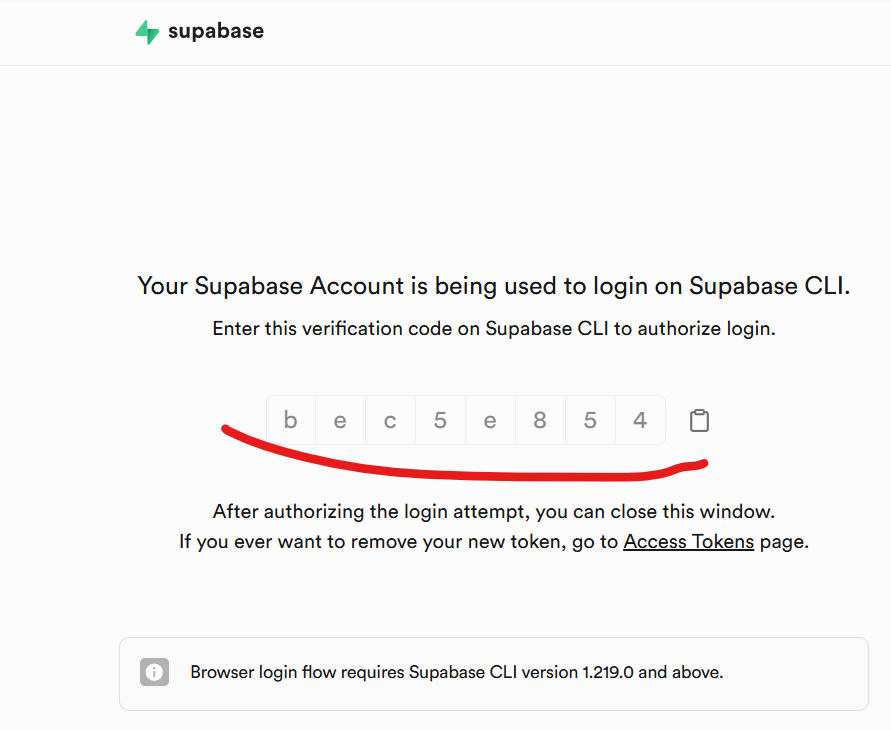
设置权限在 Supabase 控制台,点击左侧的 "Settings" → "API"滚动到 "Exposed schemas" 部分确保basejump被勾选 ✅ Step17/18: Installing Dependencies==================================================
ℹ️ Installing frontend dependencieswithnpm...
added954packages,andaudited955packagesin48s
283packagesarelookingforfunding run `npm fund`fordetails
1moderate severity vulnerability
Toaddressallissues (including breaking changes), run: npm audit fix--force
Run `npm audit`fordetails.✅ Frontend dependencies installed.ℹ️ Installing backend dependencieswithuv...ℹ️ Creating virtual environment...UsingCPython3.12.10Creating virtual environmentat: .venvActivatewith: .venv\Scripts\activate✅ Virtual environment created.Resolved154packagesin3ms░░░░░░░░░░░░░░░░░░░░ [0/151] Installing wheels... warning: Failedtohardlink files; falling backtofullcopy. This may leadtodegraded performance. If the cacheandtarget directoriesareondifferent filesystems, hardlinking maynotbe supported. If thisisintentional,set`export UV_LINK_MODE=copy`oruse `--link-mode=copy` to suppress this warning. Installed151packagesin7.57s+aioboto3==14.3.0+aiobotocore==2.22.0+aiofiles==24.1.0+aiohappyeyeballs==2.6.1+aiohttp==3.12.0+aiohttp-retry==2.9.1+aioitertools==0.12.0+aiosignal==1.3.2+altair==4.2.2+annotated-types==0.7.0+anyio==4.9.0+apscheduler==3.11.0+asyncio==3.4.3+attrs==25.3.0+automat==25.4.16+backoff==2.2.1+boto3==1.37.3+botocore==1.37.3+certifi==2024.2.2+cffi==1.17.1+chardet==5.2.0+charset-normalizer==3.4.2+click==8.1.7+colorama==0.4.6+constantly==23.10.4+croniter==6.0.0+cryptography==45.0.4+daytona-api-client==0.21.0+daytona-api-client-async==0.21.0+daytona-sdk==0.21.0+deprecated==1.2.18+deprecation==2.1.0+distro==1.9.0+dnspython==2.7.0+dramatiq==1.18.0+e2b==1.5.1+e2b-code-interpreter==1.2.0+email-validator==2.0.0+entrypoints==0.4+environs==9.5.0+et-xmlfile==2.0.0+exa-py==1.9.1+fastapi==0.115.12+filelock==3.18.0+frozenlist==1.7.0+fsspec==2025.5.1+gotrue==2.12.3+gunicorn==23.0.0+h11==0.16.0+h2==4.2.0+hpack==4.1.0+httpcore==1.0.9+httpx==0.28.0+httpx-sse==0.4.0+huggingface-hub==0.33.0+hyperframe==6.1.0+hyperlink==21.0.0+idna==3.10+importlib-metadata==8.7.0+incremental==24.7.2+iniconfig==2.1.0+jinja2==3.1.6+jiter==0.10.0+jmespath==1.0.1+jsonschema==4.24.0+jsonschema-specifications==2025.4.1+langfuse==2.60.5+litellm==1.72.2+lxml==6.0.0+mailtrap==2.0.1+markupsafe==3.0.2+marshmallow==3.26.1+mcp==1.9.4+multidict==6.4.4+nest-asyncio==1.6.0+nodeenv==1.9.1+numpy==2.3.0+openai==1.90.0+openpyxl==3.1.2+packaging==24.1+pandas==2.3.0+pika==1.3.2+pillow==11.3.0+pluggy==1.6.0+postgrest==1.1.1+prisma==0.15.0+prometheus-client==0.21.1+prompt-toolkit==3.0.36+propcache==0.3.2+protobuf==5.29.5+pycparser==2.22+pycryptodomex==3.23.0+pydantic==2.11.7+pydantic-core==2.33.2+pydantic-settings==2.9.1+pyjwt==2.10.1+pypdf2==3.0.1+pytesseract==0.3.13+pytest==8.3.3+pytest-asyncio==0.24.0+pytest-mock==3.14.1+python-dateutil==2.9.0.post0+python-docx==1.1.0+python-dotenv==1.0.1+python-multipart==0.0.20+python-ripgrep==0.0.6+pytz==2025.2+pyyaml==6.0.1+qstash==3.0.0+questionary==2.0.1+realtime==2.6.0+redis==5.2.1+referencing==0.36.2+regex==2024.11.6+requests==2.32.3+rpds-py==0.25.1+s3transfer==0.11.3+sentry-sdk==2.29.1+setuptools==75.3.0+six==1.17.0+sniffio==1.3.1+sse-starlette==2.3.6+starlette==0.46.2+storage3==0.12.0+strenum==0.4.15+stripe==12.0.1+structlog==25.4.0+supabase==2.17.0+supafunc==0.10.1+tavily-python==0.5.4+tiktoken==0.9.0+tokenizers==0.21.1+toml==0.10.2+tomlkit==0.13.3+toolz==1.0.0+tqdm==4.67.1+twisted==25.5.0+typing-extensions==4.14.0+typing-inspection==0.4.1+tzdata==2025.2+tzlocal==5.3.1+upstash-redis==1.3.0+urllib3==2.4.0+uvicorn==0.27.1+vncdotool==1.2.0+wcwidth==0.2.13+websockets==14.2+wrapt==1.17.2+yarl==1.20.1+zipp==3.23.0+zope-interface==7.2✅ Backend dependenciesandpackage installed.
Step18/18: Starting Suna==================================================
ℹ️ Allconfigurationsarecomplete. Manualstartisrequired.
✨ Suna Setup Complete!✨
ℹ️ Sunaisconfiguredtouse openrouter/google/gemini-2.5-proasthedefaultLLM.ℹ️ Deletethe .setup_progress filetoreset the setup.ℹ️ TostartSuna, you needtorun these commandsinseparate terminals:
1.StartInfrastructure (inproject root): docker compose up redis rabbitmq-d
2.StartFrontend (inanewterminal): cd frontend&&npm run dev
3.StartBackend (inanewterminal): cd backend&&uv run api.py
4.StartBackground Worker (inanewterminal): cd backend&&uv run dramatiq run_agent_background
Onceallservicesarerunning, access Sunaat: http://localhost:3000
访问端口 http://localhost:3000先安装scoop PSC:\Users\Administrator>Set-ExecutionPolicyRemoteSigned-ScopeCurrentUser-ForcePSC:\Users\Administrator>irmscoop.201704.xyz-outfile'install.ps1' SC:\Users\Administrator>.\install.ps1-ScoopDir'E:\Scoop'-ScoopGlobalDir'E:\GlobalScoopApps'-RunAsAdmin SC:\Users\Administrator>.\install.ps1-ScoopDir'E:\Scoop'-ScoopGlobalDir'E:\GlobalScoopApps'-RunAsAdmin | 









