|
导读 了解微调Llama 3使用的开源组件 了解微调的数据准备及逻辑
微调环境 数据集: Openhermes-2.5(训练700k,测试300k) GPU: 4个RTX 4090, 24GB
整个微调过程会用到以下组件: 
Deepspeed DeepSpeed 是一个深度学习优化库,使分布式训练和推断变得简单、高效和有效。 https://github.com/microsoft/DeepSpeed 我将使用四个 RTX 4090 GPU 来训练这个模型,所以我们需要采取一些步骤来跨多个 GPU 训练模型。 与在单个 GPU 上训练相比,在多个 GPU 上训练是一个复杂的任务。 为什么呢?当我们在单个 GPU 上训练时,优化器状态、参数和梯度都驻留在单个系统中,这有助于在一个 GPU 上迭代模型。
现在,如果我们添加另一个 GPU,就会有两个系统来训练模型,每个系统都有自己的状态(优化器状态、参数和梯度)。 经过一个 epoch 或几个步骤后,我们希望获得一个单一的结果。 现在想象一下两个系统并行训练两个数据批次;它们需要相互通信关于它们的状态,并以最小的数据损失收敛结果。
有多种方法可以利用多个 GPU:我们可以在所有 GPU 上复制参数、梯度和优化器状态,或者只分片优化器状态,或者优化器状态和梯度。DeepSpeed 有助于在 GPU 上分发负载而不会出现任何问题。而 Huggingface 的 accelerate 包让我们像吃蛋糕一样做到这一点。
我将使用阶段 3,它将分片所有参数、梯度和优化器状态,这将让我们在更少的内存需求下进行训练。 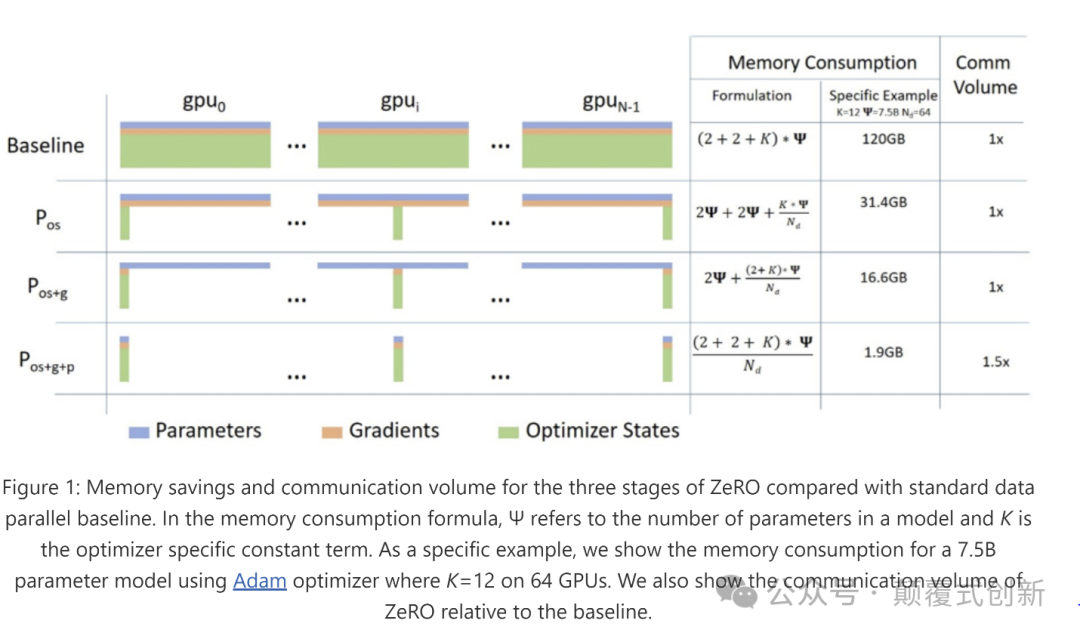
更多细节请参阅文章: ZeRO & DeepSpeed: New system optimizations enable training models with over 100 billion parameters - Microsoft Research QLoRA 70B/8B模型非常庞大,这意味着当您对其进行微调时,您将无法完全使用任何普通人预算内的GPU进行微调,因此我们尝试使用非常低的资源对其进行微调,并开发了LoRA,它帮助我们仅使用低秩训练参数并将它们与原始权重合并,然后出现了QLoRA,它通过将预训练的LLM量化为4位精度,进一步减少了内存消耗,量化本身就是一个专题,所以不再深入讨论。
还请阅读这篇文章: LoRA Fine-tuning & Hyperparameters Explained (in Plain English) | Entry Point AI 开始微调 LLamA 3 我们将在 teknium 提供的 openhermes 数据集上对 llama3 instruct 模型进行微调 meta-llama/Meta-Llama-3–8B-Instruct · Hugging Face。 数据准备 Meta 有他们自己的chat格式,所以我试图遵循他们提供的格式,并阅读他们在 llama3 git中的编码算法, 加载数据集
from datasets import load_dataset


dataset = load_dataset("teknium/OpenHermes-2.5")
我从 llama3 git中获得编码实用程序的灵感
def _return_header(message)-> str:role = message["from"]header = ""if role == "system":header = "system"elif role == "gpt":header = "assistant"elif role == "human":header = "user"return header


def encode_header(message):text = ''text = text + "<|start_header_id|>"header = _return_header(message)text = text + headertext = text + "<|end_header_id|>"text = text + "\n\n"return text


def encode_message(message)->str:text = encode_header(message)text = text + message["value"].strip()text = text + "<|eot_id|>"return text


def encode_dialog_prompt(dialog):text = ''text = text + "<|begin_of_text|>"for message in dialog:text = text + encode_message(message)return textds = dataset.map(lambda x: {"content":encode_dialog_prompt(x['conversations'])}, num_proc=10)
删除冗余列并将其拆分为训练集和验证集
ds=ds.remove_columns(['custom_instruction','topic','model_name','model','skip_prompt_formatting','category','conversations','views','language','id','title','idx','hash','avatarUrl','system_prompt','source'])train_test_split=ds["train"].train_test_split(test_size=0.3) 然后将其推送到 hub train_test_split.push_to_hub("sumandas/openhermes-2.5-llama3")结果数据集,sumandas/openhermes-2.5-llama3 · Datasets at Hugging Face,示例文本 <|begin_of_text|><|start_header_id|>system<|end_header_id|>YouareanAIassistant.Provideadetailedanswersouserdon'tneedtosearchoutsidetounderstandtheanswer.<|eot_id|><|start_header_id|>user<|end_header_id|>Instructions:Givenasentence,generatewhatshouldbethemostlikelynextstatement.Thenextstatementshouldbereasonableandlogicallycorrect.Input:Thescreenisfullofwhitebubblesandwords,whileapairofhandsplaysthepiano.ThebubblesandwordsdisappearanditOutput:<|eot_id|><|start_header_id|>assistant<|end_header_id|>Output:becomesapparentthatthehandsarecreatingavisualrepresentationofthemusicbeingplayed,captivatingtheaudiencewiththisuniquesensoryexperience.<|eot_id|>
所有资源都已可用,我们只是为了我的设置和数据需求进行微调, 先决条件 1.安装cuda开发工具包 conda install cuda 或者按照 developer.nvidia.com/cuda-downloads?target_os=Linux 进行安装 2.安装deepspeed 3.安装flash-attention pip install flash-attn - no-build-isolation 4.安装这些库,我使用 uv 进行更快的依赖解析,
git+https://github.com/huggingface/transformersgit+https://github.com/huggingface/accelerategit+https://github.com/huggingface/peftgit+https://github.com/huggingface/trlhuggingface-hubbitsandbytesevaluatedatasetseinopswandbtiktokenxformerssentencepiecedeepspeedtorch==2.2.2 训练代码 可以根据自己的方便在多种模式下进行训练,在这个repo中找到了这个 pacman100/LLM-Workshop: LLM Workshop by Sourab Mangrulkar (github.com)。 training.py 文件是我们将使用加速器和适当的配置启动的文件,只是在这里放置了training.py的要点https://gist.github.com/sumandas0/0483db8514ea43e45cc5e5f5525914ab 这个训练代码使用了来自huggingface的SFTTrainer,更多细节请参阅 Supervised Fine-tuning Trainer (huggingface.co) 您可以使用这个代码做很多事情,您可以使用loftq、unsloth、FFT、normal lora进行训练,但我只会使用QloRa与Deepspeed ZerO stage 3。
首先让我们定义使用deepspeed的加速器配置 注意,如果您增加了GPU的数量,请更新num_processes 现在让我们运行加速器命令来开始训练,
acceleratelaunch--config_file"deepspeed_config.yaml"train.py\--seed100\--model_name_or_path"meta-llama/Meta-Llama-3-8B-Instruct"\--dataset_name"sumandas/openhermes-2.5-llama3"\--chat_template_format"none"\--add_special_tokensFalse\--append_concat_tokenFalse\--splits"train,test"\--max_seq_len2048\--num_train_epochs1\--logging_steps5\--log_level"info"\--logging_strategy"steps"\--evaluation_strategy"epoch"\--save_strategy"steps"\--push_to_hub\--hub_private_repoTrue\--report_to"wandb"\--hub_strategy"every_save"\--bf16True\--packingTrue\--learning_rate1e-4\--lr_scheduler_type"cosine"\--weight_decay1e-4\--warmup_ratio0.0\--max_grad_norm1.0\--output_dir"llama3-openhermes-2.5"\--per_device_train_batch_size4\--per_device_eval_batch_size4\--gradient_accumulation_steps2\--gradient_checkpointingTrue\--use_reentrantTrue\--dataset_text_field"content"\--use_flash_attnTrue\--use_peft_loraTrue\--lora_r8\--lora_alpha16\--lora_dropout0.1\--lora_target_modules"all-linear"\--use_4bit_quantizationTrue\--use_nested_quantTrue\--bnb_4bit_compute_dtype"bfloat16"\--bnb_4bit_quant_storage_dtype"bfloat16" 注意, 首先设置环境变量HF_HUB_ENABLE_HF_TRANSFER=1 output_dir也将是在huggingface中创建的存储所有检查点的repo,检查点默认每500步创建一次 我将chat模板格式设置为none,因为我已经按照我的方式格式化了这些内容,如果您有其他格式,比如chatml、zephyr lora_target_modules 设置为all-linear,这是QLoRa特有的,他们发表了一篇论文,表明对所有线性层进行微调可以给我们带来与全面微调可比较的结果 要设置LoRa的超参数,请参阅这篇很棒的博客 LoRA Fine-tuning & Hyperparameters Explained (in Plain English) | Entry Point AI 果要报告给wandb,请设置WANDB_API_KEY=,否则删除report_to='wandb'
这就是全部,您的训练应该在全力进行中,查看GPU利用率。 观察过程 只进行了1个epoch的微调,大约花了15个小时。损失曲线如下: 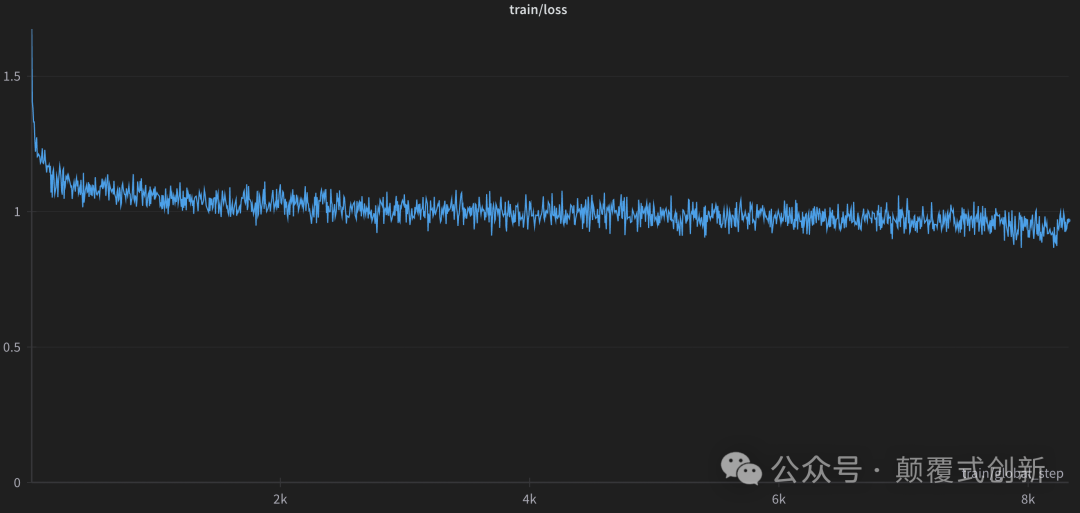
WandB 摘要 {"train/learning_rate":0.00004551803455482833,"eval/steps_per_second":0.893,"_wandb.runtime":51487,"_runtime":51480.36651659012,"_timestamp":1713698971.6200776,"train/epoch":1.0571428571428572,"train/grad_norm":0.14189070214353952,"train/global_step":8325,"eval/samples_per_second":7.141,"_step":1665,"eval/loss":0.963840126991272,"train/loss":0.9674,"eval/runtime":7532.9797}最后一步,在微调之后,您将获得一个小的适配器模型,而不是完整的模型,你可以马上开始使用模型,我们需要将适配器添加到原始的元llama3权重中, 加载PEFT适配器模型 from peft import PeftModelfrom transformers import AutoModelForCausalLM
base_model = AutoModelForCausalLM.from_pretrained("meta-llama/Meta-Llama-3-8B-Instruct",torch_dtype=torch.bfloat16, device_map="auto")adapter_model = PeftModel.from_pretrained(base_model, "sumandas/llama3-openhermes-2.5")adapter_model.merge_and_unload()
现在将适配器模型保存到hf中
adapter_model.push_to_hub("sumandas/llama3-openhermes-2.5")
推理
import torchimport transformersfrom transformers import pipeline


pipe = pipeline("text-generation", model="sumandas/llama3-openhermes-2.5",model_kwargs={"torch_dtype": torch.bfloat16},device="cuda")


generate_kwargs = {"do_sample": True,"temperature": 0.7,"max_new_tokens": 35,}pipe("<|begin_of_text|><|start_header_id|>user<|end_header_id|> Describe the food of Thailand in Chinese<|eot_id|><|start_header_id|>assistant<|end_header_id|>",max_length=2048)
模型回复如下: 泰国菜是浓郁风味和芳香成分的融合,创造出甜、酸、咸、苦和辣味的和谐平衡。泰国的食物在不同地区之间有所不同,但一些常见的成分包括大米、面条、蔬菜、草药和香料。大米是泰国菜的主食,几乎每顿饭都会配上,无论是炒、煮,还是用来做粥或炒饭。由大米或小麦制成的面条也非常受欢迎,可以在许多泰国菜中找到,配以各种汤、酱和配料。泰国菜以其使用新鲜草药和香料而闻名,如柠檬草、高良姜、香菜、罗勒、青柠檬叶、姜和大蒜,这些为菜肴赋予了独特的风味。泰国辣椒也被广泛使用,为食物增添不同程度的辣味。一些受欢迎的泰国菜包括冬阴汤(酸辣汤,加入柠檬草、青柠檬叶和辣椒)、泰式炒河粉(炒米粉配蔬菜、花生和一种酸甜的酱汁)和青咖喱(用青辣椒、椰奶和泰式罗勒制成的辣味咖喱)。许多泰国菜也配有各种酱料和调味品,包括鱼露、酱油、辣椒酱和罗望子酱。新鲜水果如芒果、木瓜和菠萝也常作为一顿饭的甜点享用。总的来说,泰国菜是一种充满活力和风味的美食,将传统的成分和烹饪技术与平衡的风味相结合,让人垂涎欲滴。 | 









