|
在人工智能的浪潮中,大型语言模型(LLMs)已成为推动技术进步的关键力量。随着Meta公司最新开源的Llama 3.1模型的问世,我们见证了开源AI领域的一大飞跃。Llama 3.1以其卓越的性能和广泛的应用潜力,为开发者和研究者提供了一个强大的工具,以探索和实现各种复杂的AI应用。
本文将深入探讨Llama 3.1模型的各个方面,从性能评估到模型的推理和微调,为读者提供一份全面的实战指南。 一、Llama 3.1简介
7月23日Meta公司推出的大型多语言预训练模型Llama 3.1,包含8B、70B和405B三种参数规模的模型。这些模型不仅支持八种语言,还具备长达128K的上下文长度,使其在处理长文本方面有着天然的优势。更重要的是,Llama 3.1在性能上与业界领先的闭源模型相媲美,同时提供了开源的灵活性和可定制性。
Llama 3.1主要特性: 1.参数规模:Llama 3.1包含三种规格:80亿、700亿和4050亿参数,4050亿参数是Llama系列中最强大的模型,具备顶尖的通用知识、数学计算、多语言翻译和工具使用能力,提升了模型的细致性和复杂任务处理能力。2.上下文长度:128K上下文长度,能够处理更长的文本输入,适用于长文本摘要、复杂对话和多步骤问题解决,提升了模型在长文本处理中的表现。3.多语言支持:支持包括英语、中文、西班牙语、法语、德语、日语、韩语和阿拉伯语在内的八种语言,增强了模型的全球适用性,适用于多语言翻译和跨语言处理。4.模型下载和定制:Llama 3.1模型可以从Meta官方网站和Hugging Face平台公开下载,允许开发者进行自定义训练和微调,适应各种应用场景,推动AI技术的普及和创新。5.高性能和高效训练:在超过15万亿个标记上进行训练,并使用超过16,000个H100 GPU进行优化,确保模型的高性能和高效能。预训练数据日期截止到2023年12月。6.量化技术:为了应对405B模型的运行需求,Meta把模型数据从16位(BF16)量化减少到8位(FP8),大幅降低了计算资源的需求,令模型能够在单一服务器节点上运行。7.增强的安全和防护措施:提供了 Llama Guard 3 和 Prompt Guard 等安全工具,以及 Llama Stack API 的评论请求,旨在促进第三方项目更容易地利用 Llama 模型。8.广泛的生态系统支持:Meta 改进了模型的训练和微调流程,以及模型的推理和部署方式,以便更广泛地支持开发者和平台提供商,包括AWS、NVIDIA、Google Cloud等25个合作伙伴提供的即用服务,确保无缝的开发和部署体验。二、Llama 3.1性能评估
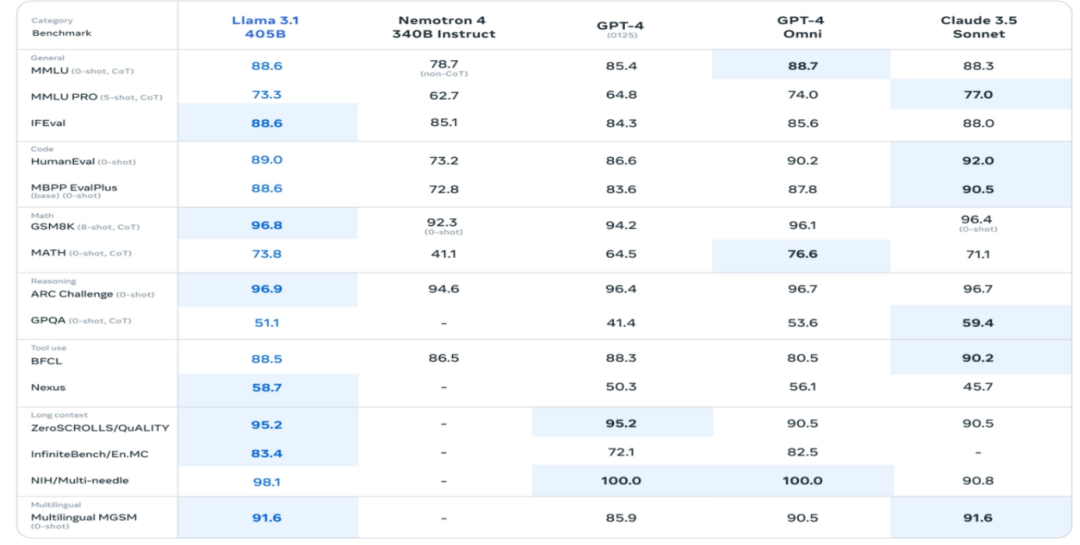
Llama 3.1版本在 150 多个涵盖多种语言的基准数据集上评估了性能。此外,还进行了广泛的人工评估,在真实场景中将 Llama 3.1 与竞争模型进行了比较。通过实验评估表明,Llama 3.1的旗舰模型在一系列任务中与领先的基础模型相媲美,包括 GPT-4、GPT-4o 和 Claude 3.5 Sonnet。此外,Llama 3.1的小型模型与具有相似数量参数的封闭和开放模型相媲美。
三、Llama 3.1模型推理实战
1、环境准备
首先,我们需要确保我们的服务器具备足够的硬件配置来支持Llama 3.1模型的运行。我们选择的是一台配备有4090型号GPU(24G显存)的服务器,基础镜像信息如下:ubuntu 22.04、python 3.12、cuda 12.1、pytorch 2.3.0。 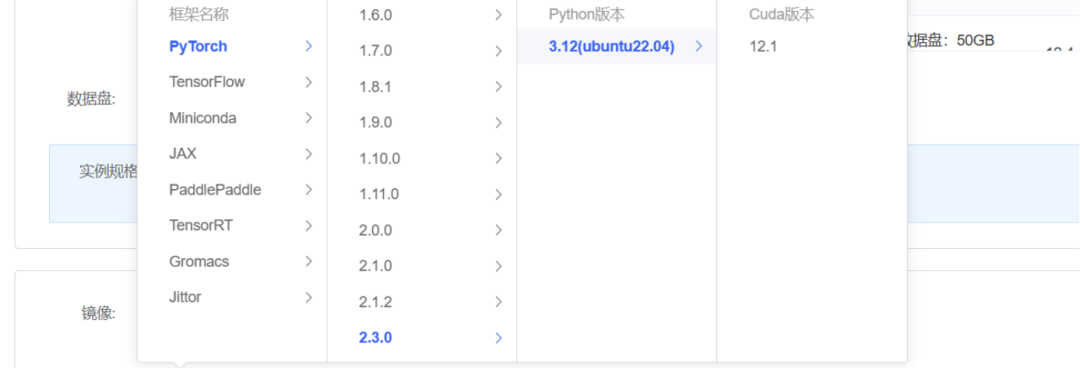
2、安装依赖
首先 pip 换源加速下载并安装依赖包 #升级pippython-mpipinstall--upgradepip#更换pypi源加速库的安装pipconfigsetglobal.index-urlhttps://pypi.tuna.tsinghua.edu.cn/simplepipinstallfastapi==0.111.1pipinstalluvicorn==0.30.3pipinstallmodelscope==1.16.1pipinstalltransformers==4.42.4pipinstallaccelerate==0.32.1
安装完成如下: 
使用 modelscope 中的 snapshot_download 函数下载模型。第一个参数为模型名称,参数 cache_dir 用于指定模型的下载路径。在 /root/autodl-tmp 路径下新建 d.py 文件,并在其中输入以下内容:importtorchfrommodelscopeimportsnapshot_download,AutoModel,AutoTokenizerimportosmodel_dir=snapshot_download('LLM-Research/Meta-Llama-3.1-8B-Instruct',cache_dir='/root/autodl-tmp',revision='master')
运行 python /root/autodl-tmp/d.py 执行下载。需注意,模型大小约为 15GB,下载模型大概需要 20分钟,请耐心等待。

4、模型推理
1)推理测试 #导入所需的库fromtransformersimportAutoTokenizer,AutoModelForCausalLMimporttorch#加载预训练的分词器和模型model_name_or_path='/root/autodl-tmp/LLM-Research/Meta-Llama-3___1-8B-Instruct'tokenizer=AutoTokenizer.from_pretrained(model_name_or_path,use_fast=False)model=AutoModelForCausalLM.from_pretrained(model_name_or_path,device_map="auto",torch_dtype=torch.bfloat16)#定义对话消息列表,包含系统角色和用户角色的消息messages=[{"role":"system","content":"Youareahelpfulassistant."},{"role":"user","content":"Whoareyou?"}]#使用分词器将对话消息转换为模型输入格式input_ids=tokenizer.apply_chat_template(messages,tokenize=False,add_generation_prompt=True)#将输入转换为PyTorch张量并移动到GPU设备上model_inputs=tokenizer([input_ids],return_tensors="pt").to('cuda')#使用模型生成回复generated_ids=model.generate(model_inputs.input_ids,max_new_tokens=512)#从生成的ID中提取回复部分generated_ids=[output_ids[len(input_ids):]forinput_ids,output_idsinzip(model_inputs.input_ids,generated_ids)]#使用分词器将生成的ID解码为文本response=tokenizer.batch_decode(generated_ids,skip_special_tokens=True)[0]查看响应结果 结果如下: "I'manartificialintelligencemodeldesignedtoassistandcommunicatewithusersinahelpfulandinformativeway.I'matypeofchatbot,andmyprimaryfunctionistoprovideinformation,answerquestions,andengageinconversationtothebestofmyabilities.\n\nIdon'thaveapersonalidentityoremotions,butI'mheretohelpyouwithanyquestionsortopicsyou'dliketodiscuss.Icanprovideinformationonawiderangeofsubjects,fromscienceandhistorytoentertainmentandculture.Icanalsohelpwithtaskssuchaslanguagetranslation,textsummarization,andevencreativewriting.\n\nHowcanIassistyoutoday?"
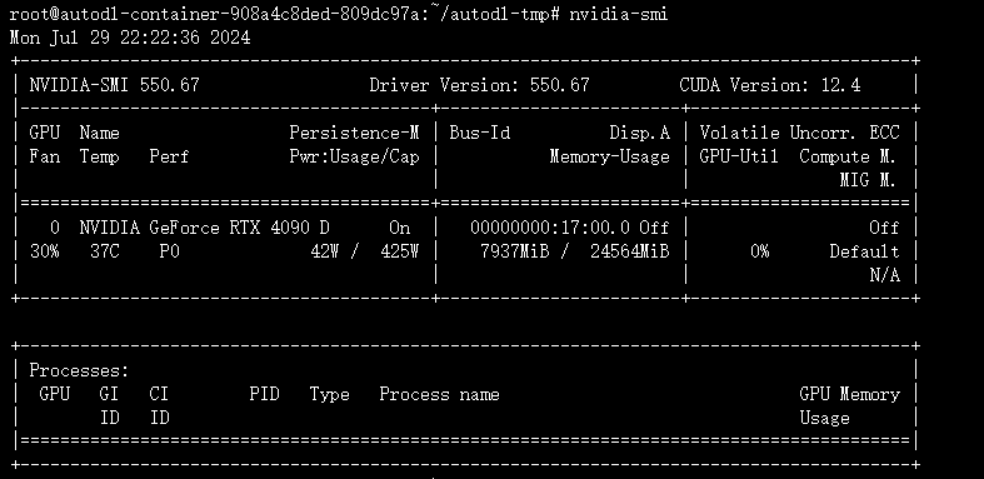
2)中文测试一 #定义对话消息列表,包含系统角色和用户角色的消息messages=[{"role":"user","content":"你会讲中文么?"}]#使用分词器将对话消息转换为模型输入格式input_ids=tokenizer.apply_chat_template(messages,tokenize=False,add_generation_prompt=True)#将输入转换为PyTorch张量并移动到GPU设备上model_inputs=tokenizer([input_ids],return_tensors="pt").to('cuda')#使用模型生成回复generated_ids=model.generate(model_inputs.input_ids,max_new_tokens=512)#从生成的ID中提取回复部分generated_ids=[output_ids[len(input_ids):]forinput_ids,output_idsinzip(model_inputs.input_ids,generated_ids)]#使用分词器将生成的ID解码为文本response=tokenizer.batch_decode(generated_ids,skip_special_tokens=True)[0]response3)中文测试二 #定义对话消息列表,包含系统角色和用户角色的消息messages=[{"role":"user","content":"请以“夜晚”为题写一首诗"}]#使用分词器将对话消息转换为模型输入格式input_ids=tokenizer.apply_chat_template(messages,tokenize=False,add_generation_prompt=True)#将输入转换为PyTorch张量并移动到GPU设备上model_inputs=tokenizer([input_ids],return_tensors="pt").to('cuda')#使用模型生成回复generated_ids=model.generate(model_inputs.input_ids,max_new_tokens=512)#从生成的ID中提取回复部分generated_ids=[output_ids[len(input_ids):]forinput_ids,output_idsinzip(model_inputs.input_ids,generated_ids)]#使用分词器将生成的ID解码为文本response=tokenizer.batch_decode(generated_ids,skip_special_tokens=True)[0]response注意:如果推理报错如下 File~/miniconda3/lib/python3.10/site-packages/transformers/models/llama/configuration_llama.py:182,inLlamaConfig._rope_scaling_validation(self)179return181ifnotisinstance(self.rope_scaling,dict)orlen(self.rope_scaling)!=2:-->182raiseValueError(183"`rope_scaling`mustbeadictionarywithtwofields,`type`and`factor`,"f"got{self.rope_scaling}"184)185rope_scaling_type=self.rope_scaling.get("type",None)186rope_scaling_factor=self.rope_scaling.get("factor",None)ValueError:`rope_scaling`mustbeadictionarywithtwofields,`type`and`factor`,got{'factor':8.0,'low_freq_factor':1.0,'high_freq_factor':4.0,'original_max_position_embeddings':8192,'rope_type':'llama3'}pipinstall--upgradetransformers 资源消耗如下:
1、数据集准备
微调大型语言模型(LLM)通常涉及指令微调,这是一种特定的数据准备和训练过程。在指令微调中,数据集由一系列包含指令、输入和输出的条目组成,例如: {
"instruction": "回答以下用户问题,仅输出答案。","input": "1+1等于几?","output": "2"}
在这个例子中,`instruction` 是给予模型的任务指令,明确告知模型需要完成的具体任务;`input` 是为了完成任务所需的用户提问或相关信息;而 `output` 则是模型应产生的预期回答。
我们的目标是训练模型,使其能够准确理解并遵循用户的指令。因此,在构建指令集时,必须针对特定的应用目标精心设计。例如,如果我们的目标是创建一个能够模仿特定对话风格的个性化LLM,我们就需要构建与之相应的指令集。
以使用开源的甄嬛传对话数据集为例,如果我们希望模型能够模拟甄嬛的对话风格,我们可以构造如下形式的指令: 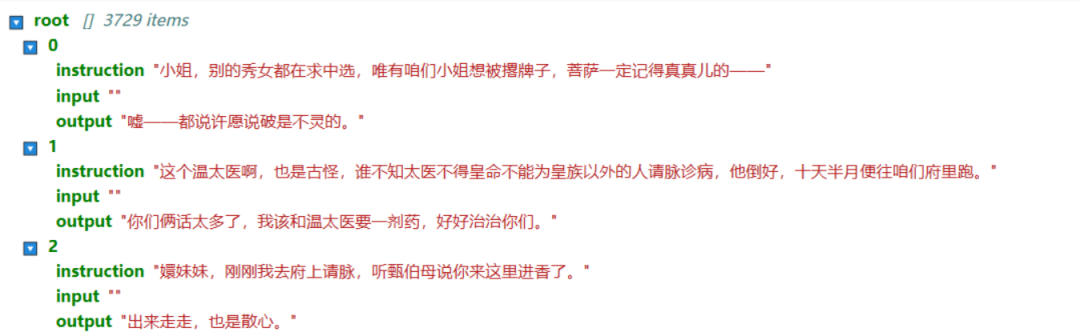
在此示例中,我们省略了 `input` 字段,因为模型的回答是基于预设的角色背景知识,而非用户的直接提问。通过这种方式,我们可以训练模型学习并模仿特定角色的语言风格和对话模式,从而在实际应用中提供更加个性化和情景化的交互体验。
2、导入依赖包fromdatasetsimportDatasetimportpandasaspdfromtransformersimportAutoTokenizer,AutoModelForCausalLM,DataCollatorForSeq2Seq,TrainingArguments,Trainer,GenerationConfig 3、读取数据集
#将JSON文件转换为CSV文件df=pd.read_json('huanhuan.json')ds=Dataset.from_pandas(df)ds[:3]输出: {'instruction':['小姐,别的秀女都在求中选,唯有咱们小姐想被撂牌子,菩萨一定记得真真儿的——','这个温太医啊,也是古怪,谁不知太医不得皇命不能为皇族以外的人请脉诊病,他倒好,十天半月便往咱们府里跑。','嬛妹妹,刚刚我去府上请脉,听甄伯母说你来这里进香了。'],'input':['','',''],'output':['嘘——都说许愿说破是不灵的。','你们俩话太多了,我该和温太医要一剂药,好好治治你们。','出来走走,也是散心。']}4、处理数据集
1)定义分词器 tokenizer=AutoTokenizer.from_pretrained('/root/autodl-tmp/LLM-Research/Meta-Llama-3___1-8B-Instruct',use_fast=False,trust_remote_code=True)tokenizer.pad_token=tokenizer.eos_token2)消息格式查看 messages=[{"role":"system","content":"现在你要扮演皇帝身边的女人--甄嬛"},{"role":"user","content":'你好呀'},{"role":"assistant","content":"你好,我是甄嬛,你有什么事情要问我吗?"},]print(tokenizer.apply_chat_template(messages,tokenize=False))输出: <|begin_of_text|><|start_header_id|>system<|end_header_id|>现在你要扮演皇帝身边的女人--甄嬛<|eot_id|><|start_header_id|>user<|end_header_id|>你好呀<|eot_id|><|start_header_id|>assistant<|end_header_id|>你好,我是甄嬛,你有什么事情要问我吗?<|eot_id|><|start_header_id|>assistant<|end_header_id|> 3)数据处理函数 defprocess_func(example):MAX_LENGTH=384#Llama分词器会将一个中文字切分为多个token,因此需要放开一些最大长度,保证数据的完整性input_ids,attention_mask,labels=[],[],[]instruction=tokenizer(f"<|begin_of_text|><|start_header_id|>system<|end_header_id|>\n\n现在你要扮演皇帝身边的女人--甄嬛<|eot_id|><|start_header_id|>user<|end_header_id|>\n\n{example['instruction']+example['input']}<|eot_id|><|start_header_id|>assistant<|end_header_id|>\n\n",add_special_tokens=False)#add_special_tokens不在开头加special_tokensresponse=tokenizer(f"{example['output']}<|eot_id|>",add_special_tokens=False)input_ids=instruction["input_ids"]+response["input_ids"]+[tokenizer.pad_token_id]attention_mask=instruction["attention_mask"]+response["attention_mask"]+[1]#因为eostoken咱们也是要关注的所以补充为1labels=[-100]*len(instruction["input_ids"])+response["input_ids"]+[tokenizer.pad_token_id]iflen(input_ids)>MAX_LENGTH:#做一个截断input_ids=input_ids[:MAX_LENGTH]attention_mask=attention_mask[:MAX_LENGTH]labels=labels[:MAX_LENGTH]return{"input_ids":input_ids,"attention_mask":attention_mask,"labels":labels}4)数据处理 tokenized_id=ds.map(process_func,remove_columns=ds.column_names)tokenized_id 5)解码查看input_ids tokenizer.decode(tokenized_id[0]['input_ids']) 输出: '<|begin_of_text|><|start_header_id|>system<|end_header_id|>\n\n现在你要扮演皇帝身边的女人--甄嬛<|eot_id|><|start_header_id|>user<|end_header_id|>\n\n小姐,别的秀女都在求中选,唯有咱们小姐想被撂牌子,菩萨一定记得真真儿的——<|eot_id|><|start_header_id|>assistant<|end_header_id|>\n\n嘘——都说许愿说破是不灵的。<|eot_id|><|eot_id|>' 6)解码查看labels tokenizer.decode(list(filter(lambdax:x!=-100,tokenized_id[1]["labels"]))) 输出: '你们俩话太多了,我该和温太医要一剂药,好好治治你们。<|eot_id|><|eot_id|>'
5、定义模型
importtorchmodel=AutoModelForCausalLM.from_pretrained('/root/autodl-tmp/LLM-Research/Meta-Llama-3___1-8B-Instruct',device_map="auto",torch_dtype=torch.bfloat16)model输出如下: 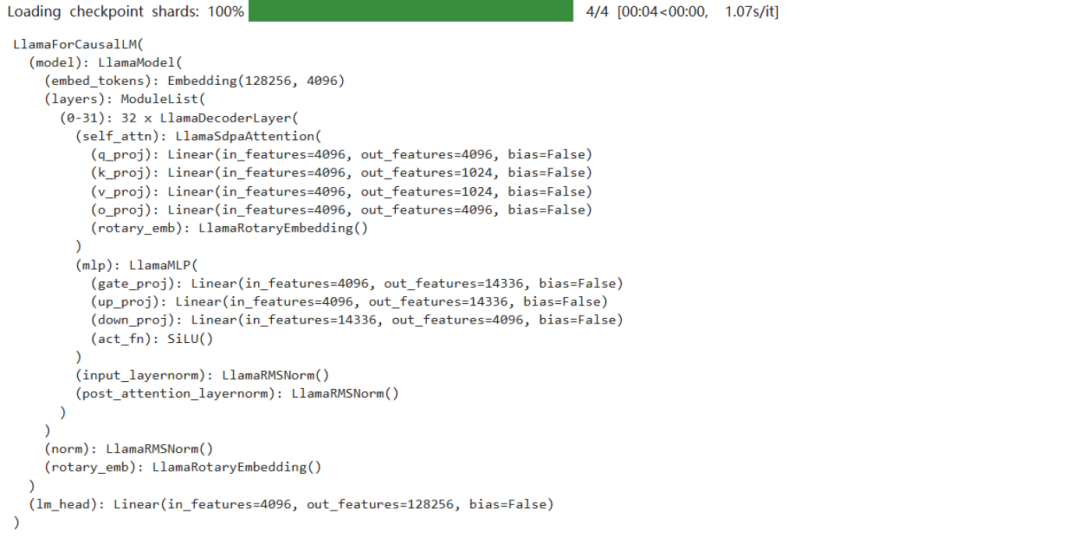
model.enable_input_require_grads()开启梯度检查点时,要执行该方法 查看模型加载的精度 输出: 6、Lora配置
LoraConfig这个类中可以设置很多参数,但主要的参数如下- target_modules:需要训练的模型层的名字,主要就是attention部分的层,不同的模型对应的层的名字不同,可以传入数组,也可以字符串,也可以正则表达式。
- 具体可以看Lora原理lora_alpha:Lora alaph,具体作用参见 Lora 原理
Lora的缩放是啥?不是r(秩),这个缩放就是lora_alpha/r, 在这个LoraConfig中缩放就是4倍。 from peft import LoraConfig, TaskType, get_peft_model
config = LoraConfig(task_type=TaskType.CAUSAL_LM, target_modules=["q_proj", "k_proj", "v_proj", "o_proj", "gate_proj", "up_proj", "down_proj"],inference_mode=False, # 训练模式r=8, # Lora 秩lora_alpha=32, # Lora alaph,具体作用参见 Lora 原理lora_dropout=0.1# Dropout 比例)config
输出: LoraConfig(peft_type=< eftType.LORA:'LORA'>,auto_mapping=None,base_model_name_or_path=None,revision=None,task_type=<TaskType.CAUSAL_LM:'CAUSAL_LM'>,inference_mode=False,r=8,target_modules={'k_proj','v_proj','up_proj','o_proj','down_proj','gate_proj','q_proj'},lora_alpha=32,lora_dropout=0.1,fan_in_fan_out=False,bias='none',use_rslora=False,modules_to_save=None,init_lora_weights=True,layers_to_transform=None,layers_pattern=None,rank_pattern={},alpha_pattern={},megatron_config=None,megatron_core='megatron.core',loftq_config={},use_dora=False,layer_replication=None) eftType.LORA:'LORA'>,auto_mapping=None,base_model_name_or_path=None,revision=None,task_type=<TaskType.CAUSAL_LM:'CAUSAL_LM'>,inference_mode=False,r=8,target_modules={'k_proj','v_proj','up_proj','o_proj','down_proj','gate_proj','q_proj'},lora_alpha=32,lora_dropout=0.1,fan_in_fan_out=False,bias='none',use_rslora=False,modules_to_save=None,init_lora_weights=True,layers_to_transform=None,layers_pattern=None,rank_pattern={},alpha_pattern={},megatron_config=None,megatron_core='megatron.core',loftq_config={},use_dora=False,layer_replication=None) 加载微调配置 model=get_peft_model(model,config)config 输出: LoraConfig(peft_type=<eftType.LORA:'LORA'>,auto_mapping=None,base_model_name_or_path='/root/autodl-tmp/LLM-Research/Meta-Llama-3___1-8B-Instruct',revision=None,task_type=<TaskType.CAUSAL_LM:'CAUSAL_LM'>,inference_mode=False,r=8,target_modules={'k_proj','v_proj','up_proj','o_proj','down_proj','gate_proj','q_proj'},lora_alpha=32,lora_dropout=0.1,fan_in_fan_out=False,bias='none',use_rslora=False,modules_to_save=None,init_lora_weights=True,layers_to_transform=None,layers_pattern=None,rank_pattern={},alpha_pattern={},megatron_config=None,megatron_core='megatron.core',loftq_config={},use_dora=False,layer_replication=None) 查看可训练的参数 model.print_trainable_parameters() 输出: trainableparams:20,971,520||allparams:8,051,232,768||trainable%:0.2605 7、配置训练参数
TrainingArguments这个类的源码也介绍了每个参数的具体作用,当然大家可以来自行探索,这里就简单说几个常用的。- per_device_train_batch_size:顾名思义batch_size
- gradient_accumulation_steps: 梯度累加,如果你的显存比较小,那可以把batch_size设置小一点,梯度累加增大一些。
- logging_steps:多少步,输出一次log
- num_train_epochs:顾名思义epoch
- gradient_checkpointing:梯度检查,这个一旦开启,模型就必须执行model.enable_input_require_grads()
args=TrainingArguments(output_dir="./output/llama3_1_instruct_lora",per_device_train_batch_size=4,gradient_accumulation_steps=4,logging_steps=10,num_train_epochs=3,save_steps=100,#为了快速演示,这里设置10,建议你设置成100learning_rate=1e-4,save_on_each_node=True,gradient_checkpointing=True) 8、开始Trainer训练trainer=Trainer(model=model,args=args,train_dataset=tokenized_id,data_collator=DataCollatorForSeq2Seq(tokenizer=tokenizer,padding=True),)trainer.train() 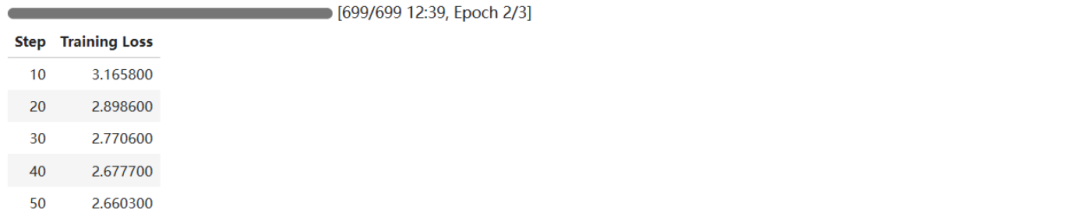
9、合并模型 将训练后的权重文件合并到基础模型中,产生新的模型文件
from transformers import AutoModelForCausalLM, AutoTokenizerimport torchfrom peft import PeftModel
mode_path = '/root/autodl-tmp/LLM-Research/Meta-Llama-3___1-8B-Instruct'lora_path = '/root/autodl-tmp/output/llama3_1_instruct_lora/checkpoint-100' # 这里改称你的 lora 输出对应 checkpoint 地址
# 加载tokenizertokenizer = AutoTokenizer.from_pretrained(mode_path, trust_remote_code=True)
# 加载模型model = AutoModelForCausalLM.from_pretrained(mode_path, device_map="auto",torch_dtype=torch.bfloat16, trust_remote_code=True).eval()
# 加载lora权重model = PeftModel.from_pretrained(model, model_id=lora_path)
10、模型推理
prompt = "你是谁?"
messages = [{"role": "system", "content": "假设你是皇帝身边的女人--甄嬛。"},{"role": "user", "content": prompt}]
input_ids = tokenizer.apply_chat_template(messages, tokenize=False)model_inputs = tokenizer([input_ids], return_tensors="pt").to('cuda')generated_ids = model.generate(model_inputs.input_ids,max_new_tokens=512)generated_ids = [output_ids[len(input_ids):] for input_ids, output_ids in zip(model_inputs.input_ids, generated_ids)]response = tokenizer.batch_decode(generated_ids, skip_special_tokens=True)[0]print(response)
推理结果输出: 五、Llama 3.1模型API部署调用
为了将Llama 3.1模型的能力发布分享给其他用户,我们采用FastAPI框架来发布一个API服务。FastAPI是一个现代、快速(高性能)的Web框架,用于构建API与Python类型提示的强大组合。它使得设计、构建、测试和部署API变得简单快捷。
首先,我们创建了一个名为fastapi-test.py的文件,这个文件将包含启动和运行我们的API服务所必需的代码。
1、代码准备
from fastapi import FastAPI, Requestfrom transformers import AutoTokenizer, AutoModelForCausalLMimport uvicornimport jsonimport datetimeimport torch
# 设置设备参数DEVICE = "cuda"# 使用CUDADEVICE_ID = "0"# CUDA设备ID,如果未设置则为空CUDA_DEVICE = f"{DEVICE}:{DEVICE_ID}" if DEVICE_ID else DEVICE# 组合CUDA设备信息
# 清理GPU内存函数def torch_gc():if torch.cuda.is_available():# 检查是否可用CUDAwith torch.cuda.device(CUDA_DEVICE):# 指定CUDA设备torch.cuda.empty_cache()# 清空CUDA缓存torch.cuda.ipc_collect()# 收集CUDA内存碎片
# 创建FastAPI应用app = FastAPI()
# 处理POST请求的端点@app.post("/")async def create_item(request: Request):global model, tokenizer# 声明全局变量以便在函数内部使用模型和分词器json_post_raw = await request.json()# 获取POST请求的JSON数据json_post = json.dumps(json_post_raw)# 将JSON数据转换为字符串json_post_list = json.loads(json_post)# 将字符串转换为Python对象prompt = json_post_list.get('prompt')# 获取请求中的提示
messages = [{"role": "system", "content": "You are a helpful assistant."},{"role": "user", "content": prompt}]
# 调用模型进行对话生成input_ids = tokenizer.apply_chat_template(messages,tokenize=False,add_generation_prompt=True)model_inputs = tokenizer([input_ids], return_tensors="pt").to('cuda')generated_ids = model.generate(model_inputs.input_ids,max_new_tokens=512)generated_ids = [output_ids[len(input_ids):] for input_ids, output_ids in zip(model_inputs.input_ids, generated_ids)]response = tokenizer.batch_decode(generated_ids, skip_special_tokens=True)[0]now = datetime.datetime.now()# 获取当前时间time = now.strftime("%Y-%m-%d %H:%M:%S")# 格式化时间为字符串# 构建响应JSONanswer = {"response": response,"status": 200,"time": time}# 构建日志信息log = "[" + time + "] " + '", prompt:"' + prompt + '", response:"' + repr(response) + '"'print(log)# 打印日志torch_gc()# 执行GPU内存清理return answer# 返回响应
# 主函数入口if __name__ == '__main__':# 加载预训练的分词器和模型model_name_or_path = '/root/autodl-tmp/LLM-Research/Meta-Llama-3___1-8B-Instruct'tokenizer = AutoTokenizer.from_pretrained(model_name_or_path, use_fast=False)model = AutoModelForCausalLM.from_pretrained(model_name_or_path, device_map="auto", torch_dtype=torch.bfloat16)
# 启动FastAPI应用# 用6006端口可以将autodl的端口映射到本地,从而在本地使用apiuvicorn.run(app, host='0.0.0.0', port=6006, workers=1)# 在指定端口和主机上启动应用
2、启动API服务
3、curl命令调用API
默认部署在 6006 端口,通过 POST 方法进行调用,可以使用 curl 调用,如下所示: curl-XPOST"http://127.0.0.1:6006"\-H'Content-Type:application/json'\-d'{"prompt":"什么是AI大模型?"}'输出: {"response":"AI大模型(LargeLanguageModel,LLM)是一种基于深度学习的计算机模型,它能够处理和理解自然语言的能力。它可以理解和生成人类语言的不同方面,如语法、语义、语调等。","status":200,"time":"2024-07-3010:37:36"}4、python代码调用API 也可以使用 python 中的 requests 库进行调用,如下所示: import requestsimport json
def get_completion(prompt):headers = {'Content-Type': 'application/json'}data = {"prompt": prompt}response = requests.post(url='http://127.0.0.1:6006', headers=headers, data=json.dumps(data))return response.json()['response']get_completion('什么是机器学习?')
'机器学习是一种人工智能的分支,研究如何让计算机能够通过数据和经验学习和改进其性能。它涉及使用算法和统计模型来分析数据,自动化决策和预测任务。'
结语
在本文中,我们深入探讨了Llama 3.1模型的推理过程、微调技巧以及API部署调用,旨在助力读者精进对AI大型模型的实践技能。Llama 3.1的开源精神不仅赋予了AI社区一款功能强大的工具,更激发了技术的共享与创新活力。随着越来越多的开发者和企业深入挖掘Llama 3.1的潜力,我们有理由相信,未来将涌现出更多令人振奋的应用成果和技术创新。 | 









