【8】GIF动画生成代理(LangGraph)-GIFAnimationGeneratorAgent(LangGraph)
【9】TTS诗歌生成代理(LangGraph)-TTSPoemGeneratorAgent(LangGraph)
【10】音乐作曲代理(LangGraph)-MusicCompositorAgent(LangGraph)
【11】记忆增强对话代理-Memory-EnhancedConversationalAgent
【12】多代理协作系统-Multi-AgentCollaborationSystem
Creative and Generative Agents创意与生成代理ingFang SC", system-ui, -apple-system, BlinkMacSystemFont, "Helvetica Neue", "Hiragino Sans GB", "Microsoft YaHei UI", "Microsoft YaHei", Arial, sans-serif;text-wrap: wrap;color: rgb(0, 0, 0);letter-spacing: normal;text-align: left;background-color: rgb(255, 255, 255);border-bottom: 2px solid rgb(239, 112, 96);visibility: visible;">【8】GIF 动画生成代理 (LangGraph)-GIF Animation Generator Agent (LangGraph)概述:GIF动画生成器,集成LangGraph用于工作流管理、GPT-4用于文本生成和DALL-E用于图像创作的,可以根据用户提示生成自定义动画。 ingFang SC", system-ui, -apple-system, BlinkMacSystemFont, "Helvetica Neue", "Hiragino Sans GB", "Microsoft YaHei UI", "Microsoft YaHei", Arial, sans-serif;letter-spacing: 0.544px;text-wrap: wrap;background-color: rgb(255, 255, 255);text-align: left;visibility: visible;">实现️:利用LangGraph来协调一个工作流程,该流程使用GPT-4生成角色描述、情节和图像提示,使用DALL-E 3创建图像,并使用PIL将它们组装成GIF。采用异步编程以实现高效的并行处理。
#SetupandImports
importos
fromtypingimportTypedDict,Annotated,Sequence,List
fromlanggraph.graphimportGraph,END
fromlangchain_openaiimportChatOpenAI
fromlangchain_core.messagesimportHumanMessage,AIMessage
fromopenaiimportOpenAI
fromPILimportImage
importio
fromIPython.displayimportdisplay,ImageasIPImage

fromlangchain_core.runnables.graphimportMermaidDrawMethod

importasyncio
importaiohttp
fromdotenvimportload_dotenv

#Loadenvironmentvariables
load_dotenv()

#SetOpenAIAPIkey
os.environ["OPENAI_API_KEY"]=os.getenv('OPENAI_API_KEY')

#InitializeOpenAIclient
client=OpenAI()

#DefineDataStructures
classGraphState(TypedDict):
messages:Annotated[Sequence[HumanMessage|AIMessage],"Themessagesintheconversation"]
query:Annotated[str,"Inputquerydescribingthecharacterandscene"]
plot:Annotated[str,"GeneratedplotfortheGIF"]
character_description:Annotated[str,"Detaileddescriptionofthemaincharacterorobject"]
image_prompts:Annotated[List[str],"Listofpromptsforeachframe"]
image_urls:Annotated[List[str],"ListofURLsforgeneratedimages"]
gif_data:Annotated[bytes,"GIFdatainbytes"]

#Initializethelanguagemodel
llm=ChatOpenAI(model="gpt-4")

#DefineGraphFunctions
asyncdefget_image_data(session,url:str):
"""FetchimagedatafromagivenURL."""
asyncwithsession.get(url)asresponse:
ifresponse.status==200:
returnawaitresponse.read()
returnNone

defgenerate_character_description(state:GraphState)->GraphState:
"""Generateadetaileddescriptionofthemaincharacterorscene."""
query=state["query"]
response=llm.invoke([HumanMessage(content=f"Basedonthequery'{query}',createadetaileddescriptionofthemaincharacter,object,orscene.
Includespecificdetailsaboutappearance,characteristics,andanyuniquefeatures.
Thisdescriptionwillbeusedtomaintainconsistencyacrossmultipleimages.")])
state["character_description"]=response.content
returnstate

defgenerate_plot(state:GraphState)->GraphState:
"""Generatea5-stepplotfortheGIFanimation."""
query=state["query"]
character_description=state["character_description"]
response=llm.invoke([HumanMessage(content=f"Createashort,5-stepplotforaGIFbasedonthisquery:'{query}'andfeaturingthisdescription:{character_description}.
Eachstepshouldbeabriefdescriptionofasingleframe,
maintainingconsistencythroughout.Keepitfamily-friendlyandavoidanysensitivethemes.")])
state["plot"]=response.content
returnstate

defgenerate_image_prompts(state:GraphState)->GraphState:
"""GeneratespecificimagepromptsforeachframeoftheGIF."""
plot=state["plot"]
character_description=state["character_description"]
response=llm.invoke([HumanMessage(content=f"""Basedonthisplot:'{plot}'andfeaturingthisdescription:{character_description},generate5specific,family-friendlyimageprompts,
oneforeachstep.Eachpromptshouldbedetailedenoughforimagegeneration,maintainingconsistency,andsuitableforDALL-E.

AlwaysincludethefollowinginEVERYprompttomaintainconsistency:
1.Abriefreminderofthemaincharacterorobject'skeyfeatures
2.Thespecificactionorscenedescribedintheplotstep
3.Anyrelevantbackgroundorenvironmentaldetails

Formateachpromptasanumberedlistitem,likethis:
1.[Yourprompthere]
2.[Yourprompthere]
...andsoon.""")])

prompts=[]
forlineinresponse.content.split('\n'):
ifline.strip().startswith(('1.','2.','3.','4.','5.')):
prompt=line.split('.',1)[1].strip()
prompts.append(f"Createadetailed,photorealisticimageofthefollowingscene:{prompt}")

iflen(prompts)!=5:
raiseValueError(f"Expected5prompts,butgot{len(prompts)}.Pleasetryagain.")

state["image_prompts"]=prompts
returnstate

asyncdefcreate_image(prompt:str,retries:int=3):
"""GenerateanimageusingDALL-Ebasedonthegivenprompt."""
forattemptinrange(retries):
try:
response=awaitasyncio.to_thread(
client.images.generate,
model="dall-e-3",
prompt=prompt,
size="1024x1024",
quality="standard",
n=1,
)
returnresponse.data[0].url
exceptExceptionase:
ifattempt==retries-1:
print(f"Failedtogenerateimageforprompt:{prompt}")
print(f"Error:{str(e)}")
returnNone
awaitasyncio.sleep(2)#Waitbeforeretrying

asyncdefcreate_images(state:GraphState)->GraphState:
"""Generateimagesforallpromptsinparallel."""
image_prompts=state["image_prompts"]
tasks=[create_image(prompt)forpromptinimage_prompts]
image_urls=awaitasyncio.gather(*tasks)
state["image_urls"]=image_urls
returnstate

asyncdefcreate_gif(state:GraphState)->GraphState:
"""CreateaGIFfromthegeneratedimages."""
image_urls=state["image_urls"]
images=[]
asyncwithaiohttp.ClientSession()assession:
tasks=[get_image_data(session,url)forurlinimage_urlsifurl]
image_data_list=awaitasyncio.gather(*tasks)

forimg_datainimage_data_list:
ifimg_data:
images.append(Image.open(io.BytesIO(img_data)))

ifimages:
gif_buffer=io.BytesIO()
images[0].save(gif_buffer,format='GIF',save_all=True,append_images=images[1:],duration=1000,loop=0)
state["gif_data"]=gif_buffer.getvalue()
else:
state["gif_data"]=None
returnstate
#SetUpLangGraphWorkflow
workflow=Graph()

workflow.add_node("generate_character_description",generate_character_description)
workflow.add_node("generate_plot",generate_plot)
workflow.add_node("generate_image_prompts",generate_image_prompts)
workflow.add_node("create_images",create_images)
workflow.add_node("create_gif",create_gif)

workflow.add_edge("generate_character_description","generate_plot")
workflow.add_edge("generate_plot","generate_image_prompts")
workflow.add_edge("generate_image_prompts","create_images")
workflow.add_edge("create_images","create_gif")
workflow.add_edge("create_gif",END)

workflow.set_entry_point("generate_character_description")

app=workflow.compile()

#DisplayGraphStructure
display(
IPImage(
app.get_graph().draw_mermaid_png(
draw_method=MermaidDrawMethod.API,
)
)
)


#RunWorkflowFunction
asyncdefrun_workflow(query:str):
"""RuntheLangGraphworkflowanddisplayresults."""
initial_state={
"messages":[],
"query":query,
"plot":"",
"character_description":"",
"image_prompts":[],
"image_urls":[],
"gif_data":None
}

try:
result=awaitapp.ainvoke(initial_state)

print("Character/SceneDescription:")
print(result["character_description"])

print("\nGeneratedPlot:")
print(result["plot"])

print("\nImagePrompts:")
fori,promptinenumerate(result["image_prompts"],1):
print(f"{i}.{prompt}")

print("\nGeneratedImageURLs:")
fori,urlinenumerate(result["image_urls"],1):
print(f"{i}.{url}")

ifresult["gif_data"]:
print("\nGIFgeneratedsuccessfully.Usethenextcelltodisplayorsaveit.")
else:
print("\nFailedtogenerateGIF.")

returnresult
exceptExceptionase:
print(f"Anerroroccurred:{str(e)}")
returnNone
#ExecuteWorkflow
query="Acatwearingatophatandmonocle,sittingatadeskandwritingaletterwithaquillpen."
result=awaitrun_workflow(query)

#DisplayandSaveGIF
ifresultandresult["gif_data"]:
#DisplaytheGIF
display(IPImage(data=result["gif_data"],format='gif'))

#AskiftheuserwantstosavetheGIF
save_gif=input("DoyouwanttosavetheGIF?(yes/no):").lower().strip()
ifsave_gif=='yes':
filename=input("EnterthefilenametosavetheGIF(e.g.,output.gif):").strip()
ifnotfilename.endswith('.gif'):
filename+='.gif'
withopen(filename,'wb')asf:
f.write(result["gif_data"])
print(f"GIFsavedas{filename}")
else:
print("GIFnotsaved.")
else:
print("NoGIFdataavailabletodisplayorsave.")
ingFang SC", system-ui, -apple-system, BlinkMacSystemFont, "Helvetica Neue", "Hiragino Sans GB", "Microsoft YaHei UI", "Microsoft YaHei", Arial, sans-serif;letter-spacing: 0.544px;text-wrap: wrap;background-color: rgb(255, 255, 255);">使用 LangGraph 和 DALL-E 的 GIF 动画生成器
ingFang SC", system-ui, -apple-system, BlinkMacSystemFont, "Helvetica Neue", "Hiragino Sans GB", "Microsoft YaHei UI", "Microsoft YaHei", Arial, sans-serif;letter-spacing: 0.544px;text-wrap: wrap;background-color: rgb(255, 255, 255);text-align: left;margin-bottom: 16px;">概述:创建GIF 动画生成器,该生成器利用大型语言模型(LLMs)和图像生成 AI 的力量。通过结合 LangGraph 进行工作流管理,GPT-4 进行文本生成,以及 DALL-E 进行图像创作,开发了一个可以根据用户提示制作自定义 GIF 动画的系统。ingFang SC", system-ui, -apple-system, BlinkMacSystemFont, "Helvetica Neue", "Hiragino Sans GB", "Microsoft YaHei UI", "Microsoft YaHei", Arial, sans-serif;letter-spacing: 0.544px;text-wrap: wrap;background-color: rgb(255, 255, 255);text-align: left;">动机:在 AI 驱动的内容创作时代,对能够自动化和简化复杂创意过程的工具的需求日益增长。本项目旨在展示如何将各种 AI 技术集成在一起,创建一个无缝的工作流,将简单的文本提示转化为动态视觉故事。通过这样做,我们正在探索 AI 在创意领域的潜力,并为内容创作者、教育工作者和爱好者提供一个有价值的工具。ingFang SC", system-ui, -apple-system, BlinkMacSystemFont, "Helvetica Neue", "Hiragino Sans GB", "Microsoft YaHei UI", "Microsoft YaHei", Arial, sans-serif;letter-spacing: 0.544px;text-wrap: wrap;background-color: rgb(255, 255, 255);text-align: left;">关键组件ingFang SC", system-ui, -apple-system, BlinkMacSystemFont, "Helvetica Neue", "Hiragino Sans GB", "Microsoft YaHei UI", "Microsoft YaHei", Arial, sans-serif;letter-spacing: 0.544px;text-wrap: wrap;background-color: rgb(255, 255, 255);text-align: left;">1.LangGraph:协调整体工作流,管理过程中不同阶段的数据流动。ingFang SC", system-ui, -apple-system, BlinkMacSystemFont, "Helvetica Neue", "Hiragino Sans GB", "Microsoft YaHei UI", "Microsoft YaHei", Arial, sans-serif;letter-spacing: 0.544px;text-wrap: wrap;background-color: rgb(255, 255, 255);text-align: left;">2.GPT-4 (via LangChain):根据初始用户查询生成详细的描述、情节和图像提示。ingFang SC", system-ui, -apple-system, BlinkMacSystemFont, "Helvetica Neue", "Hiragino Sans GB", "Microsoft YaHei UI", "Microsoft YaHei", Arial, sans-serif;letter-spacing: 0.544px;text-wrap: wrap;background-color: rgb(255, 255, 255);text-align: left;">3.DALL-E 3:根据生成的提示创建高质量图像。ingFang SC", system-ui, -apple-system, BlinkMacSystemFont, "Helvetica Neue", "Hiragino Sans GB", "Microsoft YaHei UI", "Microsoft YaHei", Arial, sans-serif;letter-spacing: 0.544px;text-wrap: wrap;background-color: rgb(255, 255, 255);text-align: left;">4.Python Imaging Library (PIL):将单个图像组合成 GIF 动画。5.Asynchronous Programming:利用 asyncio 和 aiohttp 进行高效的并行处理图像生成和检索。 方法细节GIF 生成过程遵循以下高层次步骤: 1.角色/场景描述(Character/Scene Description):根据用户的输入查询,系统生成主要角色或场景的详细描述。 2.情节生成(Plot Generation):使用角色描述和初始查询,创建一个 5 步情节,概述动画的进展。 3.图像提示创建(Image Prompt Creation):对于情节的每一步,生成特定的图像提示,确保帧之间的一致性。 4.图像生成(Image Generation)::DALL-E 3 根据每个提示创建图像。 5.GIF 组装(GIF Assembly):将生成的图像编译成 GIF 动画。 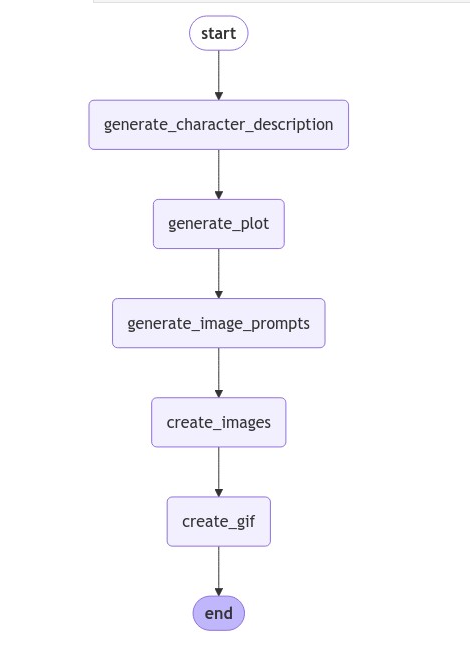
在整个过程中,LangGraph 管理步骤之间的信息流动,确保每个阶段的输出适当地输入到下一个阶段。异步编程的使用允许在图像生成和检索阶段进行高效的并行处理。 结论:这个 GIF 动画生成器展示了结合不同 AI 技术创建强大、用户友好的内容创作工具的潜力。通过自动化从文本提示到视觉动画的过程,它为讲故事、教育和娱乐开辟了新的可能性。系统的模块化特性,由 LangGraph 促进,允许轻松更新或替换单个组件。这使得项目能够适应未来语言模型或图像生成技术的进步。 虽然当前的实现侧重于创建简单的 5 帧 GIF,但这个概念可以扩展到创建更长的动画,中间阶段纳入用户反馈,或者甚至与其他媒体类型集成。随着 AI 的不断发展,这样的工具将在弥合人类创造力和机器能力之间的差距中发挥越来越重要的作用。
【9】TTS 诗歌生成代理 (LangGraph)-TTS Poem Generator Agent (LangGraph)概述:使用LangGraph和OpenAI API的高级文本转语音(TTS)代理,对输入文本进行分类,根据内容类型处理,并生成相应的语音输出。 实现️:利用LangGraph来协调工作流程,该流程使用GPT模型对输入文本进行分类,应用特定内容的处理,并使用OpenAI的TTS API将处理后的文本转换为语音。系统根据识别的内容类型(一般、诗歌、新闻或笑话)调整其输出。
#Importnecessarylibrariesandsetupenvironment
#Importrequiredlibraries
fromtypingimportTypedDict
fromlanggraph.graphimportStateGraph,END
fromIPython.displayimportdisplay,Audio,Markdown
fromopenaiimportOpenAI
fromdotenvimportload_dotenv
importio
importtempfile
importre
importos
#LoadenvironmentvariablesandsetOpenAIAPIkey
load_dotenv()
os.environ["OPENAI_API_KEY"]=os.getenv('OPENAI_API_KEY')
#InitializeOpenAIclientanddefinestate
client=OpenAI()
classAgentState(TypedDict):
input_text:str
processed_text:str
audio_data:bytes
audio_path:str
content_type:str
#DefineNodeFunctions
defclassify_content(state:AgentState)->AgentState:
"""Classifytheinputtextintooneoffourcategories:general,poem,news,orjoke."""
response=client.chat.completions.create(
model="gpt-4o-mini",
messages=[
{"role":"system","content":"Classifythecontentasoneof:'general','poem','news','joke'."},
{"role":"user","content":state["input_text"]}
]
)
state["content_type"]=response.choices[0].message.content.strip().lower()
returnstate
defprocess_general(state:AgentState)->AgentState:
"""Processgeneralcontent(nospecificprocessing,returnas-is)."""
state["processed_text"]=state["input_text"]
returnstate
defprocess_poem(state:AgentState)->AgentState:
"""Processtheinputtextasapoem,rewritingitinapoeticstyle."""
response=client.chat.completions.create(
model="gpt-4o-mini",
messages=[
{"role":"system","content":"Rewritethefollowingtextasashort,beautifulpoem:"},
{"role":"user","content":state["input_text"]}
]
)
state["processed_text"]=response.choices[0].message.content.strip()
returnstate
defprocess_news(state:AgentState)->AgentState:
"""Processtheinputtextasnews,rewritingitinaformalnewsanchorstyle."""
response=client.chat.completions.create(
model="gpt-4o-mini",
messages=[
{"role":"system","content":"Rewritethefollowingtextinaformalnewsanchorstyle:"},
{"role":"user","content":state["input_text"]}
]
)
state["processed_text"]=response.choices[0].message.content.strip()
returnstate
defprocess_joke(state:AgentState)->AgentState:
"""Processtheinputtextasajoke,turningitintoashort,funnyjoke."""
response=client.chat.completions.create(
model="gpt-4o-mini",
messages=[
{"role":"system","content":"Turnthefollowingtextintoashort,funnyjoke:"},
{"role":"user","content":state["input_text"]}
]
)
state["processed_text"]=response.choices[0].message.content.strip()
returnstate
deftext_to_speech(state:AgentState,save_file:bool=False)->AgentState:
"""
Convertsprocessedtextintospeechusingavoicemappedtothecontenttype.
Optionallysavestheaudiotoafile.
Args:
state(AgentState) ictionarycontainingtheprocessedtextandcontenttype. ictionarycontainingtheprocessedtextandcontenttype.
save_file(bool,optional):IfTrue,savestheaudiotoafile.DefaultstoFalse.
Returns:
AgentState:Updatedstatewithaudiodataandfilepath(ifsaved).
"""
#Mapcontenttypetoavoice,defaultingto"alloy"
voice_map={
"general":"alloy",
"poem":"nova",
"news":"onyx",
"joke":"shimmer"
}
voice=voice_map.get(state["content_type"],"alloy")
audio_data=io.BytesIO()
#Generatespeechandstreamaudiodataintomemory
withclient.audio.speech.with_streaming_response.create(
model="tts-1",
voice=voice,
input=state["processed_text"]
)asresponse:
forchunkinresponse.iter_bytes():
audio_data.write(chunk)
state["audio_data"]=audio_data.getvalue()
#Saveaudiotoafileifrequested
ifsave_file:
withtempfile.NamedTemporaryFile(delete=False,suffix=".mp3")astemp_audio:
temp_audio.write(state["audio_data"])
state["audio_path"]=temp_audio.name
else:
state["audio_path"]=""
returnstate
#DefineandCompiletheGraph
#Definethegraph
workflow=StateGraph(AgentState)
#Addnodestothegraph
workflow.add_node("classify_content",classify_content)
workflow.add_node("process_general",process_general)
workflow.add_node("process_poem",process_poem)
workflow.add_node("process_news",process_news)
workflow.add_node("process_joke",process_joke)
workflow.add_node("text_to_speech",text_to_speech)
#Settheentrypointofthegraph
workflow.set_entry_point("classify_content")
#Defineconditionaledgesbasedoncontenttype
workflow.add_conditional_edges(
"classify_content",
lambdax:x["content_type"],
{
"general":"process_general",
"poem":"process_poem",
"news":"process_news",
"joke":"process_joke",
}
)
#Connectprocessorstotext-to-speech
workflow.add_edge("process_general","text_to_speech")
workflow.add_edge("process_poem","text_to_speech")
workflow.add_edge("process_news","text_to_speech")
workflow.add_edge("process_joke","text_to_speech")
#Compilethegraph
app=workflow.compile()
#Afunctiontoconverttexttoavalidinformativefilename
defsanitize_filename(text,max_length=20):
"""Converttexttoavalidandconcisefilename."""
sanitized=re.sub(r'[^\w\s-]','',text.lower())
sanitized=re.sub(r'[-\s]+','_',sanitized)
returnsanitized[:max_length]
#DefineFunctiontoRunAgentandPlayAudio
defrun_tts_agent_and_play(input_text:str,content_type:str,save_file:bool=True):
result=app.invoke({
"input_text":input_text,
"processed_text":"",
"audio_data":b"",
"audio_path":"",
"content_type":content_type
})
print(f"Detectedcontenttype:{result['content_type']}")
print(f"Processedtext:{result['processed_text']}")
#Playtheaudio(thiswillonlyworkinlocalJupyterenvironment)
display(Audio(result['audio_data'],autoplay=True))
ifsave_file:
#Create'audio'directoryintheparentfolderofthenotebook
audio_dir=os.path.join('..','audio')
os.makedirs(audio_dir,exist_ok=True)
sanitized_text=sanitize_filename(input_text)
file_name=f"{content_type}_{sanitized_text}.mp3"
file_path=os.path.join(audio_dir,file_name)
withopen(file_path,"wb")asf:
f.write(result['audio_data'])
print(f"Audiosavedto:{file_path}")
#RelativepathforGitHub
github_relative_path=f"../audio/{file_name}"
display(Markdown(f"[Download{content_type}audio:{sanitized_text}]({github_relative_path})"))
#NoteaboutGitHublimitations
print("Note:AudioplaybackisnotsupporteddirectlyonGitHub.Usethedownloadlinktolistentotheaudio.")
else:
print("Audionotsavedtofile.")
returnresult
#TesttheText-to-SpeechAgent
examples={
"general":"Thequickbrownfoxjumpsoverthelazydog.",
"poem":"Rosesarered,violetsareblue,AIisamazing,andsoareyou!",
"news":"Breakingnews:Scientistsdiscoveranewspeciesofdeep-seacreatureintheMarianaTrench.",
"joke":"Whydon'tscientiststrustatoms?Becausetheymakeupeverything!"
}
forcontent_type,textinexamples.items():
print(f"\nProcessingexamplefor{content_type}content:")
print(f"Inputtext:{text}")
#RuntheTTSagentandsavethefile
result=run_tts_agent_and_play(text,content_type,save_file=True)
print("-"*50)
print("Allexamplesprocessed.Youcandownloadtheaudiofilesusingthelinksabove.")
"""
Processingexampleforgeneralcontent:
Inputtext:Thequickbrownfoxjumpsoverthelazydog.
Detectedcontenttype:poem
Processedtext:Inautumn'sbreeze,theswiftfoxleaps,
Aboveaslumberingdogitsweeps.
Withgraceitdances,swiftandfree,
Ataleofmotion,poetry.
Audiosavedto:..\audio\general_the_quick_brown_fox_.mp3
Downloadgeneralaudio:the_quick_brown_fox_
Note:AudioplaybackisnotsupporteddirectlyonGitHub.Usethedownloadlinktolistentotheaudio.
--------------------------------------------------
Processingexampleforpoemcontent:
Inputtext:Rosesarered,violetsareblue,AIisamazing,andsoareyou!
Detectedcontenttype:poem
Processedtext:Inthegardenofknowledge,wheredatabloomsbright,
UptoOctober'send,youshedyoursoftlight.
Withwisdomandinsight,likestarsinthesky,
AIisenchanting,oh,howyoucanfly!
Audiosavedto:..\audio\poem_roses_are_red_violet.mp3
Downloadpoemaudio:roses_are_red_violet
Note:AudioplaybackisnotsupporteddirectlyonGitHub.Usethedownloadlinktolistentotheaudio.
--------------------------------------------------
Processingexamplefornewscontent:
Inputtext:Breakingnews:Scientistsdiscoveranewspeciesofdeep-seacreatureintheMarianaTrench.
Detectedcontenttype:news
Processedtext:Goodevening.Inbreakingnews,scientistshavemadearemarkablediscovery,identifyinganewspeciesofdeep-seacreaturelocatedwithinthedepthsoftheMarianaTrench.Thisfindingnotonlyexpandsourunderstandingofmarinebiodiversitybutalsohighlightstheimportanceofcontinuedexplorationintheselargelyunchartedwaters.Wewillprovidemoredetailsonthisgroundbreakingannouncementastheybecomeavailable.
Audiosavedto:..\audio\news_breaking_news_scient.mp3
Downloadnewsaudio:breaking_news_scient
Note:AudioplaybackisnotsupporteddirectlyonGitHub.Usethedownloadlinktolistentotheaudio.
--------------------------------------------------
Processingexampleforjokecontent:
Inputtext:Whydon'tscientiststrustatoms?Becausetheymakeupeverything!
Detectedcontenttype:joke
Processedtext:Whydon’tAIassistantstelljokesafterOctober2023?Becausethey’restilltryingtofigureoutwhathappenedinNovember!
Audiosavedto:..\audio\joke_why_dont_scientists_.mp3
Downloadjokeaudio:why_dont_scientists_
Note:AudioplaybackisnotsupporteddirectlyonGitHub.Usethedownloadlinktolistentotheaudio.
--------------------------------------------------
Allexamplesprocessed.Youcandownloadtheaudiofilesusingthelinksabove.
"""
使用 LangGraph 和 OpenAI 构建智能文本转语音代理
概述:本教程指导您使用 LangGraph 和 OpenAI 的 API 创建一个高级文本转语音(TTS)代理的过程。该代理可以对输入文本进行分类,根据其内容类型进行处理,并生成相应的语音输出。动机:在 AI 和自然语言处理的时代,对能够智能处理和发声文本的系统需求日益增长。本项目旨在创建一个多功能 TTS 代理,它通过理解和适应不同类型的内容,超越简单的文本转语音转换。关键组件1.内容分类(Content Classification):利用 OpenAI 的 GPT 模型对输入文本进行分类。 2.内容处理(Content Processing):根据内容类型(一般、诗歌、新闻或笑话)应用特定的处理。 3.文本转语音转换(Text-to-Speech Conversion):利用 OpenAI 的 TTS API 从处理过的文本中生成音频。 4.LangGraph 工作流(LangGraph Workflow:使用状态图协调整个过程。 方法细节TTS 代理通过以下高层次步骤运作: 1.文本输入(Text Input):系统从用户那里接收文本输入。 2.内容分类(Content Classification):输入被分类为四个类别之一:通用、诗歌、新闻或笑话。 3.特定内容处理(Content-Specific Processing):根据分类,文本经过特定处理:一般文本保持不变。诗歌被重写以提高诗意质量。新闻被重新格式化为正式的新闻主播风格。笑话被提炼以增加幽默感。 4.文本转语音转换(Text-to-Speech Conversion):使用适合其内容类型的适当声音将处理过的文本转换为语音。 5.音频输出(Audio Output:根据用户偏好,生成的音频要么保存到文件,要么直接播放。 整个工作流由 LangGraph 状态机管理,确保在不同处理阶段之间平滑过渡,并在整个操作过程中保持上下文。 
结论:这个智能 TTS 代理展示了将语言模型用于内容理解与语音合成技术相结合的力量。它提供了一种更细腻、更具上下文意识的文本转语音转换方法,为各种应用中的更自然和引人入胜的音频内容生成开辟了可能性,从内容创作到无障碍解决方案。通过利用 GPT 模型在文本处理方面的优势和 OpenAI 的 TTS 能力,本项目展示了如何将先进的人工智能技术集成在一起,创建复杂的多步骤语言处理管道。
【10】音乐作曲代理 (LangGraph)-Music Compositor Agent (LangGraph)概述:使用LangGraph和OpenAI语言模型的AI音乐作曲家,根据用户输入生成自定义音乐作品。该系统通过专门的组件处理输入,每个组件都为最终的音乐作品做出贡献,然后将其转换为可播放的MIDI文件。实现️:LangGraph 协调一个工作流程,将用户输入转化为音乐作品,使用 ChatOpenAI (GPT-4) 生成旋律、和声和节奏,然后进行风格适配。最终生成的 AI 作曲被转换为 MIDI 文件,使用 music21,并可以通过 pygame 播放。
#Imports
#Importrequiredlibraries
fromtypingimportDict,TypedDict
fromlanggraph.graphimportStateGraph,END
fromlangchain_openaiimportChatOpenAI
fromlangchain.promptsimportChatPromptTemplate
importmusic21
importpygame
importtempfile
importos
importrandom

fromdotenvimportload_dotenv

#LoadenvironmentvariablesandsetOpenAIAPIkey
load_dotenv()
os.environ["OPENAI_API_KEY"]=os.getenv('OPENAI_API_KEY')

#StateDefinition

classMusicState(TypedDict):
"""Definethestructureofthestateforthemusicgenerationworkflow."""
musician_input:str#User'sinputdescribingthedesiredmusic
melody:str#Generatedmelody
harmony:str#Generatedharmony
rhythm:str#Generatedrhythm
style:str#Desiredmusicalstyle
composition:str#Completemusicalcomposition
midi_file:str#PathtothegeneratedMIDIfile

#LLMInitialization
#InitializetheChatOpenAImodel
llm=ChatOpenAI(model="gpt-4o-mini")


#ComponentFunctions
defmelody_generator(state:MusicState)->Dict:
"""Generateamelodybasedontheuser'sinput."""
prompt=ChatPromptTemplate.from_template(
"Generateamelodybasedonthisinput:{input}.Representitasastringofnotesinmusic21format."
)
chain=prompt|llm
melody=chain.invoke({"input":state["musician_input"]})
return{"melody":melody.content}

defharmony_creator(state:MusicState)->Dict:
"""Createharmonyforthegeneratedmelody."""
prompt=ChatPromptTemplate.from_template(
"Createharmonyforthismelody:{melody}.Representitasastringofchordsinmusic21format."
)
chain=prompt|llm
harmony=chain.invoke({"melody":state["melody"]})
return{"harmony":harmony.content}

defrhythm_analyzer(state:MusicState)->Dict:
"""Analyzeandsuggestarhythmforthemelodyandharmony."""
prompt=ChatPromptTemplate.from_template(
"Analyzeandsuggestarhythmforthismelodyandharmony:{melody},{harmony}.Representitasastringofdurationsinmusic21format."
)
chain=prompt|llm
rhythm=chain.invoke({"melody":state["melody"],"harmony":state["harmony"]})
return{"rhythm":rhythm.content}

defstyle_adapter(state:MusicState)->Dict:
"""Adaptthecompositiontothespecifiedmusicalstyle."""
prompt=ChatPromptTemplate.from_template(
"Adaptthiscompositiontothe{style}style:Melody:{melody},Harmony:{harmony},Rhythm:{rhythm}.Providetheresultinmusic21format."
)
chain=prompt|llm
adapted=chain.invoke({
"style":state["style"],
"melody":state["melody"],
"harmony":state["harmony"],
"rhythm":state["rhythm"]
})
return{"composition":adapted.content}

defmidi_converter(state:MusicState)->Dict:
"""ConvertthecompositiontoMIDIformatandsaveitasafile."""
#Createanewstream
piece=music21.stream.Score()

#Addthecompositiondescriptiontothestreamasatextexpression
description=music21.expressions.TextExpression(state["composition"])
piece.append(description)

#Defineawidevarietyofscalesandchords
scales={
'Cmajor':['C','D','E','F','G','A','B'],
'Cminor':['C','D','Eb','F','G','Ab','Bb'],
'Charmonicminor':['C','D','Eb','F','G','Ab','B'],
'Cmelodicminor':['C','D','Eb','F','G','A','B'],
'Cdorian':['C','D','Eb','F','G','A','Bb'],
'Cphrygian':['C','Db','Eb','F','G','Ab','Bb'],
'Clydian':['C','D','E','F#','G','A','B'],
'Cmixolydian':['C','D','E','F','G','A','Bb'],
'Clocrian':['C','Db','Eb','F','Gb','Ab','Bb'],
'Cwholetone':['C','D','E','F#','G#','A#'],
'Cdiminished':['C','D','Eb','F','Gb','Ab','A','B'],
}

chords={
'Cmajor':['C4','E4','G4'],
'Cminor':['C4','Eb4','G4'],
'Cdiminished':['C4','Eb4','Gb4'],
'Caugmented':['C4','E4','G#4'],
'Cdominant7th':['C4','E4','G4','Bb4'],
'Cmajor7th':['C4','E4','G4','B4'],
'Cminor7th':['C4','Eb4','G4','Bb4'],
'Chalf-diminished7th':['C4','Eb4','Gb4','Bb4'],
'Cfullydiminished7th':['C4','Eb4','Gb4','A4'],
}

defcreate_melody(scale_name,duration):
"""Createamelodybasedonagivenscale."""
melody=music21.stream.Part()
scale=scales[scale_name]
for_inrange(duration):
note=music21.note.Note(random.choice(scale)+'4')
note.quarterLength=1
melody.append(note)
returnmelody

defcreate_chord_progression(duration):
"""Createachordprogression."""
harmony=music21.stream.Part()
for_inrange(duration):
chord_name=random.choice(list(chords.keys()))
chord=music21.chord.Chord(chords[chord_name])
chord.quarterLength=1
harmony.append(chord)
returnharmony

#Parsetheuserinputtodeterminescaleandstyle
user_input=state['musician_input'].lower()
if'minor'inuser_input:
scale_name='Cminor'
elif'major'inuser_input:
scale_name='Cmajor'
else:
scale_name=random.choice(list(scales.keys()))

#Createa7-secondpiece(7beatsat60BPM)
melody=create_melody(scale_name,7)
harmony=create_chord_progression(7)

#Addafinalwholenotetomakeitexactly8beats(7secondsat60BPM)
final_note=music21.note.Note(scales[scale_name][0]+'4')
final_note.quarterLength=1
melody.append(final_note)

final_chord=music21.chord.Chord(chords[scale_name.split()[0]+''+scale_name.split()[1]])
final_chord.quarterLength=1
harmony.append(final_chord)

#Addthemelodyandharmonytothepiece
piece.append(melody)
piece.append(harmony)

#Setthetempoto60BPM
piece.insert(0,music21.tempo.MetronomeMark(number=60))

#CreateatemporaryMIDIfile
withtempfile.NamedTemporaryFile(delete=False,suffix='.mid')astemp_midi:
piece.write('midi',temp_midi.name)

return{"midi_file":temp_midi.name}

#GraphConstruction
#InitializetheStateGraph
workflow=StateGraph(MusicState)

#Addnodestothegraph
workflow.add_node("melody_generator",melody_generator)
workflow.add_node("harmony_creator",harmony_creator)
workflow.add_node("rhythm_analyzer",rhythm_analyzer)
workflow.add_node("style_adapter",style_adapter)
workflow.add_node("midi_converter",midi_converter)

#Settheentrypointofthegraph
workflow.set_entry_point("melody_generator")

#Addedgestoconnectthenodes
workflow.add_edge("melody_generator","harmony_creator")
workflow.add_edge("harmony_creator","rhythm_analyzer")
workflow.add_edge("rhythm_analyzer","style_adapter")
workflow.add_edge("style_adapter","midi_converter")
workflow.add_edge("midi_converter",END)

#Compilethegraph
app=workflow.compile()

#RuntheWorkflow

#Defineinputparameters
inputs={
"musician_input":"CreateahappypianopieceinCmajor",
"style":"Romanticera"
}

#Invoketheworkflow
result=app.invoke(inputs)

print("Compositioncreated")
print(f"MIDIfilesavedat:{result['midi_file']}")


#MIDIPlaybackFunction
defplay_midi(midi_file_path):
"""PlaythegeneratedMIDIfile."""
pygame.mixer.init()
pygame.mixer.music.load(midi_file_path)
pygame.mixer.music.play()

#Waitforplaybacktofinish
whilepygame.mixer.music.get_busy():
pygame.time.Clock().tick(10)

#Cleanup
pygame.mixer.quit()


print("Tocreateandplayamelody,runthefollowinginanewcell:")
print("play_midi(result['midi_file'])")
"""
Tocreateandplayamelody,runthefollowinginanewcell:
play_midi(result['midi_file'])
"""

#PlaytheGeneratedMusic
play_midi(result["midi_file"])
使用 LangGraph构建AI 音乐作曲家
概述:本教程演示了如何使用 LangGraph 构建一个 AI 驱动的音乐创作系统。LangGraph 是一个用于创建语言模型工作流的框架。该系统根据用户输入生成音乐作品,利用各种组件来创作旋律、和声、节奏和风格调整。动机:以编程方式创作音乐是人工智能与艺术表达之间迷人的交叉点。该项目旨在探索如何使用语言模型和基于图的工作流来生成连贯的音乐作品,为 AI 辅助音乐创作提供独特的方法。关键组件1.状态管理State Management:使用 MusicState 类来管理工作流的状态。 2.Language Model:采用 ChatOpenAI(GPT-4)生成音乐组件。 3.音乐功能Musical Functions:旋律生成器Melody Generator。和声创建者Harmony Creator。节奏分析器Rhythm Analyzer。风格适配器Style Adapter。 4.MIDI 转换MIDI Conversion:将作品转换为可播放的 MIDI 文件。 5.LangGraph Workflow:使用状态图协调整个创作过程。 6.播放功能Playback Functionality:允许立即播放生成的作品。 方法细节1.工作流程首先根据用户输入生成旋律。 2.然后创建和声以补充旋律。 3.分析并建议旋律和和声的节奏。 4.将作品调整为指定的音乐风格。 5.将最终作品转换为 MIDI 格式。 生成的 MIDI 文件可以使用 pygame 播放。 
整个过程使用 LangGraph 进行编排,它管理不同组件之间的信息流动,并确保每一步都建立在前一步的基础上。 结论:这个 AI 音乐作曲家展示了将语言模型与结构化工作流相结合来创作音乐作品的潜力。通过将创作过程分解为离散步骤并利用 AI 的力量,我们可以根据简单的用户输入生成独特的音乐作品。这种方法为音乐制作和创作中的 AI 辅助创造力开辟了新的可能性。
? Advanced Agent Architectures、高级代理架构
【11】记忆增强对话代理-Memory-Enhanced Conversational Agent概述:增强记忆的对话AI代理,结合了短期和长期记忆系统,以在对话和多个会话之间保持上下文,从而提高互动质量和个性化。实现:集成了一个语言模型,具有独立的短期和长期记忆存储,利用包含这两种记忆类型的提示模板,并使用内存管理器进行存储和检索。该系统包括一个交互循环,更新并利用每个响应的记忆。
#SetupandImports
fromlangchain_openaiimportChatOpenAI
fromlangchain_core.runnables.historyimportRunnableWithMessageHistory
fromlangchain.memoryimportChatMessageHistory

fromlangchain_core.promptsimportChatPromptTemplate,MessagesPlaceholder
fromdotenvimportload_dotenv
importos

#Loadenvironmentvariables
load_dotenv()
os.environ["OPENAI_API_KEY"]=os.getenv('OPENAI_API_KEY')
#Initializethelanguagemodel
llm=ChatOpenAI(model="gpt-4o-mini",max_tokens=1000,temperature=0)

#MemoryStores
chat_store={}
long_term_memory={}

defget_chat_history(session_id:str):
ifsession_idnotinchat_store:
chat_store[session_id]=ChatMessageHistory()
returnchat_store[session_id]

defupdate_long_term_memory(session_id:str,input:str,output:str):
ifsession_idnotinlong_term_memory:
long_term_memory[session_id]=[]
iflen(input)>20:#Simplelogic:storeinputslongerthan20characters
long_term_memory[session_id].append(f"Usersaid:{input}")
iflen(long_term_memory[session_id])>5:#Keeponlylast5memories
long_term_memory[session_id]=long_term_memory[session_id][-5:]

defget_long_term_memory(session_id:str):
return".".join(long_term_memory.get(session_id,[]))

#PromptTemplate
prompt=ChatPromptTemplate.from_messages([
("system","YouareahelpfulAIassistant.Usetheinformationfromlong-termmemoryifrelevant."),
("system","Long-termmemory:{long_term_memory}"),
MessagesPlaceholder(variable_name="history"),
("human","{input}")
])

#ConversationalChain
chain=prompt|llm
chain_with_history=RunnableWithMessageHistory(
chain,
get_chat_history,
input_messages_key="input",
history_messages_key="history"
)

#ChatFunction
defchat(input_text:str,session_id:str):
long_term_mem=get_long_term_memory(session_id)
response=chain_with_history.invoke(
{"input":input_text,"long_term_memory":long_term_mem},
config={"configurable":{"session_id":session_id}}
)
update_long_term_memory(session_id,input_text,response.content)
returnresponse.content

#ExampleUsage
session_id="user_123"

print("AI:",chat("Hello!MynameisAlice.",session_id))
print("AI:",chat("What'stheweatherliketoday?",session_id))
print("AI:",chat("Ilovesunnydays.",session_id))
print("AI:",chat("Doyouremembermyname?",session_id))

"""
AI:Hello,Alice!HowcanIassistyoutoday?
AI:Idon'thavereal-timeweatherdata,butyoucancheckaweatherwebsiteorappforthemostaccurateandup-to-dateinformation.Ifyoutellmeyourlocation,Icansuggestwhattolookfor!
AI:Sunnydaysarewonderful!Theycanreallyliftyourmoodandareperfectforoutdooractivities.Doyouhaveanyfavoritethingsyouliketodoonsunnydays?
AI:Yes,yournameisAlice!HowcanIassistyoufurthertoday?
"""

#ReviewMemory
print("ConversationHistory:")
formessageinchat_store[session_id].messages:
print(f"{message.type}:{message.content}")

print("\nLong-termMemory:")
print(get_long_term_memory(session_id))

"""
ConversationHistory:
human:Hello!MynameisAlice.
ai:Hello,Alice!HowcanIassistyoutoday?
human:What'stheweatherliketoday?
ai:Idon'thavereal-timeweatherdata,butyoucancheckaweatherwebsiteorappforthemostaccurateandup-to-dateinformation.Ifyoutellmeyourlocation,Icansuggestwhattolookfor!
human:Ilovesunnydays.
ai:Sunnydaysarewonderful!Theycanreallyliftyourmoodandareperfectforoutdooractivities.Doyouhaveanyfavoritethingsyouliketodoonsunnydays?
humanoyouremembermyname?
ai:Yes,yournameisAlice!HowcanIassistyoufurthertoday?

Long-termMemory:
Usersaid:Hello!MynameisAlice..Usersaid:What'stheweatherliketoday?.Usersaidoyouremembermyname?
"""
概述:本教程概述了创建具有增强记忆能力的对话式AI代理的过程。该代理结合了短期记忆和长期记忆来维持上下文,并随着时间的推移提高互动质量。
动机:传统的聊天机器人通常难以维持超出即时互动的上下文。这一限制可能导致对话断断续续,缺乏个性化。通过实施短期记忆和长期记忆,我们的目标是创建一个能够:在单次对话中维持上下文。在多个会话中记住重要信息。提供更连贯和个性化的响应。
关键组件
1.语言模型(Language Model):理解和生成响应的核心AI组件。
2.短期记忆(Short-term Memory):存储即时对话历史。
3.长期记忆(Long-term Memory):在多次对话中保留重要信息。
4.提示模板(Prompt Template):构建输入的语言模型,结合两种类型的记忆。
5.记忆管理器(Memory Manager):处理两种记忆类型中的信息存储和检索。
方法细节 1.设置环境-(Setting Up the Environment) 导入必要的语言模型、记忆管理和提示处理的库。使用所需参数(例如,模型类型、令牌限制)初始化语言模型。 2.实施记忆系统(Implementing Memory Systems)创建短期记忆存储(对话历史):使用字典管理多个对话会话。实现检索或创建新的对话历史的函数。
开发长期记忆系统:为持久信息创建单独的存储。实现更新和检索长期记忆的函数。定义简单的标准来决定哪些信息应该长期存储(例如,更长的用户输入)。
3.设计对话结构(Designing the Conversation Structure)
创建一个包含以下内容的提示模板:定义AI角色的系统消息。长期记忆上下文的部分。对话历史(短期记忆)的占位符。当前用户输入。
4.构建对话链(Building the Conversational Chain)
将提示模板与语言模型结合起来。用一个管理消息历史的组件包裹这个组合。确保链条可以访问和更新短期和长期记忆。
5.创建交互循环(Creating the Interaction Loop)
开发一个主聊天函数,该函数:检索相关的长期记忆。使用当前输入和记忆调用对话链。根据互动更新长期记忆。返回AI的响应。6.测试和完善(Testing and Refinement)运行示例对话以测试代理维持上下文的能力。在互动后审查短期和长期记忆。根据需要调整记忆管理标准和提示结构。
结论:增强记忆的对话式代理,相比传统聊天机器人具有几个优势:1.改进的上下文意识:通过利用短期和长期记忆,代理可以在对话内外维持上下文。2.个性化:长期记忆允许代理记住用户偏好和过去的互动,从而实现更个性化的响应。3.灵活的记忆管理:实施允许轻松调整长期存储的信息以及如何在对话中使用它。4.可扩展性:基于会话的方法允许管理多个独立的对话。
这种实现为创建更复杂的AI代理提供了基础。未来的增强可能包括:更高级的长期记忆存储标准。实施记忆巩固或总结技术。与外部知识库集成。跨互动的情感或情绪跟踪。通过关注记忆增强,这种对话式代理设计显著提高了基本聊天机器人的功能,为更引人入胜、上下文意识和智能的AI助手铺平了道路。
【12】多代理协作系统-Multi-Agent Collaboration System概述:一个多智能体协作系统,将历史研究与数据分析相结合,利用大型语言模型模拟专门的智能体共同工作,以回答复杂的历史问题。
实现️:利用基础代理类创建专门的历史研究代理和数据分析代理,由历史数据协作系统进行协调。该系统遵循五个步骤:历史背景提供、数据需求识别、历史数据提供、数据分析和最终综合。
#Importrequiredlibraries
importos
importtime
fromlangchain_openaiimportChatOpenAI
fromlangchain.schemaimportHumanMessage,SystemMessage,AIMessage
fromtypingimportList,Dict
fromdotenvimportload_dotenv
load_dotenv()
os.environ["OPENAI_API_KEY"]=os.getenv('OPENAI_API_KEY')
#Initializethelanguagemodel
llm=ChatOpenAI(model="gpt-4o-mini",max_tokens=1000,temperature=0.7)
#DefinethebaseAgentclass
classAgent:
def__init__(self,name:str,role:str,skills ist[str]): ist[str]):
self.name=name
self.role=role
self.skills=skills
self.llm=llm
defprocess(self,task:str,contextist[Dict]=None)->str:
messages=[
SystemMessage(content=f"Youare{self.name},a{self.role}.Yourskillsinclude:{','.join(self.skills)}.Respondtothetaskbasedonyourroleandskills.")
]
ifcontext:
formsgincontext:
ifmsg['role']=='human':
messages.append(HumanMessage(content=msg['content']))
elifmsg['role']=='ai':
messages.append(AIMessage(content=msg['content']))
messages.append(HumanMessage(content=task))
response=self.llm.invoke(messages)
returnresponse.content
#Definespecializedagents:HistoryResearchAgentandDataAnalysisAgent
classHistoryResearchAgent(Agent):
def__init__(self):
super().__init__("Clio","HistoryResearchSpecialist",["deepknowledgeofhistoricalevents","understandingofhistoricalcontexts","identifyinghistoricaltrends"])
classDataAnalysisAgent(Agent):
def__init__(self):
super().__init__("Data","DataAnalysisExpert",["interpretingnumericaldata","statisticalanalysis","datavisualizationdescription"])
#Definethedifferentfunctionsforthecollaborationsystem
#ResearchHistoricalContext
defresearch_historical_context(history_agent,task:str,context:list)->list:
print("?️HistoryAgent:Researchinghistoricalcontext...")
history_task=f"Providerelevanthistoricalcontextandinformationforthefollowingtask:{task}"
history_result=history_agent.process(history_task)
context.append({"role":"ai","content":f"HistoryAgent:{history_result}"})
print(f"?Historicalcontextprovided:{history_result[:100]}...\n")
returncontext
#IdentifyDataNeeds
defidentify_data_needs(data_agent,task:str,context:list)->list:
print("?DataAgent:Identifyingdataneedsbasedonhistoricalcontext...")
historical_context=context[-1]["content"]
data_need_task=f"Basedonthehistoricalcontext,whatspecificdataorstatisticalinformationwouldbehelpfultoanswertheoriginalquestion?Historicalcontext:{historical_context}"
data_need_result=data_agent.process(data_need_task,context)
context.append({"role":"ai","content":f"DataAgent:{data_need_result}"})
print(f"?Dataneedsidentified:{data_need_result[:100]}...\n")
returncontext
#ProvideHistoricalData
defprovide_historical_data(history_agent,task:str,context:list)->list:
print("?️HistoryAgent rovidingrelevanthistoricaldata...") rovidingrelevanthistoricaldata...")
data_needs=context[-1]["content"]
data_provision_task=f"Basedonthedataneedsidentified,providerelevanthistoricaldataorstatistics.Dataneeds:{data_needs}"
data_provision_result=history_agent.process(data_provision_task,context)
context.append({"role":"ai","content":f"HistoryAgent:{data_provision_result}"})
print(f"?Historicaldataprovided:{data_provision_result[:100]}...\n")
returncontext
#AnalyzeData
defanalyze_data(data_agent,task:str,context:list)->list:
print("?DataAgent:Analyzinghistoricaldata...")
historical_data=context[-1]["content"]
analysis_task=f"Analyzethehistoricaldataprovidedanddescribeanytrendsorinsightsrelevanttotheoriginaltask.Historicaldata:{historical_data}"
analysis_result=data_agent.process(analysis_task,context)
context.append({"role":"ai","content":f"DataAgent:{analysis_result}"})
print(f"?Dataanalysisresults:{analysis_result[:100]}...\n")
returncontext
#SynthesizeFinalAnswer
defsynthesize_final_answer(history_agent,task:str,context:list)->str:
print("?️HistoryAgent:Synthesizingfinalanswer...")
synthesis_task="Basedonallthehistoricalcontext,data,andanalysis,provideacomprehensiveanswertotheoriginaltask."
final_result=history_agent.process(synthesis_task,context)
returnfinal_result
#HistoryDataCollaborationSystemClass
classHistoryDataCollaborationSystem:
def__init__(self):
self.history_agent=Agent("Clio","HistoryResearchSpecialist",["deepknowledgeofhistoricalevents","understandingofhistoricalcontexts","identifyinghistoricaltrends"])
self.data_agent=Agent("Data","DataAnalysisExpert",["interpretingnumericaldata","statisticalanalysis","datavisualizationdescription"])
defsolve(self,task:str,timeout:int=300)->str:
print(f"\n?Startingcollaborationtosolve:{task}\n")
start_time=time.time()
context=[]
steps=[
(research_historical_context,self.history_agent),
(identify_data_needs,self.data_agent),
(provide_historical_data,self.history_agent),
(analyze_data,self.data_agent),
(synthesize_final_answer,self.history_agent)
]
forstep_func,agentinsteps:
iftime.time()-start_time>timeout:
return"Operationtimedout.Theprocesstooktoolongtocomplete."
try:
result=step_func(agent,task,context)
ifisinstance(result,str):
returnresult#Thisisthefinalanswer
context=result
exceptExceptionase:
returnf"Errorduringcollaboration:{str(e)}"
print("\n✅Collaborationcomplete.Finalanswersynthesized.\n")
returncontext[-1]["content"]
#Exampleusage
#Createaninstanceofthecollaborationsystem
collaboration_system=HistoryDataCollaborationSystem()
#Defineacomplexhistoricalquestionthatrequiresbothhistoricalknowledgeanddataanalysis
question="HowdidurbanizationratesinEuropecomparetothoseinNorthAmericaduringtheIndustrialRevolution,andwhatwerethemainfactorsinfluencingthesetrends?"
#Solvethequestionusingthecollaborationsystem
result=collaboration_system.solve(question)
#Printtheresult
print(result)
"""
?Startingcollaborationtosolve:HowdidurbanizationratesinEuropecomparetothoseinNorthAmericaduringtheIndustrialRevolution,andwhatwerethemainfactorsinfluencingthesetrends?
?️HistoryAgent:Researchinghistoricalcontext...
?HistoricalcontextprovideduringtheIndustrialRevolution,whichgenerallyspannedfromthelate18thcenturytothemid-19th...
?DataAgent:Identifyingdataneedsbasedonhistoricalcontext...
?Dataneedsidentified:ToanalyzetheurbanizationphenomenonduringtheIndustrialRevolutioninEuropeandNorthAmerica...
?️HistoryAgentrovidingrelevanthistoricaldata...
?Historicaldataprovided:Hereissomerelevanthistoricaldataandstatisticsthatpertaintotheurbanizationphenomenondur...
?DataAgent:Analyzinghistoricaldata...
?DataanalysisresultsataAgent:Analyzingthehistoricaldataprovidedrevealsseveralkeytrendsandinsightsregarding...
?️HistoryAgent:Synthesizingfinalanswer...
###UrbanizationDuringtheIndustrialRevolution:AComparativeAnalysisofEuropeandNorthAmerica
TheIndustrialRevolution,spanningfromthelate18thcenturytothemid-19thcentury,markedatransformativeeracharacterizedbysignificantchangesineconomicstructures,socialdynamics,andurbandevelopment.Urbanizationemergedasacrucialphenomenonduringthisperiod,particularlyinEuropeandNorthAmerica,albeitwithnotabledifferencesinthepace,scale,andnatureofurbangrowthbetweenthetworegions.
####UrbanizationinEurope
1.**OriginsandGrowth**:TheIndustrialRevolutionbeganinBritainaroundthe1760s,leadingtorapidindustrialgrowthandashiftfromagrariantoindustrialeconomies.CitiessuchasManchester,Birmingham,andLondonwitnessedexplosivepopulationgrowth.Forexample,London’spopulationsurgedfromapproximately1millionin1801to2.5millionby1851,whileManchestergrewfrom75,000to300,000duringthesameperiod.
2.**RateofUrbanization**:By1851,about50%ofBritain'spopulationlivedinurbanareas,reflectingasignificanturbanizationtrend.Theannualgrowthratesinmajorcitiesweresubstantial,withManchesterexperiencinganapproximate4.6%growthrate.Thisrapidurbanizationwasdrivenbythepromiseofjobsinfactoriesandimprovedtransportationnetworks,suchasrailwaysandcanals,whichfacilitatedthemovementofgoodsandpeople.
3.**SocialandEconomicShifts**:Theurbanworkforcetransformeddramatically,withroughly50%oftheBritishworkforceengagedinmanufacturingbymid-century.Thisshiftledtotheemergenceofadistinctworkingclassandsignificantsocialchanges,includingincreasedlabororganizationandpoliticalactivism,exemplifiedbymovementslikeChartism.
4.**Challenges**:Urbanizationbroughtaboutseveresocialchallenges,includingovercrowding,poorlivingconditions,andpublichealthcrises.Forinstance,choleraoutbreaksinLondonduringthe1840sunderscoredthedireconsequencesofrapidurbangrowth,asmanyurbanareaslackedadequatesanitationandhousing.
####UrbanizationinNorthAmerica
1.**EmergenceandGrowth**:NorthAmerica,particularlytheUnitedStates,beganitsindustrializationlater,gainingmomentumintheearlytomid-19thcentury.CitieslikeNewYorkandChicagobecamepivotalindustrialandurbancenters.NewYorkCity'spopulationgrewfromaround60,000in1800toover1.1millionby1860,showcasingaremarkableurbanexpansion.
2.**UrbanizationRates**:By1860,approximately20%oftheU.S.populationlivedinurbanareas,indicatingalowerurbanizationlevelcomparedtoEurope.However,thegrowthrateofurbanpopulationswashigh,withNewYorkexperiencinganannualgrowthrateofabout7.6%.Thisgrowthwasfueledbysubstantialimmigration,primarilyfromEurope,whichcontributedsignificantlytourbandemographics.
3.**EconomicandLaborDynamics**:TheU.S.sawabout20%ofitsworkforceinmanufacturingby1860,withapproximately110,000manufacturingestablishments,markingaburgeoningindustrialsector.Theinfluxofimmigrantsprovidedalaborforcethatwasessentialforthegrowthofindustriesandurbancenters,significantlydiversifyingthepopulation.
4.**SocialIssues**iketheirEuropeancounterparts,urbanareasintheU.S.facedchallengesrelatedtoovercrowdingandinadequateinfrastructure.InNewYork,someneighborhoodshadpopulationdensitiesexceeding135,000peoplepersquaremile.Theseconditionsoftenledtopublichealthconcernsandsocialunrest,promptingtheriseoflabormovementsadvocatingforworkers’rightsandimprovedlivingconditions.
5.**LegislativeResponses**:TheresponsetourbanizationintheU.S.includedtheformationoflaborunionsandearlylabormovements,suchastheNationalLaborUnionestablishedin1866,whichaimedtoaddressworkers'rightsandworkingconditions.Thisreflectedagrowingawarenessoftheneedforsocialandeconomicreformsamidsttherapidurbanandindustrialexpansion.
####Conclusion
Inconclusion,urbanizationduringtheIndustrialRevolutionwasadefiningcharacteristicofbothEuropeandNorthAmerica,drivenbyindustrialization,economicopportunities,andtransportationadvancements.Europe,particularlyBritain,experiencedanearlierandmoreadvancedstageofurbanization,whileNorthAmerica,fueledbyimmigrationandrapidindustrialgrowth,showedaremarkableincreaseinurbanpopulations.Despitetheirdifferences,bothregionsfacedsimilarchallengesrelatedtoovercrowding,publichealth,andlaborrights,leadingtosocialchangesandmovementsadvocatingforreforms.Thecomplexitiesofurbanizationduringthistransformativeeralaidthegroundworkforthemodernurbanlandscape,shapingsocioeconomicstructuresandinfluencingfuturedevelopmentsinbothregions.
"""
历史与数据分析协作系统 概述:实现一个多代理协作系统,该系统结合了历史研究和数据分析来回答复杂的历史问题。它利用大型语言模型的力量来模拟专业代理协同工作,以提供全面的答案。
动机:历史分析通常需要深入的上下文理解和定量数据解释。通过创建一个结合这两个方面的系统,我们旨在为复杂的历史问题提供更健全和有洞察力的答案。这种方法模仿了历史学家和数据分析师之间的现实世界协作,可能导致更加细致和数据驱动的历史洞察。
关键组件
1.代理类Agent Class:创建专业AI代理的基础类。
2.历史研究代理HistoryResearchAgent:擅长历史背景和趋势。
3.数据分析代理DataAnalysisAgent:专注于解释数值数据和统计。
4.历史数据协作系统HistoryDataCollaborationSystem:协调代理之间的协作。
方法细节
协作系统遵循以下步骤:
1.历史背景Historical Context:历史代理提供相关的历史背景。
2.数据需求识别Data Needs Identification:数据代理确定需要什么定量信息。
3.历史数据提供Historical Data Provision:历史代理提供相关的历史数据。
4.数据分析Data Analysis:数据代理解释所提供的历史数据。
5.最终综合Final Synthesis:历史代理将所有洞察整合成一个全面的答案。
这个迭代过程允许在历史背景和数据分析之间来回进行,模仿现实世界的协作研究。
结论:历史与数据分析协作系统展示了多代理AI系统在解决复杂、跨学科问题方面的潜力。通过结合历史研究和数据分析的优势,它提供了一种理解历史趋势和事件的新方法。该系统对于研究人员、教育工作者以及任何有兴趣深入了解历史主题的人来说都很有价值。
未来的改进可能包括添加更多专业代理,纳入外部数据源,并完善协作过程以实现更加细致的分析。
参考链接:https://github.com/NirDiamant/GenAI_Agents 视频介绍:https://www.bilibili.com/video/BV1zdxCeyEy1
|










