ingFang SC", Cambria, Cochin, Georgia, serif;font-size: medium;font-style: normal;font-variant-ligatures: normal;font-variant-caps: normal;font-weight: 400;orphans: 2;text-indent: 0px;text-transform: none;widows: 2;word-spacing: 0px;-webkit-text-stroke-width: 0px;white-space: normal;text-decoration-thickness: initial;text-decoration-style: initial;text-decoration-color: initial;">ingFang SC", Cambria, Cochin, Georgia, serif;font-size: medium;font-style: normal;font-variant-ligatures: normal;font-variant-caps: normal;font-weight: 400;orphans: 2;text-indent: 0px;text-transform: none;widows: 2;word-spacing: 0px;-webkit-text-stroke-width: 0px;white-space: normal;text-decoration-thickness: initial;text-decoration-style: initial;text-decoration-color: initial;">在本文中,我将向您展示如何使用 Unsloth 微调 LLM(Meta 的 Llama 3)。我还将提供使用您自己自定义数据集的方法。ingFang SC", Cambria, Cochin, Georgia, serif;font-size: medium;font-style: normal;font-variant-ligatures: normal;font-variant-caps: normal;font-weight: 400;orphans: 2;text-indent: 0px;text-transform: none;widows: 2;word-spacing: 0px;-webkit-text-stroke-width: 0px;white-space: normal;text-decoration-thickness: initial;text-decoration-style: initial;text-decoration-color: initial;">注意:Unsloth 是一个加速 LLM 在 NVIDIA GPU 上微调的库(与传统方法相比,内存使用减少 40%)。与 Hugging Face 兼容,支持 Llama 和 Mistral 架构。ingFang SC", Cambria, Cochin, Georgia, serif;font-size: medium;font-style: normal;font-variant-ligatures: normal;font-variant-caps: normal;font-weight: 400;orphans: 2;text-indent: 0px;text-transform: none;widows: 2;word-spacing: 0px;-webkit-text-stroke-width: 0px;white-space: normal;text-decoration-thickness: initial;text-decoration-style: initial;text-decoration-color: initial;">如果您觉得我的文章有趣,请不要忘记点赞并关注??,写这些文章需要时间和精力!ingFang SC", Cambria, Cochin, Georgia, serif;font-size: medium;font-style: normal;font-variant-ligatures: normal;font-variant-caps: normal;font-weight: 400;orphans: 2;text-indent: 0px;text-transform: none;widows: 2;word-spacing: 0px;-webkit-text-stroke-width: 0px;white-space: normal;text-decoration-thickness: initial;text-decoration-style: initial;text-decoration-color: initial;">您可以访问 GitHub 仓库中提供的免费笔记本。ingFang SC", Cambria, Cochin, Georgia, serif;font-size: medium;font-style: normal;font-variant-ligatures: normal;font-variant-caps: normal;font-weight: 400;orphans: 2;text-indent: 0px;text-transform: none;widows: 2;word-spacing: 0px;-webkit-text-stroke-width: 0px;white-space: normal;text-decoration-thickness: initial;text-decoration-style: initial;text-decoration-color: initial;"> ingFang SC", Cambria, Cochin, Georgia, serif;font-size: medium;font-style: normal;font-variant-ligatures: normal;font-variant-caps: normal;font-weight: 400;orphans: 2;text-indent: 0px;text-transform: none;widows: 2;word-spacing: 0px;-webkit-text-stroke-width: 0px;white-space: normal;text-decoration-thickness: initial;text-decoration-style: initial;text-decoration-color: initial;">由于我使用的是 Llama 3,因此我将点击笔记本(您也可以在自己的计算机上安装 Unsloth)。ingFang SC", Cambria, Cochin, Georgia, serif;font-size: medium;font-style: normal;font-variant-ligatures: normal;font-variant-caps: normal;font-weight: 400;orphans: 2;text-indent: 0px;text-transform: none;widows: 2;word-spacing: 0px;-webkit-text-stroke-width: 0px;white-space: normal;text-decoration-thickness: initial;text-decoration-style: initial;text-decoration-color: initial;">注意:我将使用这个数据集 “alpaca-cleaned” 来自 Hugging Face,数据采用 Alpaca 格式,即包含(指令、输入和输出)。ingFang SC", Cambria, Cochin, Georgia, serif;font-style: normal;font-variant-ligatures: normal;font-variant-caps: normal;letter-spacing: normal;orphans: 2;text-align: start;text-indent: 0px;text-transform: none;widows: 2;word-spacing: 0px;-webkit-text-stroke-width: 0px;white-space: normal;text-decoration-thickness: initial;text-decoration-style: initial;text-decoration-color: initial;">开始项目ingFang SC", Cambria, Cochin, Georgia, serif;font-size: medium;font-style: normal;font-variant-ligatures: normal;font-variant-caps: normal;font-weight: 400;orphans: 2;text-indent: 0px;text-transform: none;widows: 2;word-spacing: 0px;-webkit-text-stroke-width: 0px;white-space: normal;text-decoration-thickness: initial;text-decoration-style: initial;text-decoration-color: initial;">在项目中,我将指导您使用 Unsloth 进行微调,解释代码并提供建议,让我们开始我们的项目: ingFang SC", Cambria, Cochin, Georgia, serif;font-size: medium;font-style: normal;font-variant-ligatures: normal;font-variant-caps: normal;font-weight: 400;orphans: 2;text-indent: 0px;text-transform: none;widows: 2;word-spacing: 0px;-webkit-text-stroke-width: 0px;white-space: normal;text-decoration-thickness: initial;text-decoration-style: initial;text-decoration-color: initial;">由于我使用的是 Llama 3,因此我将点击笔记本(您也可以在自己的计算机上安装 Unsloth)。ingFang SC", Cambria, Cochin, Georgia, serif;font-size: medium;font-style: normal;font-variant-ligatures: normal;font-variant-caps: normal;font-weight: 400;orphans: 2;text-indent: 0px;text-transform: none;widows: 2;word-spacing: 0px;-webkit-text-stroke-width: 0px;white-space: normal;text-decoration-thickness: initial;text-decoration-style: initial;text-decoration-color: initial;">注意:我将使用这个数据集 “alpaca-cleaned” 来自 Hugging Face,数据采用 Alpaca 格式,即包含(指令、输入和输出)。ingFang SC", Cambria, Cochin, Georgia, serif;font-style: normal;font-variant-ligatures: normal;font-variant-caps: normal;letter-spacing: normal;orphans: 2;text-align: start;text-indent: 0px;text-transform: none;widows: 2;word-spacing: 0px;-webkit-text-stroke-width: 0px;white-space: normal;text-decoration-thickness: initial;text-decoration-style: initial;text-decoration-color: initial;">开始项目ingFang SC", Cambria, Cochin, Georgia, serif;font-size: medium;font-style: normal;font-variant-ligatures: normal;font-variant-caps: normal;font-weight: 400;orphans: 2;text-indent: 0px;text-transform: none;widows: 2;word-spacing: 0px;-webkit-text-stroke-width: 0px;white-space: normal;text-decoration-thickness: initial;text-decoration-style: initial;text-decoration-color: initial;">在项目中,我将指导您使用 Unsloth 进行微调,解释代码并提供建议,让我们开始我们的项目:1/ 安装所需的包:我们首先需要安装Unsloth和xformers、trl、peft、accelerate、bitsandbytes库,以便进行高效的模型训练和推理。 !pip install "unsloth[colab-new] @ git+https://github.com/unslothai/unsloth.git"
!pip install --no-deps xformers trl peft accelerate bitsandbytes
2/ 加载和配置模型:在配置中,我将设置以下内容: 注意:您可以在资源部分找到我关于微调 LLM 的技巧的文章。 from unsloth import FastLanguageModel
import torch
## 配置
max_seq_length = 2048
dtype = None
load_in_4bit = True
## 加载选定的模型
model, tokenizer = FastLanguageModel.from_pretrained(
model_name="unsloth/llama-3-8b-bnb-4bit",
max_seq_length=max_seq_length,
dtype=dtype,
load_in_4bit=load_in_4bit,
)
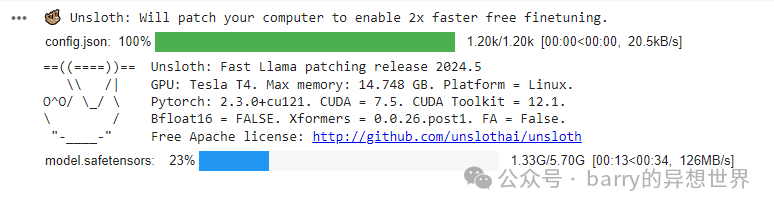
3/ 应用 PEFT(参数高效微调):然后我们将使用 LoRA 对预训练模型进行微调。 r = 16 是 LoRA 的秩参数。注意:常见值为 8、16、32、64、128 lora_alpha = 16 代表 LoRA 更新的缩放因子(我将写一篇关于 LoRA 的文章,以详细解释每个部分) 对于 LoRA 不使用 dropout 和偏置 对于 use_gradient_checkpointing,我们使用 Unsloth 来处理(节省内存)
model = FastLanguageModel.get_peft_model(
model,
r = 16,
target_modules = ["q_proj", "k_proj", "v_proj", "o_proj", "gate_proj", "up_proj", "down_proj"],
lora_alpha = 16,
lora_dropout = 0,
bias = "none",
use_gradient_checkpointing = "unsloth",
random_state = 3407,
use_rslora = False,
loftq_config = None,
)
4/ 定义提示模板:我们将创建 alpaca 提示模板以格式化数据集(如果您使用的数据不是这种格式)。 我们还将添加 EOS(结束序列)以通知 LLM 句子已结束。 最后是格式化函数,该函数接受一批示例并根据我们之前编写的 alpaca 提示模板格式化每个示例。 alpaca_prompt = """以下是描述任务的指令,配有提供进一步上下文的输入。写一个适当完成请求的响应。
#### 指令:
{}
#### 输入:
{}
#### 响应:
{}"""
EOS_TOKEN = tokenizer.eos_token
def formatting_prompts_func(examples):
instructions = examples["instruction"]
inputs = examples["input"]
outputs = examples["output"]
texts = []
for instruction, input, output in zip(instructions, inputs, outputs):
text = alpaca_prompt.format(instruction, input, output) + EOS_TOKEN
texts.append(text)
return {"text": texts}
5/ 加载和格式化数据集:加载 Alpaca 数据集并对每个数据集示例应用格式化。 from datasets import load_dataset
dataset = load_dataset("yahma/alpaca-cleaned", split = "train")
dataset = dataset.map(formatting_prompts_func, batched = True)

6/ 设置和训练模型:我在我之前的文章中涵盖了大部分关于微调的技巧。 from trl import SFTTrainer
from transformers import TrainingArguments
from unsloth import is_bfloat16_supported
trainer = SFTTrainer(
model = model,
tokenizer = tokenizer,
train_dataset = dataset,
dataset_text_field = "text",
max_seq_length = max_seq_length,
dataset_num_proc = 2, # 用于数据预处理的进程数量
packing = False, # 是否将多个序列打包成一个批次以提高训练效率
args = TrainingArguments(
per_device_train_batch_size = 2, # 每个设备的批次大小
gradient_accumulation_steps = 4, # 梯度累积步数,允许有效增大批次大小
warmup_steps = 5, # 进行线性学习率预热的步骤数
max_steps = 60, # 总训练步骤数
learning_rate = 2e-5,# 优化器的学习率
fp16 = not is_bfloat16_supported(),
bf16 = is_bfloat16_supported(),
logging_steps = 1,
optim = "adamw_8bit",
weight_decay = 0.01,
lr_scheduler_type = "cosine",
seed = 3407,
output_dir = "outputs",
),
)
trainer_stats = trainer.train()

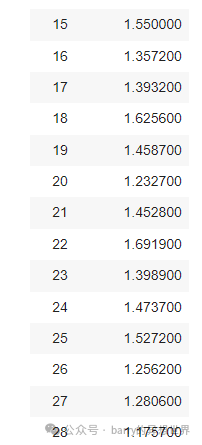
7/ 推理和生成:我们通过准备输入提示、对其进行标记化,然后使用模型根据该提示生成新文本来准备模型进行推理。生成的文本随后被转换回可读形式。 FastLanguageModel.for_inference(model)
inputs = tokenizer(
[
alpaca_prompt.format(
"继续斐波那契数列。", # 指令
"1, 1, 2, 3, 5, 8", # 输入
"", # 输出 - 留空以进行生成!
)
], return_tensors = "pt").to("cuda")
outputs = model.generate(**inputs, max_new_tokens = 64, use_cache = True)
tokenizer.batch_decode(outputs)

您还可以使用 TextStreamer 进行连续推理,这样您可以看到生成的每个标记,而不是一直等待整个过程! FastLanguageModel.for_inference(model)
inputs = tokenizer(
[
alpaca_prompt.format(
"继续斐波那契数列。",
"1, 1, 2, 3, 5, 8",
"",
)
], return_tensors = "pt").to("cuda")
outputs = model.generate(**inputs, max_new_tokens = 64, use_cache = True)
tokenizer.batch_decode(outputs)
from transformers import TextStreamer
text_streamer = TextStreamer(tokenizer)
_ = model.generate(**inputs, streamer = text_streamer, max_new_tokens = 128)

8/ 保存模型:如果您对此感到满意,可以保存您的模型或将其推送到 Hugging Face Hub。 model.save_pretrained("lora_model")
tokenizer.save_pretrained("lora_model")
## model.push_to_hub("your_name/lora_model", token = "...")
## tokenizer.push_to_hub("your_name/lora_model", token = "...")
9/ 加载模型: if False:
from unsloth import FastLanguageModel
model, tokenizer = FastLanguageModel.from_pretrained(
model_name = "lora_model",
max_seq_length = max_seq_length,
dtype = dtype,
load_in_4bit = load_in_4bit,
)
FastLanguageModel.for_inference(model)
10/ 用于生成: inputs = tokenizer(
[
alpaca_prompt.format(
"巴勒斯坦的首都是什么?",
"",
"",
)
], return_tensors = "pt").to("cuda")
outputs = model.generate(**inputs, max_new_tokens = 64, use_cache = True)
tokenizer.batch_decode(outputs)
|










