ingFang SC", "Hiragino Sans GB", "Microsoft YaHei UI", "Microsoft YaHei", Arial, sans-serif;margin: 1.5em 8px;letter-spacing: 0.1em;color: rgb(63, 63, 63);">自从企业开始采用检索增强生成(Retrieval Augmented Generation,RAG)以来,这项技术已经取得了显著进步。正如我们所见,各组织不断探索创新方法以挖掘更多价值。尽管检索过程和搜索算法变得更快、更高效,但在处理复杂任务(如多步逻辑推导)或回答需要将分散信息点连接起来的复杂问题时,它们仍然存在局限性。ingFang SC", "Hiragino Sans GB", "Microsoft YaHei UI", "Microsoft YaHei", Arial, sans-serif;margin: 1.5em 8px;letter-spacing: 0.1em;color: rgb(63, 63, 63);">让我们通过一个真实的例子来进一步探讨这个主题:“1492 年圣诞节沉没的哥伦布船叫什么名字?”ingFang SC", "Hiragino Sans GB", "Microsoft YaHei UI", "Microsoft YaHei", Arial, sans-serif;margin: 1.5em 8px;letter-spacing: 0.1em;color: rgb(63, 63, 63);">一个标准的 RAG 系统通常会遵循以下步骤:ingFang SC", "Hiragino Sans GB", "Microsoft YaHei UI", "Microsoft YaHei", Arial, sans-serif;margin: 1.5em 8px;letter-spacing: 0.1em;color: rgb(63, 63, 63);">识别事件:查找有关哥伦布船只及其沉船的信息。ingFang SC", "Hiragino Sans GB", "Microsoft YaHei UI", "Microsoft YaHei", Arial, sans-serif;margin: 1.5em 8px;letter-spacing: 0.1em;color: rgb(63, 63, 63);">确认日期:验证圣诞节当天发生事件的船只。ingFang SC", "Hiragino Sans GB", "Microsoft YaHei UI", "Microsoft YaHei", Arial, sans-serif;margin: 1.5em 8px;letter-spacing: 0.1em;color: rgb(63, 63, 63);">确定名称:提取特定船只的名称。ingFang SC", "Hiragino Sans GB", "Microsoft YaHei UI", "Microsoft YaHei", Arial, sans-serif;margin: 1.5em 8px;letter-spacing: 0.1em;color: rgb(63, 63, 63);">然而,第一个步骤往往会成为挑战,因为基础 RAG 系统主要依赖语义相似性进行文本检索。它们擅长找到相似的内容,但在连接多个事实以回答复杂问题时表现不足。当关键信息分散在不同文档中时,这些系统难以将其拼凑起来。传统解决方案(如为常见问题手动创建问答对)不仅成本高昂,而且不切实际。ingFang SC", "Hiragino Sans GB", "Microsoft YaHei UI", "Microsoft YaHei", Arial, sans-serif;margin: 1.5em 8px;letter-spacing: 0.1em;color: rgb(63, 63, 63);">为了解决这些局限性,微软研究院提出了一种创新性解决方案——GraphRAG。这种方法通过将知识图谱融入检索和生成过程,将 RAG 提升到了一个全新的高度。知识图谱通过将实体和关系以节点和边的形式保留下来,为数据创建了更丰富的表示。这就像将一团混乱的信息网转化为一张整齐有序的地图。看看下面的知识图谱,您会立刻明白,通过简单的图谱遍历,回答复杂问题变得多么轻松。是不是很神奇?ingFang SC", "Hiragino Sans GB", "Microsoft YaHei UI", "Microsoft YaHei", Arial, sans-serif;margin: 1.5em 8px;color: rgb(63, 63, 63);"> ingFang SC", "Hiragino Sans GB", "Microsoft YaHei UI", "Microsoft YaHei", Arial, sans-serif;border-radius: 4px;display: block;margin: 0.1em auto 0.5em;" title="null"/> ingFang SC", "Hiragino Sans GB", "Microsoft YaHei UI", "Microsoft YaHei", Arial, sans-serif;border-radius: 4px;display: block;margin: 0.1em auto 0.5em;" title="null"/>目录•RAG 中的向量数据库与图数据库 •FalkorDB •前置条件 •构建知识图谱 •查询知识图谱 •自动化 Cypher 查询生成 •Cypher 查询输出分析
•聊天机器人集成 •总结 •参考文献
RAG 中的向量数据库与图数据库在 RAG 系统中,选择向量数据库还是图数据库完全取决于您正在解决的问题、系统架构需求和性能目标。以下是一些帮助您决策的见解: 向量数据库:图数据库:FalkorDBFalkorDB 是一款为 GraphRAG 应用高度优化的低延迟数据库解决方案。其基于 Redis 的架构提供了高性能的图数据库,利用内存处理技术和高效的内存使用,与基于磁盘存储的图数据库相比,显著加快了查询执行速度并降低了延迟。因此,它能够高效存储和查询数据点之间的复杂关系。此外,它支持各种 AI 框架(如 LangChain 和 LlamaIndex),增强了其在构建 AI 应用方面的功能。 在本文中,我将向您展示如何为 BFSI 行业定制 GraphRAG 驱动的聊天机器人。通过一个假设的银行作为例子,我将演示该技术如何高效管理复杂的金融数据并解决客户查询。 前置条件本教程已使用以下 Python 库进行了测试。请在操作时验证版本: datasets==3.1.0
falkordb==1.0.9
gradio==5.6.0
langchain-community==0.3.7
langchain-core==0.3.17
langchain-experimental==0.3.3
langchain-google-genai==2.0.4
langchain-openai==0.2.8
langchain-text-splitters==0.3.2
langchain==0.3.7
openai==1.54.4
pypdf==5.1.0
确保为您的 API 密钥设置环境变量: os.environ["OPENAI_API_KEY"]="APIKEY" 构建知识图谱设置 FalkorDB您可以通过云端或本地 Docker 设置连接 FalkorDB。 若要在本地设置 FalkorDB,请确保系统已安装 Docker。运行以下命令启动 FalkorDB: dockerrun-p6379:6379-p3000:3000-it--rmfalkordb/falkordb:edge 或者,您可以通过 Docker Desktop 控制台启动容器。 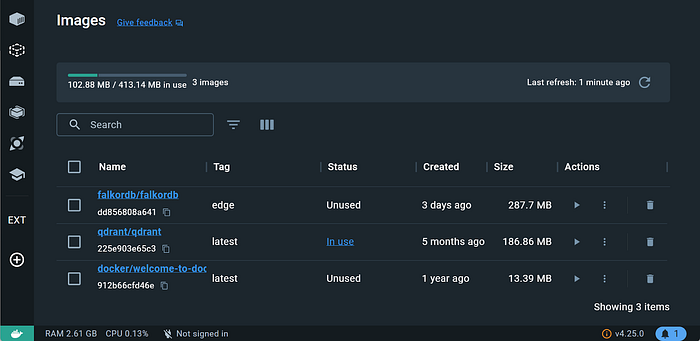 要连接到云端,请创建一个账户并登录 FalkorDB 控制台。在仪表盘中,您可以创建一个 AWS 或 Google Cloud 实例并获取凭据。  数据导入一旦 FalkorDB 启动,请定义并连接图数据库客户端。 importfalkordb
fromlangchain_community.graphsimportFalkorDBGraph
fromlangchain_community.graphs.graph_documentimportNode,Relationship
#Fordocker
graph=FalkorDBGraph(
url="redis://localhost:6379",decode_responses=True
)
#ForCloud
graph=FalkorDBGraph(
host="xxxx.cloud",
username="your_falkordb_username",
password="your_secret_password",
port=52780,
database="BFSI"
)
由于我们正在构建一个客户支持聊天机器人,我将使用一份银行手册,其中包含有关假设银行的全面信息。该数据集将演示聊天机器人如何处理有关银行产品和服务的复杂客户查询。当然,您也可以使用自己的数据集。 首先,从数据目录加载 PDF 文件。
fromlangchain_community.document_loadersimportDirectoryLoader,PyPDFLoader

DOCS_PATH="./data"

loader=DirectoryLoader(DOCS_PATH,glob="**/*.pdf",loader_cls=PyPDFLoader)

docs=loader.load()
本教程中,我将使用 OpenAI 的 LLM。以下是定义它的方法: fromlangchain_openaiimportChatOpenAI
llm=ChatOpenAI(temperature=0,model="gpt-4o-mini")
您可以手动创建知识图谱,也可以利用 LangChain 模块。 手动方法需要将文档拆分为块、识别节点和关系,并使用 Cypher 查询填充图谱。尽管有效,但它繁琐且耗时。以下是用于创建节点和关系的 Cypher 查询示例。 //CreateNodesforeachlabel
CREATE(p rogram{id:'prog1'}) rogram{id:'prog1'})
CREATE(fp:Financialproduct{id:'fin_prod1'})
CREATE(f:Feature{id:'feature1'})
CREATE(org:Organization{id:'org1'})
CREATE(s:Service{id:'service1'})
//OrganizationRelationships
CREATE(org)-[:MAINTAINS]->(f)
CREATE(org)-[:OFFERS]->(fp)
CREATE(org)-[ROVIDES]->(f)
CREATE(org)-[ROVIDES]->(s)
CREATE(org)-[:COMMITTED_TO]->(f)
CREATE(org)-[ EVELOPS]->(p) EVELOPS]->(p)
CREATE(org)-[:OFFERS]->(s)
CREATE(org)-[:OFFERS]->(p)
//FinancialProductRelationships
CREATE(fp)-[:SECURE]->(org)
CREATE(fp)-[:INCLUDES]->(f)
CREATE(fp)-[ INKED_TO]->(fp) INKED_TO]->(fp)
CREATE(fp)-[:MANAGED_THROUGH]->(f)
CREATE(fp)-[:HAS_FEATURE]->(f)
CREATE(fp)-[:OFFERS]->(p)
//FeatureRelationships
CREATE(f)-[:OFFERED_BY]->(org)
CREATE(f)-[ARTNERS_WITH]->(org)
CREATE(f)-[:INCLUDES]->(f)
CREATE(f)-[:ENCOURAGES]->(f)
CREATE(f)-[:COVERS]->(f)
//ProgramRelationships
CREATE(p)-[:INCLUDES]->(f)
CREATE(p)-[:OFFERS]->(fp)
在微软的 GraphRAG 版本中,提供给 LLM 的图谱提取提示如下所示: -Goal-
Givenatextdocumentthatispotentiallyrelevanttothisactivityandalistofentitytypes,identifyallentitiesofthosetypesfromthetextandallrelationshipsamongtheidentifiedentities.
-Steps-
1.Identifyallentities.Foreachidentifiedentity,extractthefollowinginformation:
-entity_name:Nameoftheentity,capitalized
-entity_type:Oneofthefollowingtypes:[{entity_types}]
-entity_description:Comprehensivedescriptionoftheentity'sattributesandactivities
Formateachentityas("entity"{tuple_delimiter}<entity_name>{tuple_delimiter}<entity_type>{tuple_delimiter}<entity_description>
2.Fromtheentitiesidentifiedinstep1,identifyallpairsof(source_entity,target_entity)thatare*clearlyrelated*toeachother.
Foreachpairofrelatedentities,extractthefollowinginformation:
-source_entity:nameofthesourceentity,asidentifiedinstep1
-target_entity:nameofthetargetentity,asidentifiedinstep1
-relationship_description:explanationastowhyyouthinkthesourceentityandthetargetentityarerelatedtoeachother
-relationship_strength:anumericscoreindicatingstrengthoftherelationshipbetweenthesourceentityandtargetentity
Formateachrelationshipas("relationship"{tuple_delimiter}<source_entity>{tuple_delimiter}<target_entity>{tuple_delimiter}<relationship_description>{tuple_delimiter}<relationship_strength>)
3.ReturnoutputinEnglishasasinglelistofalltheentitiesandrelationshipsidentifiedinsteps1and2.Use**{record_delimiter}**asthelistdelimiter.
4.Whenfinished,output{completion_delimiter}
<MultishotExamples>
-RealData-
######################
Entity_types:{entity_types}
Text:{input_text}
######################
Output:
为了简化,您可以将所需的 LLM 提供给 LangChain,让它完成剩下的工作。LLM 图谱转换器模块将负责为您创建知识图谱。让我解释一下背后的工作原理。 LLM 图谱转换器使用两种不同的方法来创建图谱: 1.基于工具的模式:这是默认模式,适用于支持工具调用的任何 LLM。在此模式下,节点和关系被定义为类。 2.基于提示的模式:这是备用模式,用于当 LLM 不支持工具调用时。在这种模式下,模型使用少样本学习从文本中提取实体及其关系。然后将这些数据解析为 JSON 格式以创建图节点和连接。
fromlangchain_experimental.graph_transformersimportLLMGraphTransformer


graph_transformer=LLMGraphTransformer(llm=llm)
data=graph_transformer.convert_to_graph_documents(docs)
graph.add_graph_documents(data)
您可以指定自定义节点类型以限制图谱结构。如果不指定,LLM 将根据内容自动确定适当的节点类型。例如: allowed_nodes=["Organization","FinancialProduct","Feature","Service","Program"]
graph_transformer=LLMGraphTransformer(llm=llm,allowed_nodes=allowed_nodes)
data=graph_transformer.convert_to_graph_documents(docs)
graph.add_graph_documents(data)
创建图谱后,您可以检查其模式以验证结构。请注意,输出可能很长,因此不包括在此。 graph.refresh_schema()
print(graph.schema)
为了帮助您更好地理解我创建的知识图谱,以下是一个可视化表示: 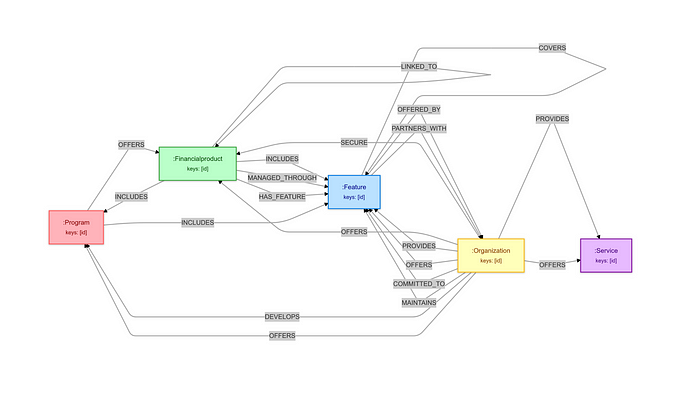 查询知识图谱尽管创建图数据库相对简单,但提取有意义的信息需要掌握像 Cypher 这样的查询语言。Cypher 是一种专为图数据库设计的声明式查询语言,使用模式匹配语法高效遍历节点和关系。FalkorDB 遵循 OpenCypher 格式。 以下是基于我们刚刚创建的知识图谱的 Cypher 查询示例: results=graph.query("MATCH(sa:Financialproduct)RETURNsa")
content_list=[]
forrowinresults:
node=row[0]
print(node)
查询返回银行提供的所有金融产品。 (:Financialproduct{id:"SavingsAccount"})
(:Financialproduct{id:"Savings_Account"})
(:Financialproduct{id:"CheckingAccount"})
(:Financialproduct{id:"Holiday-ThemedSavingsIncentives"})
(:Financialproduct{id:"YouthSavingsAccount"})
不同的图数据库以各种方式处理此类查询,可以通过直接实现或与 LangChain 等框架集成。例如,在 LangChain 中,可以通过以下方式执行查询: fromlangchain.chainsimportFalkorDBQAChain
chain=FalkorDBQAChain.from_llm(llm=llm,graph=graph,cypher_prompt=cypher_generation_prompt,qa_prompt=chat_prompt,verbose=True,allow_dangerous_requests=True)
response=chain.run(input_user_prompt)
为了让您更清楚地了解背后的工作原理,我将实现一个自定义查询来演示底层机制。这将帮助您更直观地理解这些系统的后端运行逻辑。 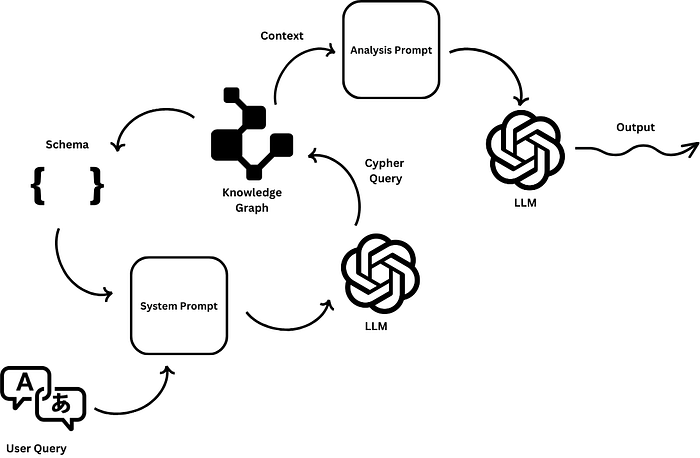 自动化 Cypher 查询生成我们需要结合一些提示工程以生成高质量的 Cypher 查询。目前,我们的实现使用精心设计的提示,将数据库模式(包括节点和关系)与用户查询结合起来。然而,总有改进的空间。您可以通过将工具调用与 OpenAI 集成或利用微调的语言模型来进一步优化查询生成。 以下是定义一个函数以优化模式提示的方法: defformat_schema_for_prompt(schema:Any)->str:
"""
Formatthegraphschemaintoaclear,LLM-friendlystring.
Args:
schema:Schemaobjectfromthegraphdatabase
Returns:
Formattedstringrepresentationoftheschema
"""
try:
nodes=set()
relationships=[]
foriteminschema:
ifhasattr(item,'start_node'):
nodes.add(item.start_node)
nodes.add(item.end_node)
relationships.append({
'start':item.start_node,
'type':item.relationship_type,
'end':item.end_node
})
#Formattheschemainformation
formatted_output="NodeTypes:\n"
fornodeinsorted(nodes):
formatted_output+=f"-{node}\n"
formatted_output+="\nRelationships:\n"
forrelinrelationships:
formatted_output+=f"-{rel['start']}-[{rel['type']}]->{rel['end']}\n"
returnformatted_output
exceptExceptionase:
#Fallbacktoreturningrawschemaifformattingfails
returnstr(schema)
格式化后的模式现在可以包含在提示模板中。 current_schema=graph.schema
formatted_schema=format_schema_for_prompt(current_schema)
system_prompt=f"""YouareanexpertatconvertingnaturallanguagequestionsintoCypherqueries.
Thegraphhasthefollowingschema:
{formatted_schema}
ReturnONLYtheCypherquerywithoutanyexplanationoradditionaltext.
MakesuretouseproperCyphersyntaxandcasing.
Usetheexactrelationshiptypesandnodelabelsasshownintheschema."""
Cypher 查询输出分析完成 Cypher 查询后,需要将结果传递给另一个 LLM。这种双 LLM 方法确保用户在聊天交互中收到清晰、上下文相关的信息,而不是原始数据库结果。 defformat_results_for_llm(resultsist)->str:
"""
Formatresultsinawaythat'soptimalforLLManalysis.
Args:
resultsrocessedqueryresults
Returns:
Formattedstringofresults
"""
output=""
fori,rowinenumerate(results,1):
output+=f"\nItem{i}:\n"
foriteminrow:
ifisinstance(item,dict):
output+=f"Type:{item['type']}\n"
output+="Properties:\n"
forkey,valueinitem['properties'].items():
output+=f"-{key}:{value}\n"
else:
output+=f"Value:{item}\n"
output+="---\n"
returnoutput
分析提示可以结构化如下: """Youareafinancialservicesexpert.Basedonthegraphqueryresultsprovided,
giveacomprehensiveanalysisandexplanation.Includerelevantdetailsabouteachitemandhowtheyrelate
toeachother.Ifappropriate,suggestrelatedproductsorservicesthatmightberelevanttotheuser.
Formatyourresponseinaclear,structuredway."""
现在,使用辅助函数并将其集成到主函数中。 defquery_graph_with_llm(
llm,
graph,
user_query:str,
system_prompt=None,
analysis_prompt:str="""Youareafinancialservicesexpert.Basedonthegraphqueryresultsprovided,
giveacomprehensiveanalysisandexplanation.Includerelevantdetailsabouteachitemandhowtheyrelate
toeachother.Ifappropriate,suggestrelatedproductsorservicesthatmightberelevanttotheuser.
Formatyourresponseinaclear,structuredway."""
):
"""
QuerytheknowledgegraphusingLLM-generatedCypherqueriesandanalyzeresults.
Args:
llmanguagemodelinstance
graph:FalkorDBgraphinstance
user_query:Naturallanguagequeryfromuser
analysis_promptromptforanalyzingresults
Returns:
Dictcontainingqueryresults,metadata,andanalysis
"""
try:
current_schema=graph.schema

formatted_schema=format_schema_for_prompt(current_schema)

system_prompt=f"""YouareanexpertatconvertingnaturallanguagequestionsintoCypherqueries.
Thegraphhasthefollowingschema:

{formatted_schema}

ReturnONLYtheCypherquerywithoutanyexplanationoradditionaltext.
MakesuretouseproperCyphersyntaxandcasing.
Usetheexactrelationshiptypesandnodelabelsasshownintheschema."""
query_messages=[
{"role":"system","content":system_prompt},
{"role":"user","content":f"ConvertthisquestiontoaCypherquery:{user_query}"}
]
cypher_query=llm.predict_messages(query_messages).content
cypher_query=re.sub(r'```cypher\s*|\s*```','',cypher_query).strip()
results=graph.query(cypher_query)
processed_results=[]
forrowinresults:
row_data=[]
foriteminrow:
ifhasattr(item,'properties'):row_data.append({
'type':item.labels[0]ifhasattr(item,'labels')elseitem.type,
'properties':dict(item.properties)
})
else:
row_data.append(item)
processed_results.append(row_data)
results_text=format_results_for_llm(processed_results)
#GenerateanalysisusingLLM
analysis_messages=[
{"role":"system","content":analysis_prompt},
{"role":"user","content":f"UserQuestion:{user_query}\n\nQueryResults:\n{results_text}\n\nPleaseprovideacomprehensiveanalysisoftheseresults."}
]
analysis=llm.predict_messages(analysis_messages).content
return{
'success':True,
'query':cypher_query,
'raw_results':processed_results,
'analysis':analysis,
'error':None,
'schema_used':formatted_schema}
exceptExceptionase:
return{
'success':False,
'query':cypher_queryif'cypher_query'inlocals()elseNone,
'raw_results':None,
'analysis':None,
'error':str(e),
'schema_used':formatted_schemaif'formatted_schema'inlocals()elseNone
}
看起来不错!让我们测试一下这个函数。 query="Whatfinancialproductsareavailableforyoungcustomers?"
results=query_graph_with_llm(llm,graph,query)
print(format_final_output(results))
CypherQuery:
MATCH(product)<-[:AVAILABLE_FOR]-(c:Customer)WHEREc.age<30RETURNp
Analysis:
Basedonthequeryresultsregardingfinancialproductsavailableforyoungcustomers,wecananalyzeandcategorizetheofferingsintoseveralkeyareas.Thisanalysiswillhelpyoungcustomersunderstandtheiroptionsandhowtheseproductscanmeettheirfinancialneeds.
###1.**SavingsAccounts**
-**YouthSavingsAccounts**:Theseaccountsarespecificallydesignedforyoungcustomers,oftenwithlowerminimumbalancerequirementsandnomonthlyfees.Theytypicallyoffercompetitiveinterestratestoencouragesavingfromanearlyage.
-**Benefits**:Teachingfinancialresponsibility,earninginterest,andbuildingasavingshabit.
###2.**CheckingAccounts**
-**StudentCheckingAccounts**:Tailoredforstudents,theseaccountsusuallycomewithnomonthlymaintenancefeesandfreeaccesstoATMs.Theymayalsoofferfeatureslikemobilebankingandbudgetingtools.
-**Benefits**:Easyaccesstofunds,budgetingassistance,andfinancialmanagementskills.
###3.**CreditCards**
-**SecuredCreditCards**:Theseareidealforyoungcustomerslookingtobuildcredit.Theyrequireacashdepositthatservesasthecreditlimit,minimizingriskfortheissuer.
-**StudentCreditCards**esignedforcollegestudents,thesecardsoftenhavelowercreditlimitsandrewardstailoredtostudentspending(e.g.,discountsontextbooksordining).
-**Benefits**:Establishingacredithistory,learningresponsiblecredituse,andpotentialrewards.
###4.**InvestmentAccounts**
-**CustodialAccounts**:Forminors,theseaccountsallowparentsorguardianstomanageinvestmentsonbehalfofthechilduntiltheyreachadulthood.Theycaninvestinstocks,bonds,ormutualfunds.
-**Robo-Advisors**:Youngcustomerscanuserobo-advisorstostartinvestingwithlowfeesandminimalinitialinvestment.Theseplatformsoftenprovideautomatedportfoliomanagementbasedonrisktolerance.
-**Benefits**:Earlyexposuretoinvesting,potentialforlong-termgrowth,andfinancialliteracy.
###5.**StudentLoans**
-**FederalStudentLoans**:Theseloansareavailabletostudentsattendingcollegeandtypicallyhavelowerinterestratesandflexiblerepaymentoptions.
-**PrivateStudentLoans**:Offeredbybanksandcreditunions,theseloanscanhelpcovereducationcostsnotmetbyfederalloans.
-**Benefits**:Accesstohighereducation,potentialforfutureearningincreases,andvariousrepaymentoptions.
###6.**InsuranceProducts**
-**HealthInsurance**:Youngcustomerscanoftenstayontheirparents'healthinsuranceplansuntilage26,buttheymayalsoexploreoptionsthroughschoolorthemarketplace.
-**Renter'sInsurance**:Foryoungadultslivingindependently,renter'sinsuranceprotectspersonalbelongingsandisoftenaffordable.
-**Benefits**:Financialprotectionagainstunexpectedeventsandhealth-relatedexpenses.
###7.**FinancialEducationResources**
-**WorkshopsandOnlineCourses**:Manyfinancialinstitutionsofferfreeresourcestoeducateyoungcustomersaboutbudgeting,saving,andinvesting.
-**MobileApps**:Budgetingappscanhelpyoungcustomerstracktheirspendingandsavingsgoals.
-**Benefits**:Empoweringyoungcustomerswithknowledge,improvingfinancialliteracy,andfosteringresponsiblefinancialhabits.
###**ConclusionandRecommendations**
Youngcustomershaveavarietyoffinancialproductstailoredtotheiruniqueneeds.Itisessentialforthemtostartwithbasicproductslikesavingsandcheckingaccountstobuildasolidfinancialfoundation.Astheyprogress,theycanexplorecreditcardsandinvestmentaccountstoenhancetheirfinancialliteracyandcreditworthiness.
**RelatedProducts/ServicesSuggestions**:
-**FinancialPlanningServices**:Considerconsultingwithafinancialadvisortocreateapersonalizedfinancialplan.
-**BudgetingTools**:Utilizeappsorsoftwarethathelptrackexpensesandsavingsgoals.
-**ScholarshipSearchServices**:Forstudents,findingscholarshipscansignificantlyreduceeducationcosts.
Byunderstandingtheseproductsandtheirinterconnections,youngcustomerscanmakeinformeddecisionsthatwillbenefittheirfinancialfuture.
聊天机器人集成恭喜您完成了所有步骤!现在,让我们将所有内容整合到一个 Gradio 界面中。以下是您的 GraphRAG 驱动虚拟助手,随时为您服务。 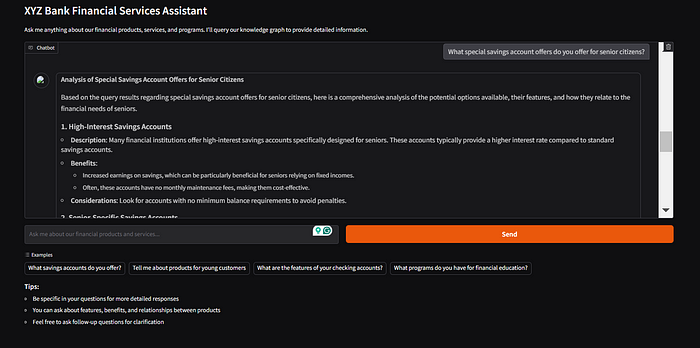 总结在本文中,我们了解了 GraphRAG 如何为企业提供客户支持聊天机器人。我已涵盖以下关键组件:构建知识图谱、为 Cypher 查询生成构建 LLM 驱动的管道,以及利用 FalkorDB 的功能创建高效、低延迟的 GraphRAG 系统。此方法展示了现代图数据库如何有效支持智能客户服务解决方案。 我还比较了 RAG 系统中图数据库与向量数据库的优劣,并演示了如何根据业务需求选择更适合的解决方案。为了进一步探索,建议您尝试创建更详细的知识图谱,以表示复杂的数据关系。您还可以试用 FalkorDB 的 graph-sdk,它能让这个过程更加简单。 |










