LLaMA Factory微调后的大模型Chat对话效果,与该模型使用vLLM推理架构中的对话效果,可能会出现不一致的情况。ingFang SC", "Hiragino Sans GB", "Microsoft YaHei", "WenQuanYi Micro Hei", sans-serif, SimHei, SimSun;font-style: normal;font-variant-ligatures: normal;font-variant-caps: normal;letter-spacing: normal;orphans: 2;text-align: start;text-indent: 0px;text-transform: none;widows: 2;word-spacing: 0px;-webkit-text-stroke-width: 0px;white-space: normal;background-color: rgb(255, 255, 255);text-decoration-thickness: initial;text-decoration-style: initial;text-decoration-color: initial;">模型回答不稳定:有一半是对的,有一半是无关的?
一般是因为训练时间太短,loss曲线未收敛;需要继续微调训练;ingFang SC", "Hiragino Sans GB", "Microsoft YaHei", "WenQuanYi Micro Hei", sans-serif, SimHei, SimSun;font-style: normal;font-variant-ligatures: normal;font-variant-caps: normal;letter-spacing: normal;orphans: 2;text-align: start;text-indent: 0px;text-transform: none;widows: 2;word-spacing: 0px;-webkit-text-stroke-width: 0px;white-space: normal;background-color: rgb(255, 255, 255);text-decoration-thickness: initial;text-decoration-style: initial;text-decoration-color: initial;">大模型回答与LLaMA Factory训练chat界面的不一致?
一般是因为对话模版chat_template不一致。ingFang SC", "Hiragino Sans GB", "Microsoft YaHei", "WenQuanYi Micro Hei", sans-serif, SimHei, SimSun;font-style: normal;font-variant-ligatures: normal;font-variant-caps: normal;letter-spacing: normal;orphans: 2;text-align: start;text-indent: 0px;text-transform: none;widows: 2;word-spacing: 0px;-webkit-text-stroke-width: 0px;white-space: normal;background-color: rgb(255, 255, 255);text-decoration-thickness: initial;text-decoration-style: initial;text-decoration-color: initial;">本文来讲解下对话模版不一致的情况的解决方法。一、原因分析 1、LLaMA Factory在微调训练需要选择模型名称,自动带出对话模版,比如qwen。这个对话模版是LLaMA Factory项目根据qwen官方提供的对话模版改编,与大模型自身的对话模版并不相等。 
2、LLaMA Factory的对话模版的源码在LLaMA-Factory/src/llamafactory/data/template.py这个类里。获取对话模版的方法(私有方法)_get_jinja_template ,可以用公共方法fix_jinja_template来调用该私有方法。 
ingFang SC", "Hiragino Sans GB", "Microsoft YaHei", "WenQuanYi Micro Hei", sans-serif, SimHei, SimSun;font-style: normal;font-variant-ligatures: normal;font-variant-caps: normal;letter-spacing: normal;orphans: 2;text-align: start;text-indent: 0px;text-transform: none;widows: 2;word-spacing: 0px;-webkit-text-stroke-width: 0px;white-space: normal;background-color: rgb(255, 255, 255);text-decoration-thickness: initial;text-decoration-style: initial;text-decoration-color: initial;">大模型的默认对话模版在 tokenizer_config.json里chat_template字段。ingFang SC", "Hiragino Sans GB", "Microsoft YaHei", "WenQuanYi Micro Hei", sans-serif, SimHei, SimSun;font-style: normal;font-variant-ligatures: normal;font-variant-caps: normal;letter-spacing: normal;orphans: 2;text-align: start;text-indent: 0px;text-transform: none;widows: 2;word-spacing: 0px;-webkit-text-stroke-width: 0px;white-space: normal;background-color: rgb(255, 255, 255);text-decoration-thickness: initial;text-decoration-style: initial;text-decoration-color: initial;">3、可以看到LLaMA Factory微调训练时的对话模版与大模型的默认对话模版并不相同。二、解决方案 既然是因为两边不一致,那么只要保证两边一致即可。也就是模版对话对齐。 我们可以将LLaMA Factory中的模版修改掉,需要修改源码;也可以在vLLM、ollama或LMDeploy等推理框架在运行大模型时候手动指定对话模版。两种方法都可以,这里我们先使用后者来操作。 1、获取LLaMA Factory中的对话模版 在微调训练中,界面中选择大模型后,自定带出对话模版,记住名称,比如qwen 。 写一个python代码,获取对话模版,get_chat_template.py 。 # get_chat_template.pyimportsysimportos
# 将项目根目录添加到 Python 路径root_dir = os.path.dirname(os.path.dirname(os.path.dirname(os.path.dirname(os.path.abspath(__file__)))))sys.path.append(root_dir)
fromllamafactory.data.templateimportTEMPLATESfromtransformersimportAutoTokenizer
# 1. 初始化分词器(任意支持的分词器均可)tokenizer = AutoTokenizer.from_pretrained("/root/autodl-tmp/llm/Qwen/Qwen2.5-0.5B-Instruct")
# 2. 获取模板对象template_name ="qwen"# 替换为你需要查看的模板名称template = TEMPLATES[template_name]
# 3. 修复分词器的 Jinja 模板template.fix_jinja_template(tokenizer)
# 4. 直接输出模板的 Jinja 格式print("="*40)print(f"Template [{template_name}] 的 Jinja 格式:")print("="*40)print(tokenizer.chat_template)
ingFang SC", "Hiragino Sans GB", "Microsoft YaHei", "WenQuanYi Micro Hei", sans-serif, SimHei, SimSun;font-style: normal;font-variant-ligatures: normal;font-variant-caps: normal;letter-spacing: normal;orphans: 2;text-align: start;text-indent: 0px;text-transform: none;widows: 2;word-spacing: 0px;-webkit-text-stroke-width: 0px;white-space: normal;background-color: rgb(255, 255, 255);text-decoration-thickness: initial;text-decoration-style: initial;text-decoration-color: initial;">需要修改2个地方,(1)初始化分词器,地址要写本地存在的大模型; (2)获取模版对象,template_name一定要写你微调界面上选择的对话模版名称,比如qwen 。ingFang SC", "Hiragino Sans GB", "Microsoft YaHei", "WenQuanYi Micro Hei", sans-serif, SimHei, SimSun;font-style: normal;font-variant-ligatures: normal;font-variant-caps: normal;letter-spacing: normal;orphans: 2;text-align: start;text-indent: 0px;text-transform: none;widows: 2;word-spacing: 0px;-webkit-text-stroke-width: 0px;white-space: normal;background-color: rgb(255, 255, 255);text-decoration-thickness: initial;text-decoration-style: initial;text-decoration-color: initial;">将该文件放在目录LLaMA-Factory/src/llamafactory/data下。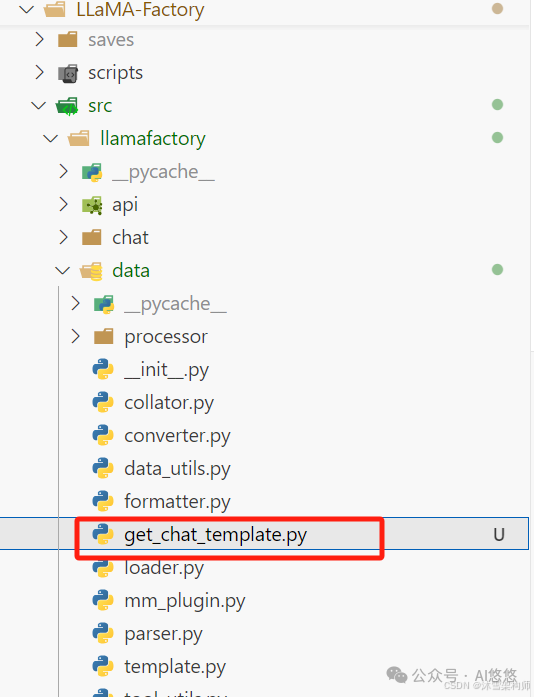
行该文件。 pythonget_chat_template.py 结果如下: 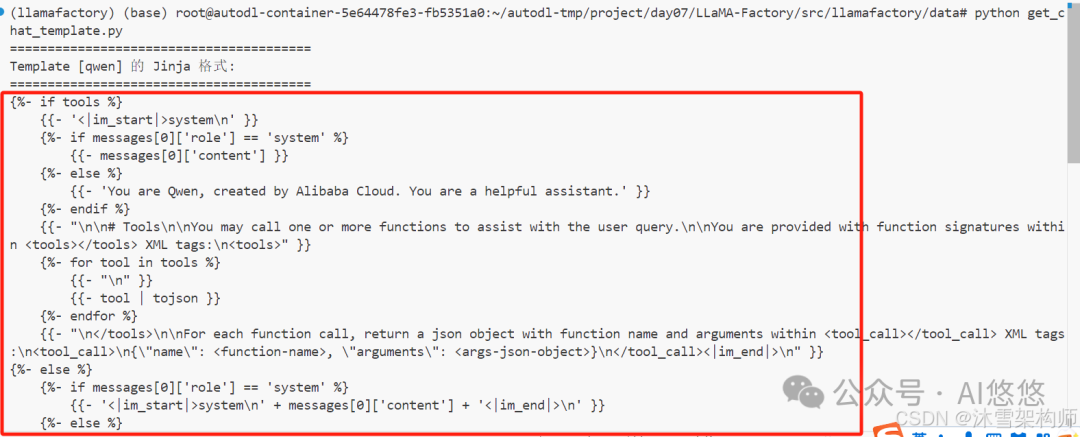
将内容复制,从====的下一行{% 开始复制。保存到一个文件中,格式为.jinja ,比如 qwen.jinja 。 
2、vLLM运行大模型指定jinja文件 为了使语言模型支持聊天协议,vLLM 要求模型在其 tokenizer 配置中包含一个聊天模板。聊天模板是一个 Jinja2 模板,它指定了角色、消息和其他特定于聊天对 tokens 如何在输入中编码。 可以在 --chat-template 参数中手动指定聊天模板的文件路径或字符串形式。 vllmserve<model>--chat-template./path-to-chat-template.jinja 比如: vllmserve/root/autodl-tmp/llm/Qwen/Qwen2.5-0.5B-Instruct-merge--chat-template/root/autodl-tmp/project/day07/qwen.jinja 这样就可以保证对话模板一致了。 ingFang SC", "Hiragino Sans GB", "Microsoft YaHei", "WenQuanYi Micro Hei", sans-serif, SimHei, SimSun;font-style: normal;font-variant-ligatures: normal;font-variant-caps: normal;letter-spacing: normal;orphans: 2;text-align: start;text-indent: 0px;text-transform: none;widows: 2;word-spacing: 0px;-webkit-text-stroke-width: 0px;white-space: normal;background-color: rgb(255, 255, 255);text-decoration-thickness: initial;text-decoration-style: initial;text-decoration-color: initial;">3、ollama创建ModelFile的内容ingFang SC", "Hiragino Sans GB", "Microsoft YaHei", "WenQuanYi Micro Hei", sans-serif, SimHei, SimSun;font-style: normal;font-variant-ligatures: normal;font-variant-caps: normal;letter-spacing: normal;orphans: 2;text-align: start;text-indent: 0px;text-transform: none;widows: 2;word-spacing: 0px;-webkit-text-stroke-width: 0px;white-space: normal;background-color: rgb(255, 255, 255);text-decoration-thickness: initial;text-decoration-style: initial;text-decoration-color: initial;">创建一个python文件,获取内容:get_ollama_modelfile.py# mytest.pyimportsysimportos
# 将项目根目录添加到 Python 路径root_dir = os.path.dirname(os.path.dirname(os.path.dirname(os.path.dirname(os.path.abspath(__file__)))))sys.path.append(root_dir)
fromllamafactory.data.templateimportTEMPLATES, get_template_and_fix_tokenizerfromtransformersimportAutoTokenizerfromllamafactory.hparamsimportDataArguments
# 1. 初始化分词器(任意支持的分词器均可)tokenizer = AutoTokenizer.from_pretrained("/root/autodl-tmp/llm/Qwen/Qwen2.5-0.5B-Instruct")
# 2. 获取模板对象template_name ="qwen"# 替换为你需要查看的模板名称template = TEMPLATES[template_name]
# 3. 修复分词器的 Jinja 模板template.fix_jinja_template(tokenizer)
# 4. ollama制作ModelFile的内容
template = get_template_and_fix_tokenizer(tokenizer, DataArguments(template=template_name))# template.get_ollama_modelfile(tokenizer)print("="*40)print(f"Template [{template_name}] 的 Modelfile 格式:")print("="*40)print(template.get_ollama_modelfile(tokenizer))
3、LMDeploy框架指定对话模版 https://lmdeploy.readthedocs.io/zh-cn/latest/advance/chat_template.html LMDeploy支持json格式的对话模版,需要将jinja2格式的转成json格式。我们可以使用AI搜索来做。比如我们使用DeepSeek来转换。 打开https://chat.deepseek.com/ ,上传jinja2文件,并且输入文字:
文件中是一个jinja2格式的qwen的对话模版,我需要转成lmdeploy框架支持的的json格式的对话模版,json模版格式如下:{ "model_name":"your awesome chat template name", "system":"<|im_start|>system\n", "meta_instruction":"You are a robot developed by LMDeploy.", "eosys":"<|im_end|>\n", "user":"<|im_start|>user\n", "eoh":"<|im_end|>\n", "assistant":"<|im_start|>assistant\n", "eoa":"<|im_end|>", "separator":"\n", "capability":"chat", "stop_words": ["<|im_end|>"]}

返回结果: {"model_name":"qwen","system":"<|im_start|>system\n","meta_instruction":"YouareQwen,createdbyAlibabaCloud.Youareahelpfulassistant.","eosys":"<|im_end|>\n","user":"<|im_start|>user\n","eoh":"<|im_end|>\n","assistant":"<|im_start|>assistant\n","eoa":"<|im_end|>","separator":"\n","capability":"chat","stop_words":["<|im_end|>","</tool_call>","<|im_start|>","<|im_end|>\n"],"tool_spec":{"tool_call_start":"<tool_call>","tool_call_end":"</tool_call>","tool_response_start":"<tool_response>","tool_response_end":"</tool_response>"}}字段说明: system/eosys:对应系统消息的开始和结束标记。 user/eoh:用户消息的起止标记。 assistant/eoa:助理消息的起止标记。 meta_instruction:使用原模板中的默认系统提示。 separator:消息间的换行符(\n)。 stop_words:添加 <|im_end|> 和其他可能的终止标记(如工具调用相关标签)。
工具调用扩展: 虽然 LMDeploy 基础模板不直接支持工具调用,但通过 tool_spec 字段扩展了工具调用的起止标记,以兼容原模板中的 <tool_call> 和 <tool_response> 逻辑。
|










