2024年4月18日,meta开源了Llama 3大模型[1],虽然只有8B[2]和70B[3]两个版本,但Llama 3表现出来的强大能力还是让AI大模型界为之震撼了一番,本人亲测Llama3-70B版本的推理能力十分接近于OpenAI的GPT-4[4],何况还有一个400B的超大模型还在路上,据说再过几个月能发布。
Github上人气巨火的本地大模型部署和运行工具项目Ollama[5]也在第一时间宣布了对Llama3的支持[6]:

近期除了学习Rust[7],还有就在研究如何将LLM应用于产品中。以前走微调的路径行不通,最近的RAG(Retrieval-Augmented Generation)和Agent路径则让我看到一丝曙光。不过实施这两个路径的前提是一个强大的LLM,而开源的meta Llama系列LLM则是不二之选。
在这篇文章中,我就先来体验一下如何基于Ollama安装和运行Meta Llama3-8B大模型,并通过兼容Ollama API的OpenWebUI[8]建立对大模型的Web图形化访问方式。
1. 安装Ollama
Ollama是一个由Go实现的、可以在本地丝滑地安装和运行各种开源大模型的工具,支持目前国内外很多主流的开源大模型,比如Llama、Mistral[9]、Gemma[10]、DBRX[11]、Qwen[12]、phi[13]、vicuna[14]、yi[15]、falcon[16]等。其支持的全量模型列表可以在Ollama library[17]查看。
Ollama的安装采用了“curl | sh”,我们可以一键将其下载并安装到本地:
$curl-fsSLhttps://ollama.com/install.sh|sh
>>>Downloadingollama...
########################################################################100.0%
>>>Installingollamato/usr/local/bin...
>>>Creatingollamauser...
>>>Addingollamausertovideogroup...
>>>Addingcurrentusertoollamagroup...
>>>Creatingollamasystemdservice...
>>>Enablingandstartingollamaservice...
Createdsymlinkfrom/etc/systemd/system/default.target.wants/ollama.serviceto/etc/systemd/system/ollama.service.
>>>TheOllamaAPIisnowavailableat127.0.0.1:11434.
>>>Installcomplete.Run"ollama"fromthecommandline.
WARNING:NoNVIDIA/AMDGPUdetected.OllamawillruninCPU-onlymode.
我们看到Ollama下载后启动了一个ollama systemd service,这个服务就是Ollama的核心API服务,它常驻内存。通过systemctl可以确认一下该服务的运行状态:
$systemctlstatusollama
●ollama.service-OllamaService
Loaded:loaded(/etc/systemd/system/ollama.service;enabled;vendorpreset:disabled)
Active:active(running)since一2024-04-2217:51:18CST;11hago
MainPID:9576(ollama)
Tasks:22
Memory:463.5M
CGroup:/system.slice/ollama.service
└─9576/usr/local/bin/ollamaserve
另外我对Ollama的systemd unit文件做了一些改动,我修改了一下Environment的值,增加了"OLLAMA_HOST=0.0.0.0",这样便于后续在容器中运行的OpenWebUI可以访问到Ollama API服务:
#cat/etc/systemd/system/ollama.service
[Unit]
Description=OllamaService
After=network-online.target
[Service]
ExecStart=/usr/local/bin/ollamaserve
User=ollama
Group=ollama
Restart=always
RestartSec=3
Environment=" ATH=/root/.cargo/bin:/usr/local/cmake/bin:/usr/local/bin:.:/root/.bin/go1.21.4/bin:/root/go/bin:/usr/local/sbin:/usr/local/bin:/usr/sbin:/usr/bin:/root/bin""OLLAMA_HOST=0.0.0.0"
[Install]
WantedBy=default.target
修改后执行下面命令使之生效:
$systemctldaemon-reload
$systemctlrestartollama
2. 下载和运行大模型
Ollama支持一键下载和运行模型。我手里有一个16/32G的云虚机,但没有GPU,因此这里我使用的是Llama3-8B指令微调后的用于chat/diaglogue的模型[18],我们只需要通过下面命令便可以快速下载并运行该模型(4bit量化的):
$ollamarunllama3
pullingmanifest
pulling00e1317cbf74...0%▕▏0B/4.7GB
pulling00e1317cbf74...7%▕█▏331MB/4.7GB34MB/s2m3s^C
pullingmanifest
pullingmanifest
pullingmanifest
pullingmanifest
pulling00e1317cbf74...61%▕█████████▏2.8GB/4.7GB21MB/s1m23s^C
......
下载和执行成功后,该命令行便会等待你的问题输入,我们随便输入一个关于Go的问题,下面是输出结果:
$ollamarunllama3
>>>couldyoutellmesomethingaboutgolanglanguage?
Go!

HerearesomeinterestingfactsandfeaturesabouttheGoprogramminglanguage:

**WhatisGo?**

Go,alsoknownasGolang,isastaticallytyped,compiled,anddesignedtobeconcurrentandgarbage-collectedlanguage.It
wasdevelopedbyGooglein2009.

**KeyFeatures:**

1.**Concurrency**:Gohasbuilt-inconcurrencysupportthroughgoroutines(lightweightthreads)andchannels(communication
mechanisms).Thismakesiteasytowriteconcurrentprograms.
2.**GarbageCollection**:Gohasaautomaticgarbagecollector,whichfreesdevelopersfromworryingaboutmemory
management.
3.**StaticTyping**:Goisstaticallytyped,meaningthatthetypesystemchecksthetypesofvariablesatcompiletime,
preventingtype-relatederrorsatruntime.
4.**SimpleSyntax**:Go'ssyntaxisdesignedtobesimpleandeasytoread.Ithasaminimalisticapproachtoprogramming
languagedesign.
......
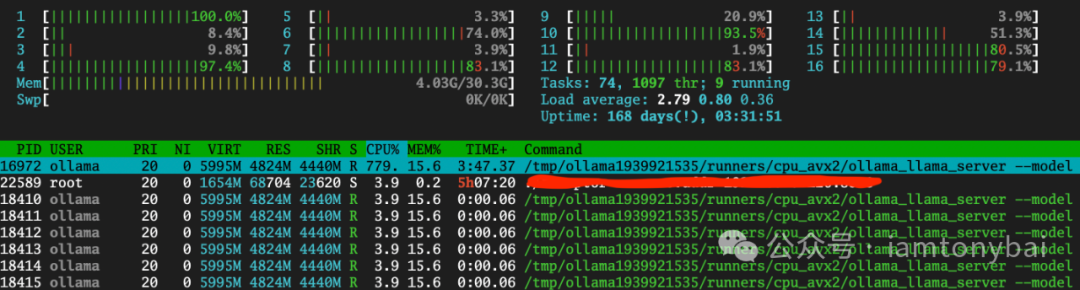
推理速度大约在5~6个token吧,尚可接受,但这个过程是相当耗CPU:
除了通过命令行方式与Ollama API服务交互之外,我们还可以用Ollama的restful API:
$curlhttp://localhost:11434/api/generate-d'{
>"model":"llama3",
>"prompt":"Whyistheskyblue?"
>}'
{"model":"llama3","created_at":"2024-04-22T07:02:36.394785618Z","response":"The","done":false}
{"model":"llama3","created_at":"2024-04-22T07:02:36.564938841Z","response":"color","done":false}
{"model":"llama3","created_at":"2024-04-22T07:02:36.745215652Z","response":"of","done":false}
{"model":"llama3","created_at":"2024-04-22T07:02:36.926111842Z","response":"the","done":false}
{"model":"llama3","created_at":"2024-04-22T07:02:37.107460031Z","response":"sky","done":false}
{"model":"llama3","created_at":"2024-04-22T07:02:37.287201658Z","response":"can","done":false}
{"model":"llama3","created_at":"2024-04-22T07:02:37.468517901Z","response":"vary","done":false}
{"model":"llama3","created_at":"2024-04-22T07:02:37.649011829Z","response":"depending","done":false}
{"model":"llama3","created_at":"2024-04-22T07:02:37.789353456Z","response":"on","done":false}
{"model":"llama3","created_at":"2024-04-22T07:02:37.969236546Z","response":"the","done":false}
{"model":"llama3","created_at":"2024-04-22T07:02:38.15172159Z","response":"time","done":false}
{"model":"llama3","created_at":"2024-04-22T07:02:38.333323271Z","response":"of","done":false}
{"model":"llama3","created_at":"2024-04-22T07:02:38.514564929Z","response":"day","done":false}
{"model":"llama3","created_at":"2024-04-22T07:02:38.693824676Z","response":",","done":false}
......
不过我日常使用大模型最为广泛的方式还是通过Web UI进行交互。目前有很多支持Ollama API的Web & Desktop项目,这里我们选取Open WebUI[19],它的前身就是Ollama WebUI。
3. 安装和使用Open WebUI与大模型交互
最快体验Open WebUI的方式当然是使用容器安装,不过官方镜像站点ghcr.io/open-webui/open-webui:main下载太慢,我找了一个位于Docker Hub上的个人mirror镜像,下面是在本地安装Open WebUI的命令:
$dockerrun-d-p13000:8080--add-host=host.docker.internal:host-gateway-vopen-webui:/app/backend/data-eOLLAMA_BASE_URL=http://host.docker.internal:11434--nameopen-webui--restartalwaysdyrnq/open-webui:main
容器启动后,我们在host上访问13000端口即可打开Open WebUI页面:

首个注册的用户,将会被Open WebUI认为是admin用户!注册登录后,我们就可以进入首页:

选择model后,我们便可以输入问题,并与Ollama部署的Llama3模型对话了:
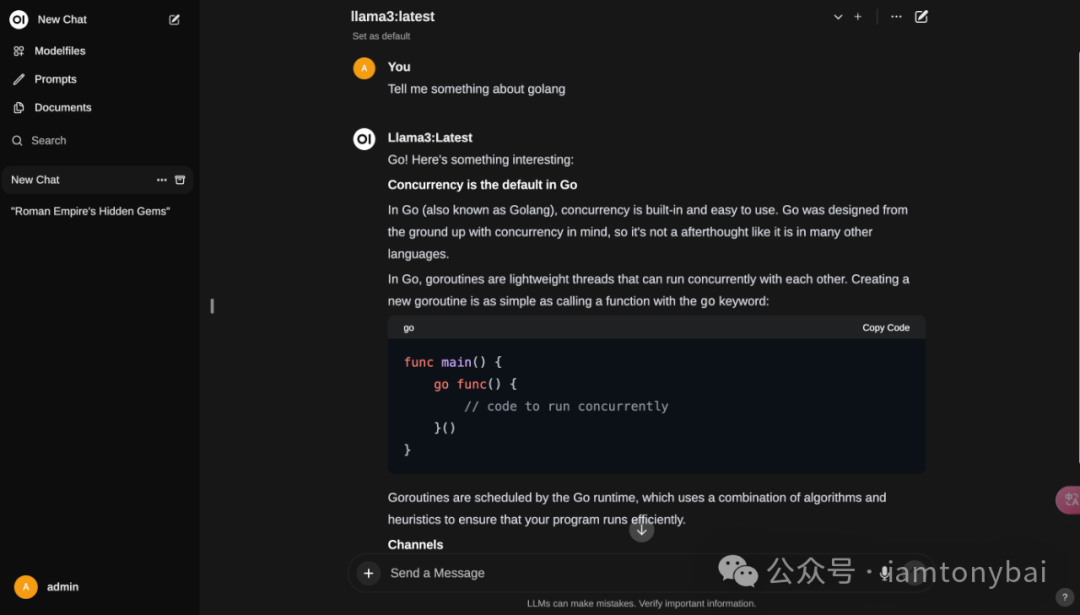
注:如果Open WebUI运行不正常,可以通过查看openwebui的容器日志来辅助诊断问题。
Open WebUI的功能还有很多,大家可以自行慢慢挖掘 。
。
4. 小结
在本文中,我介绍了Meta开源的Llama 3大模型以及Ollama和OpenWebUI的使用。Llama 3是一个强大的AI大模型,实测接近于OpenAI的GPT-4,并且还有一个更强大的400B模型即将发布。Ollama是一个用于本地部署和运行大模型的工具,支持多个国内外开源模型,包括Llama在内。我详细介绍了如何安装和运行Ollama,并使用Ollama下载和运行Llama3-8B模型。展示了通过命令行和REST API与Ollama进行交互,以及模型的推理速度和CPU消耗。此外,我还提到了OpenWebUI,一种兼容Ollama API的Web图形化访问方式。通过Ollama和OpenWebUI,大家可以方便地在CPU上使用Meta Llama3-8B大模型进行推理任务,并获得满意的结果。
后续,我将进一步研究如何将Llama3应用于产品中,并探索RAG(Retrieval-Augmented Generation)和Agent技术的潜力。这两种路径可以为基于Llama3的大模型应用开发带来新的可能性。










