ingFang SC", "Hiragino Sans GB", "Microsoft YaHei UI", "Microsoft YaHei", Arial, sans-serif;font-size: 1em;letter-spacing: 0.1em;color: rgb(80, 80, 80);">?ScrapeGraphAI 是一个网络抓取Python 库,它使用 LLM 和直接图形逻辑为网站、文档和 XML 文件创建抓取管道。只需说出您想要提取哪些信息,ScrapeGraphAI就会为你完成! ingFang SC", "Hiragino Sans GB", "Microsoft YaHei UI", "Microsoft YaHei", Arial, sans-serif;font-size: 15px;margin: 1.5em 8px;letter-spacing: 0.1em;color: rgb(63, 63, 63);">在当今数据驱动的世界中,网络抓取已成为从广阔的互联网中收集信息的重要工具。然而,传统的网络抓取工具往往难以适应网站的动态特性,需要开发人员不断维护和更新。ingFang SC", "Hiragino Sans GB", "Microsoft YaHei UI", "Microsoft YaHei", Arial, sans-serif;font-size: 15px;margin: 1.5em 8px;letter-spacing: 0.1em;color: rgb(63, 63, 63);">输入 ScrapeGraphAI,这是一个革命性的 Python 库,它利用大型语言模型 (LLMs) 的强大功能和直接图形逻辑来创建灵活且适应性强的 Web 抓取管道。ScrapeGraphAI 代表了网络抓取领域的重大进步,提供了一个开源解决方案,旨在应对当今不断发展的网络环境的挑战。这就是 ScrapeGraphAI 脱颖而出的原因: ingFang SC", "Hiragino Sans GB", "Microsoft YaHei UI", "Microsoft YaHei", Arial, sans-serif;font-size: 15px;margin: 1.5em 8px;letter-spacing: 0.1em;color: rgb(63, 63, 63);">直接图逻辑:此功能使用基于图的方法动态创建爬取管道,确保基于用户定义的提示实现高效的数据检索。ingFang SC", "Hiragino Sans GB", "Microsoft YaHei UI", "Microsoft YaHei", Arial, sans-serif;font-size: 15px;margin: 1.5em 8px;letter-spacing: 0.1em;color: rgb(63, 63, 63);">多功能模型和API:ScrapeGraphAI支持各种模型和API,包括OpenAI的GPT、Docker、Groq、Azure等,允许用户根据自己的抓取需求选择最佳选项。ingFang SC", "Hiragino Sans GB", "Microsoft YaHei UI", "Microsoft YaHei", Arial, sans-serif;font-size: 15px;margin: 1.5em 8px;letter-spacing: 0.1em;color: rgb(63, 63, 63);">灵活性和适应性:传统的网页抓取工具通常依赖于固定模式或手动配置来从网页中提取数据。ScrapeGraphAI 由 LLMs 提供支持,可适应网站结构的变化,减少开发人员持续干预的需要。ingFang SC", "Hiragino Sans GB", "Microsoft YaHei UI", "Microsoft YaHei", Arial, sans-serif;font-size: 15px;margin: 1.5em 8px;letter-spacing: 0.1em;color: rgb(63, 63, 63);">易于安装:通过简单的 pip install 命令,用户可以快速设置 ScrapeGraphAI 并开始从网站、文档和 XML 文件中抓取数据。ingFang SC", "Hiragino Sans GB", "Microsoft YaHei UI", "Microsoft YaHei", Arial, sans-serif;font-size: 1.2em;font-weight: bold;display: table;margin: 2em auto 1em;padding-right: 1em;padding-left: 1em;border-bottom: 2px solid rgb(0, 152, 116);color: rgb(63, 63, 63);">?️ ScrapeGraphAI:您只需一次爬取

ingFang SC", "Hiragino Sans GB", "Microsoft YaHei UI", "Microsoft YaHei", Arial, sans-serif;font-size: 1.2em;font-weight: bold;display: table;margin: 4em auto 2em;padding-right: 0.2em;padding-left: 0.2em;background: rgb(0, 152, 116);color: rgb(255, 255, 255);">? 快速安装ingFang SC", "Hiragino Sans GB", "Microsoft YaHei UI", "Microsoft YaHei", Arial, sans-serif;font-size: 15px;margin: 1.5em 8px;letter-spacing: 0.1em;color: rgb(63, 63, 63);">Scrapegraph-ai 的参考页面可在 pypy 的官方页面上找到:pypi。pipinstallscrapegraphai 您还需要安装 Playwright 以进行基于 JavaScript 的爬取: playwrightinstall 注意:建议在虚拟环境中安装库,以避免与其他库的冲突 ? ? 演示官方 streamlit 演示: https://skillicons.dev/icons?i=react)](https://scrapegraph-ai-demo.streamlit.app/ 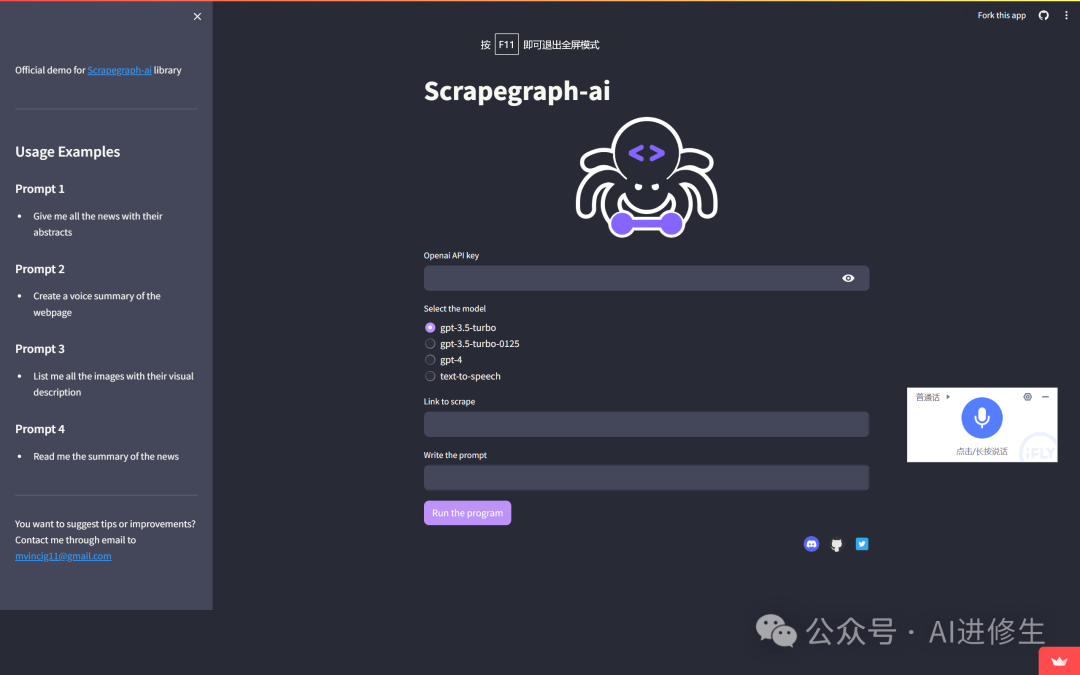
在网上直接尝试使用 Google Colab: https://colab.research.google.com/assets/colab-badge.svg 按照以下链接上的步骤设置您的 OpenAI API 密钥:[link]: https://scrapegraph-ai.readthedocs.io/en/latest/index.html ? 文档ScrapeGraphAI 的文档可以在[这里]: https://scrapegraph-ai.readthedocs.io/en/latest/ 还请查看 docusaurus [文档]: https://scrapegraph-doc.onrender.com/ ? 使用方法您可以使用SmartScraper类通过提示从网站提取信息。 SmartScraper类是一个直接图实现,使用网页爬取管道中最常见的节点。有关更多信息,请参阅文档。
情况 1:使用 Ollama 提取信息记得单独在 Ollama 上下载模型! fromscrapegraphai.graphsimportSmartScraperGraph
graph_config={
"llm":{
"model":"ollama/mistral",
"temperature":0,
"format":"json",#Ollama需要显式指定格式
"base_url":"http://localhost:11434",#设置OllamaURL
},
"embeddings":{
"model":"ollama/nomic-embed-text",
"base_url":"http://localhost:11434",#设置OllamaURL
}
}
smart_scraper_graph=SmartScraperGraph(
prompt="Listmeallthearticles",
#也可以使用已下载的HTML代码的字符串
source="https://perinim.github.io/projects",
config=graph_config
)
result=smart_scraper_graph.run()
print(result)
情况 2:使用 Docker 提取信息注意:在使用本地模型之前,请记得创建 docker 容器! docker-composeup-d
dockerexec-itollamaollamapullstablelm-zephyr
您可以使用 Ollama 上可用的模型或您自己的模型,而不是 stablelm-zephyr fromscrapegraphai.graphsimportSmartScraperGraph
graph_config={
"llm":{
"model":"ollama/mistral",
"temperature":0,
"format":"json",#Ollama需要显式指定格式
#"model_tokens":2000,#设置上下文长度任意
},
}
smart_scraper_graph=SmartScraperGraph(
prompt="Listmeallthearticles",
#也可以使用已下载的HTML代码的字符串
source="https://perinim.github.io/projects",
config=graph_config
)
result=smart_scraper_graph.run()
print(result)
情况 3:使用 Openai 模型提取信息fromscrapegraphai.graphsimportSmartScraperGraph
OPENAI_API_KEY="YOUR_API_KEY"
graph_config={
"llm":{
"api_key":OPENAI_API_KEY,
"model":"gpt-3.5-turbo",
},
}
smart_scraper_graph=SmartScraperGraph(
prompt="Listmeallthearticles",
#也可以使用已下载的HTML代码的字符串
source="https://perinim.github.io/projects",
config=graph_config
)
result=smart_scraper_graph.run()
print(result)
情况 4:使用 Groq 提取信息fromscrapegraphai.graphsimportSmartScraperGraph
fromscrapegraphai.utilsimportprettify_exec_info
groq_key=os.getenv("GROQ_APIKEY")
graph_config={
"llm":{
"model":"groq/gemma-7b-it",
"api_key":groq_key,
"temperature":0
},
"embeddings":{
"model":"ollama/nomic-embed-text",
"temperature":0,
"base_url":"http://localhost:11434",
},
"headless":False
}
smart_scraper_graph=SmartScraperGraph(
prompt="Listmealltheprojectswiththeirdescriptionandtheauthor.",
source="https://perinim.github.io/projects",
config=graph_config
)
result=smart_scraper_graph.run()
print(result)
情况 5:使用 Azure 提取信息fromlangchain_openaiimportAzureChatOpenAI
fromlangchain_openaiimportAzureOpenAIEmbeddings
lm_model_instance=AzureChatOpenAI(
openai_api_version=os.environ["AZURE_OPENAI_API_VERSION"],
azure_deployment=os.environ["AZURE_OPENAI_CHAT_DEPLOYMENT_NAME"]
)
embedder_model_instance=AzureOpenAIEmbeddings(
azure_deployment=os.environ["AZURE_OPENAI_EMBEDDINGS_DEPLOYMENT_NAME"],
openai_api_version=os.environ["AZURE_OPENAI_API_VERSION"],
)
graph_config={
"llm":{"model_instance":llm_model_instance},
"embeddings":{"model_instance":embedder_model_instance}
}
smart_scraper_graph=SmartScraperGraph(
prompt="""Listmealltheevents,withthefollowingfields:company_name,event_name,event_start_date,event_start_time,
event_end_date,event_end_time,location,event_mode,event_category,
third_party_redirect,no_of_days,
time_in_hours,hosted_or_attending,refreshments_type,
registration_available,registration_link""",
source="https://www.hmhco.com/event",
config=graph_config
)
情况 6:使用 Gemini 提取信息fromscrapegraphai.graphsimportSmartScraperGraph
GOOGLE_APIKEY="YOUR_API_KEY"
#Definetheconfigurationforthegraph
graph_config={
"llm":{
"api_key":GOOGLE_APIKEY,
"model":"gemini-pro",
},
}
#CreatetheSmartScraperGraphinstance
smart_scraper_graph=SmartScraperGraph(
prompt="Listmeallthearticles",
source="https://perinim.github.io/projects",
config=graph_config
)
result=smart_scraper_graph.run()
print(result)
所有 3 个情况的输出将是一个包含提取信息的字典,例如: {
'titles':[
'RotaryPendulumRL'
],
'descriptions':[
'OpenSourceprojectaimedatcontrollingarealliferotarypendulumusingRLalgorithms'
]
}
参考链接 Github: https://github.com/VinciGit00/Scrapegraph-ai?tab=readme-ov-fileColab Notebook: https://colab.research.google.com/drive/1sEZBonBMGP44CtO6GQTwAlL0BGJXjtfd?usp=sharing |










