Background
大模型的训练目前主要分为Pre-training和Post-training,受限于资源算力等原因,实际工作中更多用到的是SFT。
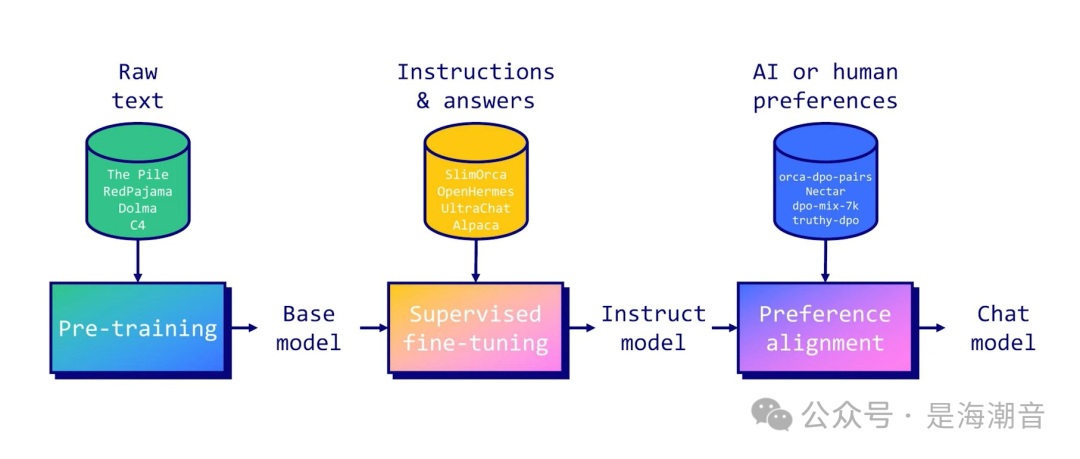
对于普通用户来说SFT仍然具备较高的门槛,需要了解一定的理论基础,准备用于微调的数据,由于不同基座模型相应的微调方法也不一样,需要对超参数优化等其他问题
目前可以通过完善的微调框架来简化上面的情况,常用框架如:
- LaMA-Factory: https://github.com/hiyouga/LLaMA-Factory
- swift: https://github.com/modelscope/swift
- unsloth: https://github.com/unslothai/unsloth
- mlx: https://github.com/ml-explore/mlx
- SuperAdapters: https://github.com/cckuailong/SuperAdapters
- Firefly: https://github.com/yangjianxin1/Firefly
- 支持多种模型:LLaMA、LLaVA、Mistral、Mixtral-MoE、Qwen、Qwen2-VL、Yi、Gemma、Baichuan、ChatGLM、Phi 等等。
- 集成方法:(增量)预训练、(多模态)指令监督微调、奖励模型训练、PPO 训练、DPO 训练、KTO 训练、ORPO 训练等等。
- 多种精度:16 比特全参数微调、冻结微调、LoRA 微调和基于 AQLM/AWQ/GPTQ/LLM.int8/HQQ/EETQ 的 2/3/4/5/6/8 比特 QLoRA 微调。
- 先进算法:GaLore、BAdam、Adam-mini、DoRA、LongLoRA、LLaMA Pro、Mixture-of-Depths、LoRA+、LoftQ、PiSSA 和 Agent 微调。
- 实用技巧:FlashAttention-2、Unsloth、Liger Kernel、RoPE scaling、NEFTune 和 rsLoRA。
- 实验监控:LlamaBoard、TensorBoard、Wandb、MLflow 等等。
- 极速推理:基于 vLLM 的 OpenAI 风格 API、浏览器界面和命令行接口。
我们原来介绍过基于LaMA-Factory对Qwen和llama3模型的微调
- 如何使用LLaMA Factory 微调Qwen1.5
由于2024年6月后,LaMA-Factory进行了升级,相较于原来操作更加简单便捷。
本文介绍下目前新版对llama3.1的微调
基于LaMA-Factory对llama3.1 8B进行微调
1. 环境配置
nvidia-smi
官方推荐:
 推荐使用
推荐使用
#1.创建虚拟环境
condacreate-nllama-factorypython=3.11
#2.激活虚拟环境
sourceactivate
condaactivatellama-factory

#3安装LLaMA-Factory
#3.1切换到工作路径
cd/home/work
#3.2下载LLaMA-Factory
gitclonehttps://github.com/hiyouga/LLaMA-Factory.git
#3.3pip安装依赖
pipinstall-e".[torch,metrics]"
- 依赖校验
注意:可以通过下面的命令查看依赖的安装情况
#查看当前环境信息
python-mtorch.utils.collect_env
#查看conda安装版本信息
condalist

#CUDA和Pytorch环境校验在python下
importtorch
torch.cuda.current_device()
torch.cuda.get_device_name(0)
torch.__version__
如果发现安装的cuda不是GPU版本,或者版本不匹配,可以直接去pytorch官网安装相应的pytorch
-安装GPU版本torch
condainstallpytorchtorchvisiontorchaudiopytorch-cuda=12.1-cpytorch-cnvidia
- 安装成功验证
在LLaMA-Factory路径下对库进行校验
llamafactory-cliversion
llamafactory-clitrain-h
如果出现下面输出则成功:
安装成功后可以通过webui在网页操作进行微调评估等操作
llamafactory-cliwebui
#切换为你下载的模型文件目录,这里的demo是Llama-3-8B-Instruct
#如果是其他模型,比如qwen,chatglm,请使用其对应的官方demo
model_id="/path/to/Meta-Llama-3-8B-Instruct"

pipeline=transformers.pipeline(
"text-generation",
model=model_id,
model_kwargs={"torch_dtype":torch.bfloat16},
device_map="auto",
)

messages=[
{"role":"system","content":"Youareapiratechatbotwhoalwaysrespondsinpiratespeak!"},
{"role":"user","content":"Whoareyou?"},
]

prompt=pipeline.tokenizer.apply_chat_template(
messages,
tokenize=False,
add_generation_prompt=True
)

terminators=[
pipeline.tokenizer.eos_token_id,
pipeline.tokenizer.convert_tokens_to_ids("<|eot_id|>")
]

outputs=pipeline(
prompt,
max_new_tokens=256,
eos_token_id=terminators,
do_sample=True,
temperature=0.6,
top_p=0.9,
)
print(outputs[0]["generated_text"][len(prompt):])
2. 上传数据集
配置好环境后,需要准备用于微调的数据集。
需要在examples/train_lora/llama3_lora_sft.yaml文件中修改dataset,
如果不修改则使用默认数据集:
###dataset
dataset:identity,alpaca_en_demo
如果要用自己的数据集,则需要将数据上传到data路径下,并且在data中注册data/dataset_info.json进行注册,如
{
"your_data":{
"file_name":"your_data.json"
},
3. 微调
这里演示使用lora微调
1. 更改模型地址
#修改sftymal文件
viexamples/train_lora/llama3_lora_sft.yaml
#使用llama3.1-8B模型文件
model_name_or_path:/path/to/Meta-Llama-3___1-8B-Instruct

#模型微调后的结果文件存储路径
output_dir:saves/llama3-8b/lora/sft
2. Run SFT
llamafactory-clitrainexamples/train_lora/llama3_lora_sft.yaml
#或者指定卡
#CUDA_VISIBLE_DEVICES=0llamafactory-clitrainexamples/lora_single_gpu/llama3_lora_sft.yaml
3. 训练过程中内存占用情况
 这里使用了两张A100-80G,实际1张A100也可以跑起来,
4. 评估预测
#在MMLU/CMMLU/C-Eval上评估
CUDA_VISIBLE_DEVICES=0llamafactory-clievalexamples/lora_single_gpu/llama3_lora_eval.yaml
#批量预测并计算BLEU和ROUGE分数
CUDA_VISIBLE_DEVICES=0llamafactory-clitrainexamples/lora_single_gpu/llama3_lora_predict.yaml
4. Merge
模型微调后的结果需要与基座模型进行merge
#1.修改mergeyaml文件,修改modelpath和微调文件path及最终merge导出文件地址
cd/home/LLaMA-Factory
viexamples/merge_lora/llama3_lora_sft.yaml
###Note ONOTusequantizedmodelorquantization_bitwhenmergingloraadapters
###model
model_name_or_path:/path/to/Meta-Llama-3___1-8B-Instruct
adapter_name_or_path:saves/llama3-8b/lora/sft
template:llama3
finetuning_type:lora
###export
export_dir:models/llama3_lora_sft
export_size:2
export_device:cpu
export_legacy_format:false
#2.runmerge
llamafactory-cliexportexamples/merge_lora/llama3_lora_sft.yaml
5.Infer
使用微调后的模型进行推理
llamafactory-clichatexamples/inference/llama3_lora_sft.yaml
reference:
- LlamaFactory: Unified Efficient Fine-Tuning of 100+ Language Models https://arxiv.org/abs/2403.13372










