昇腾 910B 是中国市场上Nvidia H100 的热门替代[1]。虽然它是 AI 训练工作负载的强大引擎,但我们最感兴趣的是它的推理性能。随着新的昇腾NPU 面向边缘设备[2]发布,这一点尤其重要。
最近,华为慷慨捐赠了 5 台裸机服务器,每台配备 8卡昇腾 910B,以支持GOSIM[3]Super Agent 黑客马拉松活动。这些机器每台售价超过 10 万美元。我们为参赛的学生团队提供了与 OpenAI 兼容的 API 服务,用于这些热门的 LLM[4]机器。其超大 VRAM(64GB)使我们能够在每个昇腾 910B NPU 上运行 70B LLM(量化到了 4 bit)。
Agent黑客马拉松使用MoFA[5]和 LangChain等 LLM Agent框架,每天消耗数千万个语言 token,而这些 NPU 轻松应对。本文中,我们将讨论使用昇腾 910B 的经验,并提供有关如何在此硬件上设置和运行 LLM 的详细教程。
轻量级和跨平台的 LLM 应用
开源 LLM 的主要应用场景是在异构边缘设备上。对于边缘而言,Python 和 PyTorch 过于臃肿,有着复杂的依赖和不安全的软件供应链。然而,如果没有 Python 提供的设备后端抽象,使用 Rust 和 C/C++ 等语言的开发者将需要为每个 GPU 设备重新编译甚至重写他们的应用程序。
假设你是一名拥有 MacBook 笔记本电脑的开发者。你编译了一个用 Rust 编写的 LLM 推理应用程序并在笔记本电脑上对其进行了测试。你很有可能在 Apple M 系列芯片上的 Apple Metal 框架上构建它。这个编译后的二进制应用程序能直接在 Nvidia CUDA 设备上运行的可能性为零。
对于昇腾等新兴 GPU 和 NPU 厂商来说,这个问题尤其严重。昇腾NPU 需要自己的运行时框架CANN[6](类似英伟达的CUDA)。很少有开发者能够使用昇腾/CANN,专门为该平台开发应用程序的开发者就更少了。

解决此问题的一个方法是 Linux 基金会和 CNCF 的开源WasmEdge Runtime[7],它为 GPU 抽象提供了原生性能。借助 WasmEdge 的标准 WASI-NN API,开发者只需将他们的应用程序编译为 Wasm,它就会自动在所有 GPU 和 NPU 上运行。
WasmEdge 对昇腾NPU和 CANN 框架的支持建立在对 llama.cpp 项目的开源贡献之上[8]。
与 Python 和 PyTorch 相比,WasmEdge 运行时大小仅为 1%,并且不依赖其他操作系统库和设备驱动程序 —— 从而更轻、更安全且更适用于边缘设备。
对于本次黑客马拉松项目,我们使用以下基于 WasmEdge 构建的与 OpenAI 兼容的 API server。它们以 Rust 编写,并编译为跨平台的 Wasm 以在昇腾 910B 上运行。
- LlamaEdge[9]是一个组件化的 API server,可以运行各种各样的 AI 模型,包括 LLM、Stable Diffusion/Flux 模型、Whisper模型和 TTS 模型。
- Gaia 节点[10]是 LLM、提示、向量知识库、访问控制、负载均衡器和域服务的完全集成堆栈,用于大规模提供知识补充的 LLM。
昇腾的 Docker 容器
虽然 WasmEdge 运行时是跨平台的,但它还没有预先构建的昇腾 release asset。在裸机昇腾 910B 服务器上使用 WasmEdge 的最简单方法是使用 Docker 镜像。它在容器内为 CANN 驱动程序构建 WasmEdge 二进制文件。Dockerfile 如下。
FROMdockerproxy.cn/hydai/expr-repo-src-baseASsrc
FROMdockerproxy.cn/ascendai/cann:8.0.rc1-910b-openeuler22.03
COPY--from=src/fmt/src/fmt
COPY--from=src/spdlog/src/spdlog
COPY--from=src/llama.cpp/src/llama.cpp
COPY--from=src/simdjson//src/simdjson
COPY./WasmEdge/src/WasmEdge
ENVASCEND_TOOLKIT_HOME=/usr/local/Ascend/ascend-toolkit/latest
ENVLIBRARY_PATH=${ASCEND_TOOLKIT_HOME}/lib64 LIBRARY_PATH
ENVLD_LIBRARY_PATH=${ASCEND_TOOLKIT_HOME}/lib64{ASCEND_TOOLKIT_HOME}/lib64/plugin/opskernel{ASCEND_TOOLKIT_HOME}/lib64/plugin/nnengine{ASCEND_TOOLKIT_HOME}/opp/built-in/op_impl/ai_core/tbe/op_tiling{LD_LIBRARY_PATH}
ENVPYTHONPATH=${ASCEND_TOOLKIT_HOME}/python/site-packages{ASCEND_TOOLKIT_HOME}/opp/built-in/op_impl/ai_core/tbe{PYTHONPATH}
ENVPATH=${ASCEND_TOOLKIT_HOME}/bin{ASCEND_TOOLKIT_HOME}/compiler/ccec_compiler/bin{PATH}
ENVASCEND_AICPU_PATH=${ASCEND_TOOLKIT_HOME}
ENVASCEND_OPP_PATH=${ASCEND_TOOLKIT_HOME}/opp
ENVTOOLCHAIN_HOME=${ASCEND_TOOLKIT_HOME}/toolkit
ENVASCEND_HOME_PATH=${ASCEND_TOOLKIT_HOME}
ENVLD_LIBRARY_PATH=${ASCEND_TOOLKIT_HOME}/runtime/lib64/stubLD_LIBRARY_PATH
RUNyuminstall-ygitgccg++cmakemakellvm15-develzlib-devellibxml2-devellibffi-devel
RUNcd/src/WasmEdge&&source/usr/local/Ascend/ascend-toolkit/set_env.sh--force&&\
cmake-Bbuild-DCMAKE_BUILD_TYPE=Release\
-DWASMEDGE_BUILD_TESTS=OFF\
-DWASMEDGE_BUILD_WASI_NN_RPC=OFF\
-DWASMEDGE_USE_LLVM=OFF\
-DWASMEDGE_PLUGIN_WASI_NN_BACKEND=GGML\
-DWASMEDGE_PLUGIN_WASI_NN_GGML_LLAMA_CANN=ON&&\
cmake--buildbuild--configRelease-j
RUNcd/src/llama.cpp&&source/usr/local/Ascend/ascend-toolkit/set_env.sh--force&&\
cmake-Bbuild-DGGML_CANN=ON-DBUILD_SHARED_LIBS=OFF&&\
cmake--buildbuild--configRelease--targetllama-cli
WORKDIR/root
RUNmkdir-p.wasmedge/{bin,lib,include,plugin}&&\
cp-f/src/WasmEdge/build/include/api/wasmedge/*.wasmedge/include/&&\
cp-f/src/WasmEdge/build/tools/wasmedge/wasmedge.wasmedge/bin/&&\
cp-f-P/src/WasmEdge/build/lib/api/libwasmedge.so*.wasmedge/lib/&&\
cp-f/src/WasmEdge/build/plugins/wasi_nn/libwasmedgePluginWasiNN.so.wasmedge/plugin/
COPY./env.wasmedge/env
为了构建 Docker 镜像,你需要获取 WasmEdge 的源代码并从源代码构建。Dockerfile 将主机上的./WasmEdge 映射到容器中的/src/WasmEdge ,并使用容器中的 CANN 库构建二进制文件。
git clone https://github.com/WasmEdge/WasmEdge.git -b dm4/cann

docker build -t build-wasmedge-cann .
接下来,按如下方式启动容器。容器应用直接访问主机上的 CANN 驱动程序和实用程序。
sudodockerrun-it--rm--nameLlamaEdge\
--device/dev/davinci0\
--device/dev/davinci_manager\
--device/dev/devmm_svm\
--device/dev/hisi_hdc\
-v/usr/local/dcmi:/usr/local/dcmi\
-v/usr/local/bin/npu-smi:/usr/local/bin/npu-smi\
-v/usr/local/Ascend/driver/lib64/:/usr/local/Ascend/driver/lib64/\
-v/usr/local/Ascend/driver/version.info:/usr/local/Ascend/driver/version.info\
-p8080:8080\
build-wasmedge-cannbash
现在你应该处在容器内的命令行提示符中。
从 GitHub 克隆 WasmEdge 项目的例子。
gitclonehttps://mirror.ghproxy.com/https://github.com/WasmEdge/WasmEdge.git-bdm4/cann
API 服务
在容器内,你可以下载 LLM 模型文件。llama.cpp 的 CANN 后端目前限制是它仅支持 Q4 和 Q8 量化级别。
curl-LOhttps://hf-mirror.com/gaianet/Llama-3-8B-Instruct-GGUF/resolve/main/Meta-Llama-3-8B-Instruct-Q4_0.gguf
下载 LlamaEdge API server的跨平台 Wasm 二进制文件。
curl-LOhttps://mirror.ghproxy.com/https://github.com/LlamaEdge/LlamaEdge/releases/download/0.14.11/llama-api-server.wasm
启动 API server。
nohupwasmedge--nn-preloaddefault:GGML:AUTO:Meta-Llama-3-8B-Instruct-Q4_0.ggufllama-api-server.wasm--model-namellama3--ctx-size4096--batch-size128--prompt-templatellama-3-chat--socket-addr0.0.0.0:8080--log-prompts--log-stat&
使用与 OpenAI 兼容的 API 请求进行测试!
curl-XPOSThttps://localhost:8080/v1/chat/completions\
-H'accept:application/json'\
-H'Content-Type:application/json'\
-d'{"messages":[{"role":"system","content":"YouareanexperiencedRustdeveloper."},{"role":"user","content":"HowdoIconvertastringintoaninteger?"}]}'
API server 的返回结果如下。
{"id":"chatcmpl-683a09ec-f0be-4d88-a0eb-77acd60dd8b5","object":"chat.completion","created":1729648349,"model":"llama3","choices":[{"index":0,"message":{"content":"YoucanconvertastringintoanintegerinRustwiththe`parse`function,whichisassociatedwiththe`FromStr`trait.Thespecificmethoddependsontheformatofyourstringandthetypeyouwanttoconvertitto.\n\nForexample:\n\n```rust\nusestd::str::FromStr;\n\nlets=\"12345\";\nifletOk(n)=i32::from_str(&s){//Replace'i32'withtheintegertypethatbestfitsyourneeds.\nprintln!(\"{}\",n);\n}else{\neprintln!(\"Unabletoparse{}intoaninteger\",s);\n}\n```\nThiscodewillconvertastringintoa32-bitsignedinteger(i32).Ifthestringdoesnotrepresentavalidnumberinthechosentypeorisoutofrangeforthattype,`parse`willreturnan`Err`valuewhichyoucanhandleasshownabove.\n\nYoumayalsouse`unwrap()`methodinsteadofpatternmatchingifyouwanttocrashyourprogramwithaclearmessagewhenparsingfails:\n\n```rust\nlets=\"12345\";\nletn=i32::from_str(&s).unwrap();//Replace'i32'withtheintegertypethatbestfitsyourneeds.\nprintln!(\"{}\",n);\n```","role":"assistant"},"finish_reason":"stop","logprobs":null}],"usage":{"prompt_tokens":30,"completion_tokens":315,"total_tokens":345}}Chatbot
在容器内停止 LlamaEdge API server。
pkill-9wasmedge
下载 chatbot 的 HTML、CSS 和 JS 文件。将它们解压到 chatbot-ui 文件夹中。
curl -LO https://github.com/LlamaEdge/chatbot-ui/releases/latest/download/chatbot-ui.tar.gz
tar xzf chatbot-ui.tar.gz
rm chatbot-ui.tar.gz
用 chatbot UI 重启 LlamaEdge API server。
nohupwasmedge--dir.:.--nn-preloaddefault:GGML:AUTO:Meta-Llama-3-8B-Instruct-Q4_0.ggufllama-api-server.wasm--model-namellama3--ctx-size4096--batch-size128--prompt-templatellama-3-chat--socket-addr0.0.0.0:8080--log-prompts--log-stat&
现在,你可以打开浏览器指向 server 的 8080 端口。

工具调用Agent 黑客马拉松的要求之一是展示 LLM 如何使用工具并进行函数调用来访问外部资源并执行复杂任务。LlamaEdge 支持在昇腾NPU 上调用与 OpenAI 兼容的工具。
停止容器内的 LlamaEdge API server。
pkill-9wasmedge
下载针对工具调用进行了微调的 LLM。
curl-LOhttps://huggingface.co/gaianet/Llama-3-Groq-8B-Tool-Use-GGUF/resolve/main/Llama-3-Groq-8B-Tool-Use-Q4_0.gguf
在容器内重新启动 API server。
nohupwasmedge--nn-preloaddefault:GGML:AUTO lama-3-Groq-8B-Tool-Use-Q4_0.ggufllama-api-server.wasm--model-nametools--ctx-size4096--batch-size128--prompt-templategroq-llama3-tool--socket-addr0.0.0.0:8080--log-prompts--log-stat&
现在,我们可以提出一个 OpenAI 风格的请求,为 LLM 提供可用工具的列表。
curl-XPOSThttp://localhost:8080/v1/chat/completions\
-H'accept:application/json'\
-H'Content-Type:application/json'\
--data-binary@tooluse.json
tooluse.json 包含以下可用工具
{
"messages":[
{
"role":"user",
"content":"WhatistheweatherlikeinSanFranciscoinCelsius?"
}
],
"tools":[
{
"type":"function",
"function":{
"name":"get_current_weather",
"description":"Getthecurrentweatherinagivenlocation",
"parameters":{
"type":"object",
"properties":{
"location":{
"type":"string",
"description":"Thecityandstate,e.g.SanFrancisco,CA"
},
"unit":{
"type":"string",
"enum":[
"celsius",
"fahrenheit"
],
"description":"Thetemperatureunittouse.Inferthisfromtheuserslocation."
}
},
"required":[
"location",
"unit"
]
}
}
},
{
"type":"function",
"function":{
"name":"predict_weather",
"description":" redicttheweatherin24hours",
"parameters":{
"type":"object",
"properties":{
"location":{
"type":"string",
"description":"Thecityandstate,e.g.SanFrancisco,CA"
},
"unit":{
"type":"string",
"enum":[
"celsius",
"fahrenheit"
],
"description":"Thetemperatureunittouse.Inferthisfromtheuserslocation."
}
},
"required":[
"location",
"unit"
]
}
}
}
],
"tool_choice":"auto",
"stream":false
}
LLM 将使用它希望 Agent执行的函数调用进行响应。
{"id":"chatcmpl-f5c9efff-c742-4948-93c1-0e19287a764e","object":"chat.completion","created":1729653908,"model":"tools","choices":[{"index":0,"message":{"content":"<tool_call>\n{\"id\":0,\"name\":\"get_current_weather\",\"arguments\":{\"location\":\"SanFrancisco,CA\",\"unit\":\"celsius\"}}\n</tool_call>","tool_calls":[{"id":"call_abc123","type":"function","function":{"name":"get_current_weather","arguments":"{\"location\":\"SanFrancisco,CA\",\"unit\":\"celsius\"}"}}],"role":"assistant"},"finish_reason":"tool_calls","logprobs":null}],"usage":{"prompt_tokens":404,"completion_tokens":38,"total_tokens":442}}
在此了解有关 LLM 工具调用的更多信息[11]。
性能和未来方向
在多 GPU 机器上,LlamaEdge 允许你指定 GPU 来运行 LLM。这使我们能够并行运行多个 LLM 应用程序。
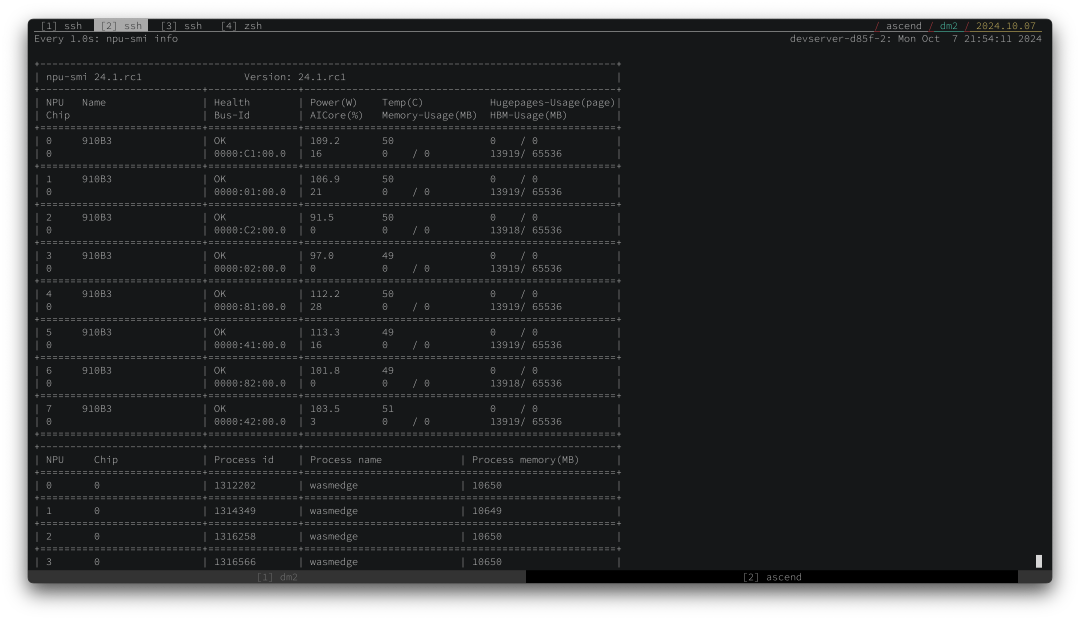
昇腾 910B 每秒为 8B 类 LLM 生成约 15 个token,为 70B 类 LLM 生成约 5 个token。这与 Apple 的 M3 芯片相当,后者在 TOPS 基准测试中比昇腾 910B 慢得多。我们认为 llama.cpp 的 CANN 后端仍有很大优化空间。我们期待在不久的将来对这款出色的硬件提供更好的软件和驱动程序支持!










