|
由 DALL·E 3 生成,prompt:A person and a machine are engaged in two-way communication through a microphone and speakers. The person, standing on the left, speaks into the microphone while the machine on the right, resembling a sleek, futuristic robot, responds through speakers. The setting is a modern, well-lit room with a professional atmosphere. The person looks focused and engaged, and the machine's digital display shows sound waves indicating speech. 语音交互系统简介
语音交互系统主要由自动语音识别(Automatic Speech Recognition, 简称 ASR)、自然语言处理(Natural Language Processing, 简称 NLP)和文本到语音合成(Text to Speech,简称 TTS)三个环节构成。ASR 相当于人的听觉系统,NLP 相当于人的大脑语言区域,TTS 相当于人的发声系统。 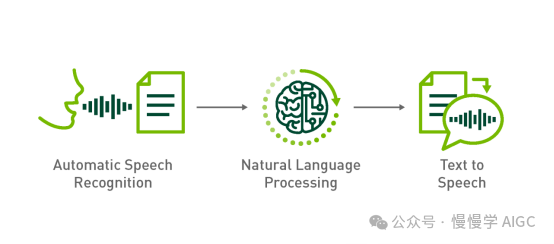
如何构建语音对话机器人
本文将完全利用开源方案构建语音对话机器人。 ASR 采用 OpenAI Whisper,同时支持中、英文。更多技术细节可以看这篇《跟着 Whisper 学说正宗河南话》; NLP 采用 DeepSeek v2,由于本地运行所需的 GPU 资源不足,我们调用云端 API 实现这一步; TTS 采用 ChatTTS,它是专门为对话场景设计的文本转语音模型,支持英文和中文两种语言。
本文基于 Gradio 实现的交互界面如图: 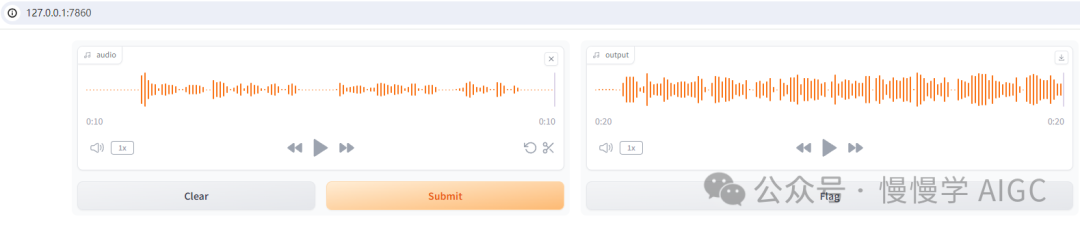
你可以基于系统麦克风采集音频,通过 Whisper 转录为文本,调用 DeepSeek v2 API 后,再将对话输出经过 ChatTTS 合成为语音,点击播放即可听到来自机器人的声音。
硬件环境:RTX 3060, 12GB 显存 软件环境信息(Miniconda3 + Python 3.8.19):
piplistPackageVersion-------------------------------------------absl-py2.0.0accelerate0.25.0aiofiles23.2.1aiohttp3.8.6aiosignal1.3.1altair5.1.2annotated-types0.6.0antlr4-python3-runtime4.9.3anyio4.0.0argon2-cffi23.1.0argon2-cffi-bindings21.2.0arrow1.3.0asttokens2.4.1astunparse1.6.3async-lru2.0.4async-timeout4.0.3attrs23.1.0audioread3.0.1Babel2.15.0backcall0.2.0backports.zoneinfo0.2.1beautifulsoup44.12.3bitarray2.8.2bitsandbytes0.41.1bleach6.1.0blinker1.6.3cachetools5.3.1cdifflib1.2.6certifi2023.7.22cffi1.16.0charset-normalizer2.1.1click8.1.7colorama0.4.6comm0.2.2contourpy1.1.1cpm-kernels1.0.11cycler0.12.1Cython3.0.3debugpy1.8.1decorator5.1.1defusedxml0.7.1distro1.9.0dlib19.24.2edge-tts6.1.8editdistance0.8.1einops0.8.0einx0.2.2encodec0.1.1exceptiongroup1.1.3executing2.0.1face-alignment1.4.1fairseq0.12.2faiss-cpu1.7.4fastapi0.108.0fastjsonschema2.19.1ffmpeg1.4ffmpeg-python0.2.0ffmpy0.3.1filelock3.12.4Flask2.1.2Flask-Cors3.0.10flatbuffers23.5.26fonttools4.43.1fqdn1.5.1frozendict2.4.4frozenlist1.4.0fsspec2023.9.2future0.18.3gast0.4.0gitdb4.0.10GitPython3.1.37google-auth2.23.3google-auth-oauthlib1.0.0google-pasta0.2.0gradio4.32.2gradio_client0.17.0grpcio1.59.0h110.14.0h5py3.10.0httpcore0.18.0httpx0.25.0huggingface-hub0.23.2hydra-core1.0.7idna3.4imageio2.31.5importlib-metadata6.8.0importlib-resources6.1.0inflect7.2.1ipykernel6.29.4ipython8.12.3ipywidgets8.1.3isoduration20.11.0itsdangerous2.1.2jedi0.19.1Jinja23.1.2joblib1.3.2json50.9.25jsonpointer2.4jsonschema4.19.1jsonschema-specifications2023.7.1jupyter1.0.0jupyter_client8.6.2jupyter-console6.6.3jupyter_core5.7.2jupyter-events0.10.0jupyter-lsp2.2.5jupyter_server2.14.1jupyter_server_terminals0.5.3jupyterlab4.2.1jupyterlab_pygments0.3.0jupyterlab_server2.27.2jupyterlab_widgets3.0.11keras2.13.1kiwisolver1.4.5langdetect1.0.9latex2mathml3.77.0lazy_loader0.3libclang16.0.6librosa0.9.1llvmlite0.41.0loguru0.7.2lxml4.9.3Markdown3.5markdown-it-py3.0.0MarkupSafe2.1.3matplotlib3.7.3matplotlib-inline0.1.7mdtex2html1.2.0mdurl0.1.2mistune3.0.2more-itertools10.1.0mpmath1.3.0multidict6.0.4nbclient0.10.0nbconvert7.16.4nbformat5.10.4nemo_text_processing1.0.2nest-asyncio1.6.0networkx3.1notebook7.2.0notebook_shim0.2.4numba0.58.0numpy1.22.4oauthlib3.2.2omegaconf2.3.0onnx1.14.1onnxoptimizer0.3.13onnxsim0.4.33openai1.6.1openai-whisper20230918opencv-python4.8.1.78opt-einsum3.3.0orjson3.9.9overrides7.7.0packaging23.2pandas2.0.3pandocfilters1.5.1parso0.8.4peft0.7.1pickleshare0.7.5Pillow10.0.1pip24.0pkgutil_resolve_name1.3.10platformdirs3.11.0playsound1.3.0pooch1.7.0portalocker2.8.2praat-parselmouth0.4.3prometheus_client0.20.0prompt_toolkit3.0.45protobuf4.25.1psutil5.9.5pure-eval0.2.2pyarrow13.0.0pyasn10.5.0pyasn1-modules0.3.0PyAudio0.2.12pycparser2.21pydantic2.5.3pydantic_core2.14.6pydeck0.8.1b0pydub0.25.1Pygments2.16.1pynini2.1.5pynvml11.5.0PyOpenGL3.1.7pyparsing3.1.1python-dateutil2.8.2python-json-logger2.0.7python-multipart0.0.9pytz2023.3.post1PyWavelets1.4.1pywin32306pywinpty2.0.13pyworld0.3.0PyYAML6.0.1pyzmq26.0.3qtconsole5.5.2QtPy2.4.1referencing0.30.2regex2023.10.3requests2.32.3requests-oauthlib1.3.1resampy0.4.2rfc3339-validator0.1.4rfc3986-validator0.1.1rich13.6.0rpds-py0.10.4rsa4.9ruff0.4.7sacrebleu2.3.1sacremoses0.1.1safetensors0.4.3scikit-image0.18.1scikit-learn1.3.1scikit-maad1.3.12scipy1.7.3semantic-version2.10.0Send2Trash1.8.3sentencepiece0.1.99setuptools69.5.1shellingham1.5.4six1.16.0smmap5.0.1sniffio1.3.0sounddevice0.4.5SoundFile0.10.3.post1soupsieve2.5sse-starlette1.8.2stack-data0.6.3starlette0.32.0.post1streamlit1.29.0sympy1.12tabulate0.9.0tenacity8.2.3tensorboard2.13.0tensorboard-data-server0.7.1tensorboardX2.6.2.2tensorflow2.13.0tensorflow-estimator2.13.0tensorflow-intel2.13.0tensorflow-io-gcs-filesystem0.31.0termcolor2.3.0terminado0.18.1threadpoolctl3.2.0tifffile2023.7.10tiktoken0.3.3timm0.9.12tinycss21.3.0tokenizers0.19.1toml0.10.2tomli2.0.1tomlkit0.12.0toolz0.12.0torch2.1.0+cu121torchaudio2.1.0+cu121torchcrepe0.0.22torchvision0.16.0+cu121tornado6.3.3tqdm4.63.0traitlets5.14.3transformers4.41.2transformers-stream-generator0.0.4trimesh4.0.0typeguard4.3.0typer0.12.3types-python-dateutil2.9.0.20240316typing_extensions4.12.0tzdata2023.3tzlocal5.1uri-template1.3.0urllib32.2.1uvicorn0.25.0validators0.22.0vector_quantize_pytorch1.14.8vocos0.1.0watchdog3.0.0wcwidth0.2.13webcolors1.13webencodings0.5.1websocket-client1.8.0websockets11.0.3Werkzeug3.0.0WeTextProcessing0.1.12wget3.2wheel0.43.0widgetsnbextension4.0.11win32-setctime1.1.0wrapt1.15.0yarl1.9.2zipp3.17.0 WebUI 代码如下(目前只是演示基本功能,比较简陋): import gradio as grfrom transformers import pipelineimport numpy as np
from ChatTTS.experimental.llm import llm_apiimport ChatTTS
chat = ChatTTS.Chat()chat.load_models(compile=False) # 设置为True以获得更快速度
API_KEY = 'sk-xxxxxxxx' # 需要自行到 https://platform.deepseek.com/api_keys 申请client = llm_api(api_key=API_KEY,base_url="https://api.deepseek.com",model="deepseek-chat")
transcriber = pipeline("automatic-speech-recognition", model="openai/whisper-base")
def transcribe(audio):sr, y = audioy = y.astype(np.float32)y /= np.max(np.abs(y))user_question = transcriber({"sampling_rate": sr, "raw": y})["text"]text = client.call(user_question, prompt_version = 'deepseek')wav = chat.infer(text, use_decoder=True)audio_data = np.array(wav[0]).flatten()sample_rate = 24000
return (sample_rate, audio_data)
demo = gr.Interface(transcribe,gr.Audio(sources=["microphone"]),"audio",)
demo.launch()
在此基础上,可以增加更多功能: ASR 模型这里只使用openai/whisper-base,可以在页面上选择多种模型; DeepSeek v2 API 使用了默认参数配置,可以在页面上增加一些额外参数,如 temperature 和 systemprompt 等; ChatTTS可以增加如 speaker 身份,打断和笑声控制,实现更丰富的输出; 支持流式对话,像 GPT-4o 那样自然打断;
| 









