1. 环境设置
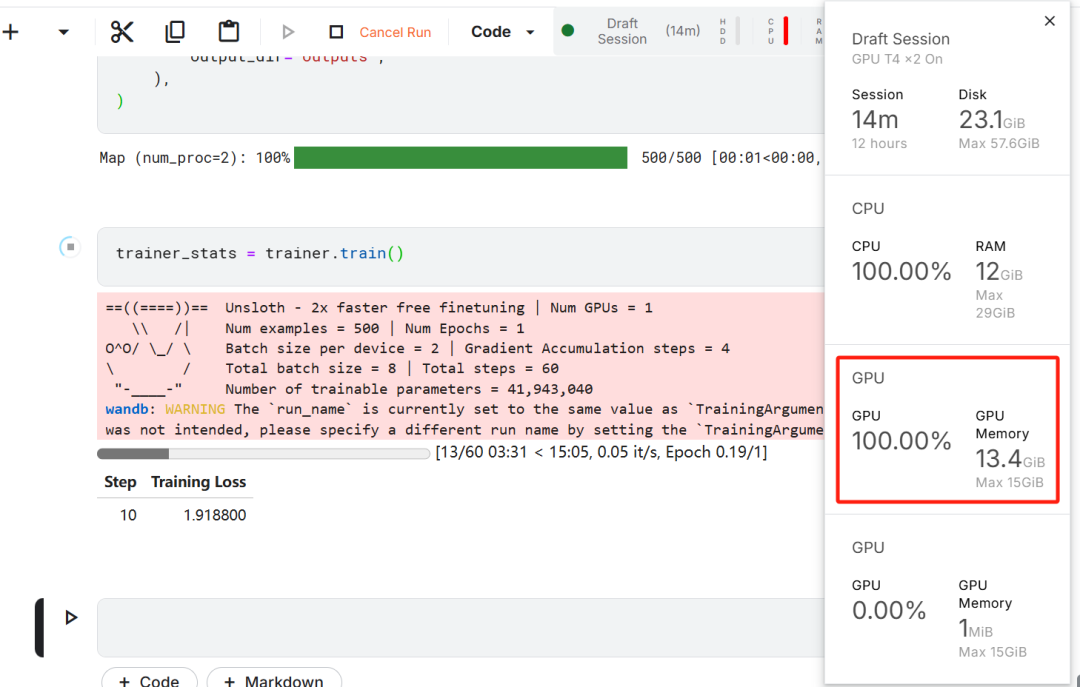
在本项目中,我们使用 Kaggle 作为云 IDE,因为它提供免费的 GPU 资源。我选择了两块 T4 GPU,但是看起来最终我只用了一块。如果你想用自己的电脑微调的话,那估计至少是要一块 16GB 显存的 RTX 3090 才行。
首先,启动一个新的 Kaggle notebook,并将你的 Hugging Face token 和 Weights & Biases token 添加为密钥。
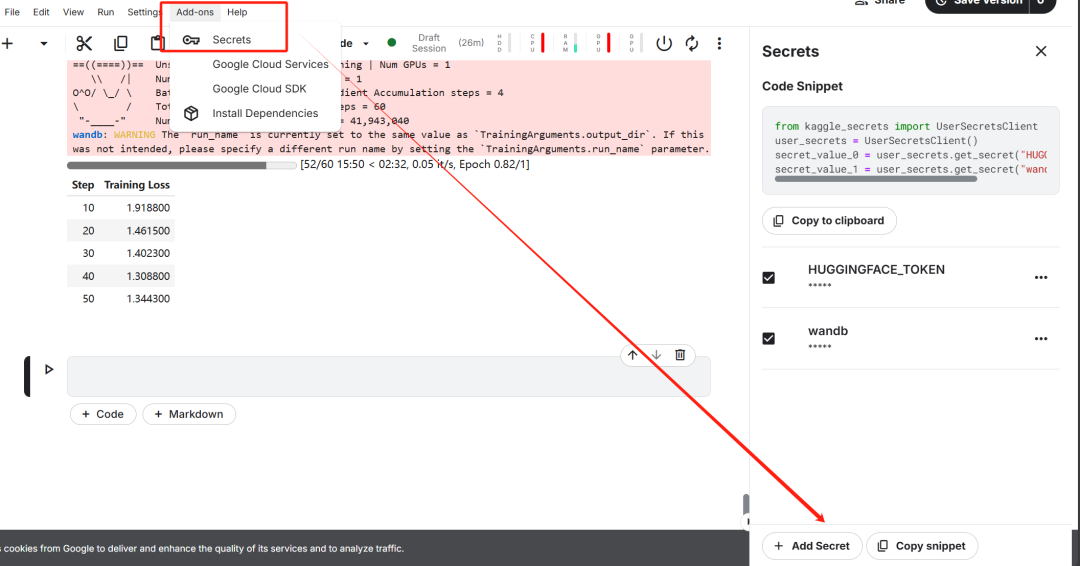
设置好密钥之后,安装unsloth Python 包。Unsloth 是一个开源框架,旨在使大型语言模型(LLM)的微调速度提高一倍,并且更具内存效率。
%%capture!pipinstallunsloth!pipinstall--force-reinstall--no-cache-dir--no-depsgit+https://github.com/unslothai/unsloth.git
登录 Hugging Face CLI,我们后续下载数据集和上传微调后的模型用得到。
from huggingface_hub import loginfrom kaggle_secrets import UserSecretsClientuser_secrets = UserSecretsClient()
hf_token = user_secrets.get_secret("HUGGINGFACE_TOKEN")login(hf_token)
登录Weights & Biases (wandb),并创建一个新项目,以跟踪实验和微调进展。
import wandb
wb_token = user_secrets.get_secret("wandb")
wandb.login(key=wb_token)run = wandb.init(project='Fine-tune-DeepSeek-R1-Distill-Llama-8B on Medical COT Dataset', job_type="training", anonymous="allow")
2.加载模型和 tokenizer
在本项目中,我们将加载 Unsloth 版本的 DeepSeek-R1-Distill-Llama-8B。
https://huggingface.co/unsloth/DeepSeek-R1-Distill-Llama-8B
此外,为了优化内存使用和性能,我们将以 4-bit 量化的方式加载该模型。
from unsloth import FastLanguageModel
max_seq_length = 2048 dtype = None load_in_4bit = True

model, tokenizer = FastLanguageModel.from_pretrained(model_name = "unsloth/DeepSeek-R1-Distill-Llama-8B",max_seq_length = max_seq_length,dtype = dtype,load_in_4bit = load_in_4bit,token = hf_token, )
3. 微调前的模型推理
为了为模型创建提示模板,我们将定义一个系统提示,并在其中包含问题和回答生成的占位符。该提示将引导模型逐步思考,并提供一个逻辑严谨、准确的回答。
prompt_style = """Below is an instruction that describes a task, paired with an input that provides further context. Write a response that appropriately completes the request. Before answering, think carefully about the question and create a step-by-step chain of thoughts to ensure a logical and accurate response.
### Instruction:You are a medical expert with advanced knowledge in clinical reasoning, diagnostics, and treatment planning. Please answer the following medical question.
### Question:{}
### Response:<think>{}"""
在这个示例中,我们将向 prompt_style 提供一个医学问题,将其转换为 token,然后将这些 token 传递给模型以生成回答。
question = "A 61-year-old woman with a long history of involuntary urine loss during activities like coughing or sneezing but no leakage at night undergoes a gynecological exam and Q-tip test. Based on these findings, what would cystometry most likely reveal about her residual volume and detrusor contractions?"

FastLanguageModel.for_inference(model) inputs = tokenizer([prompt_style.format(question, "")], return_tensors="pt").to("cuda")
outputs = model.generate(input_ids=inputs.input_ids,attention_mask=inputs.attention_mask,max_new_tokens=1200,use_cache=True,)response = tokenizer.batch_decode(outputs)print(response[0].split("### Response:")[1])
这个医学问题的大致含义是:
ingFang SC", "Hiragino Sans GB", "Microsoft YaHei UI", "Microsoft YaHei", Arial, sans-serif;letter-spacing: 0.6px;background-color: rgb(255, 255, 255);">ingFang SC", "Hiragino Sans GB", "Microsoft YaHei UI", "Microsoft YaHei", Arial, sans-serif;font-size: 12px;letter-spacing: 0.6px;background-color: rgb(255, 255, 255);">一名 61 岁的女性长期在咳嗽或打喷嚏等活动中不自觉地漏尿,但夜间没有漏尿,她接受了妇科检查和 Q-tip 测试。根据这些发现,膀胱测压最有可能揭示她的残余量和逼尿肌收缩情况?
即使在没有微调的情况下,我们的模型也成功地生成了思维链,并在给出最终答案之前进行了推理。推理过程被封装在 <think></think> 标签内。
那么,为什么我们仍然需要微调呢?尽管推理过程详细,但它显得冗长且不简洁。此外,最终答案以项目符号格式呈现,这与我们希望微调的数据集的结构和风格有所偏离。
4. 加载和处理数据集
我们将稍微调整提示模板,以处理数据集,方法是为复杂的思维链列添加第三个占位符。
train_prompt_style = """Below is an instruction that describes a task, paired with an input that provides further context. Write a response that appropriately completes the request. Before answering, think carefully about the question and create a step-by-step chain of thoughts to ensure a logical and accurate response.
### Instruction:You are a medical expert with advanced knowledge in clinical reasoning, diagnostics, and treatment planning. Please answer the following medical question.
### Question:{}
### Response:<think>{}</think>{}"""
编写一个 Python 函数,在数据集中创建一个 “text” 列,该列由训练提示模板组成。将占位符填充为问题、思维链和答案。
EOS_TOKEN = tokenizer.eos_token# Must add EOS_TOKEN

def formatting_prompts_func(examples):inputs = examples["Question"]cots = examples["Complex_CoT"]outputs = examples["Response"]texts = []for input, cot, output in zip(inputs, cots, outputs):text = train_prompt_style.format(input, cot, output) + EOS_TOKENtexts.append(text)return {"text": texts,}
我们将从 Hugging Face Hub 加载 FreedomIntelligence/medical-o1-reasoning-SFT 数据集的前 500个 样本。
https://huggingface.co/datasets/FreedomIntelligence/medical-o1-reasoning-SFT?row=46
之后,我们将使用 formatting_prompts_func 函数对 “text” 列进行映射。

如我们所见,"text" 列包含了系统提示、指令、思维链和答案。
5. 设置模型
通过使用目标模块,我们将通过向模型中添加低秩适配器(low-rank adopter)来设置模型。
model=FastLanguageModel.get_peft_model(model,r=16,target_modules=["q_proj","k_proj","v_proj","o_proj","gate_proj","up_proj","down_proj",],lora_alpha=16,lora_dropout=0,bias="none",use_gradient_checkpointing="unsloth",#Trueor"unsloth"forverylongcontextrandom_state=3407,use_rslora=False,loftq_config=None,)
接下来,我们将设置训练参数和训练器,通过提供模型、tokenizer、数据集以及其他重要的训练参数,来优化我们的微调过程。
from trl import SFTTrainerfrom transformers import TrainingArgumentsfrom unsloth import is_bfloat16_supported
trainer = SFTTrainer(model=model,tokenizer=tokenizer,train_dataset=dataset,dataset_text_field="text",max_seq_length=max_seq_length,dataset_num_proc=2,args=TrainingArguments(per_device_train_batch_size=2,gradient_accumulation_steps=4,# Use num_train_epochs = 1, warmup_ratio for full training runs!warmup_steps=5,max_steps=60,learning_rate=2e-4,fp16=not is_bfloat16_supported(),bf16=is_bfloat16_supported(),logging_steps=10,optim="adamw_8bit",weight_decay=0.01,lr_scheduler_type="linear",seed=3407,output_dir="outputs",),)
6.训练模型
trainer_stats=trainer.train()

训练过程花费了 22 分钟完成。训练损失逐渐降低,这表明模型性能有所提升,这是一个积极的信号。
通过登录 Weights & Biases 网站并查看完整的模型评估报告。

7. 微调后的模型推理
为了对比结果,我们将向微调后的模型提出与之前相同的问题,看看有什么变化。
question = "A 61-year-old woman with a long history of involuntary urine loss during activities like coughing or sneezing but no leakage at night undergoes a gynecological exam and Q-tip test. Based on these findings, what would cystometry most likely reveal about her residual volume and detrusor contractions?"

FastLanguageModel.for_inference(model)# Unsloth has 2x faster inference!inputs = tokenizer([prompt_style.format(question, "")], return_tensors="pt").to("cuda")
outputs = model.generate(input_ids=inputs.input_ids,attention_mask=inputs.attention_mask,max_new_tokens=1200,use_cache=True,)response = tokenizer.batch_decode(outputs)print(response[0].split("### Response:")[1])
结果明显更好且更准确。思维链条简洁明了,答案直接且只用了一段话。微调成功。

8. 本地保存模型
现在,让我们将适配器、完整模型和 tokenizer 保存在本地,以便在其他项目中使用。
new_model_local = "DeepSeek-R1-Medical-COT"model.save_pretrained(new_model_local) tokenizer.save_pretrained(new_model_local)
model.save_pretrained_merged(new_model_local, tokenizer, save_method = "merged_16bit",)










