|
MCP使得 AI 发展的更迅猛,让 AI 不仅能说,还长出手来,可以自己做事。 Manus到如今已小有名气,被自媒体誉为"下一个国产之光"。随后OpenManus 光速进场,阿里QwQ(这个表情真可爱 XD )也积极与 Manus 和 OpenManus 合作,强强联合。同时当前 AI 编码工具 Cursor,Cline 也都有自己的 MCP Server Marketplace,AI x 工具 的生态正在蓬勃发展,其中离不开的核心就是 MCP。 对于个人来说,AI 以及 AI Agent 让我们从「我只能做什么」,转变成「我还能做什么」,但是 AI 也如一面镜子,照映的是我们自己。 本篇将介绍: 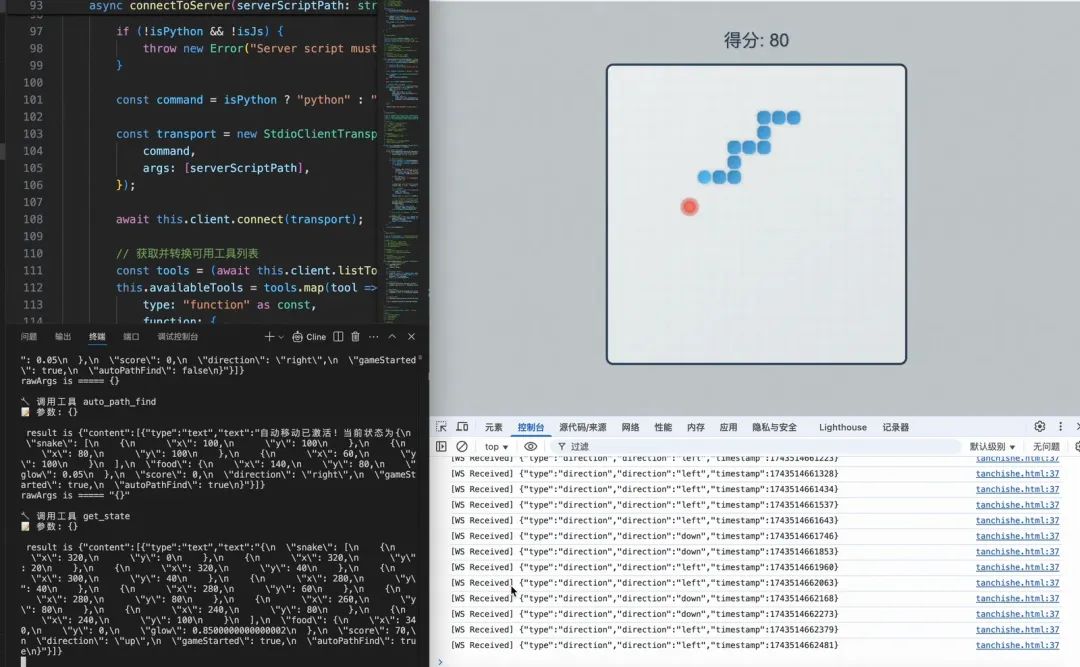
MCP Server可提供三种主要能力: 1.资源:客户端可读取的类文件数据(如API响应或文件内容) 2.工具:可由大语言模型调用的函数(需经用户批准) 3.提示模板:帮助用户完成特定任务的预制文本模板 需要注意的是:MCP Server 当前仅支持在本地运行。 官方原文:Because servers are locally run, MCP currently only supports desktop hosts. Remote hosts are in active development. 概念到这就结束了,不要惊讶,官网介绍就是这么简短,看来 MCP Server 重点在于实践。MCP 官网后续的介绍是以 Claude展开的,这里脱离官网的教程,自行在本地实现 MCP Server。 在MCP 官网上有很多mcpserver示例:https://github.com/modelcontextprotocol/servers 包含各种 js 和 py 实现的示例 
官方也收录了很多第三方平台提供的 mcp 服务 
这里也分享一下收集的一些收录 mcpserver 的平台 1.smithery.ai 2.mcpserver.org 3.pulsemcp.com 4.mcp.so 5.glama.ai/mcp/server 
如图所示 1.服务启动,客户端连接服务端并获取其能力集,初始化完成,等待用户指令 2.用户给 AI 一个任务,输入:开一局贪吃蛇吧,当得分大于100 分时停止! 3.客户端接收到指令,发送给 AI,一并发送的还有可用的工具集 4.AI 分析用户意图,判断用户要玩贪吃蛇,看到工具集里有start_game,决定调用,同时看到还有get_state,也觉得是必要的,也调用一下吧 5.于是告诉MCP Client,本次我要调用的工具是 start_game,get_state,去调用吧,调用完把结果返回给我 6.MCP Client 使用 Call Tool 去调用这两个工具 7.MCP Server 收到消息,要我开始游戏,好的,给连接的贪吃蛇游戏客户端,发出指令,开始游戏 8.贪吃蛇游戏汇报当前状态,游戏已开始,当前蛇在哪,食物在哪,蛇的方向,当前得分 9.MCP Server接收到贪吃蛇状态,记录下来,并告诉 MCP Client 当前游戏开始了,蛇的状态是... 10.MCP Client 获取到第一个工具 start_game 的结果后,发起第二次工具调用get_state,服务端再返回当前贪吃蛇最新的状态 11.MCP Client 拿到所有的数据后,发送给 AI 12.AI 根据当前的数据可以判断出,当前游戏已开始,贪吃蛇此时的状态是 xxx,我下一步应该怎么走,告诉 Client,我这一次要调用的工具是move_step,参数是{"direction": "right"} 13.MCP Client 根据 AI 返回的数据去调用 MCP Server 对应的工具,MCP Server 收到通知后,去控制贪吃蛇移动 14.继续多轮交互下去,直到用户输入的任务完成 ...看起来一切都如此完美,但实际中会遇到不少问题,且看是如何解决的,实践开始。 首先得有一个贪吃蛇,我对 AI 说,要有贪吃蛇,于是,它立马给我写了一个。 贪吃蛇游戏-手动版 <!DOCTYPEhtml><html><head> <title>贪吃蛇游戏</title> <style> canvas{ border:2pxsolid#333; background-color:#f0f0f0; } #score-panel{ font-size:24px; margin:10px0; } </style></head><body> <divid="score-panel">得分: 0</div> <canvasid="gameCanvas"width="400"height="400"></canvas>
<script> // 游戏配置 constcanvas =document.getElementById('gameCanvas'); constctx = canvas.getContext('2d'); constgridSize =20; // 网格大小 constinitialSpeed =150; // 初始速度(毫秒) // 游戏状态 letsnake = []; letfood = {}; letdx = gridSize; letdy =0; letscore =0; letgameStarted =false; letgameLoop;
// 初始化游戏(新增重置功能) functioninitGame(){ // 重置蛇的初始状态 snake = [ {x:5* gridSize,y:5* gridSize}, {x:4* gridSize,y:5* gridSize}, {x:3* gridSize,y:5* gridSize} ]; // 重置移动方向 dx = gridSize; dy =0; // 重置得分 score =0; document.getElementById('score-panel').textContent=`得分 {score}`; {score}`; // 生成新食物 generateFood(); // 清除旧画面 draw(); }
functiongenerateFood(){ food = { x:Math.floor(Math.random() * (canvas.width/gridSize)) * gridSize, y:Math.floor(Math.random() * (canvas.height/gridSize)) * gridSize }; while(snake.some(segment=>segment.x=== food.x&& segment.y=== food.y)) { generateFood(); } }
functiongameStep(){ consthead = {x: snake[0].x+ dx,y: snake[0].y+ dy}; if(head.x<0|| head.x>= canvas.width|| head.y<0|| head.y>= canvas.height|| snake.some(segment=>segment.x=== head.x&& segment.y=== head.y)) { gameOver(); return; }
snake.unshift(head);
if(head.x=== food.x&& head.y=== food.y) { score +=10; document.getElementById('score-panel').textContent=`得分{score}`; generateFood(); }else{ snake.pop(); }
draw(); }
functiondraw(){ ctx.clearRect(0,0, canvas.width, canvas.height); snake.forEach((segment, index) =>{ ctx.fillStyle= index ===0?'#2ecc71':'#27ae60'; ctx.fillRect(segment.x, segment.y, gridSize-1, gridSize-1); });
ctx.fillStyle='#e74c3c'; ctx.fillRect(food.x, food.y, gridSize-1, gridSize-1); }
// 修改后的游戏结束逻辑 functiongameOver(){ clearInterval(gameLoop); gameStarted =false; alert(`就这?才${score}分,还得练`); initGame();// 游戏结束后立即重置状态 }
// 增强的键盘控制 document.addEventListener('keydown',(e) =>{ if(!gameStarted && [37,38,39,40].includes(e.keyCode)) { gameStarted =true; initGame();// 每次开始前确保重置 gameLoop =setInterval(gameStep, initialSpeed); } switch(e.keyCode) { case37:if(dx !== gridSize) { dx = -gridSize; dy =0; }break; case38:if(dy !== gridSize) { dx =0; dy = -gridSize; }break; case39:if(dx !== -gridSize) { dx = gridSize; dy =0; }break; case40:if(dy !== -gridSize) { dx =0; dy = gridSize; }break; } });
// 初始化首次显示 initGame(); </script></body></html>
对于代码,我想说
调试了一下,勉强可以玩,又让它加上计分板
ok,有了手动版后,目前只能通过键盘进行交互,要让服务与它进行交互,就建立一个 WebSocket 通道吧。 贪吃蛇游戏客户端实现以手动版作为模板,稍微改了一下代码,实现 WebSocket 版本,再稍稍优化一下 UI,支持手动控制的同时,也支持连接 Web Socket Server,进行通信,有感兴趣的朋友可以保存成本地html格式,双击直接运行。 贪吃蛇-豪华尊享版 <!DOCTYPEhtml><html><head><title>贪吃蛇-豪华尊享版</title><style>canvas{border:3pxsolid#2c3e50;border-radius:10px;background:linear-gradient(145deg,#ecf0f1,#dfe6e9);}#score-panel{font-size:24px;margin:15px0;color:#2c3e50;font-family:Arial,sans-serif;text-shadow:1px1px2pxrgba(0,0,0,0.1);}body{display:flex;flex-direction:column;align-items:center;background:#bdc3c7;min-height:100vh;margin:0;padding-top:20px;}</style></head><body><divid="score-panel">得分:0</div><canvasid="gameCanvas"width="400"height="400"></canvas><scripttype="module">//连接snake-serverconstsocket=newWebSocket('ws://localhost:8080');socket.onmessage=(event)=>{console.log('[WSReceived]',event.data);constdata=JSON.parse(event.data);//处理方向指令if(data.type==='direction'){switch(data.direction){case'left':if(dx!==gridSize){dx=-gridSize;dy=0;}break;case'up':if(dy!==gridSize){dx=0;dy=-gridSize;}break;case'right':if(dx!==-gridSize){dx=gridSize;dy=0;}break;case'down':if(dy!==-gridSize){dx=0;dy=gridSize;}break;}gameStep();//执行一步}//处理游戏开始指令elseif(data.type==='start'){if(!gameStarted){gameStarted=true;initGame();//发送状态到服务端sendStateToServer();}}//处理游戏结束指令elseif(data.type==='end'){//发送状态到服务端sendStateToServer();if(gameStarted){gameOver();}}//获取状态elseif(data.type==='get_state'){//发送状态到服务端sendStateToServer();}};constcanvas=document.getElementById('gameCanvas');constctx=canvas.getContext('2d');constgridSize=20;constinitialSpeed=150;//颜色配置constcolors={snakeHead:'#3498db',snakeBody:'#2980b9',food:'#e74c3c',foodGlow:'rgba(231,76,60,0.4)',eye:'#FFFFFF'};letsnake=[];letfood={};letdx=gridSize;letdy=0;letscore=0;letgameStarted=false;letautoMove=false;//新增自动移动控制开关letisSetting=false;//定时器注入开关letgameLoop;functioninitGame(){isSetting=false;snake=[{x:5*gridSize,y:5*gridSize},{x:4*gridSize,y:5*gridSize},{x:3*gridSize,y:5*gridSize}];dx=gridSize;dy=0;score=0;document.getElementById('score-panel').textContent=`得分{score}`;generateFood();draw();}functiongenerateFood(){food={x:Math.floor(Math.random()*(canvas.width/gridSize))*gridSize,y:Math.floor(Math.random()*(canvas.height/gridSize))*gridSize,glow:0//新增发光动画状态};while(snake.some(s=>s.x===food.x&&s.y===food.y))generateFood();}functiondrawSnake(){snake.forEach((segment,index)=>{constisHead=index===0;constradius=gridSize/2*(isHead?0.9:0.8);//身体渐变constgradient=ctx.createLinearGradient(segment.x,segment.y,segment.x+gridSize,segment.y+gridSize);gradient.addColorStop(0,isHead?colors.snakeHead:colors.snakeBody);gradient.addColorStop(1,isHead?lightenColor(colors.snakeHead,20):lightenColor(colors.snakeBody,20));//绘制身体ctx.beginPath();ctx.roundRect(segment.x+1,segment.y+1,gridSize-2,gridSize-2,isHead?8:6);ctx.fillStyle=gradient;ctx.shadowColor='rgba(0,0,0,0.2)';ctx.shadowBlur=5;ctx.fill();});}functiondrawFood(){//发光动画food.glow=(food.glow+0.05)%(Math.PI*2);constglowSize=Math.sin(food.glow)*3;//外发光ctx.beginPath();ctx.arc(food.x+gridSize/2,food.y+gridSize/2,gridSize/2+glowSize,0,Math.PI*2);ctx.fillStyle=colors.foodGlow;ctx.fill();//食物主体ctx.beginPath();ctx.arc(food.x+gridSize/2,food.y+gridSize/2,gridSize/2-2,0,Math.PI*2);constgradient=ctx.createRadialGradient(food.x+gridSize/2,food.y+gridSize/2,0,food.x+gridSize/2,food.y+gridSize/2,gridSize/2);gradient.addColorStop(0,lightenColor(colors.food,20));gradient.addColorStop(1,colors.food);ctx.fillStyle=gradient;ctx.fill();}functiondraw(){ctx.clearRect(0,0,canvas.width,canvas.height);//绘制网格背景drawGrid();drawSnake();drawFood();}functiondrawGrid(){ctx.strokeStyle='rgba(0,0,0,0.05)';ctx.lineWidth=0.5;for(letx=0;x<canvas.width;x+=gridSize){ctx.beginPath();ctx.moveTo(x,0);ctx.lineTo(x,canvas.height);ctx.stroke();}for(lety=0;y<canvas.height;y+=gridSize){ctx.beginPath();ctx.moveTo(0,y);ctx.lineTo(canvas.width,y);ctx.stroke();}}functionlightenColor(hex,percent){constnum=parseInt(hex.replace('#',''),16),amt=Math.round(2.55*percent),R=(num>>16)+amt,G=(num>>8&0x00FF)+amt,B=(num&0x0000FF)+amt;return`#${(1<<24|(R<255?R<1?0:R:255)<<16|(G<255?G<1?0:G:255)<<8|(B<255?B<1?0:B:255)).toString(16).slice(1)}`;}functiongameStep(){consthead={x:snake[0].x+dx,y:snake[0].y+dy};if(head.x<0||head.x>=canvas.width||head.y<0||head.y>=canvas.height||snake.some(segment=>segment.x===head.x&&segment.y===head.y)){gameOver();return;}snake.unshift(head);if(head.x===food.x&&head.y===food.y){score+=10;document.getElementById('score-panel').textContent=`得分{score}`;generateFood();}else{snake.pop();}//发送状态到服务端sendStateToServer();draw();}//修改后的游戏结束逻辑functiongameOver(){clearInterval(gameLoop);gameStarted=false;autoMove=false;alert(`游戏结束!得分{score}`);initGame();//游戏结束后立即重置状态}functionsendStateToServer(){//发送状态到服务端conststate={type:'state',snake:snake,food:food,direction:{dx,dy},score:score};if(socket.readyState===WebSocket.OPEN){socket.send(JSON.stringify(state));}}//键盘事件监听document.addEventListener('keydown',(e)=>{if(!gameStarted){gameStarted=true;initGame();}switch(e.key){case'ArrowLeft':if(dx!==gridSize){dx=-gridSize;dy=0;}break;case'ArrowUp':if(dy!==gridSize){dx=0;dy=-gridSize;}break;case'ArrowRight':if(dx!==-gridSize){dx=gridSize;dy=0;}break;case'ArrowDown':if(dy!==-gridSize){dx=0;dy=gridSize;}break;}move();});functionmove(){//当自动开启,且没有设置定时器时,设置定时器,并将定时器标志位置为trueif(autoMove&&!isSetting){gameLoop=setInterval(gameStep,initialSpeed);isSetting=true;}else{gameStep();}}//初始化首次显示initGame();</script></body></html>对于代码,只能说我从 AI 那学习了很多... 是吧有了客户端,就可以用 MCP Server 与它进行建立连接,并控制贪吃蛇吃食物了,接下来实现一下 MCP Server MCP Client 代码实现本文主要介绍 MCP Server 的使用,MCP Client 原理及实现可以详见:《手搓Manus?MCP 原理解析与MCP Client实践》 这里只是贴一下代码,写了 TS 和 Python版本的Client,任君选择。 MCP Client typescript 版 /***MCP客户端实现**提供与MCP服务器的连接、工具调用和聊天交互功能**主要功能:*1.连接Python或JavaScript实现的MCP服务器*2.获取服务器提供的工具列表*3.通过OpenAIAPI处理用户查询*4.自动处理工具调用链*5.提供交互式命令行界面**使用说明:*1.确保设置OPENAI_API_KEY环境变量*2.通过命令行参数指定MCP服务器脚本路径*3.启动后输入查询或'quit'退出**依赖:*-@modelcontextprotocol/sdk:MCP协议SDK*-openai:OpenAIAPI客户端*-dotenv:环境变量加载*/import{Client}from"@modelcontextprotocol/sdk/client/index.js";import{StdioClientTransport}from"@modelcontextprotocol/sdk/client/stdio.js";importOpenAIfrom"openai";importtype{ChatCompletionMessageParam}from"openai/resources/chat/completions";importtype{Tool}from"@modelcontextprotocol/sdk/types.js";import*asdotenvfrom"dotenv";import*asreadlinefrom'readline';//加载环境变量配置dotenv.config();/***MCP客户端类,封装与MCP服务器的交互逻辑*/classMCPClient{privateopenai:OpenAI;//OpenAIAPI客户端实例privateclient:Client;//MCP协议客户端实例privatemessages:ChatCompletionMessageParam[]=[{role:"system",content:"Youareaversatileassistantcapableofansweringquestions,completingtasks,andintelligentlyinvokingspecializedtoolstodeliveroptimalresults."},];//聊天消息历史记录,用于维护对话上下文privateavailableTools:any[]=[];//服务器提供的可用工具列表,格式化为OpenAI工具格式/***构造函数,初始化OpenAI和MCP客户端**@throws{Error}如果OPENAI_API_KEY环境变量未设置**初始化过程:*1.检查必要的环境变量*2.创建OpenAI客户端实例*3.创建MCP客户端实例*4.初始化消息历史记录*/constructor(){if(!process.env.OPENAI_API_KEY){thrownewError("OPENAI_API_KEY环境变量未设置");}this.openai=newOpenAI({apiKey:process.env.OPENAI_API_KEY,baseURL:process.env.OPENAI_BASE_URL,});this.client=newClient({name:"my-mcp-client",version:"1.0.0",},);}/***连接到MCP服务器**@param{string}serverScriptPath-服务器脚本路径(.py或.js)*@returns{Promise<void>}连接成功时解析*@throws{Error}如果服务器脚本不是.py或.js文件,或连接失败**连接过程:*1.检查脚本文件扩展名*2.根据扩展名决定使用python或node执行*3.通过stdio建立连接*4.获取服务器工具列表并转换为OpenAI工具格式**注意事项:*-服务器脚本必须具有可执行权限*-连接成功后会自动获取工具列表*/asyncconnectToServer(serverScriptPath:string){constisPython=serverScriptPath.endsWith('.py');constisJs=serverScriptPath.endsWith('.js');if(!isPython&&!isJs){thrownewError("Serverscriptmustbea.pyor.jsfile");}constcommand=isPython?"python":"node";consttransport=newStdioClientTransport({command,args:[serverScriptPath],});awaitthis.client.connect(transport);//获取并转换可用工具列表consttools=(awaitthis.client.listTools()).toolsasunknownasTool[];this.availableTools=tools.map(tool=>({type:"function"asconst,function:{name:tool.nameasstring,description:tool.descriptionasstring,parameters:{type:"object",properties:tool.inputSchema.propertiesasRecord<string,unknown>,required:tool.inputSchema.requiredasstring[],},}}));console.log("\n已连接到服务器,可用工具:",tools.map(tool=>tool.name));}/***处理工具调用链**@param{OpenAI.Chat.Completions.ChatCompletion}response-初始OpenAI响应,包含工具调用*@param{ChatCompletionMessageParam[]}messages-当前消息历史记录*@returns{Promise<OpenAI.Chat.Completions.ChatCompletion>}最终OpenAI响应**处理流程:*1.检查响应中是否包含工具调用*2.循环处理所有工具调用*3.解析每个工具调用的参数*4.执行工具调用*5.将工具结果添加到消息历史*6.获取下一个OpenAI响应**错误处理:*-参数解析失败时使用空对象继续执行*-工具调用失败会抛出异常**注意事项:*-此方法会修改传入的messages数组*-可能多次调用OpenAIAPI*/privateasynctoolCalls(response:OpenAI.Chat.Completions.ChatCompletion,messages:ChatCompletionMessageParam[]){letcurrentResponse=response;//直到下一次交互AI没有选择调用工具时退出循环while(currentResponse.choices[0].message.tool_calls){if(currentResponse.choices[0].message.content){console.log("\n?AI:tool_calls",JSON.stringify(currentResponse.choices[0].message));}//AI一次交互中可能会调用多个工具for(consttoolCallofcurrentResponse.choices[0].message.tool_calls){consttoolName=toolCall.function.name;constrawArgs=toolCall.function.arguments;lettoolArgs;try{console.log(`rawArgsis=====${rawArgs}`)toolArgs="{}"==JSON.parse(rawArgs)?{}:JSON.parse(rawArgs);if(typeoftoolArgs==="string"){toolArgs=JSON.parse(toolArgs);}}catch(error){console.error('⚠️参数解析失败,使用空对象替代');toolArgs={};}console.log(`\n?调用工具${toolName}`);console.log(`?参数:`,toolArgs);//调用工具获取结果constresult=awaitthis.client.callTool({name:toolName,arguments:toolArgs});console.log(`\nresultis${JSON.stringify(result)}`);//添加AI的响应和工具调用结果到消息历史//console.log(`?currentResponse.choices[0].message:`,currentResponse.choices[0].message);messages.push(currentResponse.choices[0].message);messages.push({role:"tool",tool_call_id:toolCall.id,content:JSON.stringify(result.content),}asChatCompletionMessageParam);}//console.log(`?messages:`,messages);//获取下一个响应currentResponse=awaitthis.openai.chat.completions.create({model:process.env.OPENAI_MODELasstring,messages:messages,tools:this.availableTools,});}returncurrentResponse;}/***处理用户查询**@param{string}query-用户输入的查询字符串*@returns{Promise<string>}AI生成的响应内容**处理流程:*1.将用户查询添加到消息历史*2.调用OpenAIAPI获取初始响应*3.如果有工具调用,处理工具调用链*4.返回最终响应内容**错误处理:*-OpenAIAPI调用失败会抛出异常*-工具调用链中的错误会被捕获并记录**注意事项:*-此方法会更新内部消息历史*-可能触发多个工具调用*/asyncprocessQuery(query:string) romise<string>{//添加用户查询到消息历史this.messages.push({role:"user",content:query,});//初始OpenAIAPI调用letresponse=awaitthis.openai.chat.completions.create({model:process.env.OPENAI_MODELasstring,messages:this.messages,tools:this.availableTools,});//打印初始响应if(response.choices[0].message.content){console.log("\n?AI:",response.choices[0].message);}//处理工具调用链if(response.choices[0].message.tool_calls){response=awaitthis.toolCalls(response,this.messages);}//更新消息历史this.messages.push(response.choices[0].message);returnresponse.choices[0].message.content||"";}/***启动交互式聊天循环**@returns{Promise<void>}当用户退出时解析**功能:*1.持续接收用户输入*2.处理用户查询*3.显示AI响应*4.输入'quit'退出**实现细节:*-使用readline模块实现交互式输入输出*-循环处理直到用户输入退出命令*-捕获并显示处理过程中的错误**注意事项:*-此方法是阻塞调用,会一直运行直到用户退出*-确保在调用前已连接服务器*/asyncchatLoop(){console.log("\nMCPClientStarted!");console.log("Typeyourqueriesor'quit'toexit.");constrl=readline.createInterface({input:process.stdin,output:process.stdout,});while(true){constquery=awaitnewPromise<string>((resolve)=>{rl.question("\nQuery:",resolve);});if(query.toLowerCase()==='quit'){break;}try{constresponse=awaitthis.processQuery(query);console.log("\n"+response);}catch(e){console.error("\nError:",einstanceofError?e.message:String(e));}}rl.close();}/***清理资源**@returns{Promise<void>}资源清理完成后解析**关闭以下资源:*1.MCP客户端连接*2.任何打开的句柄**最佳实践:*-应在程序退出前调用*-建议在finally块中调用以确保执行**注意事项:*-多次调用是安全的*-清理后实例不可再用*/asynccleanup(){if(this.client){awaitthis.client.close();}}}/***主函数**程序入口点,执行流程:*1.检查命令行参数*2.创建MCP客户端实例*3.连接到指定服务器脚本*4.启动交互式聊天循环*5.退出时清理资源**@throws{Error}如果缺少命令行参数或连接失败**使用示例:*```bash*nodeindex.js/path/to/server.js*```**退出码:*-0:正常退出*-1:参数错误或运行时错误*/asyncfunctionmain(){if(process.argv.length<3){console.log("Usage:nodedist/index.js<path_to_server_script>");process.exit(1);}constclient=newMCPClient();try{awaitclient.connectToServer(process.argv[2]);awaitclient.chatLoop();}finally{awaitclient.cleanup();}}main().catch((error)=>{console.error("Error:",error);process.exit(1);}); romise<string>{//添加用户查询到消息历史this.messages.push({role:"user",content:query,});//初始OpenAIAPI调用letresponse=awaitthis.openai.chat.completions.create({model:process.env.OPENAI_MODELasstring,messages:this.messages,tools:this.availableTools,});//打印初始响应if(response.choices[0].message.content){console.log("\n?AI:",response.choices[0].message);}//处理工具调用链if(response.choices[0].message.tool_calls){response=awaitthis.toolCalls(response,this.messages);}//更新消息历史this.messages.push(response.choices[0].message);returnresponse.choices[0].message.content||"";}/***启动交互式聊天循环**@returns{Promise<void>}当用户退出时解析**功能:*1.持续接收用户输入*2.处理用户查询*3.显示AI响应*4.输入'quit'退出**实现细节:*-使用readline模块实现交互式输入输出*-循环处理直到用户输入退出命令*-捕获并显示处理过程中的错误**注意事项:*-此方法是阻塞调用,会一直运行直到用户退出*-确保在调用前已连接服务器*/asyncchatLoop(){console.log("\nMCPClientStarted!");console.log("Typeyourqueriesor'quit'toexit.");constrl=readline.createInterface({input:process.stdin,output:process.stdout,});while(true){constquery=awaitnewPromise<string>((resolve)=>{rl.question("\nQuery:",resolve);});if(query.toLowerCase()==='quit'){break;}try{constresponse=awaitthis.processQuery(query);console.log("\n"+response);}catch(e){console.error("\nError:",einstanceofError?e.message:String(e));}}rl.close();}/***清理资源**@returns{Promise<void>}资源清理完成后解析**关闭以下资源:*1.MCP客户端连接*2.任何打开的句柄**最佳实践:*-应在程序退出前调用*-建议在finally块中调用以确保执行**注意事项:*-多次调用是安全的*-清理后实例不可再用*/asynccleanup(){if(this.client){awaitthis.client.close();}}}/***主函数**程序入口点,执行流程:*1.检查命令行参数*2.创建MCP客户端实例*3.连接到指定服务器脚本*4.启动交互式聊天循环*5.退出时清理资源**@throws{Error}如果缺少命令行参数或连接失败**使用示例:*```bash*nodeindex.js/path/to/server.js*```**退出码:*-0:正常退出*-1:参数错误或运行时错误*/asyncfunctionmain(){if(process.argv.length<3){console.log("Usage:nodedist/index.js<path_to_server_script>");process.exit(1);}constclient=newMCPClient();try{awaitclient.connectToServer(process.argv[2]);awaitclient.chatLoop();}finally{awaitclient.cleanup();}}main().catch((error)=>{console.error("Error:",error);process.exit(1);});MCP Client python 版 importasyncioimportjsonimportosimporttracebackfromtypingimportOptionalfromcontextlibimportAsyncExitStackfrommcpimportClientSession,StdioServerParametersfrommcp.client.stdioimportstdio_clientfromopenaiimportOpenAIfromdotenvimportload_dotenvload_dotenv()#loadenvironmentvariablesfrom.envclassMCPClient:def__init__(self):#Initializesessionandclientobjectsself.session:Optional[ClientSession]=Noneself.exit_stack=AsyncExitStack()self.client=OpenAI(api_key=os.getenv("OPENAI_API_KEY"),base_url=os.getenv("OPENAI_BASE_URL"))self.model=os.getenv("OPENAI_MODEL")self.messages=[{"role":"system","content":"Youareaversatileassistantcapableofansweringquestions,completingtasks,andintelligentlyinvokingspecializedtoolstodeliveroptimalresults."}]self.available_tools=[]@staticmethoddefconvert_custom_object(obj):"""将自定义对象转换为字典"""ifhasattr(obj,"__dict__"):#如果对象有__dict__属性,直接使用returnobj.__dict__elifisinstance(obj,(list,tuple)):#如果是列表或元组,递归处理return[MCPClient.convert_custom_object(item)foriteminobj]elifisinstance(obj,dict):#如果是字典,递归处理值return{key:MCPClient.convert_custom_object(value)forkey,valueinobj.items()}else:#其他类型(如字符串、数字等)直接返回returnobjasyncdefconnect_to_server(self,server_script_path:str):"""ConnecttoanMCPserverArgs:server_script_pathathtotheserverscript(.pyor.js)"""is_python=server_script_path.endswith('.py')is_js=server_script_path.endswith('.js')ifnot(is_pythonoris_js):raiseValueError("Serverscriptmustbea.pyor.jsfile")command="python"ifis_pythonelse"node"server_params=StdioServerParameters(command=command,args=[server_script_path],env=None)stdio_transport=awaitself.exit_stack.enter_async_context(stdio_client(server_params))self.stdio,self.write=stdio_transportself.session=awaitself.exit_stack.enter_async_context(ClientSession(self.stdio,self.write))awaitself.session.initialize()#Listavailabletoolsresponse=awaitself.session.list_tools()tools=response.toolsprint("\nConnectedtoserverwithtools:",[tool.namefortoolintools])asyncdefprocess_query(self,query:str)->str:""" rocessaquerywithmulti-turntoolcallingsupport"""#Adduserquerytomessagehistoryself.messages.append({"role":"user","content":query})#Getavailabletoolsifnotalreadysetifnotself.available_tools:response=awaitself.session.list_tools()self.available_tools=[{"type":"function","function":{"name":tool.name,"description":tool.description,"parameters":tool.inputSchema}}fortoolinresponse.tools]current_response=self.client.chat.completions.create(model=self.model,messages=self.messages,tools=self.available_tools,stream=False)#Printinitialresponseifexistsifcurrent_response.choices[0].message.content:print("\n?AI:",current_response.choices[0].message.content)#Handletoolcallsrecursivelywhilecurrent_response.choices[0].message.tool_calls:fortool_callincurrent_response.choices[0].message.tool_calls:tool_name=tool_call.function.nametry:tool_args=json.loads(tool_call.function.arguments)exceptjson.JSONDecodeError:tool_args={}print(f"\n?调用工具{tool_name}")print(f"?参数:{tool_args}")#Executetoolcallresult=awaitself.session.call_tool(tool_name,tool_args)print(f"\n工具结果:{result}")#AddAImessageandtoolresulttohistoryself.messages.append(current_response.choices[0].message)self.messages.append({"role":"tool","tool_call_id":tool_call.id,"content":json.dumps(result.content)})#Getnextresponsecurrent_response=self.client.chat.completions.create(model=self.model,messages=self.messages,tools=self.available_tools,stream=False)#Addfinalresponsetohistoryself.messages.append(current_response.choices[0].message)returncurrent_response.choices[0].message.contentor""asyncdefchat_loop(self):"""Runaninteractivechatloop"""print("\nMCPClientStarted!")print("Typeyourqueriesor'quit'toexit.")whileTrue:try:query=input("\nCommend:").strip()ifquery.lower()=='quit':breakresponse=awaitself.process_query(query)print("\n?AI:"+response)exceptExceptionase:print(f"\nErroroccurs:{e}")traceback.print_exc()asyncdefcleanup(self):"""Cleanupresources"""awaitself.exit_stack.aclose()asyncdefmain():iflen(sys.argv)<2:print("Usage:pythonclient.py<path_to_server_script>")sys.exit(1)client=MCPClient()try:awaitclient.connect_to_server(sys.argv[1])awaitclient.chat_loop()finally:awaitclient.cleanup()if__name__=="__main__":importsysasyncio.run(main()) rocessaquerywithmulti-turntoolcallingsupport"""#Adduserquerytomessagehistoryself.messages.append({"role":"user","content":query})#Getavailabletoolsifnotalreadysetifnotself.available_tools:response=awaitself.session.list_tools()self.available_tools=[{"type":"function","function":{"name":tool.name,"description":tool.description,"parameters":tool.inputSchema}}fortoolinresponse.tools]current_response=self.client.chat.completions.create(model=self.model,messages=self.messages,tools=self.available_tools,stream=False)#Printinitialresponseifexistsifcurrent_response.choices[0].message.content:print("\n?AI:",current_response.choices[0].message.content)#Handletoolcallsrecursivelywhilecurrent_response.choices[0].message.tool_calls:fortool_callincurrent_response.choices[0].message.tool_calls:tool_name=tool_call.function.nametry:tool_args=json.loads(tool_call.function.arguments)exceptjson.JSONDecodeError:tool_args={}print(f"\n?调用工具{tool_name}")print(f"?参数:{tool_args}")#Executetoolcallresult=awaitself.session.call_tool(tool_name,tool_args)print(f"\n工具结果:{result}")#AddAImessageandtoolresulttohistoryself.messages.append(current_response.choices[0].message)self.messages.append({"role":"tool","tool_call_id":tool_call.id,"content":json.dumps(result.content)})#Getnextresponsecurrent_response=self.client.chat.completions.create(model=self.model,messages=self.messages,tools=self.available_tools,stream=False)#Addfinalresponsetohistoryself.messages.append(current_response.choices[0].message)returncurrent_response.choices[0].message.contentor""asyncdefchat_loop(self):"""Runaninteractivechatloop"""print("\nMCPClientStarted!")print("Typeyourqueriesor'quit'toexit.")whileTrue:try:query=input("\nCommend:").strip()ifquery.lower()=='quit':breakresponse=awaitself.process_query(query)print("\n?AI:"+response)exceptExceptionase:print(f"\nErroroccurs:{e}")traceback.print_exc()asyncdefcleanup(self):"""Cleanupresources"""awaitself.exit_stack.aclose()asyncdefmain():iflen(sys.argv)<2:print("Usage:pythonclient.py<path_to_server_script>")sys.exit(1)client=MCPClient()try:awaitclient.connect_to_server(sys.argv[1])awaitclient.chat_loop()finally:awaitclient.cleanup()if__name__=="__main__":importsysasyncio.run(main())MCP Server 代码实现 MCP Server重要的组成部分有 ingFang SC", "Microsoft YaHei", STHeiti, Helvetica, Arial, sans-serif, "Apple Color Emoji";font-style: normal;font-variant-caps: normal;letter-spacing: normal;text-indent: 0px;text-transform: none;white-space: pre-wrap;word-spacing: 0px;text-size-adjust: auto;-webkit-text-stroke-width: 0px;text-decoration: none;text-align: justify;">构造函数constructor() { // 创建 WebSocket 服务器 constWebSocket=require('ws');// 引入库 this.WebSocket=WebSocket; this.wss=newWebSocket.Server({port:8080}); this.wss.on('connection',(ws) =>{ // ws 的回调省略,完整代码见附录 });
this.server=newServer( { name:'snake-server', version:'0.1.0', }, { capabilities: { tools: {}, }, } );
this.setupToolHandlers(); this.server.onerror=(error) =>console.error('[MCP Error]', error); process.on('SIGINT',async() => { awaitthis.server.close(); process.exit(0); }); }
ingFang SC", "Microsoft YaHei", STHeiti, Helvetica, Arial, sans-serif, "Apple Color Emoji";font-style: normal;font-variant-caps: normal;letter-spacing: normal;text-indent: 0px;text-transform: none;white-space: pre-wrap;word-spacing: 0px;text-size-adjust: auto;-webkit-text-stroke-width: 0px;text-decoration: none;text-align: justify;">Tools 的定义如这里实现的贪吃蛇,想一下控制客户端的流程,先启动游戏,获取贪吃蛇位置,再根据贪吃蛇位置进行上下左右移动,最后结束游戏获取得分 根据流程,设计几个必要的 tools : move_step、get_state、start_game、end_game this.server.setRequestHandler(ListToolsRequestSchema,async()=>({tools:[{name:'move_step',description:'使蛇移动一步,需要精确传入up,down,left,right中的一个',inputSchema:{type:'object',properties:{direction:{type:'string',enum:['up','down','left','right']}},required:['direction']}},{name:'get_state',description:'获取当前游戏状态',inputSchema:{type:'object',properties:{}}},{name:'start_game',description:'开始新游戏',inputSchema:{type:'object',properties:{}}},{name:'end_game',description:'结束当前游戏',inputSchema:{type:'object',properties:{}}}]}));有了这四个工具就可以对贪吃蛇游戏进行基本的控制了 Tools的逻辑 这里省去的内部实现逻辑,让大家可以聚焦在代码结构上,明白 MCP Server 是如何运行的,当从 MCP Client 那收到请求时,会解析,根据入参来决定调用什么能力,原来就是个 switch 呀 this.server.setRequestHandler(CallToolRequestSchema,async(request)=>{switch(request.params.name){case'move_step':{//逻辑省略,完整代码在附录return{content:[{type:'text',text:`方向已更新,当前状态为${JSON.stringify(this.gameState,null,2)}`}]};}case'get_state'://逻辑省略,完整代码在附录return{content:[{type:'text',text:JSON.stringify(this.gameState,null,2)}]};case'start_game'://逻辑省略,完整代码在附录return{content:[{type:'text',text:`游戏已开始,当前状态为${JSON.stringify(this.gameState,null,2)}`}]};case'end_game'://逻辑省略,完整代码在附录return{content:[{type:'text',text:'游戏已结束'}]};default:return{content:[{type:'text',text:'未知的调用'}]};}});ingFang SC", "Microsoft YaHei", STHeiti, Helvetica, Arial, sans-serif, "Apple Color Emoji";font-style: normal;font-variant-caps: normal;letter-spacing: normal;text-indent: 0px;text-transform: none;white-space: pre-wrap;word-spacing: 0px;text-size-adjust: auto;-webkit-text-stroke-width: 0px;text-decoration: none;text-align: justify;">建立本地传输通道asyncrun(){consttransport=newStdioServerTransport();awaitthis.server.connect(transport);console.error('SnakeMCP服务器已启动');}ingFang SC", "Microsoft YaHei", STHeiti, Helvetica, Arial, sans-serif, "Apple Color Emoji";font-style: normal;font-variant-caps: normal;letter-spacing: normal;text-indent: 0px;text-transform: none;white-space: pre-wrap;word-spacing: 0px;text-size-adjust: auto;-webkit-text-stroke-width: 0px;text-decoration: none;text-align: justify;">服务启动时constserver=newSnakeServer();server.run().catch(console.log); MCP 调试MCP Server 大功告成,如何看它的效果,测试它的功能是否 ok 呢,如果从全链路的起点调试,链路长,也不易排查和定位问题,这里介绍一下 MCP 官方提供了一个组件-inspector,用于方便的调试 MCP Server。 
可以看到,调试器里可以连接当前的 MCP Server,并且获取它的 Tools List,点击某个 Tools,在右侧可以 Run Tool。 Tool 的输入,输出可以清晰的在下方看到,非常方便调试。 启动方式 终端输入 npx@modelcontextprotocol/inspectornode./build/index.js 启动后,也可以在终端里看到更具体的日志信息 通过 MCP Server,成功与贪吃蛇客户端建立连接,并实现基础控制,接下来,就让 AI 来玩贪吃蛇吧。 AI x MCP 让 AI 玩贪吃蛇 贪吃蛇,启动! 使用上一篇文档里写的 MCP Client,连接上这个贪吃蛇 MCP Server,给 AI 一个任务,让它玩一盘贪吃蛇。 跟 AI 说,玩一局贪吃蛇,自动移动,持续监控蛇的状态,当分数大于 100 时结束 AI 会自动从 MCP Server 的能力集里选择合适的能力让 Client 进行调用。
在运行时,调试了很多遍,翻了很多次车,比如贪吃蛇是自动移动的,整个链路太长,AI 的响应时间太慢,导致整个反射弧非常的长,像树懒先生。在反应过来之前,贪吃蛇就已经撞了墙,于是把贪吃蛇改成一步一步的走。
但是等等,如果把贪吃蛇抽象成一个运行的系统的话,它还得考虑到 AI 下达指令是否及时吗,然后去适配 AI?这样肯定不行的,对一个系统是有入侵性的。 于是就想怎么解决,想到AI 擅长做什么?在这里它的职责是什么?是否有必要让它执行实时的干预终端系统的行为? AI 在这里实际上是没有必要充当一个需要实时的操作的执行者,它擅长的是理解用户意图,与人或其他 AI 进行交互,拆解用户需求,将任务分配给合适的专业的工具去做。 有一天用户想要做什么事情的时候,AI 会理解用户的需求,对任务进行拆解,将任务分配各专业领域的其他 Agent,其他 Agent 来负责完成特定领域的任务,将结果反馈给 AI Center。AI Center再根据结果进行下一步的决策。 
想到这里,在当前场景下,控制贪吃蛇实时移动的任务,应该交给 MCP Server 来完成,于是在里面写了一个自动寻路的能力,暴露给 AI 进行调用,虽然move_step 的能力 AI 仍然可以使用,但是尝试了各家模型,都不约而同的选择调用自动寻路的能力,让 MCP Server 完成我给定的任务。 效果 最终效果如下,使用的模型是 QwQ-32B,接到「玩一局贪吃蛇,自动移动,持续监控蛇的状态,当分数大于 100 时结束」任务后,模型会识别到,先调用 start_game、通知 MCP Server 执行开始游戏的操作,再调用 get_state 和 auto_find_path,查看贪吃蛇当前最新状态和食物的位置,并进行自动寻路 ![]() ingFang SC", "Hiragino Sans GB", "Microsoft YaHei", Arial, sans-serif;font-size: 12.000001px;font-style: normal;font-variant-caps: normal;font-weight: 400;letter-spacing: normal;text-align: start;text-indent: 0px;text-transform: none;white-space: normal;word-spacing: 0px;-webkit-text-size-adjust: auto;-webkit-text-stroke-width: 0px;text-decoration: none;width: 1080px;opacity: 1;transition: transform 400ms cubic-bezier(0.25, 0.8, 0.25, 1), opacity 400ms, height 0ms cubic-bezier(0.25, 0.8, 0.25, 1);height: auto !important;" src="https://api.ibos.cn/v4/weapparticle/accesswximg?aid=109888&url=aHR0cHM6Ly9tbWJpei5xcGljLmNuL21tYml6X2dpZi9aNmJpY3hJeDVuYUtiODZ1YnJOaWFPUmV6aGdCQmFoaWFaa2VtaWNORjVGT2p0azY0ZmdpYlRiaWI2VHBOaWI5MjhpYUFpYjBzeHdxb0JPc2ljeXN4S0wyb3JoaWE3YmNRLzY0MD93eF9mbXQ9Z2lmJmFtcA==;from=appmsg"/> ingFang SC", "Hiragino Sans GB", "Microsoft YaHei", Arial, sans-serif;font-size: 12.000001px;font-style: normal;font-variant-caps: normal;font-weight: 400;letter-spacing: normal;text-align: start;text-indent: 0px;text-transform: none;white-space: normal;word-spacing: 0px;-webkit-text-size-adjust: auto;-webkit-text-stroke-width: 0px;text-decoration: none;width: 1080px;opacity: 1;transition: transform 400ms cubic-bezier(0.25, 0.8, 0.25, 1), opacity 400ms, height 0ms cubic-bezier(0.25, 0.8, 0.25, 1);height: auto !important;" src="https://api.ibos.cn/v4/weapparticle/accesswximg?aid=109888&url=aHR0cHM6Ly9tbWJpei5xcGljLmNuL21tYml6X2dpZi9aNmJpY3hJeDVuYUtiODZ1YnJOaWFPUmV6aGdCQmFoaWFaa2VtaWNORjVGT2p0azY0ZmdpYlRiaWI2VHBOaWI5MjhpYUFpYjBzeHdxb0JPc2ljeXN4S0wyb3JoaWE3YmNRLzY0MD93eF9mbXQ9Z2lmJmFtcA==;from=appmsg"/>
一个小插曲,在运行的时候,重新开始游戏,会使得蛇的速度越来越快 ![]() ingFang SC", "Hiragino Sans GB", "Microsoft YaHei", Arial, sans-serif;font-size: 12.000001px;font-style: normal;font-variant-caps: normal;font-weight: 400;letter-spacing: normal;text-align: start;text-indent: 0px;text-transform: none;white-space: normal;word-spacing: 0px;-webkit-text-size-adjust: auto;-webkit-text-stroke-width: 0px;text-decoration: none;width: 720px;opacity: 1;transition: transform 400ms cubic-bezier(0.25, 0.8, 0.25, 1), opacity 400ms, height 0ms cubic-bezier(0.25, 0.8, 0.25, 1);height: auto !important;" src="https://api.ibos.cn/v4/weapparticle/accesswximg?aid=109888&url=aHR0cHM6Ly9tbWJpei5xcGljLmNuL21tYml6X2dpZi9aNmJpY3hJeDVuYUtiODZ1YnJOaWFPUmV6aGdCQmFoaWFaa1hwbWpYdXNuZVREQmVCU1R2Ynlwa0hiQ3NaV1RRT2N2OWFpYUZuaEp3OE5ZcGpYNnE1VjdEZ0EvNjQwP3d4X2ZtdD1naWYmYW1w;from=appmsg"/> ingFang SC", "Hiragino Sans GB", "Microsoft YaHei", Arial, sans-serif;font-size: 12.000001px;font-style: normal;font-variant-caps: normal;font-weight: 400;letter-spacing: normal;text-align: start;text-indent: 0px;text-transform: none;white-space: normal;word-spacing: 0px;-webkit-text-size-adjust: auto;-webkit-text-stroke-width: 0px;text-decoration: none;width: 720px;opacity: 1;transition: transform 400ms cubic-bezier(0.25, 0.8, 0.25, 1), opacity 400ms, height 0ms cubic-bezier(0.25, 0.8, 0.25, 1);height: auto !important;" src="https://api.ibos.cn/v4/weapparticle/accesswximg?aid=109888&url=aHR0cHM6Ly9tbWJpei5xcGljLmNuL21tYml6X2dpZi9aNmJpY3hJeDVuYUtiODZ1YnJOaWFPUmV6aGdCQmFoaWFaa1hwbWpYdXNuZVREQmVCU1R2Ynlwa0hiQ3NaV1RRT2N2OWFpYUZuaEp3OE5ZcGpYNnE1VjdEZ0EvNjQwP3d4X2ZtdD1naWYmYW1w;from=appmsg"/>
排查了一下,是因为蛇的自动移动是由定时器实现的,这个情况是由于我增加了键盘的监听事件,按一下键盘会加入一个新的定时器,没有重置定时器,蛇就会变得越来越快,不过,就这么地吧。什么?你说这是 bug?不不不,这叫引入的 new feature~ 我会和 AI 这样说: 机生就是这样的,要把握好每一局,下一局也许会越来越难。AI:...
token 爆炸问题 相信大家在使用Cursor 或者 Cline 时,会发现 调用模型的 token 消耗非常的快,这主要是由于,这个多轮对话过程中,上下文信息太过庞大,多次交互下来带的上下文越来越多,该问题会导致超过最大 token 限制,使模型调用失败,或者使模型忘记原本任务或者产生幻觉,已读乱回。当然最重要的一点是,你的小钱钱?也在流式中流走。 可能的解决方案有 a.先让模型将这个任务拆成多个小任务,已小任务开启模型的交互,这样上下文不用太多; b.或者精简上下文信息,保留关键信息,毕竟无用的上下文太多,但是当遇到复杂任务时,AI 的处理对你来说是一个黑盒,你也控制不了什么是重要信息什么是不重要,只有在清晰准确的短任务中可以尝试这样干; c.又或是,MCP 升级一下,对信息进行编码和压缩,保留信息同时减少包体积,但是这需要各家大模型去支持; 目前越来越多的平台或者插件都支持 MCP Server,打造自己的生态圈,这是 MCP Server 的好处就体现出来了,开发者开发一款 MCP Server 后,可以很方便的被其他支持 MCP Server 的平台所接纳,有利于开发者,也有利于平台。MCP作为一个协议,发挥出了它真正的价值,被更多的人了解,被更多的人使用,使用多了,标准就统一了,天下大同。 目前 Cursor 和 Cline 作为热门的AI 编码工具,都有自己的 MCP Server Marketplace ![]() ingFang SC", "Hiragino Sans GB", "Microsoft YaHei", Arial, sans-serif;font-size: 12px;font-style: normal;font-variant-caps: normal;font-weight: 400;letter-spacing: normal;text-indent: 0px;text-transform: none;white-space: normal;word-spacing: 0px;-webkit-text-stroke-width: 0px;text-decoration: none;width: 549px;opacity: 1;transition: transform 400ms cubic-bezier(0.25, 0.8, 0.25, 1), opacity 400ms, height cubic-bezier(0.25, 0.8, 0.25, 1);height: auto !important;" src="https://api.ibos.cn/v4/weapparticle/accesswximg?aid=109888&url=aHR0cHM6Ly9tbWJpei5xcGljLmNuL21tYml6X3BuZy9aNmJpY3hJeDVuYUtiODZ1YnJOaWFPUmV6aGdCQmFoaWFaa3BGOUEzQWF0SlFMMU9IZ2ppYm0zZXBOWGxBV2pQdHRjNTEwNTBkdmljVnVCcDBHQ05RQk5XOUhRLzY0MD93eF9mbXQ9cG5nJmFtcA==;from=appmsg"/> ingFang SC", "Hiragino Sans GB", "Microsoft YaHei", Arial, sans-serif;font-size: 12px;font-style: normal;font-variant-caps: normal;font-weight: 400;letter-spacing: normal;text-indent: 0px;text-transform: none;white-space: normal;word-spacing: 0px;-webkit-text-stroke-width: 0px;text-decoration: none;width: 549px;opacity: 1;transition: transform 400ms cubic-bezier(0.25, 0.8, 0.25, 1), opacity 400ms, height cubic-bezier(0.25, 0.8, 0.25, 1);height: auto !important;" src="https://api.ibos.cn/v4/weapparticle/accesswximg?aid=109888&url=aHR0cHM6Ly9tbWJpei5xcGljLmNuL21tYml6X3BuZy9aNmJpY3hJeDVuYUtiODZ1YnJOaWFPUmV6aGdCQmFoaWFaa3BGOUEzQWF0SlFMMU9IZ2ppYm0zZXBOWGxBV2pQdHRjNTEwNTBkdmljVnVCcDBHQ05RQk5XOUhRLzY0MD93eF9mbXQ9cG5nJmFtcA==;from=appmsg"/>
将自己本地写的 MCP Server添加在 Cline 上,不会添加?配置麻烦?那就让 Cline 自己添加,全自动。 安装好后的 MCP Server 是这样的,会有个状态提示,绿色的就是 ok 的,有报错时,查看日志可以自己解决,服务可通过开关控制,非常的方便。 ![]() ingFang SC", "Hiragino Sans GB", "Microsoft YaHei", Arial, sans-serif;font-size: 12px;font-style: normal;font-variant-caps: normal;font-weight: 400;letter-spacing: normal;text-indent: 0px;text-transform: none;white-space: normal;word-spacing: 0px;-webkit-text-stroke-width: 0px;text-decoration: none;width: 368.979px;opacity: 1;transition: transform 400ms cubic-bezier(0.25, 0.8, 0.25, 1), opacity 400ms, height cubic-bezier(0.25, 0.8, 0.25, 1);height: auto !important;" src="https://api.ibos.cn/v4/weapparticle/accesswximg?aid=109888&url=aHR0cHM6Ly9tbWJpei5xcGljLmNuL21tYml6X3BuZy9aNmJpY3hJeDVuYUtiODZ1YnJOaWFPUmV6aGdCQmFoaWFaa3VNTnRRbHFZbXppYUloUEdjODUwOXJUSzlxYUxrZTJ5aWFwcW1oaWE0TTlacWpxazN5Y2RxWDM4US82NDA/d3hfZm10PXBuZyZhbXA=;from=appmsg"/> ingFang SC", "Hiragino Sans GB", "Microsoft YaHei", Arial, sans-serif;font-size: 12px;font-style: normal;font-variant-caps: normal;font-weight: 400;letter-spacing: normal;text-indent: 0px;text-transform: none;white-space: normal;word-spacing: 0px;-webkit-text-stroke-width: 0px;text-decoration: none;width: 368.979px;opacity: 1;transition: transform 400ms cubic-bezier(0.25, 0.8, 0.25, 1), opacity 400ms, height cubic-bezier(0.25, 0.8, 0.25, 1);height: auto !important;" src="https://api.ibos.cn/v4/weapparticle/accesswximg?aid=109888&url=aHR0cHM6Ly9tbWJpei5xcGljLmNuL21tYml6X3BuZy9aNmJpY3hJeDVuYUtiODZ1YnJOaWFPUmV6aGdCQmFoaWFaa3VNTnRRbHFZbXppYUloUEdjODUwOXJUSzlxYUxrZTJ5aWFwcW1oaWE0TTlacWpxazN5Y2RxWDM4US82NDA/d3hfZm10PXBuZyZhbXA=;from=appmsg"/>
安装好后,就让 Cline 玩一局贪吃蛇吧,效果是这样的 ![]() ingFang SC", "Hiragino Sans GB", "Microsoft YaHei", Arial, sans-serif;font-size: 12.000001px;font-style: normal;font-variant-caps: normal;font-weight: 400;letter-spacing: normal;text-align: start;text-indent: 0px;text-transform: none;white-space: normal;word-spacing: 0px;-webkit-text-size-adjust: auto;-webkit-text-stroke-width: 0px;text-decoration: none;width: 800px;opacity: 1;transition: transform 400ms cubic-bezier(0.25, 0.8, 0.25, 1), opacity 400ms, height 0ms cubic-bezier(0.25, 0.8, 0.25, 1);height: auto !important;" src="https://api.ibos.cn/v4/weapparticle/accesswximg?aid=109888&url=aHR0cHM6Ly9tbWJpei5xcGljLmNuL21tYml6X2dpZi9aNmJpY3hJeDVuYUtiODZ1YnJOaWFPUmV6aGdCQmFoaWFaa0F4RGg0b3dVc2xkbjJiRGFXbDZSM3AyZDZ4OXdBYllLOHVEd1RUTm9KcmlhZGx3SmxXUzRGNmcvNjQwP3d4X2ZtdD1naWYmYW1w;from=appmsg"/> ingFang SC", "Hiragino Sans GB", "Microsoft YaHei", Arial, sans-serif;font-size: 12.000001px;font-style: normal;font-variant-caps: normal;font-weight: 400;letter-spacing: normal;text-align: start;text-indent: 0px;text-transform: none;white-space: normal;word-spacing: 0px;-webkit-text-size-adjust: auto;-webkit-text-stroke-width: 0px;text-decoration: none;width: 800px;opacity: 1;transition: transform 400ms cubic-bezier(0.25, 0.8, 0.25, 1), opacity 400ms, height 0ms cubic-bezier(0.25, 0.8, 0.25, 1);height: auto !important;" src="https://api.ibos.cn/v4/weapparticle/accesswximg?aid=109888&url=aHR0cHM6Ly9tbWJpei5xcGljLmNuL21tYml6X2dpZi9aNmJpY3hJeDVuYUtiODZ1YnJOaWFPUmV6aGdCQmFoaWFaa0F4RGg0b3dVc2xkbjJiRGFXbDZSM3AyZDZ4OXdBYllLOHVEd1RUTm9KcmlhZGx3SmxXUzRGNmcvNjQwP3d4X2ZtdD1naWYmYW1w;from=appmsg"/>
在实现了 AI Agent 操作贪吃蛇进行游戏后,让两个 AI Agent 下一盘中国象棋好像也可以实现,即两个 AI Agent 通过一个系统进行通信。 在 25 年初的时候,发生一个极具戏剧性的事件,DeepSeek 与 chatGPT o1 的国际象棋对决,DeepSeek 竟然把 chartGPT 的马忽悠没了。 如果用 AI Agent 开一局中国象棋,至少chatGPT可以避免被忽悠瘸的情况。 为什么要选择下中国象棋呢? 因为下完棋局多年以后,某 seek 对某未成年的小 AI 说,想当年,我与你爷爷进行了一场旷世大战,当时,我们下到最后只剩士和象了,于是,我就士你爷爷,你爷爷象我,我士你爷爷,你爷爷象我... 某未成年 AI: ... 附录MCP Server实现#!/usr/bin/envnodeimport{Server}from'@modelcontextprotocol/sdk/server/index.js';import{StdioServerTransport}from'@modelcontextprotocol/sdk/server/stdio.js';import{CallToolRequestSchema,ListToolsRequestSchema,}from'@modelcontextprotocol/sdk/types.js';import{WebSocketServer}from'ws';interfaceGameState{snake:{x:number;y:number}[];food:{x:number;y:number};score:number;direction:'up'|'down'|'left'|'right';gameStarted:boolean;autoPathFind:boolean;}classSnakeServer{privateserver:Server;privatewss:WebSocketServer;privateWebSocket:typeofWebSocket;//新增成员变量保存WebSocket引用privategameState:GameState={snake:[{x:5,y:5},{x:4,y:5},{x:3,y:5}],//初始蛇身food:{x:10,y:10},//初始食物位置score:0,direction:'right',gameStarted:false,autoPathFind:false//自动寻路};privategridSize=20;//游戏区域大小privategameInterval:NodeJS.Timer|null=null;constructor(){//创建WebSocket服务器constWebSocket=require('ws');//引入库this.WebSocket=WebSocket;this.wss=newWebSocket.Server({port:8080});this.wss.on('connection',(ws)=>{console.log('clientconnected');ws.on('message',(message)=>{try{constdata=JSON.parse(message.toString());console.log(data);if(data.type==='state'){//更新游戏状态this.gameState.snake=data.snake;this.gameState.food=data.food;this.gameState.score=data.score;this.gameState.direction=data.direction.dx>0?'right':data.direction.dx<0?'left':data.direction.dy>0?'down':'up';//检测是否开启自动移动if(this.gameState.autoPathFind){//添加延迟控制(防止消息洪水)setTimeout(()=>{constdirection=this.calculateDirection(this.gameState);ws.send(JSON.stringify({type:'direction',direction:direction,timestamp ate.now()//添加时间戳用于调试}));},100);//50ms延迟}}}catch(err){console.error('解析消息失败:',err);}});ws.on('close',()=>{console.log('clientclosed');});ws.on('error',console.error);});this.server=newServer({name:'snake-server',version:'0.1.0',},{capabilities:{tools:{},},});this.setupToolHandlers();this.server.onerror=(error)=>console.error('[MCPError]',error);process.on('SIGINT',async()=>{awaitthis.server.close();process.exit(0);});}privatecalculateDirection(state:any){consthead=state.snake[0];constfood=state.food;constgridSize=20;constcanvasSize=400;//确定当前方向letcurrentDir=state.direction;//可能的方向(不能反向)constpossibleDirs=[];switch(currentDir){case'right':possibleDirs.push('right','up','down');break;case'left':possibleDirs.push('left','up','down');break;case'up':possibleDirs.push('up','left','right');break;case'down':possibleDirs.push('down','left','right');break;}//评估每个方向的安全性constsafeDirs=possibleDirs.filter(dir=>{constnewHead=this.moveHead(head,dir,gridSize);return!this.isCollision(newHead,state.snake,canvasSize);});//选择最优方向(靠近食物)consttargetDir=safeDirs.length>0?this.findBestDirection(head,food,safeDirs,gridSize):possibleDirs[0];//无安全方向时默认returntargetDir||possibleDirs[0];}privatemoveHead(head:{x:number,y:number},dir:string,gridSize:number):{x:number,y:number}{switch(dir){case'left':return{x:head.x-gridSize,y:head.y};case'right':return{x:head.x+gridSize,y:head.y};case'up':return{x:head.x,y:head.y-gridSize};case'down':return{x:head.x,y:head.y+gridSize};default:return{x:head.x,y:head.y};}}privateisCollision(newHead:{x:number,y:number},snake:{x:number,y:number}[],canvasSize:number){returnnewHead.x<0||newHead.x>=canvasSize||newHead.y<0||newHead.y>=canvasSize||snake.some(s=>s.x===newHead.x&&s.y===newHead.y);}privatefindBestDirection(head:{x:number,y:number},food:{x:number,y:number},directions:string[],gridSize:number){letbestDir=directions[0];letminDistance=Infinity;for(constdirofdirections){constnewHead=this.moveHead(head,dir,gridSize);if(!newHead)continue;constdx=food.x-newHead.x;constdy=food.y-newHead.y;constdistance=Math.sqrt(dx*dx+dy*dy);if(distance<minDistance){minDistance=distance;bestDir=dir;}}returnbestDir;}privateasyncgetDirection()romise<'up'|'down'|'left'|'right'>{returnthis.gameState.direction;}privatesetupToolHandlers(){this.server.setRequestHandler(ListToolsRequestSchema,async()=>({tools:[{name:'move_step',description:'使蛇移动一步,需要精确传入up,down,left,right中的一个',inputSchema:{type:'object',properties:{direction:{type:'string',enum:['up','down','left','right']}},required:['direction']}},{name:'get_state',description:'获取当前游戏状态',inputSchema:{type:'object',properties:{}}},{name:'auto_path_find',description:'开启自动移动',inputSchema:{type:'object',properties:{}}},{name:'start_game',description:'开始新游戏',inputSchema:{type:'object',properties:{}}},{name:'end_game',description:'结束当前游戏',inputSchema:{type:'object',properties:{}}}]}));this.server.setRequestHandler(CallToolRequestSchema,async(request)=>{switch(request.params.name){case'move_step':{if(!request.params.arguments){thrownewError('无效的方向参数');}constargs=request.params.arguments;//方向参数校验if(typeofargs.direction!=="string"){thrownewError('direction参数必须为字符串类型');}constdirection=args.directionas'up'|'down'|'left'|'right';this.gameState.direction=direction;//广播方向更新this.wss.clients.forEach(client=>{if(client.readyState===this.WebSocket.OPEN){client.send(JSON.stringify({type:'direction',direction:direction,timestampate.now()//添加时间戳用于调试}));}});return{content:[{type:'text',text:`方向已更新,当前状态为${JSON.stringify(this.gameState,null,2)}`}]};}case'get_state'://确保arguments是对象类型if(request.params.arguments!==undefined&&(typeofrequest.params.arguments!=='object'||Array.isArray(request.params.arguments))){thrownewError('参数必须是一个空对象');}return{content:[{type:'text',text:JSON.stringify(this.gameState,null,2)}]};case'auto_path_find':{//自动移动this.gameState.autoPathFind=true;//获取当前状态,触发自动移动this.wss.clients.forEach(client=>{if(client.readyState===this.WebSocket.OPEN){client.send(JSON.stringify({type:'get_state',timestampate.now()//添加时间戳用于调试}));}});return{content:[{type:'text',text:`自动移动已激活!当前状态为${JSON.stringify(this.gameState,null,2)}`}]};}case'start_game':this.gameState.gameStarted=true;//广播游戏开始this.wss.clients.forEach(client=>{if(client.readyState===this.WebSocket.OPEN){client.send(JSON.stringify({type:'start'}));}});//添加100ms延迟确保状态更新awaitnewPromise(resolve=>setTimeout(resolve,100));return{content:[{type:'text',text:`游戏已开始,当前状态为${JSON.stringify(this.gameState,null,2)}`}]};case'end_game':this.gameState.gameStarted=false;this.gameState.autoPathFind=false;//广播游戏结束this.wss.clients.forEach(client=>{if(client.readyState===this.WebSocket.OPEN){client.send(JSON.stringify({type:'end'}));}});return{content:[{type:'text',text:'游戏已结束'}]};default:return{content:[{type:'text',text:'未知的调用'}]};}});}asyncrun(){consttransport=newStdioServerTransport();awaitthis.server.connect(transport);console.error('SnakeMCP服务器已启动');}}constserver=newSnakeServer();server.run().catch(console.log); ate.now()//添加时间戳用于调试}));},100);//50ms延迟}}}catch(err){console.error('解析消息失败:',err);}});ws.on('close',()=>{console.log('clientclosed');});ws.on('error',console.error);});this.server=newServer({name:'snake-server',version:'0.1.0',},{capabilities:{tools:{},},});this.setupToolHandlers();this.server.onerror=(error)=>console.error('[MCPError]',error);process.on('SIGINT',async()=>{awaitthis.server.close();process.exit(0);});}privatecalculateDirection(state:any){consthead=state.snake[0];constfood=state.food;constgridSize=20;constcanvasSize=400;//确定当前方向letcurrentDir=state.direction;//可能的方向(不能反向)constpossibleDirs=[];switch(currentDir){case'right':possibleDirs.push('right','up','down');break;case'left':possibleDirs.push('left','up','down');break;case'up':possibleDirs.push('up','left','right');break;case'down':possibleDirs.push('down','left','right');break;}//评估每个方向的安全性constsafeDirs=possibleDirs.filter(dir=>{constnewHead=this.moveHead(head,dir,gridSize);return!this.isCollision(newHead,state.snake,canvasSize);});//选择最优方向(靠近食物)consttargetDir=safeDirs.length>0?this.findBestDirection(head,food,safeDirs,gridSize):possibleDirs[0];//无安全方向时默认returntargetDir||possibleDirs[0];}privatemoveHead(head:{x:number,y:number},dir:string,gridSize:number):{x:number,y:number}{switch(dir){case'left':return{x:head.x-gridSize,y:head.y};case'right':return{x:head.x+gridSize,y:head.y};case'up':return{x:head.x,y:head.y-gridSize};case'down':return{x:head.x,y:head.y+gridSize};default:return{x:head.x,y:head.y};}}privateisCollision(newHead:{x:number,y:number},snake:{x:number,y:number}[],canvasSize:number){returnnewHead.x<0||newHead.x>=canvasSize||newHead.y<0||newHead.y>=canvasSize||snake.some(s=>s.x===newHead.x&&s.y===newHead.y);}privatefindBestDirection(head:{x:number,y:number},food:{x:number,y:number},directions:string[],gridSize:number){letbestDir=directions[0];letminDistance=Infinity;for(constdirofdirections){constnewHead=this.moveHead(head,dir,gridSize);if(!newHead)continue;constdx=food.x-newHead.x;constdy=food.y-newHead.y;constdistance=Math.sqrt(dx*dx+dy*dy);if(distance<minDistance){minDistance=distance;bestDir=dir;}}returnbestDir;}privateasyncgetDirection()romise<'up'|'down'|'left'|'right'>{returnthis.gameState.direction;}privatesetupToolHandlers(){this.server.setRequestHandler(ListToolsRequestSchema,async()=>({tools:[{name:'move_step',description:'使蛇移动一步,需要精确传入up,down,left,right中的一个',inputSchema:{type:'object',properties:{direction:{type:'string',enum:['up','down','left','right']}},required:['direction']}},{name:'get_state',description:'获取当前游戏状态',inputSchema:{type:'object',properties:{}}},{name:'auto_path_find',description:'开启自动移动',inputSchema:{type:'object',properties:{}}},{name:'start_game',description:'开始新游戏',inputSchema:{type:'object',properties:{}}},{name:'end_game',description:'结束当前游戏',inputSchema:{type:'object',properties:{}}}]}));this.server.setRequestHandler(CallToolRequestSchema,async(request)=>{switch(request.params.name){case'move_step':{if(!request.params.arguments){thrownewError('无效的方向参数');}constargs=request.params.arguments;//方向参数校验if(typeofargs.direction!=="string"){thrownewError('direction参数必须为字符串类型');}constdirection=args.directionas'up'|'down'|'left'|'right';this.gameState.direction=direction;//广播方向更新this.wss.clients.forEach(client=>{if(client.readyState===this.WebSocket.OPEN){client.send(JSON.stringify({type:'direction',direction:direction,timestampate.now()//添加时间戳用于调试}));}});return{content:[{type:'text',text:`方向已更新,当前状态为${JSON.stringify(this.gameState,null,2)}`}]};}case'get_state'://确保arguments是对象类型if(request.params.arguments!==undefined&&(typeofrequest.params.arguments!=='object'||Array.isArray(request.params.arguments))){thrownewError('参数必须是一个空对象');}return{content:[{type:'text',text:JSON.stringify(this.gameState,null,2)}]};case'auto_path_find':{//自动移动this.gameState.autoPathFind=true;//获取当前状态,触发自动移动this.wss.clients.forEach(client=>{if(client.readyState===this.WebSocket.OPEN){client.send(JSON.stringify({type:'get_state',timestampate.now()//添加时间戳用于调试}));}});return{content:[{type:'text',text:`自动移动已激活!当前状态为${JSON.stringify(this.gameState,null,2)}`}]};}case'start_game':this.gameState.gameStarted=true;//广播游戏开始this.wss.clients.forEach(client=>{if(client.readyState===this.WebSocket.OPEN){client.send(JSON.stringify({type:'start'}));}});//添加100ms延迟确保状态更新awaitnewPromise(resolve=>setTimeout(resolve,100));return{content:[{type:'text',text:`游戏已开始,当前状态为${JSON.stringify(this.gameState,null,2)}`}]};case'end_game':this.gameState.gameStarted=false;this.gameState.autoPathFind=false;//广播游戏结束this.wss.clients.forEach(client=>{if(client.readyState===this.WebSocket.OPEN){client.send(JSON.stringify({type:'end'}));}});return{content:[{type:'text',text:'游戏已结束'}]};default:return{content:[{type:'text',text:'未知的调用'}]};}});}asyncrun(){consttransport=newStdioServerTransport();awaitthis.server.connect(transport);console.error('SnakeMCP服务器已启动');}}constserver=newSnakeServer();server.run().catch(console.log);MCP 开源协议通过标准化交互方式解决 AI 大模型与外部数据源、工具的集成难题,阿里云百炼上线了业界首个的全生命周期 MCP 服务,大幅降低了 Agent 的开发门槛。本方案介绍基于 MCP 协议,通过阿里云百炼平台 5 分钟即可完成增强型智能体搭建。
|










