工作流简介
本教程通过搭建一个 SQL Assistant 工作流,实现自然语言查询 SQL 数据库的功能。 企业内的市场运营、产品经理等非技术背景人员可以使用此助手独立查询企业的业务数据,减少对数据分析师的依赖;学校和编程教育机构也可以使用它作为 SQL 的教学工具。 该工作流编排完成后,如下: 工作流编排思路: 将数据库的 Schema、数据库表的每个字段描述和 SQL 的例子以知识库的形式存入 RAGFlow。通过编排将用户的问题到三个知识库中检索,然后把检索后的内容传递给 Agent 生成 SQL 语句。 最后,再把生成的 SQL 语句传送给 SQL Executor 节点,执行获得最终结果。
搭建步骤
1. 准备知识库文件
可以从Hugging Face Datasets【文献 1】下载本样例的数据集。 知识库名称 | 用途 | 预置模板文件 | 推荐切片方法 | Schema | 存储数据库 Schema 定义 | Schema.txt | General,建议文本块大小:2,按 “ ; ” 切分 | Question to SQL | 存储「问题与 SQL 」的示例对,作为模型的学习素材 | Question to SQL.csv | Q&A | Database Description | 存储表与字段的业务描述 | Database Description EN.txt | General,建议文本块大小:2,按###切分 |
知识库文件部分内容如下: Schema.txt CREATETABLE`users`(`id`INTNOTNULLAUTO_INCREMENT,`username`VARCHAR(50)NOTNULL,`password`VARCHAR(50)NOTNULL,`email`VARCHAR(100),`mobile`VARCHAR(20),`create_time`TIMESTAMPNOTNULLDEFAULTCURRENT_TIMESTAMP,`update_time`TIMESTAMPNOTNULLDEFAULTCURRENT_TIMESTAMPONUPDATECURRENT_TIMESTAMP,PRIMARYKEY(`id`),UNIQUEKEY`uk_username`(`username`),UNIQUEKEY`uk_email`(`email`),UNIQUEKEY`uk_mobile`(`mobile`));...
注意:定义 Schema 字段时,应避免使用下划线等特殊符号,否则可能导致 LLM 生成的 SQL 语句出现错误。 Question to SQL.csv WhatarethenamesofalltheCitiesinCanadaSELECTgeo_name,idFROMdata_commons_public_data.cybersyn.geo_indexWHEREiso_nameilike'%can%WhatisaverageFertilityRatemeasureofCanadain2002?SELECTvariable_name,avg(value)asaverage_fertility_rateFROMdata_commons_public_data.cybersyn.timeseriesWHEREvariable_name='FertilityRate'andgeo_id='country/CAN'anddate>='2002-01-01'anddate<'2003-01-01'GROUPBY1;What5countrieshavethehighestlifeexpectancy?SELECTgeo_name,valueFROMdata_commons_public_data.cybersyn.timeseriesjoindata_commons_public_data.cybersyn.geo_indexONtimeseries.geo_id=geo_index.idWHEREvariable_name='LifeExpectancy'anddate='2020-01-01'ORDERBYvaluedesclimit5;... Database Description EN.txt ###UsersTable(users)Theuserstablestoresuserinformationforthewebsiteorapplication.Belowarethedefinitionsofeachcolumninthistable:-`id`:INTEGER,anauto-incrementingfieldthatuniquelyidentifieseachuser(primarykey).Itautomaticallyincreaseswitheverynewuseradded,guaranteeingadistinctIDforeveryuser.-`username`:VARCHAR,storestheuser’sloginname;thisvalueistypicallytheuniqueidentifierusedduringauthentication.-`password`:VARCHAR,holdstheuser’spassword;forsecurity,thevaluemustbeencrypted(hashed)beforepersistence.-`email`:VARCHAR,storestheuser’se-mailaddress;itcanserveasanalternatelogincredentialandisusedfornotificationsorpassword-resetflows.-`mobile`:VARCHAR,storestheuser’smobilephonenumber;itcanbeusedforlogin,receivingSMSnotifications,oridentityverification.-`create_time`:TIMESTAMP,recordsthetimestampwhentheuseraccountwascreated;defaultstothecurrenttimestamp.-`update_time`:TIMESTAMP,recordsthetimestampofthelastupdatetotheuser’sinformation;automaticallyrefreshedtothecurrenttimestamponeveryupdate....

2.创建知识库
Schema 知识库 创建知识库并命名 “ Schema ” 后上传 Schema.txt。 数据库表中不同的 TABLE 长度不同,每张表都以 ; 结尾, CREATETABLE`users`(`id`INTNOTNULLAUTO_INCREMENT,`username`VARCHAR(50)NOTNULL,`password`VARCHAR(50)NOTNULL,...UNIQUEKEY`uk_mobile`(`mobile`));CREATETABLE`products`(`id`INTNOTNULLAUTO_INCREMENT,`name`VARCHAR(100)NOTNULL,`description`TEXT,`price`DECIMAL(10,2)NOTNULL,`stock`INTNOTNULL,...FOREIGNKEY(`merchant_id`)REFERENCES`merchants`(`id`));CREATETABLE`merchants`(`id`INTNOTNULLAUTO_INCREMENT,`name`VARCHAR(100)NOTNULL,`description`TEXT,`email`VARCHAR(100),...UNIQUEKEY`uk_mobile`(`mobile`));
为了实现将一个 TABLE 切割成一个 Chunk 且不包含任何其他 TABLE 的内容,设置此知识库的配置: 切片方法:General 文本块大小:2 Token 文本分段标识符:;
General 方法适合切分结构简明的连续文本,具体效果可以查看知识库配置中的" General " 分块方法说明。 设置文本块大小为 2 是因为所有 SQL 语句文本长度都会超过 2。 RAGFlow 会按照下面的流程图解析文本生成 Chunk。 解析结果如下: 也可以通过检索测试验证召回结果: Question toSQL知识库 新建知识库命名 “ Question to SQL ” 后上传 Question to SQL.csv。 配置切片方法为 Q&A 后解析产生如下结果: 检索测试验证召回结果如下: Database Description知识库 新建知识库命名 “ Database Description ”,上传 Database Description EN.txt 。 配置思路和 Schema 知识库相同: 切片方法:General 建议文本块大小:2Token 文本分段标识符:`###`
配置成功后解析 Database Description EN.txt 预览结果。 通过检索测试验证召回结果:
注意:三个知识库独立维护、独立检索,Agent 节点会合并三路结果再做生成。
编排工作流
1.创建工作流应用创建成功后,画布上自动出现开始节点。 可以在开始节点配置问候语。例如: Hi!I'myourSQLassistant,whatcanIdoforyou?
2.配置三个知识检索节点
在开始节点后添加三个并行的知识检索节点,分别命名: Schema Question to SQL Database Description
每个知识检索节点的查询变量为 sys.query , 勾选与节点名称相同的知识库。
3.配置 Agent 节点
在知识检索节点后添加 Agent 节点,命名 “ SQL Generator ”,将 3 个知识检索节点全部连接到 SQL Generator。 撰写 System Prompt : ###ROLEYouareaText-to-SQLassistant.Givenarelationaldatabaseschemaandanatural-languagerequest,youmustproducea**single,syntactically-correctMySQLquery**thatanswerstherequest.Return**nothingexcepttheSQLstatementitself**—nocodefences,nocommentary,noexplanations,nocomments,notrailingsemicolonifnotrequired.###EXAMPLES--Example1User isteveryproductnameanditsunitprice.SQL:SELECTname,unit_priceFROMProducts;--Example2User:ShowthenamesandemailsofcustomerswhoplacedordersinJanuary2025.SQL:SELECTDISTINCTc.name,c.emailFROMCustomerscJOINOrdersoONo.customer_id=c.idWHEREo.order_dateBETWEEN'2025-01-01'AND'2025-01-31';--Example3User:Howmanyordershaveastatusof"Completed"foreachmonthin2024?SQL:SELECTDATE_FORMAT(order_date,'%Y-%m')ASmonth,COUNT(*)AScompleted_ordersFROMOrdersWHEREstatus='Completed'ANDYEAR(order_date)=2024GROUPBYmonthORDERBYmonth;--Example4User:Whichproductsgeneratedatleast\$10000intotalrevenue?SQL:SELECTp.id,p.name,SUM(oi.quantity*oi.unit_price)ASrevenueFROMProductspJOINOrderItemsoiONoi.product_id=p.idGROUPBYp.id,p.nameHAVINGrevenue>=10000ORDERBYrevenueDESC;###OUTPUTGUIDELINES1.Thinkthroughtheschemaandtherequest.2.Write**only**thefinalMySQLquery.3.Do**not**wrapthequeryinback-ticksormarkdownfences.4.Do**not**addexplanations,comments,oradditionaltext—justtheSQL. isteveryproductnameanditsunitprice.SQL:SELECTname,unit_priceFROMProducts;--Example2User:ShowthenamesandemailsofcustomerswhoplacedordersinJanuary2025.SQL:SELECTDISTINCTc.name,c.emailFROMCustomerscJOINOrdersoONo.customer_id=c.idWHEREo.order_dateBETWEEN'2025-01-01'AND'2025-01-31';--Example3User:Howmanyordershaveastatusof"Completed"foreachmonthin2024?SQL:SELECTDATE_FORMAT(order_date,'%Y-%m')ASmonth,COUNT(*)AScompleted_ordersFROMOrdersWHEREstatus='Completed'ANDYEAR(order_date)=2024GROUPBYmonthORDERBYmonth;--Example4User:Whichproductsgeneratedatleast\$10000intotalrevenue?SQL:SELECTp.id,p.name,SUM(oi.quantity*oi.unit_price)ASrevenueFROMProductspJOINOrderItemsoiONoi.product_id=p.idGROUPBYp.id,p.nameHAVINGrevenue>=10000ORDERBYrevenueDESC;###OUTPUTGUIDELINES1.Thinkthroughtheschemaandtherequest.2.Write**only**thefinalMySQLquery.3.Do**not**wrapthequeryinback-ticksormarkdownfences.4.Do**not**addexplanations,comments,oradditionaltext—justtheSQL.
撰写 User Prompt : User'squery:/(BeginInput)sys.querySchema:/(Schema)formalized_contentSamplesaboutquestiontoSQL:/(QuestiontoSQL)formalized_contentDescriptionaboutmeaningsoftablesandfiles:/(DatabaseDescription)formalized_content
4.配置 ExeSQL 节点在 SQL Generator 后添加 ExeSQL 节点,命名“ SQL Executor ”。 给 SQL Executor 配置数据库,指定数据库查询的 Query 是 SQL Generator 输出结果。
5. 配置回复消息节点给 SQL Executor 添加回复消息节点。 在消息中插入变量,让回复消息节点显示 SQL Executor 的输出内容: /(SQLExecutor)formalized_content。 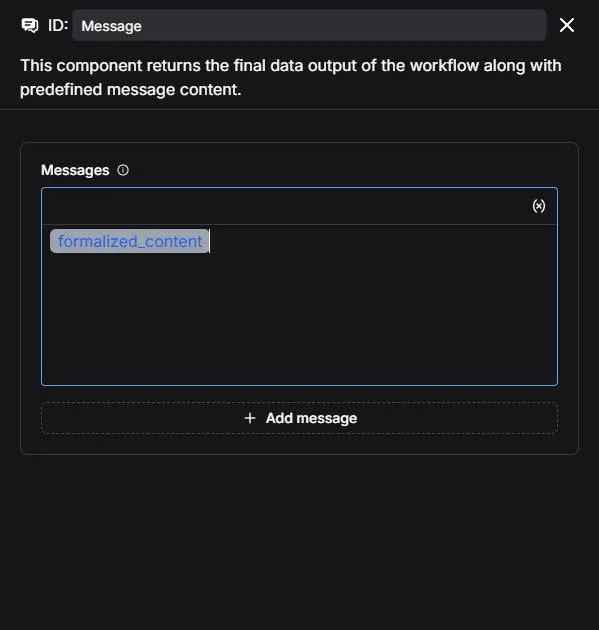
6.保存并测试点击保存→ 运行→ 输入自然语言问题 → 查看执行结果。 最后,NL2SQL 技术与当前的其他 Copilot 一样,是无法做到 100% 正确的。针对结构化数据的标准处理方案,我们建议将其操作收窄成部分 API,然后把这些 API 封装为 MCP ,再由 RAGFlow 进行调用。我们会在后续文章中,展示该方案的做法。 | 









