ingFang SC', Cambria, Cochin, Georgia, Times, 'Times New Roman', serif;font-size: 22.4px;display: table;padding: 0.5em 1em;border-bottom: 2px solid #55C9EA;margin: 2em auto 1em;color: #3f3f3f;font-weight: bold;text-shadow: 1px 1px 3px rgba(0,0,0,0.05);margin-top: 0;">dify插件开发全攻略:从架构设计到企业级实战ingFang SC', Cambria, Cochin, Georgia, Times, 'Times New Roman', serif;font-size: 20.8px;display: table;padding: 0.3em 1.2em;margin: 4em auto 2em;color: #fff;background: #55C9EA;font-weight: bold;border-radius: 8px 24px 8px 24px;box-shadow: 0 2px 6px rgba(0,0,0,0.06);">插件体系概览ingFang SC', Cambria, Cochin, Georgia, Times, 'Times New Roman', serif;font-size: 16px;margin: 1.5em 8px;letter-spacing: 0.1em;color: #3f3f3f;">企业级AI应用在规模化落地过程中常面临功能扩展受限、多系统集成复杂、定制化需求响应滞后等痛点。Dify插件体系通过模块化扩展机制,将外部能力与主系统解耦,实现工作流自动化与跨平台集成,成为解决上述问题的核心方案。ingFang SC', Cambria, Cochin, Georgia, Times, 'Times New Roman', serif;font-size: 19.2px;padding-left: 12px;border-left: 4px solid #55C9EA;margin: 2em 8px 0.75em 0;color: #3f3f3f;font-weight: bold;border-radius: 6px;border-right: 1px solid color-mix(in srgb, #55C9EA 10%, transparent);border-bottom: 1px solid color-mix(in srgb, #55C9EA 10%, transparent);border-top: 1px solid color-mix(in srgb, #55C9EA 10%, transparent);background: color-mix(in srgb, #55C9EA 8%, transparent);">插件类型与核心能力ingFang SC', Cambria, Cochin, Georgia, Times, 'Times New Roman', serif;font-size: 16px;margin: 1.5em 8px;letter-spacing: 0.1em;color: #3f3f3f;">Dify插件体系围绕三大核心能力构建,对应ingFang SC', Cambria, Cochin, Georgia, Times, 'Times New Roman', serif;font-size: inherit;color: #55C9EA;font-weight: bold;">Tool(工具)、ingFang SC', Cambria, Cochin, Georgia, Times, 'Times New Roman', serif;font-size: inherit;color: #55C9EA;font-weight: bold;">Model(模型)、ingFang SC', Cambria, Cochin, Georgia, Times, 'Times New Roman', serif;font-size: inherit;color: #55C9EA;font-weight: bold;">Extension(扩展)三种类型:ingFang SC', Cambria, Cochin, Georgia, Times, 'Times New Roman', serif;font-size: 16px;list-style: none;padding-left: 1.5em;margin-left: 0;color: #3f3f3f;" class="list-paddingleft-1">ingFang SC', Cambria, Cochin, Georgia, Times, 'Times New Roman', serif;font-size: 16px;display: block;margin: 0.5em 8px;color: #3f3f3f;">•Tool插件:作为工具提供者,支持执行特定任务如信息检索、图像生成等,可包含Endpoint接口定义,实现输入输出参数的标准化流转[1][2]。•Model插件:专注于扩展模型能力,分为预定义模型(如OpenAI、Anthropic等商业模型)和自定义模型(支持私有训练模型集成)[3]。•Extension插件:作为轻量级HTTP服务扩展,适用于仅需独立服务的场景(如简单数据转换、通知推送),支持Python 3.12运行时环境[4]。插件扩展限制:不可同时扩展tools和models,不可无扩展内容,不可同时扩展models和endpoints;每种扩展类型最多支持一个供应商[1][5]。
技术架构与交互流程
Dify插件体系采用分层架构设计,通过接入层、处理层、数据层的协同实现与主系统的高效交互:
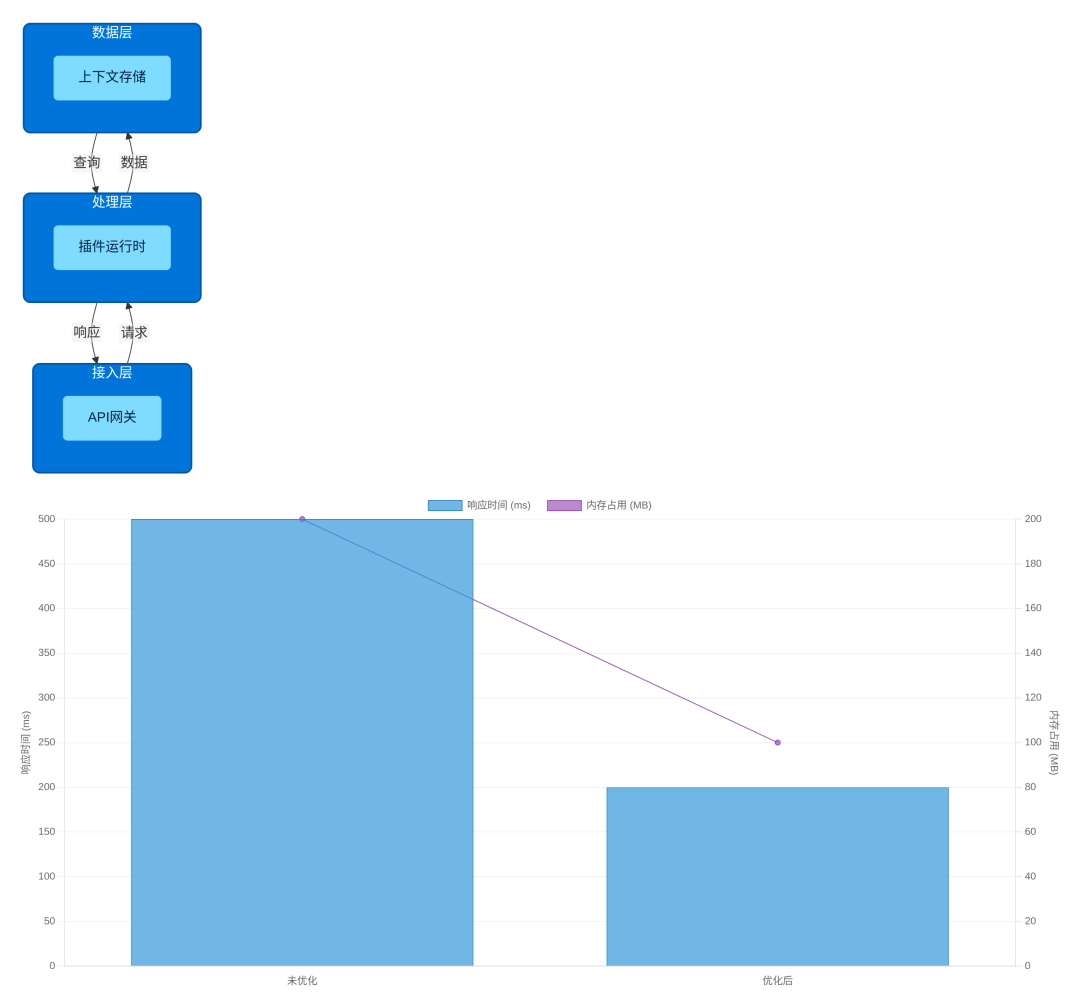
- •接入层(API网关):作为插件与主系统的通信入口,负责请求路由、权限校验与协议转换。
- •处理层(插件运行时):基于Python 3.12等环境提供沙箱执行环境,解析插件配置并调度功能模块。
- •数据层(上下文存储):负责插件执行过程中的状态管理与数据持久化,支持工作流节点间的上下文传递。
官方与第三方插件对比
| 对比维度 | 官方插件 | 第三方插件 |
|---|
| 开发权限 | | |
| 审核流程 | | |
| 维护责任 | | |
| 典型案例 | OpenAI模型插件、Google Search工具插件 | dify-on-wechat、自定义企业API插件 |
开发标准与接口规范详解
Dify插件开发需遵循标准化的技术规范与流程约束,涵盖开发环境配置、核心接口协议、生命周期管理及错误处理体系四大维度。
开发环境配置
插件开发需基于Python 3.12及以上版本,并依赖专用脚手架工具:
分平台安装脚本
- •Windows:
choco install python --version=3.12.0
pip install dify-plugin-cli
- •macOS:
brew install python@3.12
pip3 install dify-plugin-cli
- •Linux:
sudoapt update &&sudoapt install python3.12 python3-pip -y
pip3 install dify-plugin-cli
脚手架初始化流程
difyplugininit--typeextension--namewechat-dingtalk-connector--author"your-team@company.com"
核心接口协议
Manifest配置规范
manifest.yaml作为插件的"身份证",定义了插件的基本信息、权限声明与功能描述:
name:"weather-forecast"
author:"Dify Team"
description:"提供实时天气查询服务"
version:"1.0.0"
permission:
 tools:true
 llms:false
 apps:read
 storage:10MB
 endpoints:["GET","POST"]
Endpoint接口定义
插件功能通过HTTP端点暴露给主平台:
-path:"/weather"
 method:"GET"
 description:"查询指定城市天气"
 parameters:
  -name:"city"
   type:"string"
   required:true
   description:"城市名称"
 extra:
  python:
   source:"endpoints/weather.py"
   function:"get_weather"
参数校验实现
使用Python pydantic库实现JSON Schema校验:
frompydanticimportBaseModel, field_validator

classWeatherRequest(BaseModel):
  city:str
  date:str=None

  @field_validator('city')
  defcity_must_not_be_empty(cls, v):
    ifnotv.strip():
      raiseValueError('城市名称不能为空')
    returnv.title()
生命周期管理
插件从安装到卸载的完整生命周期包含安装→激活→运行→停用→卸载五个阶段,其中激活阶段需完成三项核心校验:配置完整性、权限一致性、依赖可用性。

错误处理体系
采用三位数字编码体系:
- •1xx:配置错误(101:缺失必填配置项,102:配置值格式错误)
- •2xx:运行时错误(201:第三方API调用失败,202:数据解析错误)
- •3xx:系统错误(301:内存溢出,302:文件IO异常)
日志管理实现:
importlogging
fromlogging.handlersimportRotatingFileHandler

defcreate_logger():
  logger = logging.getLogger("dify-plugin")
  logger.setLevel(logging.INFO)
  handler = RotatingFileHandler(
    "plugin.log", maxBytes=10*1024*1024, backupCount=5, encoding="utf-8"
  )
  formatter = logging.Formatter("%(asctime)s - %(name)s - %(levelname)s - %(message)s")
  handler.setFormatter(formatter)
  logger.addHandler(handler)
  returnlogger
即时通讯插件开发实战(微信/钉钉)
前置准备:平台接入配置
在企业微信管理后台创建自定义应用,记录AgentId,配置"API接收消息"的回调URL与Token/EncodingAESKey。
钉钉开放平台创建企业内部应用,获取AppKey与AppSecret,申请企业消息通知与用户信息获取接口权限。
技术方案设计:消息接收机制选型
| 评估维度 | Webhook机制 | 长轮询机制 |
|---|
| 实时性 | | |
| 并发处理能力 | | |
| 资源占用 | | |
| 部署要求 | | |

分阶段开发实现
阶段1:插件框架初始化
difyplugininit--typeextension--namewechat-dingtalk-connector--author"your-team@company.com"
阶段2:API客户端封装
importrequests
fromcachetoolsimportTTLCache

classWeChatAPIClient:
  def__init__(self, corp_id:str, agent_id:int, app_secret:str):
    self.corp_id = corp_id
    self.agent_id = agent_id
    self.app_secret = app_secret
    self.token_cache = TTLCache(maxsize=1, ttl=7100)

  defget_access_token(self) ->str:
    if"token"inself.token_cache:
      returnself.token_cache["token"]
    url =f"https://qyapi.weixin.qq.com/cgi-bin/gettoken?corpid={self.corp_id}&corpsecret={self.app_secret}"
    response = requests.get(url)
    result = response.json()
    ifresult.get("errcode") !=0:
      raiseRuntimeError(f"获取access_token失败:{result.get('errmsg')}")
    self.token_cache["token"] = result["access_token"]
    returnresult["access_token"]
阶段3:消息转发核心逻辑
defhandle_wechat_message(request: Request) -> Response:
  # 1. 消息签名验证
  msg_signature = request.args.get("msg_signature")
  timestamp = request.args.get("timestamp")
  nonce = request.args.get("nonce")
  ifnotverify_signature(msg_signature, token, timestamp, nonce, request.data):
    returnResponse("签名验证失败", status=403)

  # 2. 解密消息内容
  encrypted_msg = xmltodict.parse(request.data)["xml"]["Encrypt"]
  decrypted_msg = decrypt_message(encrypted_msg, encoding_aes_key)
  msg_content = xmltodict.parse(decrypted_msg)["xml"]

  # 3. 格式转换为Dify工作流输入
  dify_input = {
    "user_id": msg_content["FromUserName"],
    "message_type":"text"ifmsg_content["MsgType"] =="text"else"unknown",
    "content": msg_content["Content"],
    "platform":"wechat"
  }

  # 4. 调用Dify工作流API
  workflow_result = call_dify_workflow(
    workflow_id=current_app.config["DIFY_WORKFLOW_ID"],
    inputs=dify_input,
    user=msg_content["FromUserName"]
  )

  # 5. 返回处理结果
  returnResponse(
    f"""<xml>
      <ToUserName>{msg_content['FromUserName']}</ToUserName>
      <FromUserName>{msg_content['ToUserName']}</FromUserName>
      <CreateTime>{int(time.time())}</CreateTime>
      <MsgType>text</MsgType>
      <Content>{workflow_result['output']}</Content>
    </xml>""",
    content_type="application/xml"
  )
阶段4:多租户配置界面开发
constConfigForm= () => {
 const[form] =Form.useForm();
 const[testResult, setTestResult] =useState(null);

 consthandleTestConnection=async() => {
  constvalues =awaitform.validateFields();
  try{
   constresponse =awaitfetch('/api/test-connection', {
    method:'POST',
    headers: {'Content-Type':'application/json'},
    body:JSON.stringify(values)
   });
   constresult =awaitresponse.json();
   setTestResult({success: result.success,message: result.message});
  }catch(error) {
   setTestResult({success:false,message:'连接测试失败'});
  }
 };

 return(
 <Formform={form}layout="vertical">
   <Form.Itemname="platform_type"label="平台类型"rules={[{required:true}]}>
    <Selectoptions={[{label:'企业微信',value:'wechat'}, {label:'钉钉',value:'dingtalk'}]} />
   </Form.Item>
   <Form.Itemname="corp_id"label="企业ID"rules={[{required:true}]}>
    <Inputplaceholder="企业微信/钉钉开放平台获取的企业ID"/>
   </Form.Item>
   <Buttontype="primary"onClick={handleTestConnection}>测试连接</Button>
   {testResult &&<Resultstatus={testResult.success? 'success':'error'}title={testResult.message}/>}
  </Form>
 );
};
阶段5:本地调试与官方测试环境验证
ngrokhttp8000#将本地8000端口映射为公网URL
工作流中的插件数据流转技术
信息收集模式
主动查询模式适用于数据源具有明确访问接口的场景,事件触发模式则适用于实时性要求高的场景。
中间步骤传参方案
Dify工作流通过上下文(Context)维护节点间的数据关联,典型结构如下:
{
 "nodes": {
  "wechat": {"output": {"message":"如何办理增值税发票认证?"}},
  "ai_model": {"output": {"response":"增值税发票认证需登录电子税务局..."}}
 },
 "variables": {"user_id":"wx123456","ticket_type":"增值税发票"},
 "files": [{"name":"invoice.jpg","url":"https://dify-file-storage.com/invoice.jpg"}]
}
三种核心传参方式:
直接引用:{{nodes.<node_id>.output.<field>}}
变量注入:create_json_message({"ocr_text": "apple, banana, orange"})
结果映射:通过工作流界面的"输出映射"功能可视化配置字段关联。
实战案例:典型业务场景的数据流转实现
案例1:客户咨询响应工作流
{
 "output":{
  "message":"如何办理增值税发票认证?",
  "user_openid":"o6_bmjrPTlm6_2sgVt7hMZOPfL2M"
 }
}
{
 "output":{
  "response":"增值税发票认证流程如下:1. 登录电子税务局...",
  "confidence":0.92
 }
}
{
 "input":{
  "user_openid":"{{nodes.wechat.output.user_openid}}",
  "reply":"{{nodes.ai_model.output.response}}"
 }
}

高级特性与性能优化
高级特性实现
并行执行与资源调度模型
fromconcurrent.futuresimportThreadPoolExecutor
importpsutil

defget_executor(plugin_type:str) -> ThreadPoolExecutor:
  cpu_count = psutil.cpu_count()
  ifplugin_type =="io_bound": # IO密集型
    returnThreadPoolExecutor(max_workers=2* cpu_count +1)
  elifplugin_type =="cpu_bound": # CPU密集型
    returnThreadPoolExecutor(max_workers=cpu_count +1)
  returnThreadPoolExecutor(max_workers=cpu_count)
大文件传输优化
importrequests
importhashlib

defupload_large_file(file_path:str, upload_url:str, chunk_size:int=5*1024*1024):
  file_size = getsize(file_path)
  md5_hash = hashlib.md5()
  chunks = []

  withopen(file_path,'rb')asf:
    whilechunk := f.read(chunk_size):
      chunks.append(chunk)
      md5_hash.update(chunk)
  total_md5 = md5_hash.hexdigest()

  fori, chunkinenumerate(chunks):
    headers = {
      "Content-Range":f"bytes{i*chunk_size}-{(i+1)*chunk_size-1}/{file_size}",
      "Chunk-Index":str(i),
      "Total-Chunks":str(len(chunks)),
      "File-MD5": total_md5
    }
    response = requests.post(upload_url, data=chunk, headers=headers)
    response.raise_for_status()

  return{"status":"success","file_md5": total_md5}
流式数据处理
fromdify_sdkimportstream_variable_message

defstream_data_processor(data_source) ->None:
  foritemindata_source:
    processed_item = process_single_item(item)
    yieldprocessed_item
    stream_variable_message(
      variable="output_stream",
      value=processed_item,
      finish=False
    )
  stream_variable_message(variable="output_stream", value="", finish=True)
性能监控体系
importtime
importpsutil
fromfunctoolsimportwraps

defperformance_monitor(func):
  @wraps(func)
  defwrapper(*args, **kwargs):
    start_time = time.perf_counter()
    process = psutil.Process()
    start_memory = process.memory_info().rss /1024/1024

    result = func(*args, **kwargs)

    elapsed_time = (time.perf_counter() - start_time) *1000
    end_memory = process.memory_info().rss /1024/1024
    memory_used = end_memory - start_memory

    print(f"Function:{func.__name__}, Time:{elapsed_time:.2f}ms, Memory:{memory_used:.2f}MB")
    returnresult
  returnwrapper
性能优化策略
缓存策略:第三方API结果缓存
importredis
importjson

redis_client = redis.Redis(host="localhost", port=6379, db=0)

defcached_api_call(func):
  defwrapper(*args, **kwargs):
    cache_key =f"api_cache:{func.__name__}:{json.dumps(args)}:{json.dumps(kwargs)}"
    cached_result = redis_client.get(cache_key)
    ifcached_result:
      returnjson.loads(cached_result)
    result = func(*args, **kwargs)
    redis_client.setex(cache_key,600, json.dumps(result))
    returnresult
  returnwrapper

上架发布与生态共建
打包规范与版本管理
打包命令:dify plugin pack --output my-plugin.pkg
版本号管理采用语义化版本控制(Semantic Versioning):
审核标准与问题解决
常见驳回案例及解决方案:
- •输入验证缺失:使用
pydantic对所有输入参数进行类型、格式及范围验证。 - •配置界面不规范:添加前端表单验证,对必填字段标记
*号并实时提示错误信息。 - •功能与描述不符:开发阶段通过单元测试覆盖核心功能,交叉验证功能描述与实际效果。
文档撰写与社区贡献
GitHub README.md模板应包含:
常见问题与解决方案
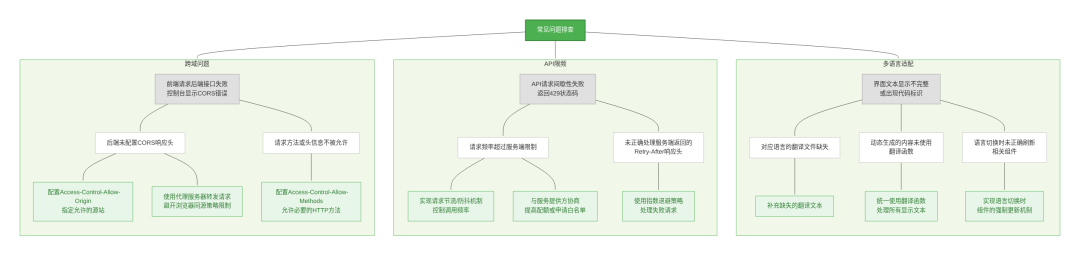
跨域请求失败
解决方案:
- 1.Dify平台CORS配置:登录Dify管理后台,进入「系统设置→安全配置→跨域资源共享」,添加插件服务域名。
server{
  listen443ssl;
  server_namedify.ai;

  location/plugins/weather/ {
    proxy_passhttp://plugin-service:8080/;
    proxy_set_headerHost$host;
    proxy_set_headerX-Real-IP$remote_addr;
    proxy_set_headerX-Forwarded-For$proxy_add_x_forwarded_for;
    proxy_set_headerX-Forwarded-Proto$scheme;
  }
}
第三方API调用限频
解决方案:
fromtenacityimportretry, stop_after_attempt, wait_exponential

@retry(
  stop=stop_after_attempt(3),
  wait=wait_exponential(multiplier=1),
  retry=retry_if_exception_type((requests.exceptions.RequestException,))
)
defcall_third_party_api(city:str):
  response = requests.get(
    f"https://api.weather.com/forecast?city={city}",
    headers={"Authorization":"Bearer YOUR_API_KEY"}
  )
  response.raise_for_status()
  returnresponse.json()
多语言适配异常
解决方案:
manifest_version:1.0
name:
 en_US:"Weather Forecast"
 zh_Hans:"天气预报"
description:
 en_US:"Get real-time weather and 7-day forecast"
 zh_Hans:"获取实时天气与7天预报"
importgettext
fromflaskimportrequest

defget_translator():
  lang = request.headers.get("Accept-Language","en_US").split(",")[0].replace("-","_")
  try:
    returngettext.translation("plugin", localedir="locales", languages=[lang])
  exceptFileNotFoundError:
    returngettext.translation("plugin", localedir="locales", languages=["en_US"])