|
Docling 简化了文档处理,解析各种格式(包括高级 PDF 理解),并提供与 gen AI 生态系统的无缝集成。 特征 解析多种文档格式 ,包括 PDF、DOCX、PPTX、XLSX、HTML、WAV、MP3、图像(PNG、TIFF、JPEG 等)等; 高级 PDF 理解,包括页面布局、阅读顺序、表格结构、代码、公式、图像分类等; 统一、富有表现力的 DoclingDocument 表示格式; 各种导出格式和选项,包括 Markdown、HTML、 DocTags 和无损 JSON; 敏感数据和隔离环境的本地执行能力; 即插即用集成, 包括 LangChain、LlamaIndex、Crew AI 和用于代理 AI 的 Haystack; 对扫描的 PDF 和图像提供广泛的 OCR 支持; 支持多种可视化语言模型; 支持自动语音识别 (ASR) 模型的音频; 简单便捷的 CLI。
一、简单Demo入门 安装包 官方提供的demo代码, from docling.document_converter import DocumentConverter# pdf文档地址,这里可以替换为本地的path路径source="https://arxiv.org/pdf/2206.01062"# document per local path or URL
converter = DocumentConverter()result = converter.convert(source)print(result.document.export_to_markdown()) # output: "## Docling Technical Report[...]"
几行代码就可以将pdf文档转成markdown格式的文档,pdf里的表格也转换的很成功。 注意事项: 1、若未科学上网,代码执行可能会失败;因为代码运行时会自动下载docling运行所依赖的模型以及默认的easyocr的模型文件;下载的文件默认会放$HOME/.cache/docling/models 目录。 2、一般我们都会事先从huggface或modelscope下载好模型文件,下载如下文件,放同一个目录下。 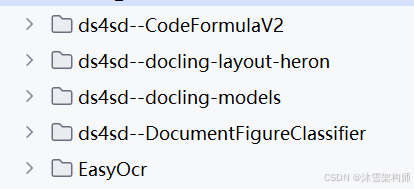
二、pdf转markdown,图片本地存储 docling将pdf转markdown文件,指定本地模型文件,图片保存到本地。 importpathlibimportloggingimporttimefromdocling.datamodel.base_modelsimportInputFormatfromdocling.datamodel.pipeline_optionsimportPdfPipelineOptions, EasyOcrOptionsfromdocling.document_converterimportPdfFormatOption, DocumentConverter, ImageFormatOption, PowerpointFormatOption, \ WordFormatOption, ExcelFormatOption, HTMLFormatOptionfromdocling_core.types.docimportImageRefMode, PictureItem, TableItem
# # 指定模型路径# easyocr_model_storage_directory = r"D:\muxue\models_file\easyocr" # 使用绝对路径# # 指定OCR模型# easyocr_options = EasyOcrOptions()# # 可以不设置,默认语言:["fr", "de", "es", "en"]# easyocr_options.lang = ['ch_sim', 'en'] # 中英文# easyocr_options.model_storage_directory = easyocr_model_storage_directory
artifacts_path =r"D:\muxue\models_file\docling_all"# 模型文件地址,使用绝对路径pipeline_options = PdfPipelineOptions(artifacts_path=artifacts_path)# 设置支持OCRpipeline_options.do_ocr =True# 设置支持表结构pipeline_options.do_table_structure =True
IMAGE_RESOLUTION_SCALE =2.0pipeline_options.images_scale = IMAGE_RESOLUTION_SCALE#pipeline_options.generate_page_images = True#生成图片,必须要改配置为Truepipeline_options.generate_picture_images =True
# 指定OCR模型#pipeline_options.ocr_options = easyocr_options
doc_converter = DocumentConverter( format_options={ InputFormat.PDF: PdfFormatOption(pipeline_options=pipeline_options), InputFormat.IMAGE: ImageFormatOption(pipeline_options=pipeline_options), InputFormat.PPTX: PowerpointFormatOption(pipeline_options=pipeline_options), InputFormat.DOCX: WordFormatOption(pipeline_options=pipeline_options), InputFormat.XLSX: ExcelFormatOption(pipeline_options=pipeline_options), InputFormat.HTML: HTMLFormatOption(pipeline_options=pipeline_options) })
input_doc_path =r"D:\Test\test.pdf"start_time = time.time()
conv_res = doc_converter.convert(input_doc_path)output_dir = pathlib.Path("scratch")output_dir.mkdir(parents=True, exist_ok=True)doc_filename = conv_res.input.file.stem
# Save markdown with externally referenced picturesmd_filename = output_dir /f"{doc_filename}-with-image-refs.md"conv_res.document.save_as_markdown(md_filename, image_mode=ImageRefMode.REFERENCED)
end_time = time.time() - start_timeprint(f"Time taken:{end_time}seconds")
easyocr是docling的默认选项,无需配置,当然也可以手动配置。其中有2个配置必须要设置,如下: pipeline_options.generate_picture_imagesimage_mode=ImageRefMode.REFERENCED三、批量pdf转markdown 将多个pdf批量装成 markdown是常见操作。我们来实现一下吧。 importloggingimporttimefromcollections.abcimportIterablefrompathlibimportPathimportyamlfromdocling_core.types.docimportImageRefModefromdocling.datamodel.base_modelsimportConversionStatus, InputFormatfromdocling.datamodel.documentimportConversionResultfromdocling.datamodel.pipeline_optionsimportPdfPipelineOptionsfromdocling.document_converterimportDocumentConverter, PdfFormatOption
defexport2md(conv_results: Iterable[ConversionResult], output_dir: Path): output_dir.mkdir(parents=True, exist_ok=True) success_count =0
forconv_resinconv_results: ifconv_res.status == ConversionStatus.SUCCESS: success_count +=1 doc_filename = conv_res.input.file.stem conv_res.document.save_as_markdown( output_dir /f"{doc_filename}.md", image_mode=ImageRefMode.REFERENCED, ) logging.info(f"Converted{doc_filename}to Markdown successfully.")
defmain(): artifacts_path =r"D:\muxue\model_file\docling_all"# 模型文件使用绝对路径 pipeline_options = PdfPipelineOptions(artifacts_path=artifacts_path) # 设置支持OCR pipeline_options.do_ocr =True # 设置支持表结构 pipeline_options.do_table_structure =True
IMAGE_RESOLUTION_SCALE =2.0 pipeline_options.images_scale = IMAGE_RESOLUTION_SCALE #pipeline_options.generate_page_images = True #生成图片,必须要改配置为True pipeline_options.generate_picture_images =True
doc_converter = DocumentConverter( format_options={ InputFormat.PDF: PdfFormatOption(pipeline_options=pipeline_options) } )
data_folder = Path(r"D:\muxue\orginal_file") input_doc_paths = [ data_folder /"test.pdf", data_folder /"2206.01062v1.pdf", ]
start_time = time.time() conv_results = doc_converter.convert_all( input_doc_paths, raises_on_error=False, # to let conversion run through all and examine results at the end ) export2md(conv_results, Path("scratch"))
end_time = time.time() - start_time print(f"Time taken:{end_time}seconds")
if__name__ =='__main__': logging.basicConfig(level=logging.INFO) main()
可以指定多个pdf文件,保存成markdown\json或者其他格式。
四、PDF无损转Json importpathlibimportloggingimporttimefromdocling.datamodel.base_modelsimportInputFormatfromdocling.datamodel.pipeline_optionsimportPdfPipelineOptions, EasyOcrOptionsfromdocling.document_converterimportPdfFormatOption, DocumentConverter, ImageFormatOption, PowerpointFormatOption, \ WordFormatOption, ExcelFormatOption, HTMLFormatOptionfromdocling_core.types.docimportImageRefMode, PictureItem, TableItem
artifacts_path =r"D:\muxue\model_file\docling_all"# 使用绝对路径pipeline_options = PdfPipelineOptions(artifacts_path=artifacts_path)# 设置支持OCRpipeline_options.do_ocr =True# 设置支持表结构pipeline_options.do_table_structure =True
IMAGE_RESOLUTION_SCALE =2.0pipeline_options.images_scale = IMAGE_RESOLUTION_SCALE#pipeline_options.generate_page_images = True#生成图片,必须要改配置为Truepipeline_options.generate_picture_images =True
# 指定OCR模型#pipeline_options.ocr_options = easyocr_options
doc_converter = DocumentConverter( format_options={ InputFormat.PDF: PdfFormatOption(pipeline_options=pipeline_options), InputFormat.IMAGE: ImageFormatOption(pipeline_options=pipeline_options), InputFormat.PPTX: PowerpointFormatOption(pipeline_options=pipeline_options), InputFormat.DOCX: WordFormatOption(pipeline_options=pipeline_options), InputFormat.XLSX: ExcelFormatOption(pipeline_options=pipeline_options), InputFormat.HTML: HTMLFormatOption(pipeline_options=pipeline_options) })
input_doc_path =r"D:\muxue\test.pdf"start_time = time.time()
conv_res = doc_converter.convert(input_doc_path)output_dir = pathlib.Path("scratch")output_dir.mkdir(parents=True, exist_ok=True)doc_filename = conv_res.input.file.stem
# Save markdown with externally referenced picturesmd_filename = output_dir /f"{doc_filename}.json"conv_res.document.save_as_json(md_filename, image_mode=ImageRefMode.REFERENCED)
end_time = time.time() - start_timeprint(f"Time taken:{end_time}seconds")
“无损 JSON” 在 Docling 中意味着:将文档的内在数据结构与详细元信息完整转到 JSON,并保证可以从 JSON 完整还原为同一个文档模型。 而 Markdown/HTML 导出是“有损” 的,因为这些格式省略了很多底层结构与元数据,只是适合人类阅读和简单内容展示。
五、Docling与AI生态集成 Docling 与众多领先框架和工具的集成,比如LangChain、LlamaIndex和Crew AI等。 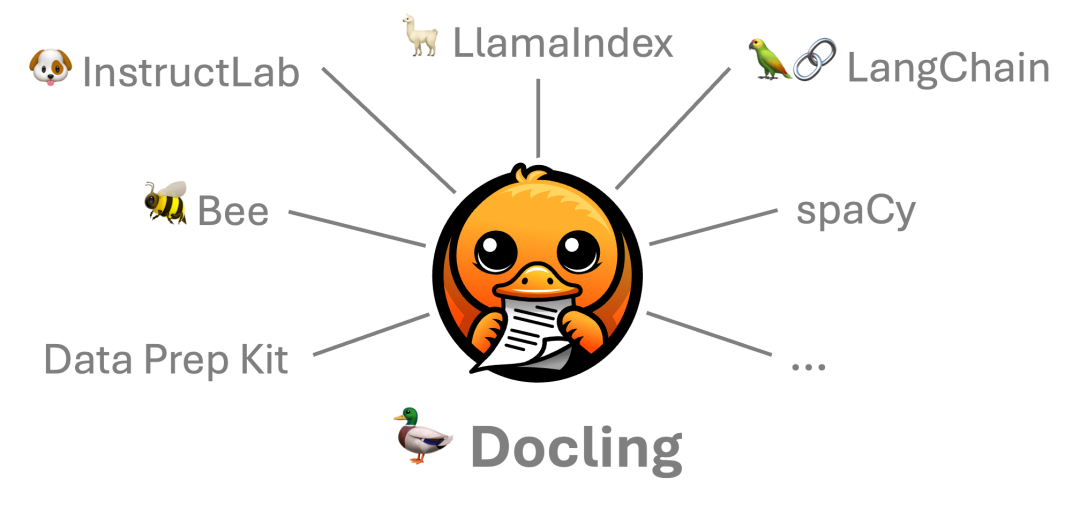
ingFang SC", "Hiragino Sans GB", "Microsoft YaHei", "Helvetica Neue", Helvetica, Arial, sans-serif;font-size:16px;font-style:normal;font-variant-ligatures:normal;font-variant-caps:normal;font-weight:400;letter-spacing:normal;orphans:2;text-transform:none;widows:2;word-spacing:0px;-webkit-text-stroke-width:0px;white-space:normal;background-color:rgb(255, 255, 255);text-decoration-thickness:initial;text-decoration-style:initial;text-decoration-color:initial;min-width:75px;"> | | |
|---|
| 









