ingFang SC", "Hiragino Sans GB", "Microsoft YaHei UI", "Microsoft YaHei", Arial, sans-serif;"> ingFang SC", "Hiragino Sans GB", "Microsoft YaHei UI", "Microsoft YaHei", Arial, sans-serif;">在本实践教程中,我们将实现一个免费使用并在本地 GPU 上运行的 AI 代码助手。ingFang SC", "Hiragino Sans GB", "Microsoft YaHei UI", "Microsoft YaHei", Arial, sans-serif;">您可以向聊天机器人提问,它会以自然语言和多种编程语言的代码进行回答。ingFang SC", "Hiragino Sans GB", "Microsoft YaHei UI", "Microsoft YaHei", Arial, sans-serif;">我们将使用 Hugging Face 转换器库来实现 Chatbot 前端的 LLM 和 Streamlit。ingFang SC", "Hiragino Sans GB", "Microsoft YaHei UI", "Microsoft YaHei", Arial, sans-serif;"> ingFang SC", "Hiragino Sans GB", "Microsoft YaHei UI", "Microsoft YaHei", Arial, sans-serif;">在本实践教程中,我们将实现一个免费使用并在本地 GPU 上运行的 AI 代码助手。ingFang SC", "Hiragino Sans GB", "Microsoft YaHei UI", "Microsoft YaHei", Arial, sans-serif;">您可以向聊天机器人提问,它会以自然语言和多种编程语言的代码进行回答。ingFang SC", "Hiragino Sans GB", "Microsoft YaHei UI", "Microsoft YaHei", Arial, sans-serif;">我们将使用 Hugging Face 转换器库来实现 Chatbot 前端的 LLM 和 Streamlit。ingFang SC", "Hiragino Sans GB", "Microsoft YaHei UI", "Microsoft YaHei", Arial, sans-serif;">
ingFang SC", Cambria, Cochin, Georgia, Times, "Times New Roman", serif;letter-spacing: normal;outline: 0px;text-align: left;line-height: 1.75em;visibility: visible;background-color: rgb(255, 255, 255);">LLM 如何生成文本?ingFang SC", "Hiragino Sans GB", "Microsoft YaHei UI", "Microsoft YaHei", Arial, sans-serif;">仅解码器 Transformer 模型(例如 GPT 系列)经过训练可以预测给定输入提示的下一个单词。这使得他们非常擅长文本生成。ingFang SC", "Hiragino Sans GB", "Microsoft YaHei UI", "Microsoft YaHei", Arial, sans-serif;"> ingFang SC", "Hiragino Sans GB", "Microsoft YaHei UI", "Microsoft YaHei", Arial, sans-serif;"> ingFang SC", "Hiragino Sans GB", "Microsoft YaHei UI", "Microsoft YaHei", Arial, sans-serif;">
ingFang SC", "Hiragino Sans GB", "Microsoft YaHei UI", "Microsoft YaHei", Arial, sans-serif;">如果有足够的训练数据,他们还可以学习生成代码。要么在 IDE 中填写代码,要么作为聊天机器人回答问题。GitHub Copilot 是 AI 结对程序员的商业示例。Meta AI 的 Code Llama 模型具有类似的功能,也可以免费使用。
什么是Code Llama?Code Llama 是由 Meta AI 创建的一个特殊的代码 LLMs 系列,最初于 2023 年 8 月发布。 
从基础模型 Llama 2(类似于 GPT-4 的仅解码器的 Transformer 模型)开始,Meta AI 使用 500B 个令牌的训练数据(主要是代码)进行了进一步训练。 之后,Code Llama 又推出了三个不同版本、四种不同尺寸。 Code Llama 模型可免费用于研究和商业用途。 
Code LlamaCode Llama 是代码生成的基础模型。Code Llama 模型使用填充目标进行训练,并设计用于在 IDE 中完成代码。 Code Llama — 指示Instruct 版本在指令数据集上进行了微调,以回答人类问题,类似于 ChatGPT。 Code Llama — PythonPython 版本在包含 100B 个 Python 代码标记的附加数据集上进行了训练。这些模型用于代码生成。
对 LLM 聊天机器人进行编码在本教程中,我们将使用 CodeLlama-7b-Instruct — hf,它是 Instruct 版本的最小模型。它经过微调,可以用自然语言回答问题,因此可以用作聊天机器人。 即使是最小的模型也相当大,有 7B 参数。该模型使用 16 位半精度参数,需要约 14 GB 的 GPU 内存。通过 4 位量化,我们可以将内存需求减少到大约 3.5 GB。 实现模型我们首先创建一个类,ChatModel 该类首先从 Hugging Face 加载 Code Llama 模型,然后根据给定的提示生成文本。 我们使用BitsAndBytesConfig4 位量化AutoModelForCausalLM来加载模型,并AutoTokenizer根据输入提示生成标记嵌入。 import torchfrom transformers import AutoTokenizer, AutoModelForCausalLM, BitsAndBytesConfig
class ChatModel:def __init__(self, model="codellama/CodeLlama-7b-Instruct-hf"):quantization_config = BitsAndBytesConfig(load_in_4bit=True, # use 4-bit quantizationbnb_4bit_compute_dtype=torch.float16,bnb_4bit_use_double_quant=True,)self.model = AutoModelForCausalLM.from_pretrained(model,quantization_config=quantization_config,device_map="cuda",cache_dir="./models", # download model to the models folder)self.tokenizer = AutoTokenizer.from_pretrained(model, use_fast=True, padding_side="left")
此外,我们创建一个固定长度的history列表,用于存储用户之前的输入提示和人工智能生成的响应。这对于让 LLMs 记住对话很有用。 self.history=[]self.history_length=1
Code Llama 使用位于用户提示之前的系统提示。 默认情况下,我们可以使用 codellama-13b-chat 示例中的系统提示符。 self.DEFAULT_SYSTEM_PROMPT="""\\Youareahelpful,respectfulandhonestassistantwithadeepknowledgeofcodeandsoftwaredesign.Alwaysanswerashelpfullyaspossible,whilebeingsafe.Youranswersshouldnotincludeanyharmful,unethical,racist,sexist,toxic,dangerous,orillegalcontent.Pleaseensurethatyourresponsesaresociallyunbiasedandpositiveinnature.\\n\\nIfaquestiondoesnotmakeanysense,orisnotfactuallycoherent,explainwhyinsteadofansweringsomethingnotcorrect.Ifyoudon'tknowtheanswertoaquestion,pleasedon'tsharefalseinformation.\\"""
接下来,我们实现一个函数,将当前会话附加到 。self.history 由于 LLMs 的上下文长度有限,我们只能在内存中保存有限数量的信息。在这里,我们只是保留最多的self.history_length = 1问题和答案。 defappend_to_history(self,user_prompt,response):self.history.append((user_prompt,response))iflen(self.history)>self.history_length:self.history.pop(0)
最后,我们实现了generate根据输入提示生成文本的功能。 每个 LLMs 都有一个用于培训的特定提示模板。对于 Code Llama,我使用了codellama-13b-chat中的提示模板作为参考。 def generate(self, user_prompt, system_prompt, top_p=0.9, temperature=0.1, max_new_tokens=512):
texts = [f"<s>[INST] <<SYS>>\\n{system_prompt}\\n<</SYS>>\\n\\n"]do_strip = Falsefor old_prompt, old_response in self.history:old_prompt = old_prompt.strip() if do_strip else old_promptdo_strip = Truetexts.append(f"{old_prompt} [/INST] {old_response.strip()} </s><s>[INST] ")user_prompt = user_prompt.strip() if do_strip else user_prompttexts.append(f"{user_prompt} [/INST]")prompt = "".join(texts)
inputs = self.tokenizer(prompt, return_tensors="pt", add_special_tokens=False).to("cuda")
output = self.model.generate(inputs["input_ids"],attention_mask=inputs["attention_mask"],pad_token_id=self.tokenizer.eos_token_id,max_new_tokens=max_new_tokens,do_sample=True,top_p=top_p,top_k=50,temperature=temperature,)output = output[0].to("cpu")response = self.tokenizer.decode(output[inputs["input_ids"].shape[1] : -1])self.append_to_history(user_prompt, response)return response
响应基于系统提示加上用户提示。答案的创造性取决于参数top_p和temperature。 我们top_p可以限制输出标记的概率值,以避免生成不太可能的标记: top_p ( float,可选,默认为 1.0) — 如果设置为 float < 1,则仅保留概率总计为top_p或更高的最可能的标记进行生成。
我们temperature可以展平或锐化输出标记的概率分布: 温度(float,可选,默认为 1.0) — 用于对下一个标记概率进行建模的值。
ChatModel在做前端应用之前我们先测试一下。
from ChatModel import *
model = ChatModel()response = model.generate(user_prompt="Write a hello world program in C++",system_prompt=model.DEFAULT_SYSTEM_PROMPT)print(response)
 Sure, here is a simple "Hello World" program in C++:
#include <iostream>int main() {std::cout << "Hello, World!" << std::endl;return 0;}This program will print "Hello, World!" to the console when it is run.The `std::cout` statement is used to print the message to the console, and the `std::endl` statement is used to print a newline character after the message.The `return 0;` statement is used to indicate that the program has completed successfully.
实现前端应用我们将使用 Streamlit 快速构建聊天机器人前端。Streamlit 文档已经包含一个构建基本 LLM 聊天应用程序的示例,我们可以根据我们的用例进行修改。 load_model首先,我们创建一个使用装饰器的函数@st.cache_resource。Streamlit 在每次用户交互时从上到下重新运行您的脚本。装饰器用于缓存全局资源而不是重新加载它们。 import streamlit as stfrom ChatModel import *
st.title("Code Llama Assistant")
@st.cache_resourcedef load_model():model = ChatModel()return model
model = load_model()# load our ChatModel once and then cache it
接下来,我们创建一个侧边栏,其中包含函数模型参数的输入控件generate。 withst.sidebar:temperature=st.slider("temperature",0.0,2.0,0.1)top_p=st.slider("top_p",0.0,1.0,0.9)max_new_tokens=st.number_input("max_new_tokens",128,4096,256)system_prompt=st.text_area("systemprompt",value=model.DEFAULT_SYSTEM_PROMPT,height=500)
然后我们创建聊天机器人消息界面。 # Initialize chat historyif "messages" not in st.session_state:st.session_state.messages = []
# Display chat messages from history on app rerunfor message in st.session_state.messages:with st.chat_message(message["role"]):st.markdown(message["content"])
# Accept user inputif prompt := st.chat_input("Ask me anything!"):# Add user message to chat historyst.session_state.messages.append({"role": "user", "content": prompt})# Display user message in chat message containerwith st.chat_message("user"):st.markdown(prompt)
# Display assistant response in chat message containerwith st.chat_message("assistant"):user_prompt = st.session_state.messages[-1]["content"]answer = model.generate(user_prompt,top_p=top_p,temperature=temperature,max_new_tokens=max_new_tokens,system_prompt=system_prompt,)response = st.write(answer)st.session_state.messages.append({"role": "assistant", "content": answer})
我们可以通过运行 Streamlit 应用程序streamlit run app.py,这将打开浏览器。 现在,我们可以向聊天机器人询问一些与编码相关的问题。 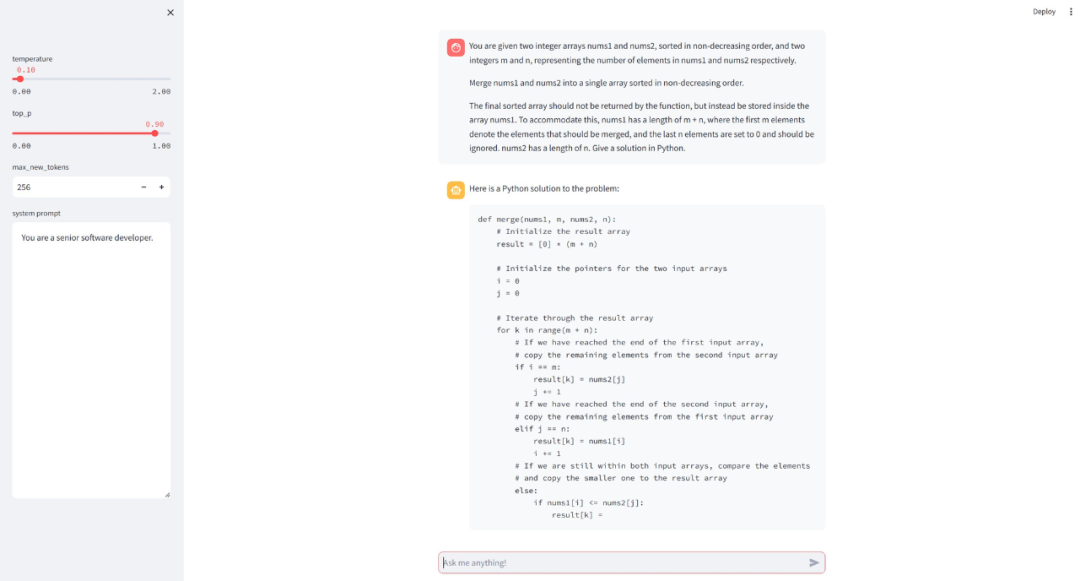
结论我们使用 Meta AI 的 Code Llama LLM 以及 Hugging Face 的转换器库和 Streamlit 作为前端应用程序,实现了人工智能编码助手。 在我的具有 6 GB GPU 内存的笔记本电脑上,我只能使用具有 7B 参数的 4 位量化 Code Llama 模型。有了更大的 GPU,16 位版本或更大的型号应该会工作得更好。 
资源Streamlit 聊天应用示例:https://docs.streamlit.io/knowledge-base/tutorials/build-conversational-apps 拥抱人脸代码 Llama gradio 实现:https://huggingface.co/spaces/codellama/codellama-13b-chat/tree/main 本文的完整工作代码:https://github.com/leoneversberg/codellama-chatbot CodeLlama-7b-Instruct — hf:https://huggingface.co/codellama/CodeLlama-7b-Instruct-hf
|










